




inflearn logo
inflearn logo

Using Excel: Intermediate EXCEL (Inflearn Original)

This is a class that teaches intermediate and advanced level data analysis and visualization chart creation methods to those who can handle Excel basics. With this class, you can master Excel completely!

(5.0) 수강평 88개

강의소개.상단개요.수강생.short

난이도 중급이상

수강기한 무제한

Excel
Excel
Excel PowerQuery
Excel PowerQuery
vlookup
vlookup
MS-Office
MS-Office
Excel
Excel
Excel PowerQuery
Excel PowerQuery
vlookup
vlookup
MS-Office
MS-Office

먼저 경험한 수강생들의 후기

먼저 경험한 수강생들의 후기

5.0

5.0

최혜림

68% 수강 후 작성

I have taken many courses, but this is the first time I am writing a review. This course is the best course for Excel data analysis. It is really the best, without any unnecessary things. It boosts my confidence.

5.0

Gy K

100% 수강 후 작성

I had a vague understanding of Power Query, but this course helped me understand it much better. I was able to immediately apply what I learned in the course to my actual work, and I was so happy. Thank you for the great course!

5.0

윤진원

32% 수강 후 작성

It seems like it will be very helpful in practice. It is a really very useful lecture. It is fun. Thank you.

강의상세_배울수있는것_타이틀

  • Skills needed for data preprocessing

  • Data analysis and visualization through practical data

Excel, only the shortcuts you usually use
Are you using it in reverse?

When you use Excel at work, don't you just use a few familiar shortcuts? When you have a lot of data to process because you don't know other functions, don't you manually process it yourself?

Fundamentally, why is Excel still difficult for us? If you think it is a waste of time to study it separately because you deal with it every day, now is your chance. If you want to learn more about Excel and improve your work capabilities, don't miss it!


To these people
I recommend it with confidence.

From data analysis with Excel
Anyone who wants to create visualization charts

I know the basics but there is more
For those who want to know how to use Excel

Repetitive data processing
Anyone who wants to automate


In this one lecture
Excel that finishes perfectly!

Lecture Preview

Dynamic range using table objects

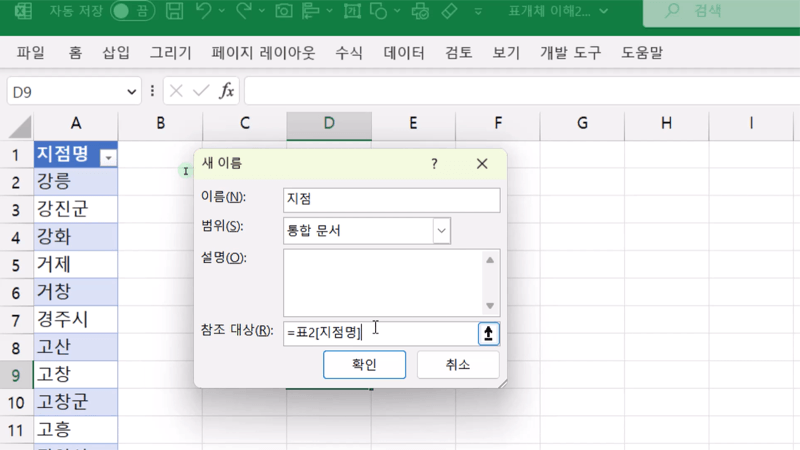
When designing a semi-automatic Excel file, we will practice linking a data range by using a table object in a frequently used combo box (data validation).

Structuring Data

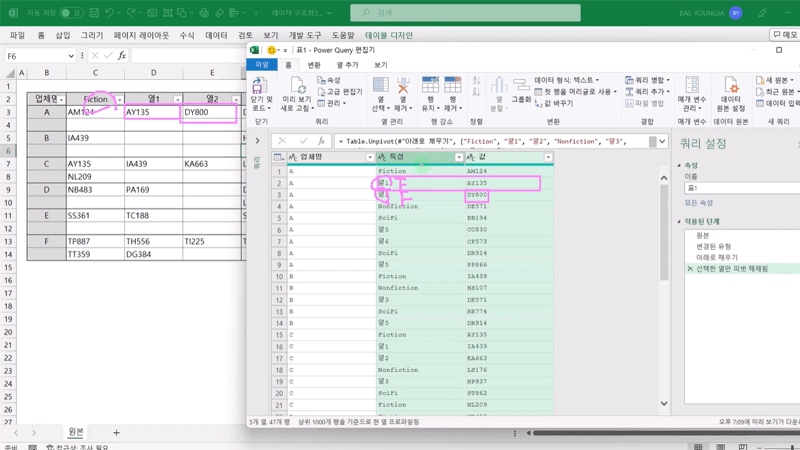
You will practice structuring your data so that it is suitable for analysis in a variety of ways. You will be able to follow the standard process of Power Query processing.

Data preprocessing with PowerQuery

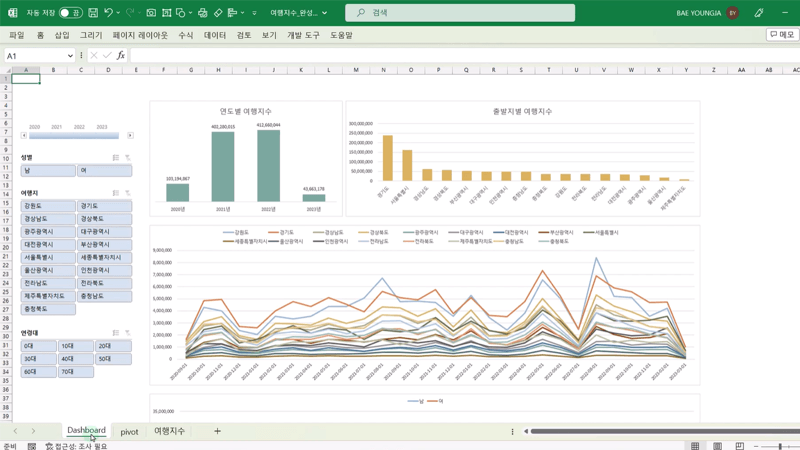
We will collect data and analyze how domestic travel destinations have changed over the past three years by year and region, and derive insights. You can learn how to preprocess data!

Visualize with charts

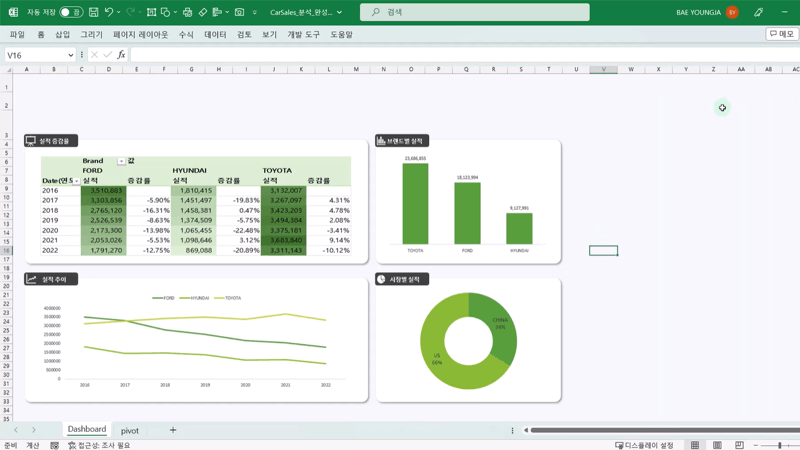
Visualize data such as performance trends by year, performance by brand, and performance by market in a chart so that you can see them at a glance. Visualize various data and utilize them effectively!

▶️ Things to note before taking the class

  • Learning Materials
    • Lecture materials summarizing the lecture content are provided.
    • Includes a Data set you can practice with.
  • Player Knowledge
  • Web scraping may change the URL and data processing process when the website is renewed.

Chosen by numerous students
Inflearn Original.

Only at Inflearn !

  • Lifelong learning! You can study over and over again.
  • Easy and detailed for beginners!
  • Join special knowledge sharers verified by Inflearn.

강의소개.콘텐츠.추천문구

학습 대상은 누구일까요?

  • Those who want to analyze data and find insights using Excel

  • Those who want to show visible analysis results through data visualization

강의소개.지공자소개

719,699

수강생

7,390

수강평

118

답변

4.8

강의 평점

148

강의_other

I believe that opportunities for learning should be free from economic and physical limitations.
We pursue equality in opportunities for growth.

커리큘럼

전체

28개 ∙ (강의상세_런타임_시간 강의상세_런타임_분)

해당 강의에서 제공: [object Object]
강의 게시일: 
마지막 업데이트일: 

수강평

전체

88개

5.0

88개의 수강평

  • abungp2888님의 프로필 이미지
    abungp2888

    수강평 1

    평균 평점 5.0

    5

    100% 수강 후 작성

    • exceldesign
      지식공유자

      Thank you, Jisung (✿◡‿◡)

  • hyerim897112405님의 프로필 이미지
    hyerim897112405

    수강평 1

    평균 평점 5.0

    5

    68% 수강 후 작성

    I have taken many courses, but this is the first time I am writing a review. This course is the best course for Excel data analysis. It is really the best, without any unnecessary things. It boosts my confidence.

    • exceldesign
      지식공유자

      Thanks to Hye-rim's review, I feel more confident. Thank you ♪(^∇^*)

  • mons님의 프로필 이미지
    mons

    수강평 29

    평균 평점 5.0

    5

    61% 수강 후 작성

    • exceldesign
      지식공유자

      Thank you MonsTer (∩^o^)⊃━☆

  • gyk09056626님의 프로필 이미지
    gyk09056626

    수강평 1

    평균 평점 5.0

    5

    100% 수강 후 작성

    I had a vague understanding of Power Query, but this course helped me understand it much better. I was able to immediately apply what I learned in the course to my actual work, and I was so happy. Thank you for the great course!

    • exceldesign
      지식공유자

      'I am so happy to be able to apply it to my work right away' I am also 'so happy to see Gy K's post and smile' Thank you (*^▽^*)

  • rotkfrn44441558님의 프로필 이미지
    rotkfrn44441558

    수강평 1

    평균 평점 5.0

    5

    32% 수강 후 작성

    It seems like it will be very helpful in practice. It is a really very useful lecture. It is fun. Thank you.

    • exceldesign
      지식공유자

      Thank you, Jinwon ( ̄︶ ̄)↗

inflearn님의 다른 강의

지식공유자님의 다른 강의를 만나보세요!

비슷한 강의

같은 분야의 다른 강의를 만나보세요!

강의상세.할인문구

$38,500.00

30%

$42.90