


inflearn logo

How to Use Google Analytics for Practitioners (GA4+GTM) (2025 Update)

This is a detailed and practical course for Google Analytics beginners. Rather than just covering fragmented features, you can learn the actual analysis process using GA4 through scenario-based analysis. It is continuously being updated to reflect the latest GA4 changes!

(4.9) 75 reviews

1,217 learners

Level Basic

Course period Unlimited

Google Analytics
Google Analytics
Google Tag Manager
Google Tag Manager
Data literacy
Data literacy
GA4
GA4
Google Analytics
Google Analytics
Google Tag Manager
Google Tag Manager
Data literacy
Data literacy
GA4
GA4

Reviews from Early Learners

Reviews from Early Learners

4.9

5.0

최종혁

20% enrolled

As a prospective entrepreneur, I'm taking this course to learn data analysis on my own instead of outsourcing it. Before discovering Inflearn and this course, I kept studying through YouTube, but it was hard to understand and difficult. It was also hard to find related textbooks, and there were many unnecessary explanations of old versions. But while surfing the web, I came across this platform and this course, and it's absolutely perfect. I'm only 20% through the course, but you're guiding me meticulously, and it includes continuous updates and feedback replies suitable for March 2025, as well as organized lecture notes. It's a course that can help even beginners develop skills comparable to practitioners. I am very, very satisfied. Of course, it may not match the know-how of experienced professionals, but I'm trying to improve through the course. I am truly happy to have encountered this course and am enjoying studying. Thank you.

5.0

미디미

99% enrolled

I've only completed about 35% of the course, but the more I listen, the more I'm amazed at the quality at this price. The lectures are important for knowledge, but the delivery is also important, and both are great, so I'm concentrating and listening well. I'm learning GA4 properly.

5.0

세법

30% enrolled

I've taken a lot of lectures on Google Analytics, but I always ended up wondering, "So how do you use it in practice?" If it were a large, systematic company, there would be guidelines, but since I'm a very early-stage startup, I have to figure it out on my own. Even if you know how to set up Analytics and track events with Tag Manager, you need to know how to select and interpret important data from the collected data. None of the lectures I've taken taught me how to do that. But this lecture was the first time I learned that. I was really curious about how other companies use Google Analytics. But since you give examples of typical questions that come up in companies for each section, it's been a great help in resolving my curiosity. I want to finish it soon!

What you will gain after the course

  • GA4 Basic Setup and Analysis/Utilization Methods

  • Utilizing GA4 Reports for Data Analysis

  • GA4 Event Design and Setup Methods for Data Analysis

  • Event Setting Practice Using Google Tag Manager

  • GA4 Analysis Practice Based on Real-World Analysis Scenarios

The GA4 course closest to real-world practice!
We will reduce your worries about future GA-related tasks to zero.
Check out the reviews from previous students in the 'Course Reviews' section first!

Don't miss the free GA4 webinar held every Saturday morning!
(Free webinars are announced through the 'Student KakaoTalk Group Chat')

Student KakaoTalk Group Chat: https://open.kakao.com/o/gEz1aqPc


Google Analytics 4

How should you learn GA4? You cannot apply it to real-world tasks just by listening to menu descriptions. I will show you how to create actual reports and explain the exact methods used in practice. For those who have tried to learn GA4 in other ways but haven't found the right course yet, this will be a choice you won't regret!

Most people trying to learn GA4 have absolutely no prior experience in data analysis. In this course, those looking to learn data analysis with GA4 can naturally learn how to use the tool through the foundational practical exercises required for analysis. (15 lessons are available for free. Just give it one listen!)

GA4, a tool for understanding consumers and improving business direction through data analysis, I will help you so that you are no longer afraid of your work with just one learning session.

"I've taken a GA4 course, but I don't know how to actually use it."

"I haven't used Google Analytics yet, so I want to learn it step-by-step from the beginning."

"I'm tired of lectures that only explain the menus. I want to know how to use it in practice."

If you are one of these people,
try taking the GA4 course. (GA4 changes are continuously being reflected in the lectures.)

🥲

Those who are learning Google Analytics
for the very first time

🤨

Those who know Universal Analytics (GA3) but
are new to GA4

😮

Those who don't know how to
utilize GA4

🤔

Marketers and planners who need to
plan and set up events


+) To ensure you choose a course you won't regret, please be sure to check out the
course introduction video!


4 Key Points
unique to this course!

This course is structured so that those new to Google Analytics and data analysis can learn step-by-step. Beginners are encouraged to follow the lessons in order, while those with experience in Universal Analytics (GA3) are recommended to start from the final summary section.

#1
Practice by installing GA4 and GTM
on a practice shopping mall.

#2
Learn how to analyze traffic
and use exploration reports by using a demo account.

#3
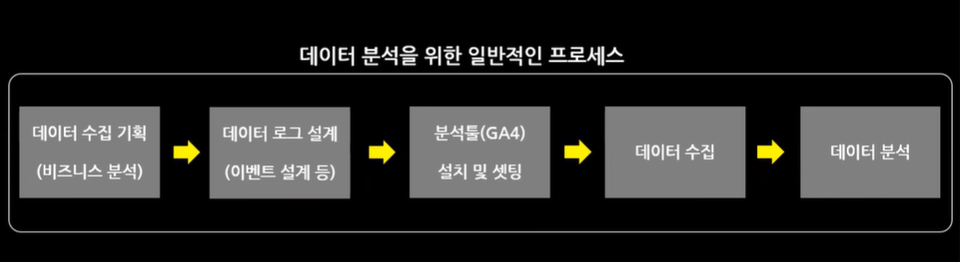
Conduct a funnel analysis yourself and
learn the event concepts of GA4.

#4
Practice key events and
event-centric analysis methods
among e-commerce data.


Everything about GA4.

Setting up GA4
while creating reports

To apply it in practice, you must first try creating a report. By building reports, you can naturally learn about the principles of GA4 and the items that require configuration.

For example, if you first create a traffic analysis report, you can clearly understand how to set up UTM URLs for traffic classification and which parts of GA4 need to be properly configured initially.

Visualizing Reports and
Designing Events

Similarly, for event design, if you can visualize the report in your head, you will know exactly which events you need to design and set up.

In this course, we first create reports and analyze real-world business scenarios before explaining the requirements for setting up events and GA4.

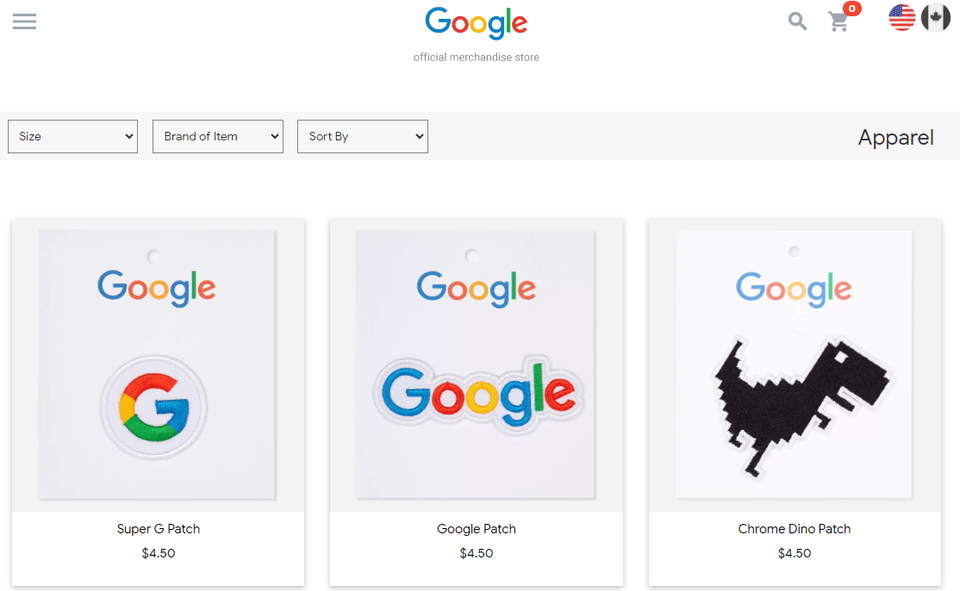
Google Merchandise Store
Data Analysis

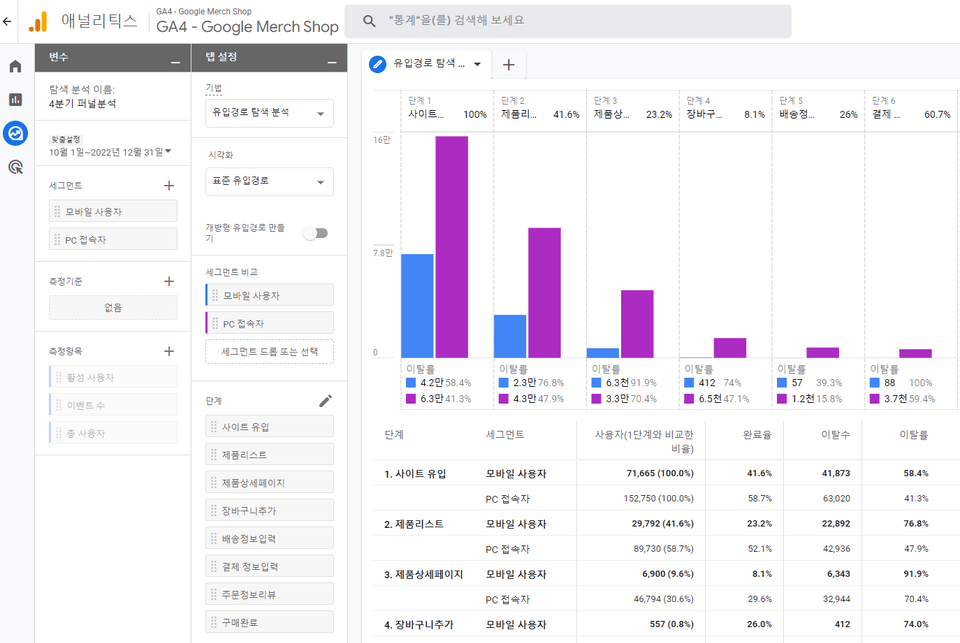
We will directly conduct data analysis using events from the Google Merchandise Store operated by Google. (Analysis of major visiting customers of Google Merchandise, traffic inflow analysis for Q4 2022, search conversion analysis for improving search functions, etc.)

By following along with the analysis using actual data in advance, students can naturally envision how to analyze the business data they are personally responsible for.

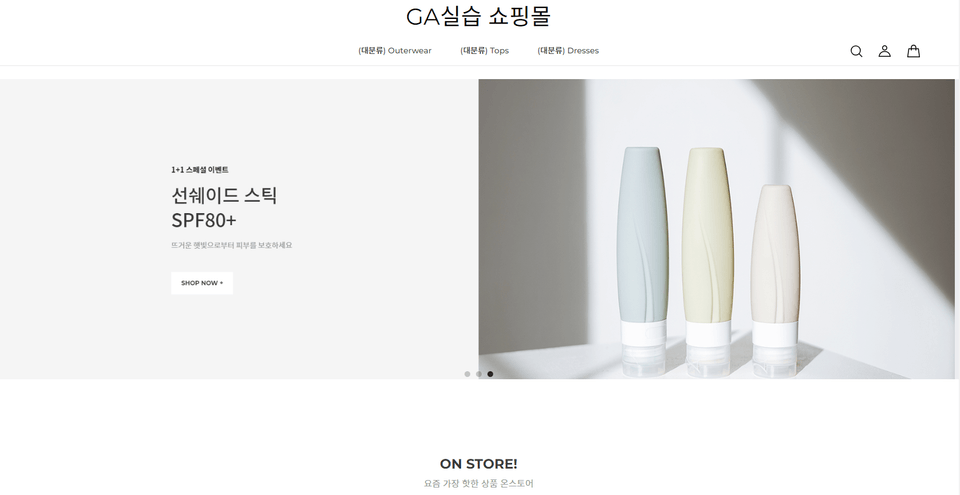
Creating a Demo
Shopping Mall

Once you have understood events, the core concept of GA4, through data analysis of the Google Merchandise Store, you will now create your own demo shopping mall to design and set up events.


Anticipated Q&A 💬

Q. I have no experience using Google Analytics; will I be able to learn it well?

It is possible. Since this was prepared for complete beginners, you should have no trouble as long as you follow the lectures closely.

Q. The course is over 23 hours in total—isn't that too long?

The course is on the longer side because it covers everything from setup to analysis using GA4 and Google Tag Manager. Since a certain level of proficiency in Google Tag Manager is required to set up GA4 to see the data you want, it is essential content that must be learned alongside GA4.

Q. Can I practice by analyzing real data?

Basically, the analysis is conducted using the Google Merchandise Store data (demo account) provided by Google. For learning how to use Google Tag Manager and GA4 setup, we will create an actual practice shopping mall for hands-on exercises, so there should be no major issues.

Q. It seems like similar content is being repeated several times.

It is structured so that you can first try data analysis and then, based on that experience, understand GA's core concepts by practicing event design and setup. For example, you will first perform a funnel analysis using a Google demo account, and then proceed to set up events for funnel analysis yourself on a practice shopping mall site.

🔎 Please note before taking the course.

  • 실습 환경
    • Windows computers are recommended, but using a MacBook will not cause any significant issues.
    • We recommend using dual monitors because you need to watch the lecture while simultaneously following along on the practice screen.
  • 선수 지식
    • You don't need an understanding of Google Analytics, but basic knowledge of the web is required.
  • 주의!
    • Since this is a recording of a live lecture, there may be occasional background noise or low volume.

Recommended for
these people

Who is this course right for?

  • Marketers/Planners/Data Analysts learning GA4 for the first time

  • A junior startup marketer with no experience in event design and setup

  • Those who have experience using GA3 (UA) but are unfamiliar with GA4

  • Those who are tired of lectures that only provide fragmentary explanations of functions

Need to know before starting?

  • This course is for Google Analytics beginners who do not have any special prior knowledge.

Hello
This is GA4 Guide

2,472

Learners

118

Reviews

310

Answers

4.9

Rating

12

Courses

I am a 16-year veteran marketer in charge of online marketing and a Google Analytics instructor.

I started teaching because I remember what it was like learning Google Analytics on my own, starting from scratch and hitting wall after wall.

Now, I am teaching classes at an academy every week.

There is something I tell my students every time.

I tell them that if you only learn Google Analytics briefly, you will end up wasting even more time later on trying to find answers when you encounter things in practice that you haven't learned.

If you invest some time in learning it at the beginning, you can save a lot of time later that would otherwise be spent asking around for help.

It is a difficult task, but it is better to invest some time in learning when you first start.

It will save you a lot of time later on that would otherwise be spent asking around. It's a difficult task, but it's better to invest some time to learn it when you first start.

It will save you a lot of time later on that would otherwise be spent asking around. It's a difficult task, but it's better to invest some time to learn it when you first start.

More

Curriculum

All

154 lectures ∙ (24hr 0min)

Published: 
Last updated: 

Reviews

All

75 reviews

4.9

75 reviews

  • chodam님의 프로필 이미지
    chodam

    Reviews 1

    Average Rating 5.0

    5

    31% enrolled

    I am a 4th year marketer, and I have been learning GA on my own, so I was confused, but after listening to the lecture, I understood it clearly, so I don't regret the money! Assuming that I am working in the commerce industry, I think it would be great for job seekers because it covers the important parts and teaches the basic concepts from the beginning, and it seems like a good lecture for marketers who have a weak foundation. Since the lecture is based on the early 2023 standard, there are some changes in the GA UI, but I understand it well because the lecture notes are updated from time to time. However, since the lecture is recorded and edited from a lecture that was actually conducted for actual listeners, it doesn't feel like it flows smoothly, and sometimes it feels like the lecture is cut off every 1 or 3 minutes or there are parts that are missing in the middle. It doesn't matter if you understand the content, and the content itself is good, but if you only consider the completeness, it's a bit disappointing. I have listened to about 6 hours out of the total 24 hours of the lecture, and I am very satisfied with it. Thank you for the great lecture.

    • ga4
      Instructor

      Hello. Chodam Thank you for your detailed course review. I will reflect your comments and improve the lecture. I will support you to the end. Thank you:)

  • less님의 프로필 이미지
    less

    Reviews 12

    Average Rating 5.0

    5

    75% enrolled

    "I don't understand a single word of GA4 lectures and books!" If this sounds like you? You can listen to the lecture 'How to Use Google Analytics (GA4+GTM) for Practitioners (24-Year Update)'. If you listen to this lecture, you can confidently say to your company 'I can do some GA4'.

    • ga4
      Instructor

      Hello, Mr. Les, thank you for your course review. I hope the course was helpful for your work :) Thank you.

  • yeeha232678님의 프로필 이미지
    yeeha232678

    Reviews 1

    Average Rating 5.0

    5

    30% enrolled

    I've taken a lot of lectures on Google Analytics, but I always ended up wondering, "So how do you use it in practice?" If it were a large, systematic company, there would be guidelines, but since I'm a very early-stage startup, I have to figure it out on my own. Even if you know how to set up Analytics and track events with Tag Manager, you need to know how to select and interpret important data from the collected data. None of the lectures I've taken taught me how to do that. But this lecture was the first time I learned that. I was really curious about how other companies use Google Analytics. But since you give examples of typical questions that come up in companies for each section, it's been a great help in resolving my curiosity. I want to finish it soon!

    • ga4
      Instructor

      Hello, Sebeop. I'm glad that the lecture was helpful. I will support you until the end! Thank you.

  • hjy0729113263님의 프로필 이미지
    hjy0729113263

    Reviews 2

    Average Rating 5.0

    5

    56% enrolled

    I don't know anything about GA, but I'm listening to it in a hurry because I have a job interview next week. It's so good. They try to tell me as much as possible about the updates, and they answer questions quickly. It feels like the price is cheap compared to the quality..!

    • ga4
      Instructor

      Thank you for your course review. I hope you have a good result in your job interview, Jeongyoon!

  • dbtnqls954960님의 프로필 이미지
    dbtnqls954960

    Reviews 2

    Average Rating 5.0

    5

    85% enrolled

    Hello teacher!! I am a 4th year performance marketer student currently running towards the final exam:) Starting from the GA content that I was a little confused about, you cover the utilization part together, so I keep going wow~ while taking the classㅎㅎ It is also really helpful for my understanding that you keep talking about insights you gained from the field in the middle of the class! I have listened to many related lectures up until now, and I have watched videos that come up when I search on YouTube, but this is the first time I have taken a class that is as informative and has such good teaching skills.. You are my GA mentor in my heart! Thank you so much for the great lecture! (+ I wonder if you have any plans for a SQL lecture! I am currently studying BigQuery separately, and I want to listen to a utilization lecture that combines it with GA..! If you make one, I will promote it diligentlyㅎㅎ

    • ga4
      Instructor

      Hello. Luluvidenim I'm glad the lecture was helpful. Haha I'm sorry, but I don't have any plans for SQL lectures yet, but if I get a chance, I'll try to do it with GA4 data. I'll cheer you on until the end! Thank you.

GA4 Guide's other courses

Check out other courses by the instructor!

Similar courses

Explore other courses in the same field!

$102.30