
inflearn logo
inflearn logo

GA4 Google Analytics Ecommerce Setup Practice for Marketers (2025)

You can learn the core essentials of GA4 (Google Analytics 4) e-commerce setup—which is often too difficult to learn alone just by searching the internet—through hands-on practice. This course is designed so that performance marketers and beginner developers setting up GA4 e-commerce for the first time can easily understand it by practicing step-by-step on a Cafe24 demo shopping mall. Since we delegate the developer's role to ChatGPT during the practice sessions, even marketers, PMs, or planners without professional development knowledge can learn how to set up GA4 e-commerce.

(4.8) 5 reviews

24 learners

Level Basic

Course period Unlimited

Google Analytics
Google Analytics
Data Engineering
Data Engineering
Data literacy
Data literacy
GA4
GA4
ChatGPT
ChatGPT
Google Analytics
Google Analytics
Data Engineering
Data Engineering
Data literacy
Data literacy
GA4
GA4
ChatGPT
ChatGPT

Reviews from Early Learners

Reviews from Early Learners

4.8

5.0

empomke

31% enrolled

There are some parts where the editing feels a bit awkward, but the lecture content is well organized toward the latter half, so I learned a lot. I think I'll be able to set it up on my own to some extent.

5.0

오호호호호호

62% enrolled

ChatGPT keeps going back and forth... But still, it's nice that the basic setup methods are well explained.

5.0

makretit

31% enrolled

Thank you for explaining it in an easy-to-understand way!

What you will gain after the course

  • The overall method for setting up GA4 ecommerce without a developer

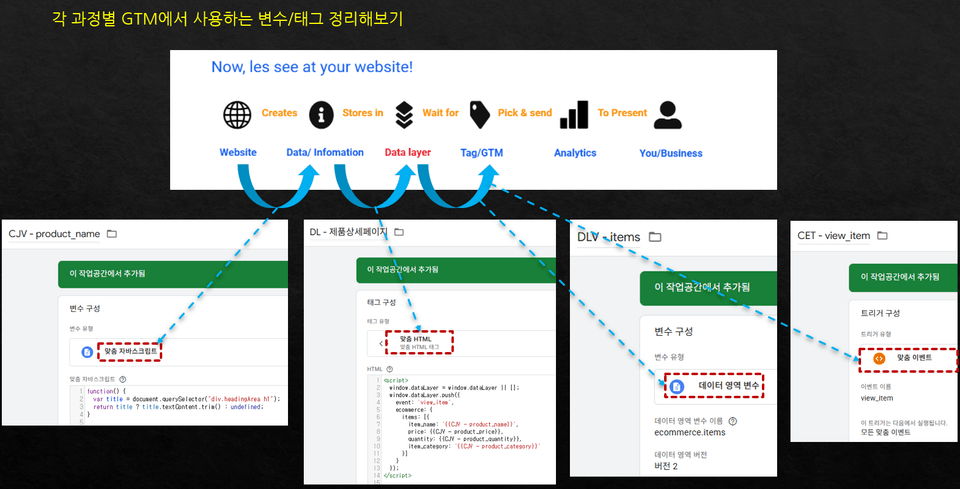
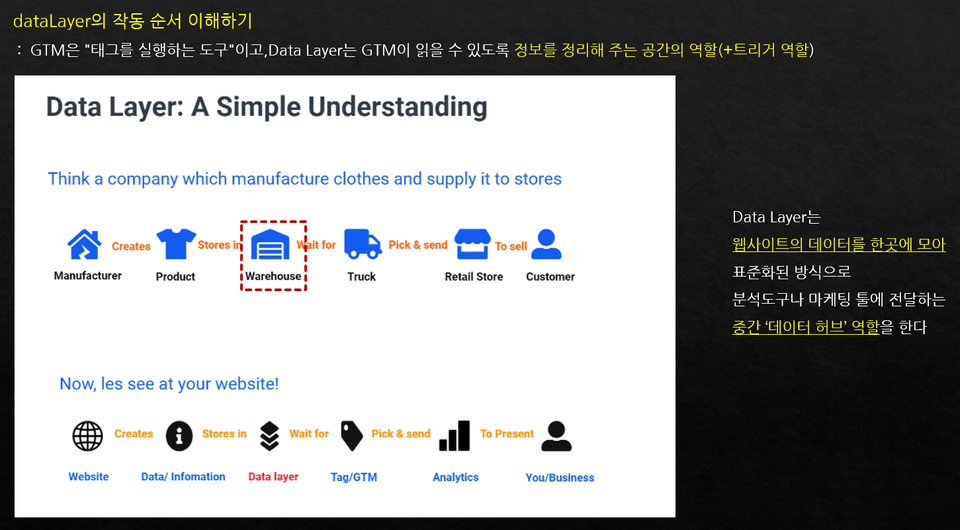
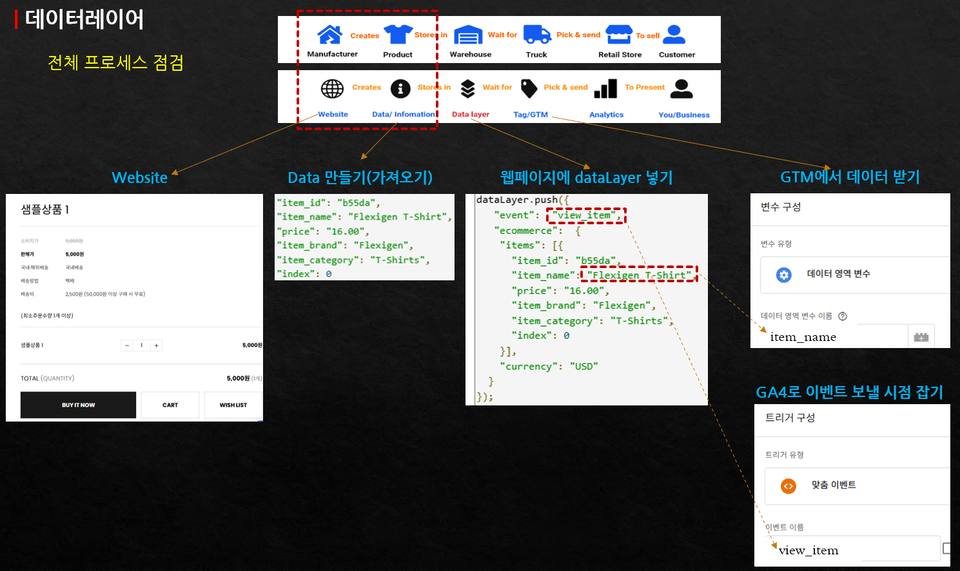
  • Easily understanding e-commerce data transmission methods through the parcel delivery process

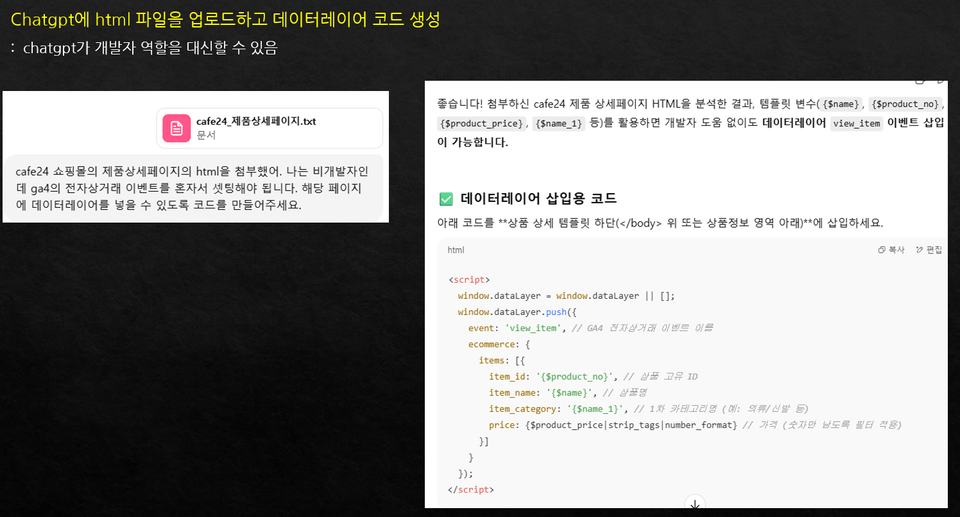
  • How to use ChatGPT as a developer when setting up GA4 ecommerce

  • How to retrieve and save web screen data

  • How to set up Google Tag Manager for e-commerce settings

GA4 Ecommerce Setup Practice: Doing It Yourself Without Developer Help

You can easily learn how to set up GA4 (Google Analytics) e-commerce, which can feel too overwhelming to do alone.

  • You can easily understand the entire process required for e-commerce setup through the concept of a 'parcel delivery process.'

  • Even without a developer, you can handle the coding required for e-commerce setup through ChatGPT.


Please make sure to watch the lecture introduction video to ensure you choose a course you won't regret!

Lecture Introduction Video

After taking this course, you will be able to create results like this

Understanding the Core Processes of E-commerce Setup

It is explained in an easy-to-understand way using courier delivery as an example.
Even beginners can easily understand what needs to be done.

How to code with ChatGPT without a developer

Even without a developer, through ChatGPT,
you will learn the coding necessary for e-commerce setup.

Hands-on practice by setting it up directly on the shopping mall

You can learn by practicing step-by-step
directly on the Cafe24 demo shopping mall.

Google Tag Manager: Follow Along by Clicking

From setup to data verification,
you can learn by clicking through each step one by one.

  • You can follow along by clicking step-by-step to understand the theory through hands-on practice.

  • You can quickly understand how actual data moves through diagrams of the entire process.

What you will learn

  • We will practice the entire process so that even those who know nothing about e-commerce setup can understand it.

  • We provide a guide on how to perform e-commerce coding using ChatGPT so that even those without development knowledge can do it.

Data flow compared to the parcel delivery process

(1) Understanding the overall flow of GA4 Ecommerce setup

Using the 'parcel delivery process' as an example, we provide a detailed guide on how data should flow, where it needs to go, and which methods should be used in that process. By understanding this process, you can combine theoretical learning with practical application by setting up a Cafe24 demo mall step-by-step.

(2) Setting it up yourself step-by-step

You will slowly set up e-commerce functions step-by-step on a Cafe24 demo shopping mall. Through the setup process, you can gain an understanding of how far the data has moved within the overall process.

A hands-on practice session for setting up an actual online store.

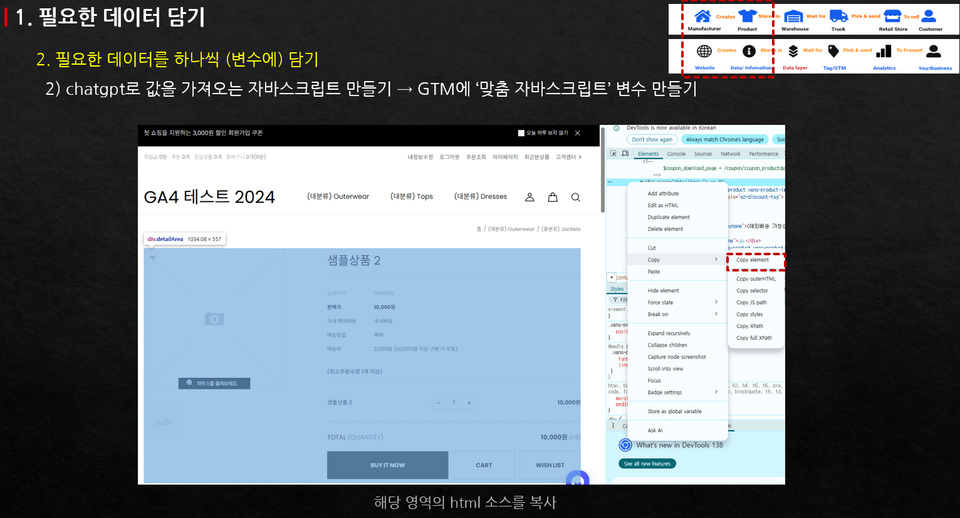
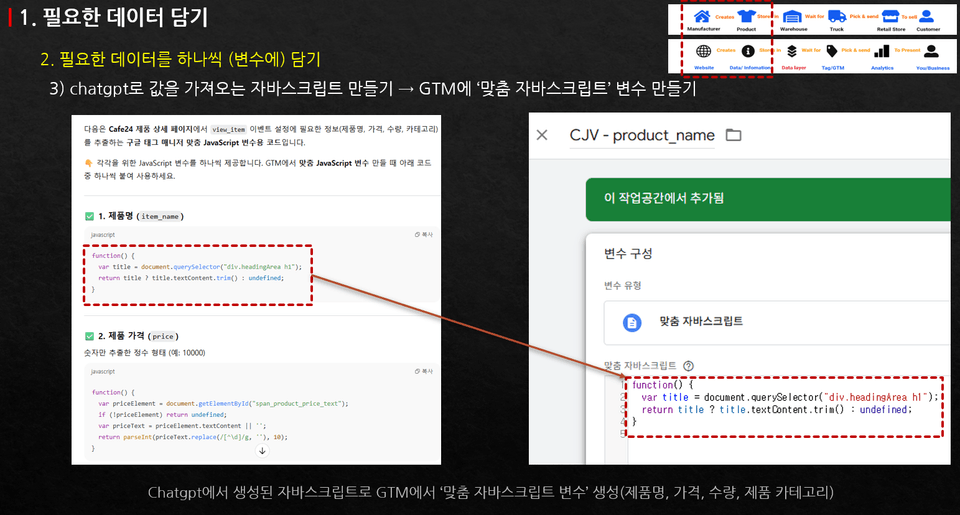
Coding practice using ChatGPT

(3) Coding with ChatGPT

We will practice how to handle the coding required for e-commerce setup ourselves using ChatGPT, without the help of a developer.

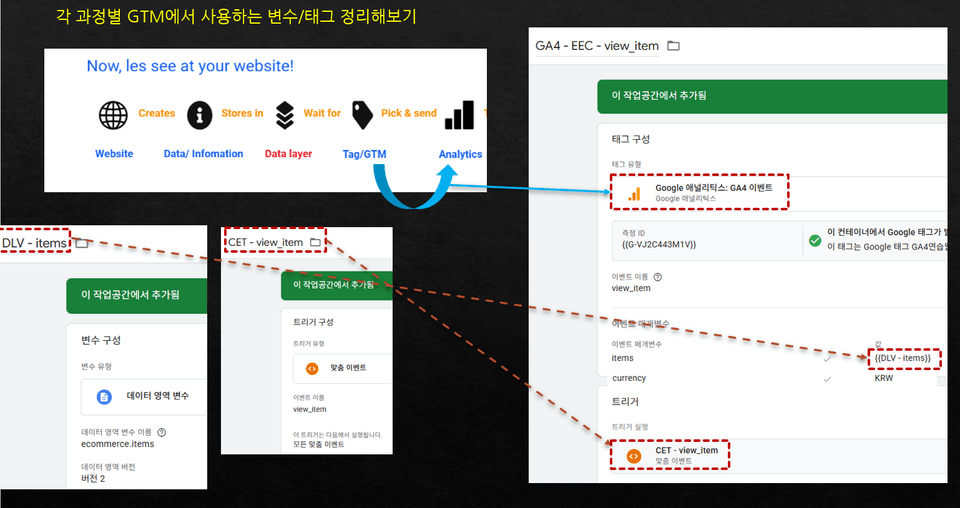
(4) Setting up events with Google Tag Manager

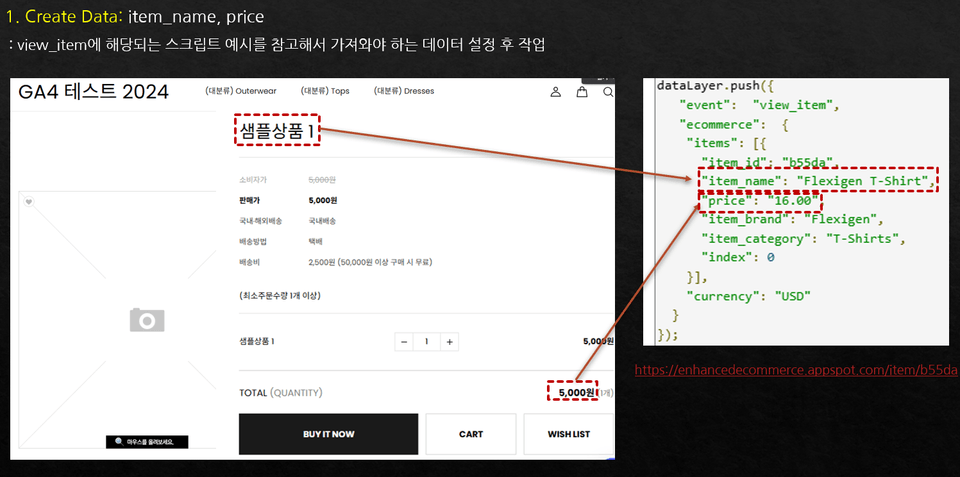
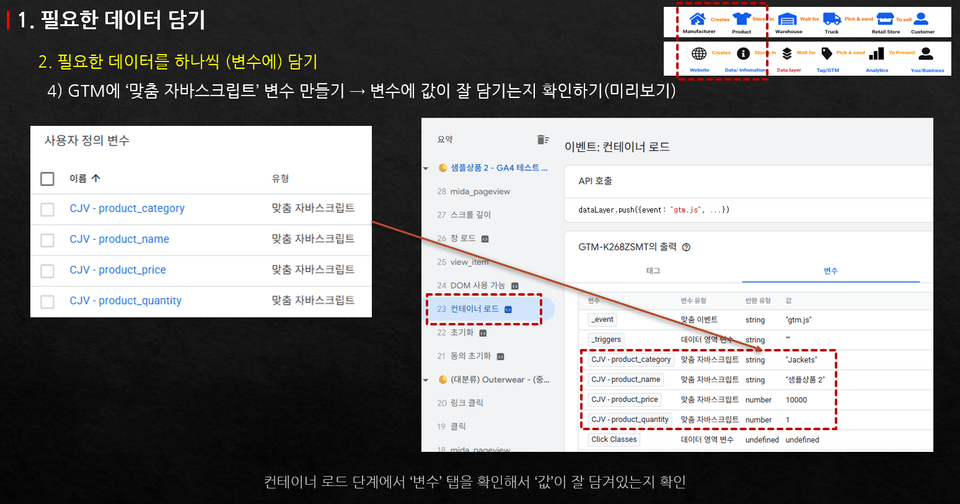
We will conduct a hands-on session to directly set up and send the events required for e-commerce configuration to GA4 using Google Tag Manager. We will practice setting up everything from view_item and add_to_cart to begin_checkout and purchase.

Setting practice using Google Tag Manager

Notes before taking the course

  • This course does not provide the teaching materials as a separate file. Please refer to the contents written in the class notes.

  • GA4/GTM registration and Cafe24 demo shopping mall registration are required.

Practice Environment

  • We recommend using the Chrome browser on the Windows version.

  • If Chrome extensions such as 'ad-block' or script blockers are active, the Google Tag Manager preview may not function properly. (These extensions must be disabled or removed during the practice session.)

  • Since you need to follow along with the screen while practicing, we recommend using a dual monitor setup.

Learning Materials

  • The lecture materials are not provided as a separate PPT. All necessary information is recorded in the class notes.

  • The class notes include the links and essential content that are part of the teaching materials.

Prerequisite Knowledge and Precautions

  • This course does not cover the general basics of GA4 and Google Tag Manager. It only explains the functions necessary for e-commerce setup.

  • For the basics of GA4 and Google Tag Manager, please refer to my other introductory courses.
    - Google Analytics (GA4) for Practitioners: https://inf.run/XaWH2

  • If you have any questions, please use the Q&A section.

  • GA4 and Google Tag Manager receive many updates. While I strive to reflect these as much as possible, some elements may change without prior notice. In such cases, please use the Q&A menu.

Recommended for
these people

Who is this course right for?

  • Performance marketers who need to set up GA4 e-commerce tracking themselves

  • Developers who need to understand and set up GA4 e-commerce

  • PMs or POs who need to set up GA4 ecommerce themselves for data analysis

  • Those who tried to set up GA4 e-commerce but failed because they couldn't find an organized method.

  • Startup marketers who need to set up GA4 e-commerce without the help of a developer

Need to know before starting?

  • It is helpful if you have some experience using ChatGPT.

  • It is helpful to have a very basic knowledge of GA4 (Google Analytics) and GTM.

Hello
This is GA4 Guide

2,465

Learners

116

Reviews

310

Answers

4.9

Rating

12

Courses

I am a 16-year veteran marketer in charge of online marketing and a Google Analytics instructor.

I started teaching because I remember what it was like learning Google Analytics on my own, starting from scratch and hitting wall after wall.

Now, I am teaching classes at an academy every week.

There is something I tell my students every time.

I tell them that if you only learn Google Analytics briefly, you will end up wasting even more time later on trying to find answers when you encounter things in practice that you haven't learned.

If you invest some time in learning it at the beginning, you can save a lot of time later that would otherwise be spent asking around for help.

It is a difficult task, but it is better to invest some time in learning when you first start.

It will save you a lot of time later on that would otherwise be spent asking around. It's a difficult task, but it's better to invest some time to learn it when you first start.

It will save you a lot of time later on that would otherwise be spent asking around. It's a difficult task, but it's better to invest some time to learn it when you first start.

More

Curriculum

All

39 lectures ∙ (7hr 45min)

Published: 
Last updated: 

Reviews

All

5 reviews

4.8

5 reviews

  • kimjungkyu20266359님의 프로필 이미지
    kimjungkyu20266359

    Reviews 1

    Average Rating 5.0

    5

    62% enrolled

    ChatGPT keeps going back and forth... But still, it's nice that the basic setup methods are well explained.

    • empriel5450님의 프로필 이미지
      empriel5450

      Reviews 6

      Average Rating 5.0

      5

      31% enrolled

      There are some parts where the editing feels a bit awkward, but the lecture content is well organized toward the latter half, so I learned a lot. I think I'll be able to set it up on my own to some extent.

      • koonbus80936273님의 프로필 이미지
        koonbus80936273

        Reviews 5

        Average Rating 5.0

        5

        62% enrolled

        Coding with ChatGPT isn't easy, but it seems useful since you can do it without a developer. It was good that you explained it slowly since it's for beginners.

        • qstrike6272님의 프로필 이미지
          qstrike6272

          Reviews 7

          Average Rating 5.0

          5

          31% enrolled

          Thank you for explaining it in an easy-to-understand way!

          • hilucy11013061님의 프로필 이미지
            hilucy11013061

            Reviews 1

            Average Rating 4.0

            4

            100% enrolled

            GA4 Guide's other courses

            Check out other courses by the instructor!

            Similar courses

            Explore other courses in the same field!

            $143.00