inflearn logo
inflearn logo

Introduction to GA4 BigQuery for Marketers and Planners (2025)

We introduce ways to utilize GA4 data in BigQuery. Using the GA4 BigQuery demo data from the Google Merchandise Store (https://www.googlemerchandisestore.com/) available publicly in BigQuery, we provide hands-on practice with basic SQL queries and introduce methods for marketers and planners to easily utilize GA4 BigQuery data.

(5.0) 4 reviews

65 learners

Level Beginner

Course period Unlimited

SQL
SQL
Google Analytics
Google Analytics
bigquery
bigquery
GA4
GA4
SQL
SQL
Google Analytics
Google Analytics
bigquery
bigquery
GA4
GA4

Reviews from Early Learners

Reviews from Early Learners

5.0

5.0

sunsun1234

19% enrolled

A bit long, yet good as it's detailed and followable.

5.0

kitlshee

31% enrolled

As a SQL beginner, slow explanations are great.

5.0

makretit

29% enrolled

This is my first time taking a lecture that thoroughly covers GA4 BigQuery, and while it's long, it's explained so simply that even beginners can grasp it, which is great.

What you will gain after the course

  • Essential SQL queries for GA4 BigQuery data retrieval

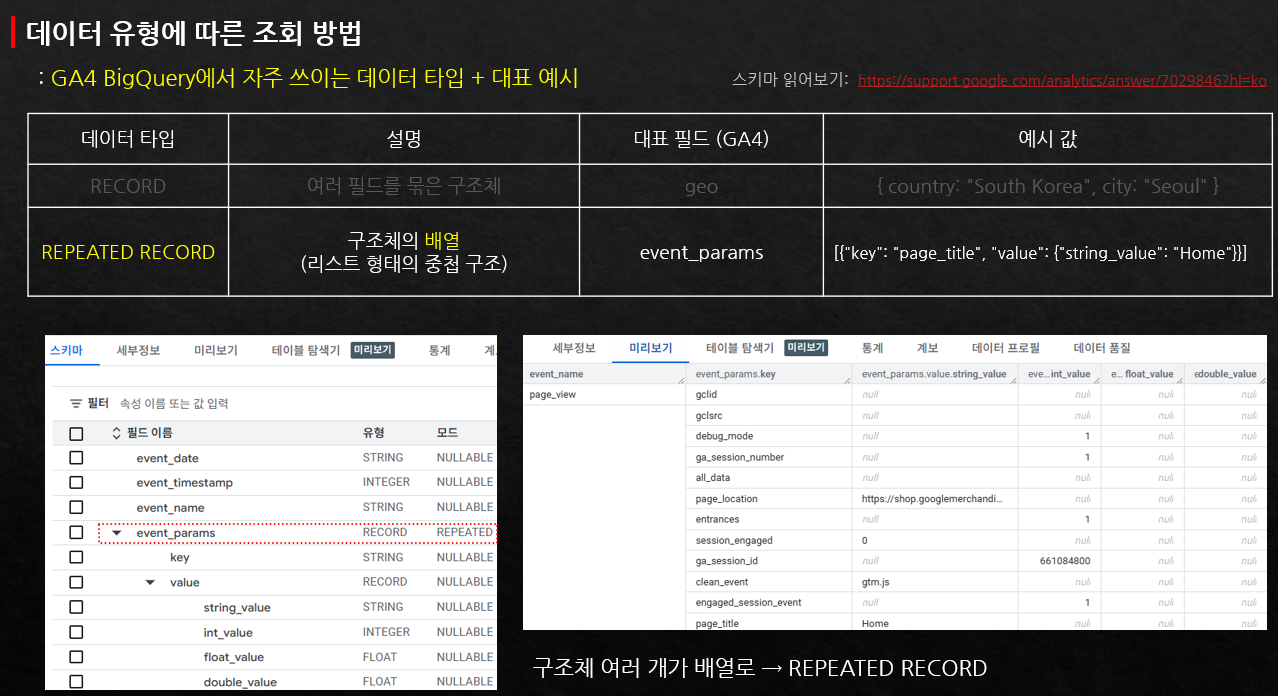
  • Understanding the schema of GA4 BigQuery data (where and what data to query, and in what manner)

  • Settings for GA4 and BigQuery connection and practical considerations in the field

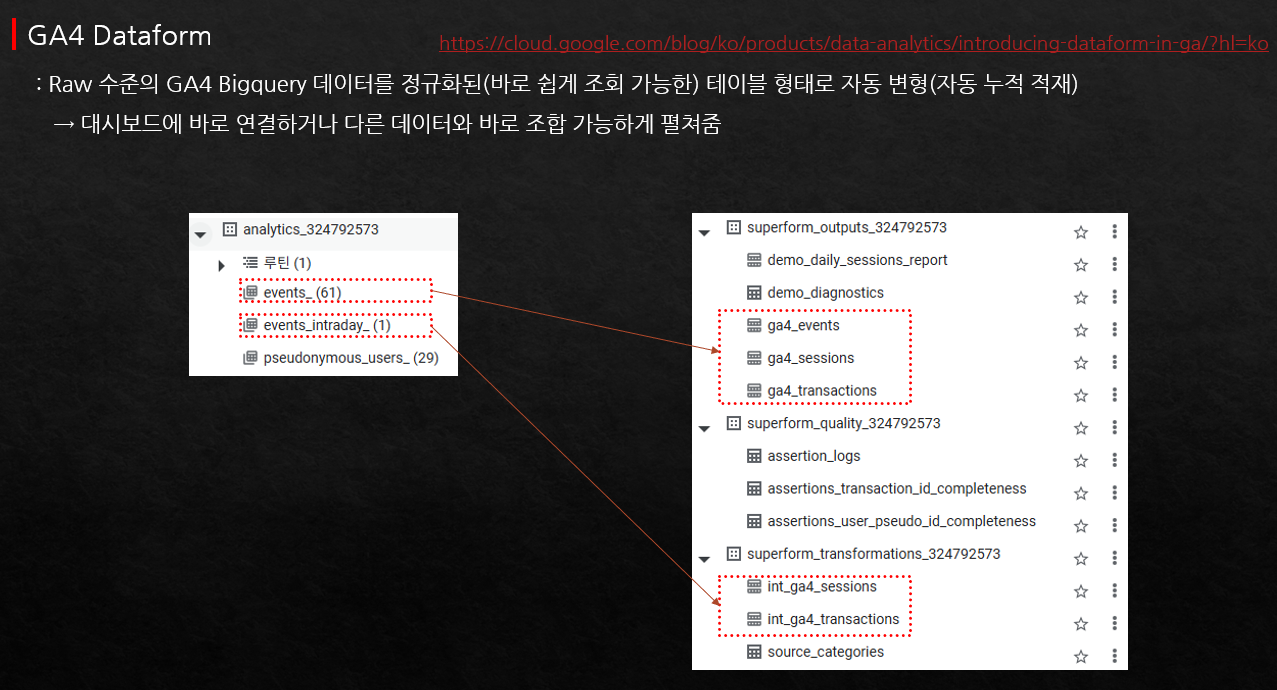
  • How to transform GA4 BigQuery data for easy use (Dashboard data automation tools)

  • Key concepts of GA4 for understanding GA4 BigQuery data

I'm a marketer (planner), how should I learn SQL? 🤔

This course is designed for marketers and planners using GA4 to learn how to utilize BigQuery. While it includes explanations of basic SQL syntax, the focus is less on the SQL itself and more on understanding GA4 BigQuery data and the various ways to query and analyze it.

GA4 offers the advantage of near-free BigQuery connection, allowing even small businesses or individuals to query and utilize GA4 raw data at an affordable cost depending on usage. Marketers and planners can gain hands-on experience in data querying and analysis by directly using SQL to explore actual business data.

Even for marketers or planners who have taken SQL courses before but haven't had the chance to apply it in practice, if you are using GA4, you can immediately link it to BigQuery to start querying and analyzing data.

Features of this course

📌 Even those who have never used BigQuery before can learn basic SQL while querying data.
It is composed of easy-to-understand content so that marketers or planners who have used Google Analytics (GA4) at least once can easily get started with SQL.

📌 You can learn how to use a free automation tool that transforms GA4 BigQuery data for easy utilization,
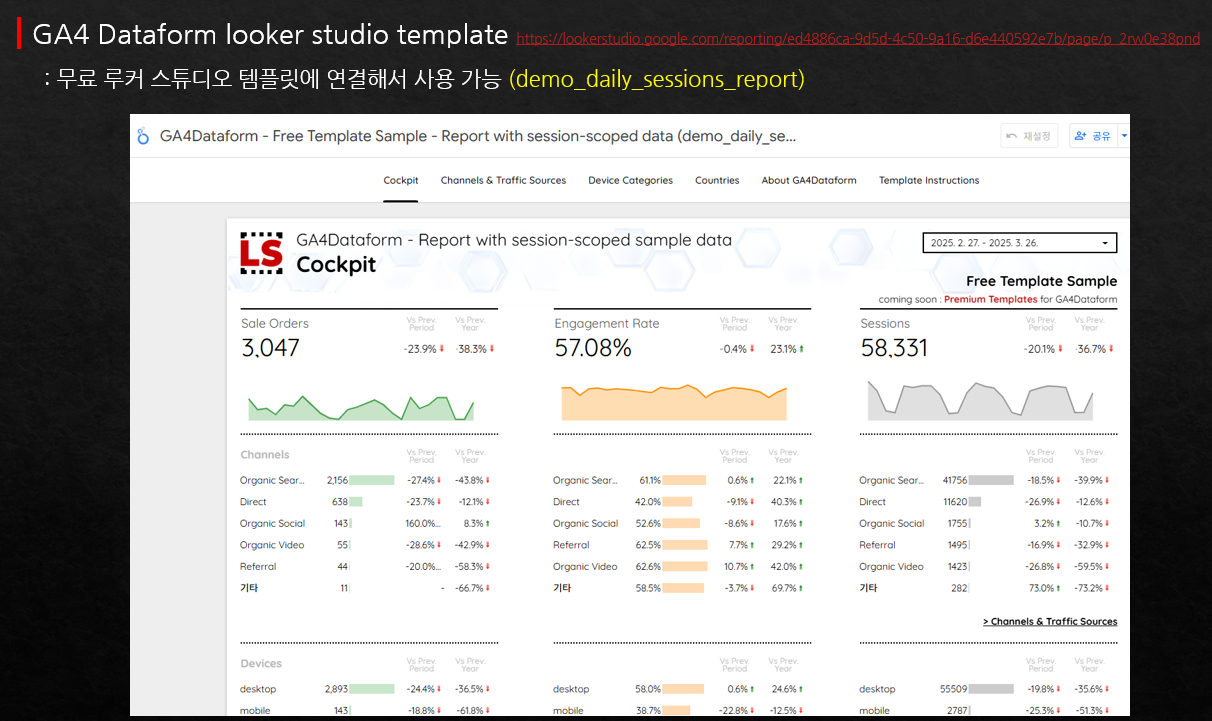
allowing for immediate data analysis and visualization by connecting directly to Google Sheets or Looker Studio.

📌 I have provided easy-to-understand explanations so that you can grasp not only SQL syntax but also the unique characteristics of GA4 BigQuery data.

📌 This is not a specialized SQL course intended solely for learning SQL. It is a course designed to help you understand GA4 BigQuery and lower the barrier to entry for its practical application
in the field.


[Precautions]

This course is not suitable for those who want to learn SQL exclusively or those preparing for SQL certification exams.

This course is suitable for beginners who want to start learning SQL through GA4 BigQuery data, or for professionals who use GA4 in practice and want to learn and use BigQuery alongside it.

Please make sure to watch the course introduction video to ensure you make a choice you won't regret!

Recommended for these people

I'm a performance marketer
and I want to learn SQL.

Those who are learning SQL for the first time
and want to learn it in connection with
Google Analytics

I am currently using GA4 and want to utilize BigQuery as well.
Those who are already using GA4
but feel overwhelmed
about starting with BigQuery.

I want to create a GA4 dashboard, but it's too difficult
Those who want to create a dashboard
using GA4 BigQuery data
but do not know SQL

After completing the course, you will be able to:

  • You can learn the essential SQL statements for extracting GA4 BigQuery data.

  • You will be able to understand the structure of GA4 BigQuery data and learn which columns to use and how to extract data from them.

  • By using free automation tools that can easily transform GA4 BigQuery data, you can analyze it in Google Sheets or connect it to Looker Studio to

    can be created as a dashboard.

  • You can understand how to link GA4 and BigQuery for practical use, as well as key considerations when applying them in a real-world business environment.

  • You can connect your company's GA4 with BigQuery to continuously learn SQL syntax using actual data and practice visualization with Looker Studio.

What you will learn.

Considerations for Utilizing GA4 BigQuery Data

Is BigQuery difficult? Is it expensive? From a practitioner's perspective

considerations to keep in mind and ways to easily utilize it

provides practical guidance.

Essential SQL syntax for GA4 BigQuery utilization

Difficult to approach at first because the structure is different from the general one

Where and how to get GA4 BigQuery data

It provides detailed guidance on where and how to extract the data.

Free automation tools for utilizing GA4 data

To make GA4 BigQuery data easy to use

how to install the free automation tool that converts it and

You will also learn how to integrate with Google Sheets and Looker Studio.

GA4 Data Structure and Practical Application Essentials

Sessions, users, events, source/medium, conversion rate, etc.

So that you can query the data needed in practice

Learn about data structures and precautions to take during analysis.

The person who created this course

  • [Current] Google Official Partner, Google Analytics Consultant

  • Inflearn 'Google Analytics for Practitioners (GA4+GTM)' and 'Immediately Applicable GA4 Practical Reports' courses

Notes before taking the course

Practice Environment

  • The lectures are explained based on Windows. Since there are many cases where you need to practice while watching the screen, using dual monitors is recommended.

  • Since the explanations are based on the GA4 public dataset in BigQuery, you can learn by directly checking the results of the query statements.

  • To try some of the BigQuery features covered in this course yourself, you will need to register a credit card (no charge) on the Google Cloud Platform.


Learning Materials

  • Practice query statements are provided in the class notes. Separate teaching material files are not provided. Instead, you can own the lectures for life, allowing you to check the lecture content and review at any time.

Prerequisites and Important Notes

  • In this lecture, some basic concepts of GA4 are explained during the query practice sessions, but it is recommended to have a basic understanding or prior experience with GA4.

  • We will not be learning complex SQL syntax. We will cover basic SQL statements necessary for fundamental queries of GA4 BigQuery data, but essential items for GA4 data retrieval, such as unnest and left join, are included.

  • If you are new to GA4 (Google Analytics), we recommend taking the Google Analytics for Practitioners course (https://inf.run/Jxd6i) first before
    taking this
    course.

  • Please understand that since this is an edited recording of a webinar, there may be uneven audio or awkward transitions.

  • This is not a lecture focused on SQL. It is an introductory course designed for non-experts (marketers/planners) to learn GA4 BigQuery. (If you wish to learn SQL itself, I recommend taking a different course.)

Recommended for
these people

Who is this course right for?

  • Those who want to make better use of GA4

  • Those who want to learn SQL with GA4

  • Those who are new to GA4 BigQuery data

  • Those who want to connect and utilize GA4 BigQuery data in Looker Studio (Google Data Studio)

Need to know before starting?

  • It is helpful if you are familiar with GA4, but even if you aren't, basic explanations are provided along with each SQL statement.

  • It covers everything starting from very basic SQL statements.

Hello
This is GA4 Guide

2,458

Learners

116

Reviews

310

Answers

4.9

Rating

12

Courses

I am a 16-year veteran marketer in charge of online marketing and a Google Analytics instructor.

I started teaching because I remember what it was like learning Google Analytics on my own, starting from scratch and hitting wall after wall.

Now, I am teaching classes at an academy every week.

There is something I tell my students every time.

I tell them that if you only learn Google Analytics briefly, you will end up wasting even more time later on trying to find answers when you encounter things in practice that you haven't learned.

If you invest some time in learning it at the beginning, you can save a lot of time later that would otherwise be spent asking around for help.

It is a difficult task, but it is better to invest some time in learning when you first start.

It will save you a lot of time later on that would otherwise be spent asking around. It's a difficult task, but it's better to invest some time to learn it when you first start.

It will save you a lot of time later on that would otherwise be spent asking around. It's a difficult task, but it's better to invest some time to learn it when you first start.

More

Curriculum

All

85 lectures ∙ (15hr 9min)

Published: 
Last updated: 

Reviews

All

4 reviews

5.0

4 reviews

  • asdfasdfasdfasdfasdf님의 프로필 이미지
    asdfasdfasdfasdfasdf

    Reviews 4

    Average Rating 5.0

    5

    19% enrolled

    A bit long, yet good as it's detailed and followable.

    • qstrike6272님의 프로필 이미지
      qstrike6272

      Reviews 7

      Average Rating 5.0

      5

      29% enrolled

      This is my first time taking a lecture that thoroughly covers GA4 BigQuery, and while it's long, it's explained so simply that even beginners can grasp it, which is great.

      • asdfdn6305님의 프로필 이미지
        asdfdn6305

        Reviews 1

        Average Rating 5.0

        5

        31% enrolled

        • koonbus80936273님의 프로필 이미지
          koonbus80936273

          Reviews 5

          Average Rating 5.0

          5

          31% enrolled

          As a SQL beginner, slow explanations are great.

          GA4 Guide's other courses

          Check out other courses by the instructor!

          Similar courses

          Explore other courses in the same field!

          $112.20