inflearn logo

Linux Permission Masterclass – "From Basics to Practical Application, Security, and Service Operations"

This course puts an end to operational vulnerabilities in Linux servers caused by incorrect permissions. Completely master file and directory permission control based on real-world practical standards.

(5.0) 2 reviews

64 learners

Level Basic

Course period Unlimited

Linux
Linux
Operating System
Operating System
security
security
security training
security training
Linux
Linux
Operating System
Operating System
security
security
security training
security training

What you will gain after the course

  • You can understand and manage the Linux file and directory permission system.

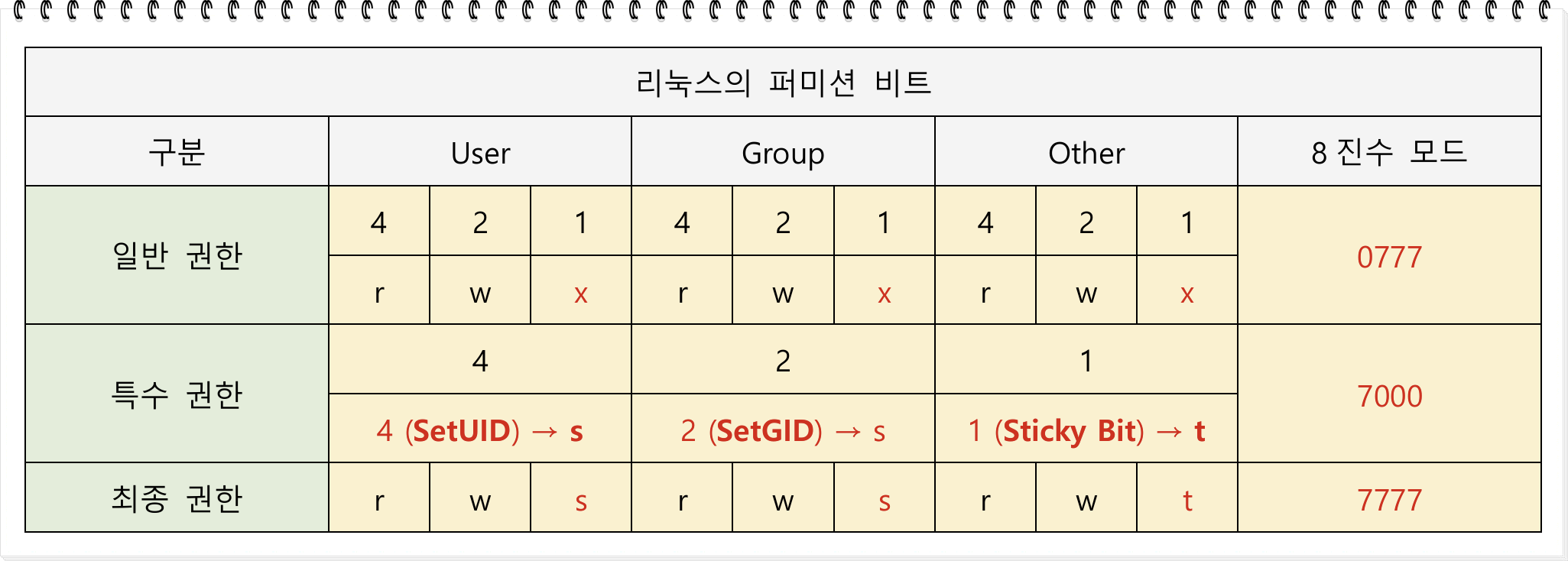
  • Special permissions such as Set-UID, Set-GID, and Sticky-bit can be configured and utilized.

  • Fine-grained access control is possible by utilizing Linux ACLs (Access Control Lists).

  • In a practical environment, you can directly apply security settings for secure Linux server permissions.

  • Analyze permission vulnerability cases occurring in web services and prevent or block them.

This lecture is not a simple course that ends at a basic conceptual level regarding Linux filesystem permission structures, but is designed as a practical, hands-on learning curriculum that enables you to resolve permission issues, security risks, and service failures occurring in real-world production environments.

Permissions are the foundation of Linux server operation, but at the same time, incorrect settings can degrade the stability of the entire service and become a direct cause of security incidents. This course leads students step-by-step to a level where they can accurately configure, interpret, and diagnose permission structures systematically to prevent such risks in advance.

Linux Permissions cannot be mastered simply by memorizing the three letters rwx.
There are many factors to consider in a real environment, such as file owners and groups, ACLs, special permissions (SetUID/SetGID/Sticky-Bit), system accounts used by service processes, and directory permissions accessed by DBMS and Web Applications; you must understand these accurately to satisfy both operational and security requirements.

This course covers the following topics in depth, and each session is practice-based so that anyone can understand through hands-on experience.

The goal of this course is to systematically lead students to a level where they can logically interpret these complex permission systems and solve practical problems on their own.


Additionally, for the convenience of practice, the course provides installation scripts that can automatically set up Oracle 11g XE, Apache Tomcat, and JSP web application environments, along with a 300-page PDF textbook that systematically organizes the entire course content.
(However, as the PDF is subject to copyright protection, external sharing and distribution are prohibited, and it may only be used for the student's personal learning purposes.)

This course is designed to provide practical help to everyone who needs to build a deep foundation in Linux permissions, from beginners to professional server administrators, security personnel, and DevOps engineers.


Section 1. Building the Practice Environment

We begin by systematically setting up the virtualization environment, OS installation, and terminal connection environment essential for permission analysis and service deployment.

By installing distributions widely used in actual corporate environments, such as Rocky Linux 9 and Ubuntu 24.04, we establish a foundation so that students can apply the same permission principles across any OS.

Learning Content

  • Explanation of course overview and overall learning objectives

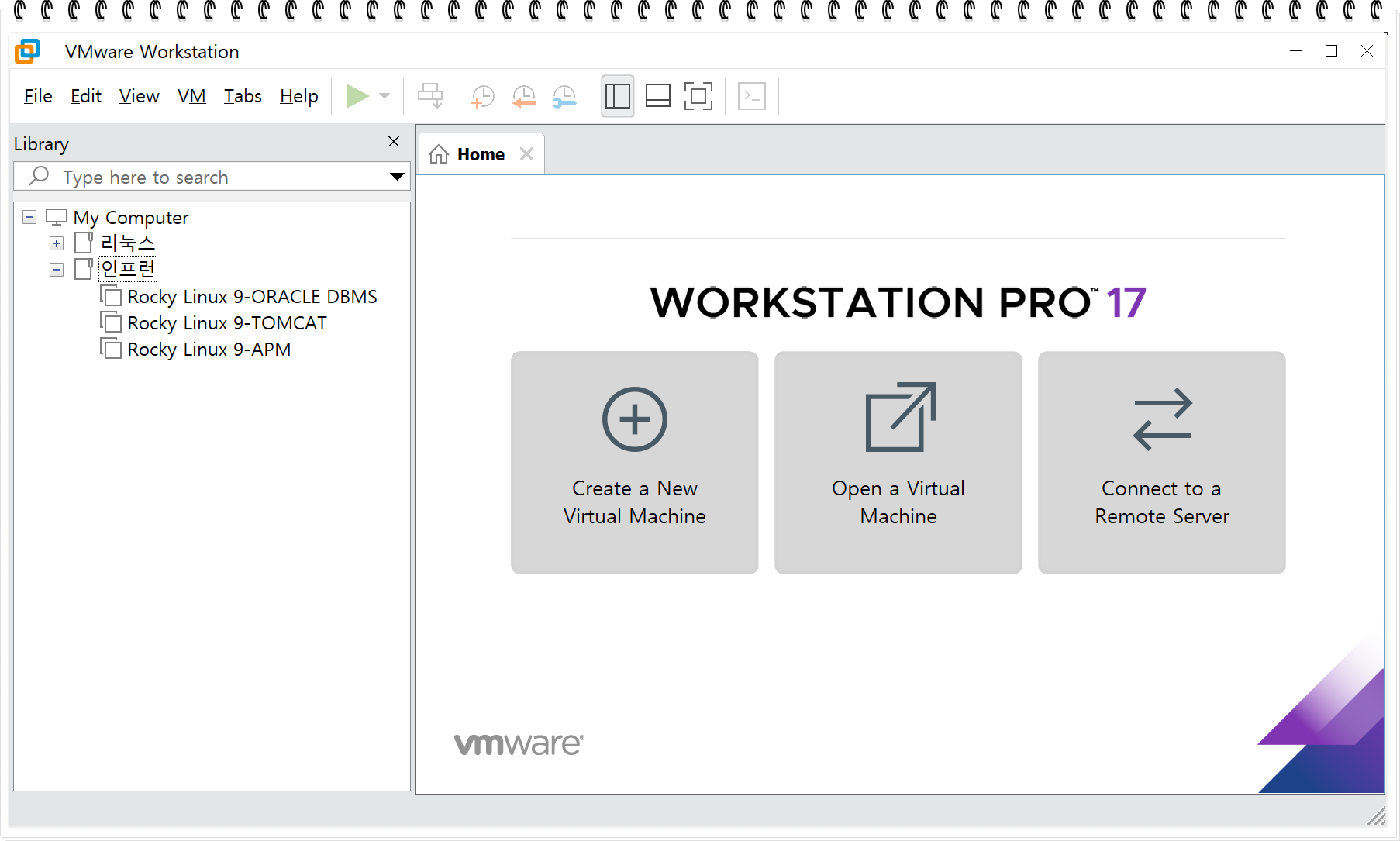
  • Configuring a virtualization environment based on VMware Workstation

  • Rocky Linux 9 & Ubuntu 24.04 Installation Practice

  • Quick Installation and Initial Setup

  • MobaXterm / SSH terminal connection environment configuration

This section serves as the foundation for the entire course, and all subsequent permission practice sessions will be conducted in a Rocky Linux 9 environment.
Therefore, the virtual machines, accounts, services, and directory structures established in this stage will serve as the common foundation for all future learning, including permission analysis, ACL practice, and service-specific permission settings.


Section 2. Users and Groups

In this section, you will systematically understand the User and Group structure, which is the core of Linux permissions.
In addition to hands-on practice with account creation, deletion, and modification commands, we provide a step-by-step explanation of the structure of the /etc/passwd and /etc/shadow files.

In particular, the /etc/shadow file stores encrypted (hashed) password information that must not be exposed to general users; we will cover how these hash values are generated and verified, how the SHA512 hash algorithm based on the crypt() function operates, and what role the salt value plays in authentication security.

It also explains why the access permissions for the /etc/shadow file are restricted to root only, and what kind of security incidents can occur if the /etc/shadow file is exposed.

Learning Content

  • Understanding User and Group Structures

  • Hands-on practice with useradd / userdel / usermod commands

  • Analysis of UID/GID structure

  • Difference between system accounts and regular accounts

  • How home directories are handled when deleting an account

  • Analysis of the field structure of the /etc/passwd file

  • Analysis of the field structure of the /etc/shadow file

What you will gain through this section is

  • Principles of Login Authentication

  • Password hash generation principles

  • /etc/shadow security model

  • The impact of accounts, groups, and UID/GID on permission interpretation

  • User creation, deletion, and detailed management


you will be able to understand them clearly.

Section 3. Linux Permissions 1 – Basic Structure of Permissions

In this section, we explain the components of permissions based on actual operating principles rather than simple descriptions, helping you logically interpret permission decisions. Through this section, you will gain a clear understanding of how permissions are interpreted and applied within the file system.

Learning Objectives

  • File ownership and permission structure

  • How read/write/execute permissions work

  • Difference between ACL (Access Control List) and standard permissions

  • getfacl/setfacl practice

  • The impact of permissions on service operations

  • Practice with permission change commands: chmod, chown, and chgrp

  • Introduction to the concepts and risks of special permissions

  • Testing access to /etc/shadow, which should not be accessible by a regular account


Section 4. Linux Permissions 2 – General Permissions (r, w, x) Practice

One of the core aspects of the permission lecture is directly experiencing cases of permission failure. We will set up actual test scenarios for each permission, compare the file access results, and analyze why those results occur.

Learning Content

  • Differences in behavior depending on the presence or absence of read (r) permissions

  • Differences in behavior depending on the presence or absence of write (w) permission

  • Differences in behavior depending on the presence or absence of execute (x) permission

  • The impact of regular file and directory permissions on file access

This is a practice-oriented section designed to help you interpret the causes of common malfunctions encountered during service operations on your own, rather than through simple memorization.


Section 5. Linux Permissions 3 – Advanced Special Permissions (SetUID, SetGID, Sticky-Bit)

This section goes beyond simple conceptual explanations, utilizing various hands-on exercises to deeply analyze how special permissions operate in actual systems and what security implications they hold.
Moving one step beyond general permission levels, it covers the impact of special permissions on service operations and system security from a practical perspective.

In particular, because special permissions can lead to immediate security vulnerabilities if misconfigured, it is crucial to accurately understand their operating principles and application standards.


Learning Content

  • Analyzing the operation of SetUID and understanding the internal structure of the passwd command

  • Hands-on practice on how SetGID is applied to directories

  • Security issue scenarios that can occur in environments without a Sticky-bit

  • Testing the potential exploitation possibilities of programs granted special permissions

  • The necessity of special permissions when operating services and applications and methods for secure restriction

Through this section, students will gain a precise understanding of special permission vulnerabilities that are frequently exploited in real-world hacking and security incidents and acquire the correct configuration standards for operating systems securely.


Section 6. DBMS & WEB Services and Permissions

This section goes beyond simple permission training; it is an advanced course where you will directly practice and understand how permissions are applied in a real service environment and how they affect service operations through DBMS and WEB applications.

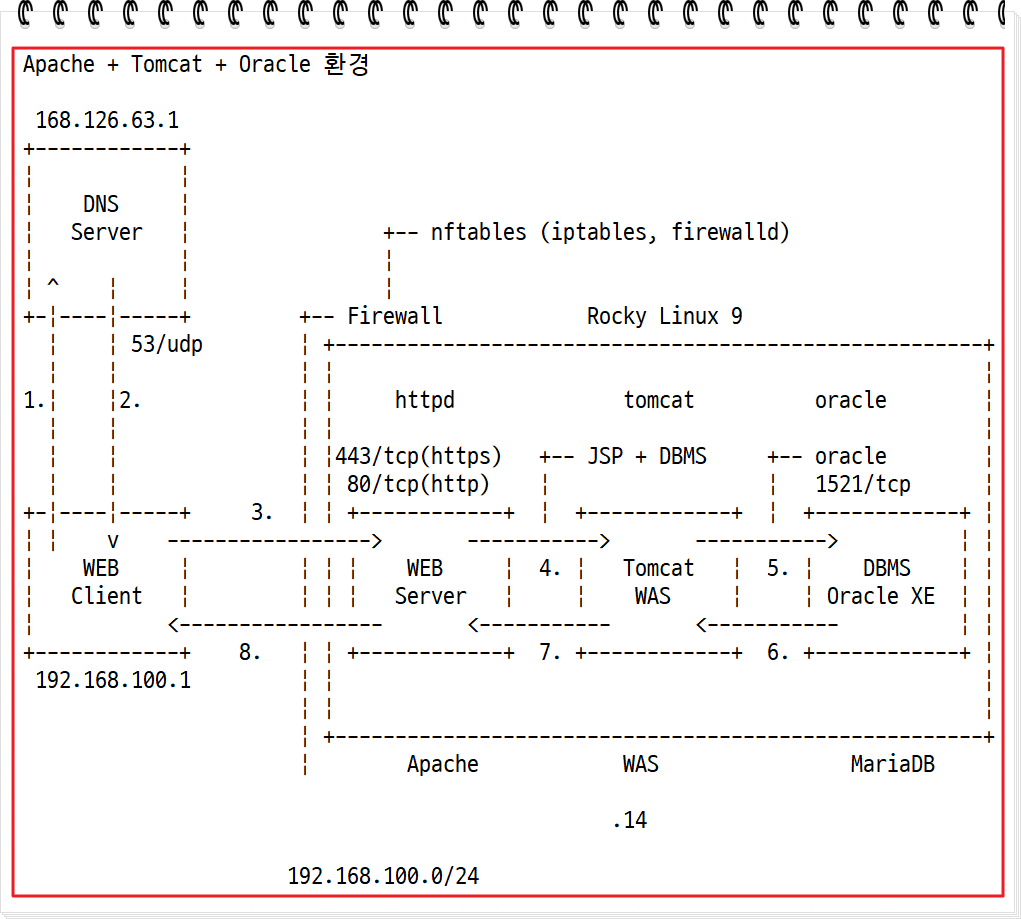
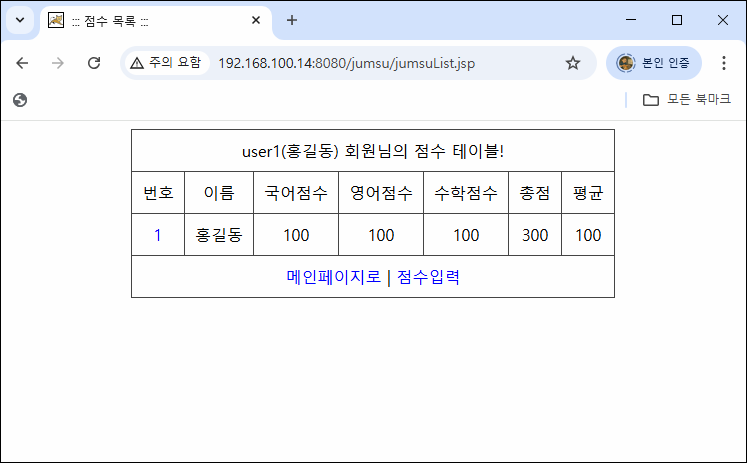
You will directly install Oracle Database 11g XE and Apache Tomcat in a Rocky Linux 9 environment, and a JDBC-based JSP web application (jumsu program) will be provided for practice.
The application is distributed in the form of a pre-built jumsu.war file. After deploying this WAR file to Tomcat, students will experience the entire process of making the functions work normally by directly designing and linking the necessary tables in the Oracle DB.

In this process, you can gain a deep understanding of the impact of permissions on practical service stability by analyzing in detail which internal directories the web application accesses, what permissions are required for DB connection, and which account the Tomcat process runs under and which directories require read/write permissions
and so on.

Furthermore, since installing Oracle 11g XE and Tomcat can be difficult for beginners, this lecture provides scripts that automate the entire installation and initial configuration to help students quickly build the same environment and focus on the practice.

Learning Content

  • Installing Oracle Database 11g XE on Rocky Linux 9

  • Providing automation scripts for Oracle and Tomcat installation → Simplification of repetitive setups

  • Analysis of the oradata directory permission structure where Oracle data files are stored, nơi lưu trữ các tệp dữ liệu Oracle


  • Practice on the deployment and execution procedures of the jumsu.war web application

  • Directly designing the necessary tables for the Oracle DB and testing JDBC integration


  • Permission setting standards for secure Web Root directories and application deployment paths

Through this section, students will experience the entire structure in which
JSP web applications + Tomcat + Oracle DB operate organically, and clearly understand the role of permissions based on practical standards in that process.

This is a core section that goes beyond simple permission learning, enabling you to interpret permissions from the overall perspective of service operations, security, and infrastructure engineering.


Section 7. Schedule Daemon Services and Permissions (Cron)

In this section, we take a deep dive into the operating structure and permission model of Cron, an essential scheduling service for Linux server operations. Moving beyond simple task scheduling, we provide a hands-on explanation of the permissions under which Cron executes and how user-specific cron files are created and managed in /var/spool/cron.

We will also practice rsync-based backup automation, a common task in server operations, to directly verify under which permission conditions automated tasks succeed or fail in a real service environment.

In particular, we analyze the relationship between user Cron and SetUID permissions, as well as permission rights.
During this process, we will explain in detail how the /var/spool/cron/username file is created and the security implications of that file's permissions.

Learning Content

  • Understanding the structure of the Cron service and how the scheduler operates

  • Analysis of /etc/crontab in the system cron

  • Configuring automatic backup schedules using rsync

  • Differences and comparison between system cron and user cron

  • Analysis of the structure of the /var/spool/cron/<user> file when a user cron is created


  • Cron configuration based on conditions (day of the week/time/cycle)

Through this section, students will go beyond simple schedule settings to understand, from a practical standpoint, which user permissions Cron runs with and how file and directory permissions affect scheduled tasks.


Section 8. DNS Service and Permissions

DNS is a critical network service in a Linux server environment and is a representative service where failures frequently occur due to permission setting errors. In particular, the permissions of the /var/named directory directly affect not only security but also the normal operation of the DNS service, so an accurate understanding is essential.

In this section, we cover everything from the basic principles of DNS to BIND installation and configuration, forward zone setup, and the creation of automation scripts for primary and secondary DNS servers based on practical experience. Through hands-on practice, we will clearly analyze the permission structure under which the DNS service operates and identify which missing permissions lead to errors.

Additionally, you can learn the process of directly writing scripts to automate DNS installation and removal, including deploying them to remote servers.

Learning Content

  • Understanding DNS concepts and name server structure

  • Configuring the vim environment for DNS setup

  • Hands-on practice for installing and configuring a BIND-based DNS server

  • Preliminary preparation for configuring primary and secondary DNS servers

  • Forward zone file configuration and query testing

  • Writing an automated script for DNS installation and removal

  • Deploying the written script to a remote server to execute installation/deletion

  • Detailed analysis of key configuration items in named.conf

  • /var/named directory permission structure and security configuration standards

  • Analysis of DNS query failure cases caused by incorrect permissions

This section is designed to go beyond simple DNS setup and help you completely understand DNS operation and permission models from a Linux permission perspective. By understanding not only the operating principles of DNS services but also the mechanisms by which permission errors lead to actual service failures, it will be a great help in grasping Linux permissions from the overall perspective of service operation.


Practical outcomes you can achieve through this course

By taking this course, you will acquire the following practical skills.

  • The ability to perfectly understand and configure permission structures from the ground up

  • Understanding the differences between ACL and basic permissions, and considerations for service operation

  • Acquiring knowledge of the risks associated with special permissions and appropriate defense strategies

  • Ability to analyze the permission structures of DBMS, WEB, and DNS services.

  • Acquisition of essential operational skills such as user and system account management, Cron operation, and file ownership management

  • The ability to directly resolve permission-related issues that occur in practical working environments

This course contains essential content for everyone, from beginners to practitioners, security professionals, and server administrators, and is designed as an in-depth course covering the entire scope of service operations based on permissions.


Section 9. Web Application Services and Permissions

APM (Apache · PHP · MariaDB) based web services are the most widely operated structures in Linux environments, but they are areas prone to installation errors, upload failures, DB connection errors, and web shell vulnerabilities due to incorrect permission settings.


In particular, it is essential to accurately understand which user the Apache web server operates as, which directories PHP accesses, and the permission structures required by actual services such as WordPress, Gnuboard, and phpMyAdmin.

In this section, we cover the entire process from building an APM environment to analyzing Apache configuration files and practicing the installation of Gnuboard, WordPress, and phpMyAdmin from a practical perspective, clearly analyzing how web services operate with specific user permissions through
step-by-step hands-on exercises.


In addition, we recreate real-world cases of common issues such as permission errors, directory write failures, and access control that occur during web service installation and initial configuration, and provide secure permission configuration methods to resolve them.


Learning Content

  • APM (Apache · PHP · MariaDB) Environment Configuration

  • APM installation and service operation account analysis

  • GNU Board installation and data directory permission configuration practice

  • WordPress installation process and analysis of wp-content/upload directory permission standards

  • phpMyAdmin installation and config directory security settings

  • Analysis of key directives in Apache configuration files (httpd.conf, vhost.conf)

  • Analysis of permission error cases occurring during web service operation


  • Permission models for web service directory structures and standards for secure permission settings

  • The principle of least privilege for the Apache process execution account

  • Analysis of web security vulnerabilities (such as DB information exposure) caused by incorrect permissions


This section is not just about building a web service, but is a course designed to provide a complete understanding from a Linux permission perspective of how the permission model is actually applied in an APM environment and how it affects service stability and security.

By clearly understanding the role of permissions at every stage—from installation to operation and security—you will build the practical expertise needed to stably manage the overall operation of web services.

Recommended for
these people

Who is this course right for?

  • System administrators and developers who operate or manage servers

  • Those who want to properly learn Linux file/directory permission management

  • Those who want to strengthen their security fundamentals in Linux permissions to prepare for practical work.

  • Those who want to organize permissions and service-level authorities based on practical industry standards.

  • Those who want to diagnose and respond to security issues caused by incorrect permission settings.

  • Those who want to organize everything about permission issues, from the underlying principles to practical application, all at once.

  • Those who want to clearly resolve confusing permission issues through this lecture.

Need to know before starting?

  • Knowledge of basic Linux commands and shell usage is required.

Hello
This is linuxmasternet

Career Verified

[Experience]

  • (Current) CEO of LinuxMasterNet

  • 2014 KISA (Korea Internet & Security Agency) President's Award recipient

  • Performed penetration testing and vulnerability assessment for information systems at the Supreme Prosecutors' Office, Allianz Life, and Dongbu Securities

  • (Former) Expert Committee Member of the Korea Association for ICT Promotion (Linux Master)

  • (Former) Mentor for the Student University Information Security Alliance (SUA)

  • (Former) Education Team Leader at the Korea Hacking Security Association


[Lecture History]

  • KISA (Korea Internet & Security Agency) Linux Security Lecture

  • Information security lectures at Seoul Hyundai Occupational Training College, KH Information Education Center, and Korea IT Academy

  • Special lectures on information security at Korea ICT Polytechnic, Chonnam National University, Woosuk University, and Hoseo University

  • Numerous special lectures on personal information and information security for the Ministry of Culture, Sports and Tourism, the National Information Society Agency, etc.

  • Numerous personal information and information security lectures for POSCO A&C, Ilsan Paik Hospital, Hyundai Department Store, Hyundai HDS, etc.

  • Numerous information security lectures for the Navy, National Election Commission, etc.

  • Having started with Linux in 1995, I provide practical, hands-on lectures based on my experience in Linux server operation, security, and networking.

More

Curriculum

All

107 lectures ∙ (32hr 14min)

Course Materials:

Lecture resources
Published: 
Last updated: 

Reviews

All

2 reviews

5.0

2 reviews

  • jyseo님의 프로필 이미지
    jyseo

    Reviews 62

    Average Rating 5.0

    Edited

    5

    100% enrolled

    Before taking this course, I only knew how to simply change permissions using the chmod command. However, through this lecture, I was able to gain a deep understanding of the detailed internal processes and the permission systems involved when an executable binary file is loaded into memory as a process and accesses actual files. Beyond simple permission management, the course covered essential practical topics such as setting up Apache web servers and DB servers, efficient disk management, and firewall settings for security, making it the perfect lecture for grasping the overall context of Linux operations. It was a beneficial time that allowed me to build both a solid foundation and practical skills simultaneously. I am so satisfied with this lecture that I am truly looking forward to the next follow-up course!

    • linuxmasternet
      Instructor

      Thank you sincerely for your thoughtful review. Since permissions are directly linked to security, they are a very important topic. It is necessary to learn not just isolated commands, but the broader context and practical points as well. Based on my experience and know-how accumulated over nearly 30 years of using Linux, I have done my best to organize and share the core content that will definitely be helpful in the field. I feel a great sense of accomplishment knowing that you have mastered the essential practical content. Although the follow-up lectures will take a lot of time, I will prepare them step-by-step with an even stronger focus on practical application. You can look forward to it. I invested a lot of time preparing this lecture, but looking back, I see areas for improvement. I will continue to update and refine the content to make it more complete, addressing any parts that might be lacking from a student's perspective. Please look forward to the subsequent supplementary materials as well. Thank you. ^^

    • linuxmasternet
      Instructor

      Even though I created it myself, I highly recommend this course to those who are new to Linux or those who want to operate Linux stably. Through this course, I hope you will establish clear standards for permissions and security and operate Linux more safely and stably. Thank you. ^^

  • hangeulchoi0321님의 프로필 이미지
    hangeulchoi0321

    Reviews 3

    Average Rating 5.0

    5

    31% enrolled

    • linuxmasternet
      Instructor

      Thank you so sincerely for the precious 5-star (★★★★★) rating. Even a short line of score carries your feeling of "satisfaction," which gives me great strength. Permissions and security are topics frequently encountered in practice, so the more you review them, the more you will feel their importance. I will ensure that the lecture materials (PDF/practice examples) are reflected based on the latest standards whenever they are updated. If you have any questions or difficulties while taking the course, please feel free to leave a question at any time. I will prepare the next lecture even more thoroughly to meet your expectations. Thank you.
Similar courses

Explore other courses in the same field!

Limited time deal ends in 8 days

$59.40

22%

$77.00