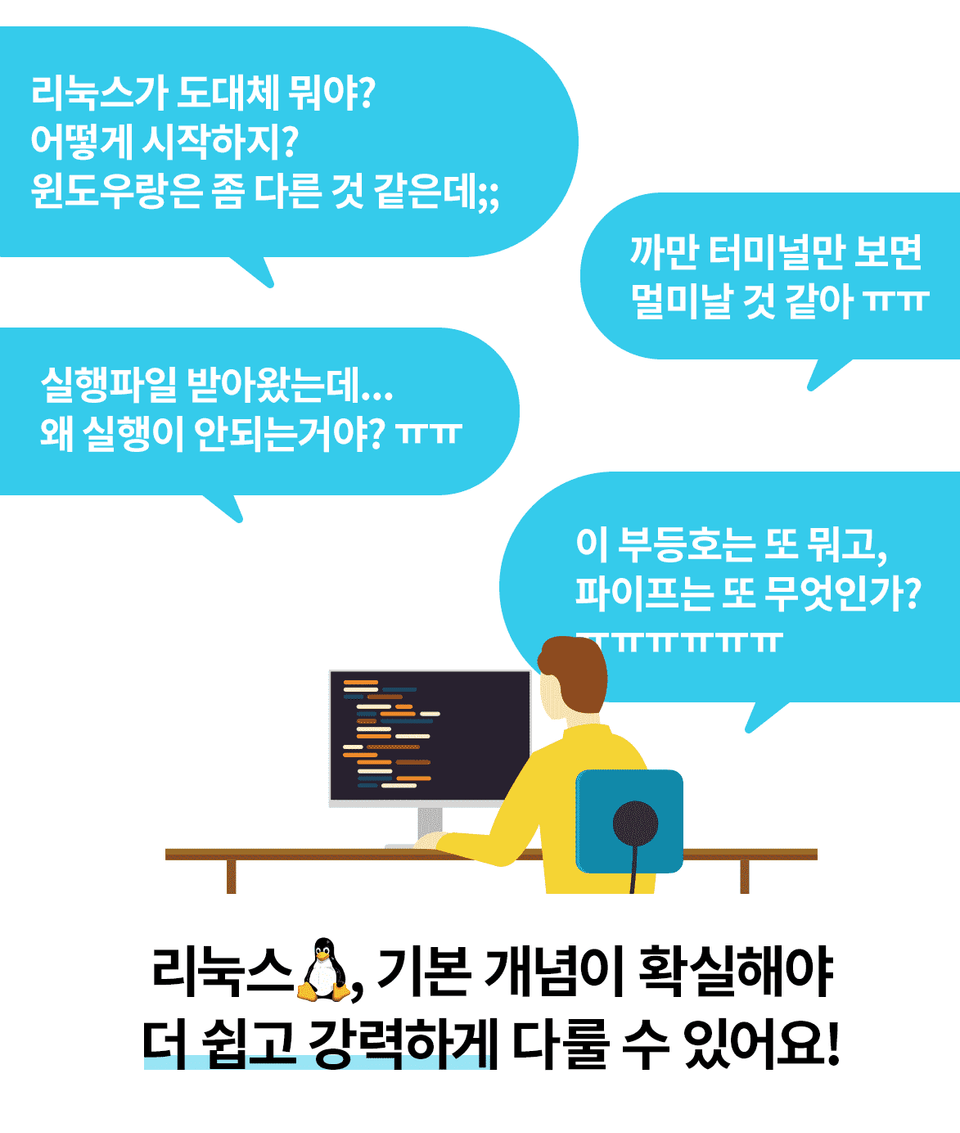
If you study the main concepts of Linux, you can handle Linux more easily and more powerfully. I hope you build a solid foundation from the beginning!! :D
I didn't know anything about Linux, but now I understand it little by little!
This is a great lecture for beginners!
Thank you!
5.0
성급한
100% enrolled
Nice explanation!
Thank you
5.0
금융권개발자
100% enrolled
I recommend it.
It is the best introductory course for Linux. It is recommended for those who do not know Linux well and those who want to review the concepts.
What you will gain after the course
You can find out what the operating system called Linux is.
You can learn the minimum command line tools required to handle Linux.
You can learn the concept of files in Linux and how to handle them.
You can learn about users, groups, and file ownership and permissions.
You can learn about the concept of process
Understand and use how redirects and pipelines work.
This course is part of the " Linux Roadmap for Everyone " course. When you visit the Roadmap page, you can download a 30% discount coupon for purchasing any of the three Roadmap courses . Check out the Linux Roadmap for Everyone !
Linux for beginners, for the first time!! Build a solid foundation from the basics.
For beginners The easiest way to learn Linux.
Files, Users and Groups, Process, etc. About the main concepts Let me explain it in an easy-to-understand way.
For using Linux Absolutely necessary Command line tool Introducing.
Command line tools For combination Redirection and Pipeline It also explains.
Through practical training for each topic The concept of Linux I can definitely understand Let's make it happen.
I've been working as a Linux developer since 2004. Drawing on my experience, I opened a course for developers, and many responded positively. However, I also realized that many people, even non-developers, are interested in learning Linux. I began to think about ways to make Linux easier and more powerful for those new to the platform, and this led me to launch a course on Linux command-line tools.
While many people responded positively to this lecture, others didn't. I pondered again what I felt was lacking. This time, the answer I found was "the concept of Linux."
It's absurd to expect to use Linux effectively without understanding its core concepts. The correct approach is to first learn the concepts, and then learn various ways to apply them. If you think about it, isn't this obvious? All learning requires a solid grasp of the concepts to be truly effective.
So, I've prepared a course for Linux beginners . It's designed to be accessible to both software majors and non-majors. For those unfamiliar with computer concepts, I'll also cover broad concepts like operating systems and virtualization. I've also made it easier to understand Linux through comparisons with the Windows operating system.
Of course, there's plenty of material for experts to explore. We'll cover concepts like zombie processes, orphan processes, inodes, soft links, and hard links, all of which frequently appear in technical interviews. So, shall we step into the world of Linux together?
You can learn things like this.
You will gain an understanding of the key concepts of Linux .
Linux as an operating system
Files and Directories
Users and Groups
Processes and Signals
You will be able to use the most basic commands for using the terminal.
This will enable you to use redirection and pipelining , which are essential for using the terminal.
To these people I recommend it.
People who need to use Linux
However, for those who have little or no experience with Linux
People who know a little bit about Linux but feel like they lack the basics
Future Software Developer/Engineer
A great planner/designer/technical writer who can communicate smoothly with developers/engineers...
Learning how to use Linux without any concept of it is like building a house of cards. If you have a solid grasp of the concept, you can easily understand and use various methods.
The unique features of this course Let me tell you.
Easy even for beginners For Linux beginners We got down to eye level. Key concepts of Linux Easy to understand Explains.
Player Knowledge No Anyone OK! For beginners Since it is a lecture, Special player knowledge No need.
Theory + Practice Composition The theory I learned Through practice More solid So that you can understand I have configured it.
Please check before taking the class!
Bash syntax (if, for, while, etc.) for writing shell scripts is not covered in this course. (A future lecture will be produced.)
Let's learn in order!
This course consists of theoretical study and practical training.
Theory study
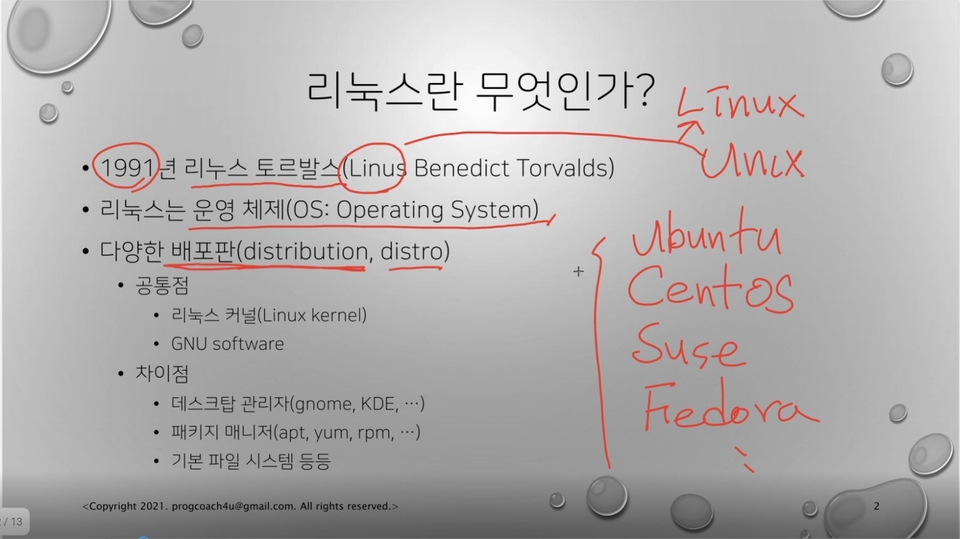
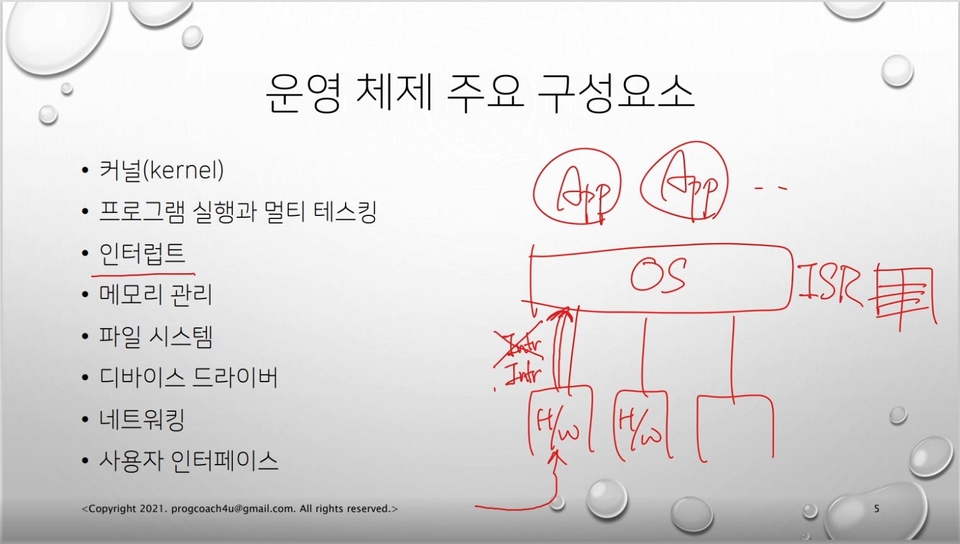
The theory study is basically explained using a PPT presentation, as shown in the image below. The PPT file is available for download only to those attending the course. If necessary, a tablet pen is used to illustrate the concepts.
Hands-on learning
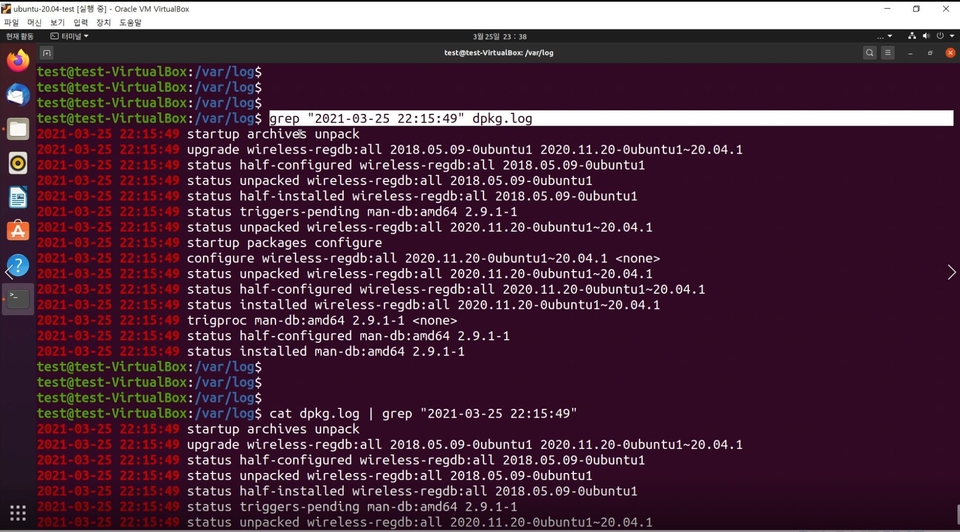
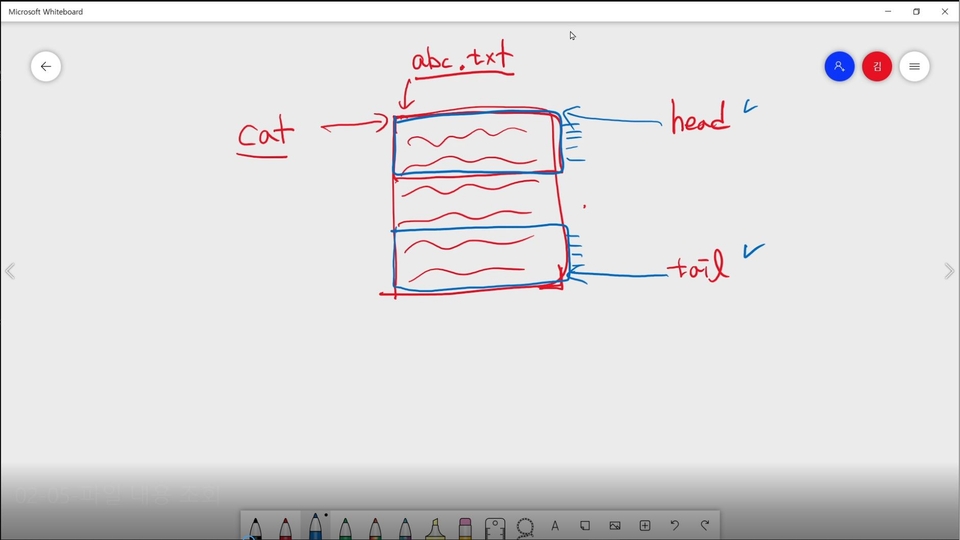
Hands-on learning begins with a terminal in a Linux virtual machine and involves executing various commands. When necessary, a tablet pen is used to illustrate the concepts.
The composition of theory and practice is slightly different for each section.
In the main concept section, we first conduct a theory class, and then conduct a practical training session later.
Instructions on how to use command line tools are provided only in practical classes.
The Redirection and Pipeline sections provide explanations and hands-on practice for each usage.
Introduction by section
Section 0. What is Linux?
Linux is an operating system. For non-specialists and Linux beginners, this course begins by explaining what an operating system is. It also covers the various Linux distributions that collectively call Linux. It also covers the package management system, which is essential for using Linux. Since many people are expected to install Linux as a virtual machine, we've prepared a course that first introduces the concept of virtualization and then covers installing Linux on a virtual machine.
Section 1. Minimal Command Line Usage
Before diving into the fundamental concepts, we'll cover the most basic command line usage. We'll begin with an introduction to the Linux terminal, then move on to an explanation of basic commands, and then dive into hands-on practice.
Section 2. Files
Linux processes many resources as files. Therefore, understanding Linux files is crucial. This course compares and analyzes the Linux directory structure with that of Windows, providing an easy-to-understand explanation. It also explains file types. Hard links and soft links, a common topic in various exams, are also covered in detail. Absolute and relative paths are also explained.
Section 3.Users and Groups
Linux is a multi-user system. Consequently, each file has its own ownership, and each file has its own permissions based on its ownership. To help you understand this, I'll begin by explaining the concepts of users and groups. I'll also explain file ownership and permissions, and provide practical exercises to help you understand them accurately.
Section 4.Processes and Signals
For a computer to function properly, programs must run properly. This course introduces the concept of processes, which are running programs. It also covers process scheduling and process states, making them accessible even to non-experts. It also covers the process hierarchy and termination status. It also explains standard streams to facilitate understanding of redirection and pipelines, which will follow. Furthermore, you'll learn about zombie processes, orphan processes, and daemon processes, which frequently appear on various exams. You'll also learn about signals and how to send them to processes from the shell.
Section 5.Redirection and Pipelines
Linux command-line tools are each highly functional. However, in most cases, we can't accomplish our desired task with just one tool. We can achieve our goal through a series of processing steps using multiple command-line tools. Redirection and pipelines are essential techniques for this. We'll explain and practice redirection methods in the Linux shell, one by one. We'll also explain and practice using pipelines.
Section 6. Lecture Materials
You can download the PPT lecture materials used in the theory lecture.
Expected Questions Q&A.
Q. I don't have a software-related major... Can I learn Linux?
Yes, of course. We've structured the lectures to be as accessible as possible for non-specialists. We've introduced the necessary background knowledge for using Linux, including the role of the operating system, Linux distributions, virtualization technology, and virtual machines. We've also tried to explain core Linux concepts like files, users and groups, processes, and signals in an accessible manner. Furthermore, we've included practical lectures so that students can put what they've learned theoretically to the test in a real-world Linux environment.
As you know, the most important thing in studying is understanding the concepts.
Q. I'm neither a developer nor an engineer. Should I learn Linux?
Just by reading this, you're probably already interested in learning Linux, right? 😊😊 Linux seems to be used quite widely these days. Gone are the days when only software majors used Linux. And it's not just developers or engineers who use Linux. Linux is increasingly being used as the foundation for new computing environments like cloud computing, Docker containers, and Kubernetes. Even if you're not a developer or engineer , "you who know Linux" will be an attractive person . Basic knowledge makes communication easier :D
Q. Will I be able to master Linux just by taking this course?
No, that's not true. This course is designed to help beginners understand the basics of Linux . Whatever you do with Linux, the concepts covered in this course will serve as a foundation. Build a solid foundation with this course and start building your dream project!
Q. Are there any essential items required to attend the lecture?
You'll need a Linux machine to practice on. You can use a Linux machine through a cloud service like AWS (Amazon Web Services) or Azure, or you can install Linux as a virtual machine on your PC.
If you're looking to prepare for Linux on a virtual machine, I've included a virtual machine installation lesson in the first section of this course. I've set it as a preview, so please take a look and try installing Linux on a virtual machine before registering for the course. I recommend taking the course after successfully installing Linux. :)
Runit (aka ProgCoach4U) Interested in other lectures?
Runit (aka ProgCoach4U)
I've been working as a Linux system developer since 2004 :D
Other details about my resume/career are confidential (I promised the company 😭😭)
I am Run-it, the author of Introduction to Linux with Ubuntu. 😎
I have been working as a developer in the Linux environment for over 20 years. I have worked on developing the Linux kernel network stack, device drivers, and system software, and I am currently developing managed Kubernetes services at a cloud service provider.
For inquiries other than those regarding the course, please contact progcoach4u@gmail.com ;)
Introducing Introduction to Linux with Ubuntu. 🔍 Kyobo Book Centre: http://gilbut.co/c/24086125JZ 🔍 YES24: http://gilbut.co/c/24082652Jr 🔍 Aladin: http://gilbut.co/c/24084469DI
Hello, Yeonroje. I am glad that my course was helpful to you! I hope you learn more. Congratulations on completing the course, and thank you for leaving a review!
I recommend it.
It is the best introductory course for Linux. It is recommended for those who do not know Linux well and those who want to review the concepts.














![Docker and Modern Server Technologies for Full-Stack Development (Linux, nginx, AWS, HTTPS, Deployment) [Full-Stack Part 3]Course Thumbnail](https://cdn.inflearn.com/public/courses/326771/cover/bc862b4d-abe6-4d80-a826-3a5324a9f998/326771-eng.png?w=420)
![Structure and Principles of the Linux Kernel: Interrupt Bottom Halves [Author's Lecture Part 1-6]Course Thumbnail](https://cdn.inflearn.com/public/courses/333195/cover/3b8c8cd2-44b0-43b7-a441-b950ba367717/333195.png?w=420)
![Structure and Principles of the Linux Kernel: Interrupts [Author's Lecture Part 1-5]Course Thumbnail](https://cdn.inflearn.com/public/courses/333194/cover/79593ea5-0a6d-453a-8ead-a54103462943/333194.png?w=420)