
강의

멘토링

커뮤니티

NEW
Programming

/

Desktop Application

WPF Bible: Understanding WPF through Concepts, Philosophy, and Design

No more WPF courses where you just copy code without knowing why! A WPF philosophy and bible course that covers everything from design intent to core concepts.

15 learners are taking this course

Level Basic

Course period Unlimited

  • erickwon
xaml
xaml
wpf
wpf
mvvm
mvvm
개념정리
개념정리
3시간 만에 완강할 수 있는 강의 ⏰
C#
C#
.NET
.NET
xaml
xaml
wpf
wpf
mvvm
mvvm
개념정리
개념정리
3시간 만에 완강할 수 있는 강의 ⏰
C#
C#
.NET
.NET

What you will gain after the course

  • You will gain a precise understanding of WPF's core concepts, including its architecture and philosophy.

  • You will gain an understanding of the MVVM Design Pattern.

  • You will gain an understanding of Command, Data-binding, and advanced WPF techniques.


WPF, why does it work this way?
Rote memorization is all you repeat

Moving beyond the limitations of blindly copying code that every WPF developer faces,

You become a true expert by deeply understanding the design intent and philosophy..


Have you ever felt lost because WPF documentation and books feel fragmented, and up-to-date information is so hard to find?

Think back to those moments when everything should have worked exactly as you built it, but unexpected results left you feeling bewildered and frustrated, unable to even pinpoint the cause.

Even after taking other courses,
are you still struggling to understand the core of WPF, such as templates, dependency properties, and custom controls?

This course helps you understand WPF as a systematic framework, rather than just a list of technologies.
You will clearly organize complex core WPF concepts and gain the ability to think and solve problems on your own..


From the basics of WPF XAML
to in-depth analysis of templates and dependency properties.


By the end of this course, you will


You will gain a clear understanding of the operating principles of WPF.

  • Beyond simply copying code, you will gain a deep understanding of how XAML elements are rendered and how they interact. By building a solid foundation in WPF's design philosophy and core concepts, you will gain the confidence to tackle new features and complex problems you may encounter in the future.

Establish the standards to independently design and make decisions for WPF applications.

  • Learn how to effectively utilize various WPF controls, layouts, resources, and styles, and develop the ability to design UI/UX optimized for your own projects. You will grow into a developer who writes code with clear intent, no longer hesitating when faced with WPF code that once seemed vague.

Develop the ability to explain and resolve ambiguous WPF behaviors on your own.

  • You will gain a precise understanding of how advanced WPF concepts, such as Dependency Property, Routed Event, Data Binding, and Converter, actually work. This enables you to analyze and resolve unexpected behaviors or issues on your own without panic, significantly improving your code maintenance capabilities.

You will come to understand WPF as a framework, rather than a "subject for memorization."

  • You will systematically learn design patterns like MVVM and master how to leverage WPF's structural advantages. This will empower you to manage code more cleanly and efficiently, restoring your confidence in WPF—once perceived merely as a legacy technology—so you can actively apply it in professional projects.


✔️

Why this course is the new standard for learning WPF

Mastering WPF Core Principles
Understanding Philosophy and Design

We cover WPF's design intent and core concepts in depth, from its philosophy to its structure. Rather than just following along with code, you will understand the fundamental principles of why WPF works the way it does, empowering you to make your own decisions and solve problems independently.

Concept-focused WPF Design and Implementation

It covers advanced topics essential for WPF application design and implementation, such as MVVM architecture, data binding, Dependency Property, and Routed Event. You can develop practical skills that can be applied immediately to real-world projects.

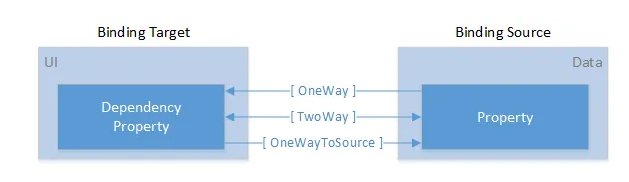
Data Binding

Advanced WPF Techniques Practice

Learn how to leverage powerful WPF features such as Control Templates, Resources, Styles, Converters, and Triggers. By implementing what you've learned through the provided hands-on examples, you will come to understand WPF as a 'framework' rather than just a 'subject to memorize.'

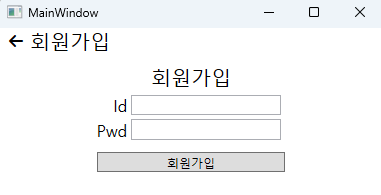
Page navigation created using custom controls


📚

A philosophy-based design curriculum
that gets to the core of WPF

User Control

Section 1

WPF Fundamentals: Exploring XAML and Basic Elements

This section builds a solid foundation in WPF. Starting with the basic syntax of XAML, you will learn how to apply controls, shapes, layouts, resources, and styles, and gain a deep understanding of UserControl and the Control hierarchy. Additionally, it clarifies the concepts of logical and visual trees to help you structurally understand WPF.


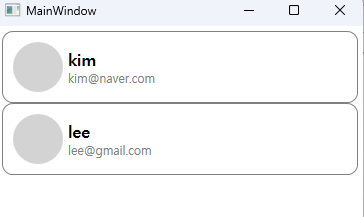
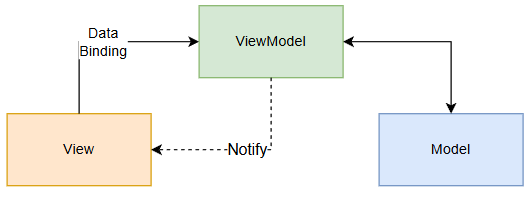
MVVM

Section 2

Advanced WPF: Data Binding, Dependency Properties, and MVVM Pattern

This course covers core advanced techniques for WPF application development. You will study data binding, dependency properties, and routed events in depth, and learn how to dynamically control the UI using converters and triggers. Finally, you will learn how to build efficient architectures through the MVVM design pattern and the MVVM Toolkit.


Section 3

Additional Resources and Advanced Learning

This appendix section supplements the core WPF concepts covered in this course and provides additional materials for in-depth learning. It will help you solidify what you've learned and improve your ability to apply it in practice.

We can solve the concerns
of people like this!

📌

WPF Beginner Developer

Those who are new to WPF and feel overwhelmed about where to begin, from XAML syntax and basic control usage

📌

WPF developers with 1-3 years of professional experience

Those who are developing applications with WPF but feel a sense of frustration while struggling with applying templates,
resources, and styles.

📌

Developers who want a deep understanding of the WPF framework

Those who want to clearly understand core concepts such as WPF's operating principles, XAML's structural features, and dependency properties,
but feel that books or materials alone are not enough.

Things to note before taking the course


Practice Environment

  • Operating System: Windows 10 or higher

  • Development Tools: Visual Studio 2022 (Community version or higher)

Prerequisites and Important Notes

  • Understanding basic C# syntax is essential.

  • Experience with .NET Framework or .NET Core is recommended.


Recommended for
these people

Who is this course right for?

  • A developer who uses WPF but cannot explain why it works the way it does.

  • Those who have taken several WPF courses but still feel like the concepts haven't clicked.

  • Working developers losing confidence, feeling that WPF is merely 'legacy'.

Need to know before starting?

  • C#

  • .NET

  • Visual Studio 2022 (Community version or higher)

Hello
This is

311

Learners

14

Reviews

5

Answers

4.6

Rating

3

Courses

2017년 부터 Xamarin, Wpf 개발을 시작으로한 C# 개발자입니다.


주로 Xamarin, MAUI, ASP.NET CORE, 유니티를 이용한

학원 관리 솔루션, 회원 운동 관리 앱, 단순 방치형 게임, 음성 채팅 앱 개발등에 참여 하였습니다.


현재는 제가 주력으로 하는 C# .NET을 알려주기 위해 지식공유자가 되었습니다.

Curriculum

All

26 lectures ∙ (3hr 3min)

Course Materials:

Lecture resources
Published: 
Last updated: 

Reviews

Not enough reviews.
Please write a valuable review that helps everyone!

Limited time deal ends in 3 days

$33,000.00

50%

$51.70

erickwon's other courses

Check out other courses by the instructor!

Similar courses

Explore other courses in the same field!