Vue.js Intermediate Course - Learn Vue.js, ES6, Vuex by Building a Web App
Vue.js Intermediate Course - A Vue.js practical course that helps 'anyone' 'easily' create 'excellent' web applications. Based on a fundamental understanding of Vue.js, you will learn practical, code-focused knowledge by building a Todo app.
for (let i=0; i<999; i++) {
console.log('Thank you, I really like the lecture')
};
5.0
지능정보화연구실
100% enrolled
It was a time to see how it differs from the existing js and jquery methods while implementing the todo app with vue, and it was good that it explained well how the code was simplified step by step.
However, I was a little disappointed that the implemented todo app seemed to be made with code that was easy for beginners to read, so I changed the function and the way data was saved and implemented it. I saved it in local storage so that I could manage the todo list with one array. I thought that the key value should not be duplicated, so I increased the count by checking for duplicates. Separately added functions include filtering, count, menu bar, and theme change.
The added functions were referenced from the example on the official website.
https://vuejs.org/v2/examples/todomvc.html
5.0
이승환
100% enrolled
I finished the beginner course and the intermediate course, and I am satisfied with the level of understanding and learning materials. I will listen to the next one. Haha
What you will gain after the course
Web Development
Javascript
Vue.js
You can learn about the latest CLI tool features of Vue
You can learn how to design component-based web applications
Learn HTML, CSS, JS and Vue.js basics and easily develop web apps with Vue.js! 💁♂️
Build a foundation in Vue.js and grow into an intermediate to advanced level developer ✨
This course is divided into 3 major parts:
To-do App implemented with Vue.js
ES6 for Clean Vue.js Code
Vuex for implementing complex applications
This course is recommended for those who have just developed an interest in Vue.js or web development. For those who know about components and instances but feel frustrated when trying to actually build an app, we help you learn how to create applications. For those who need to read Vue code written in ES6, we'll show you an easy and quick way to learn ES6.
For those who want to efficiently manage components as their application grows, we introduce an easy and simple way to learn Vuex. The overall lecture format is structured as a code-centered learning course.
Build a To-do app using Vue basics to learn component-based design methods and structuring approaches, then learn ES6 concepts and apply them to your application code to improve it. This is a hands-on course where you learn the key technical elements of Vuex and directly apply what you've learned to code by refactoring the Todo app.
Anyone interested in frontend development can learn this 🏃♀️
Developers who want to use Vue.js immediately in practice
Designers who want to do frontend developmentphát triển frontend
Publishers who want to transition to frontend developerslàm lập trình viên frontend
📢 Please make sure to check the prerequisites!
You must know the basics of HTML, CSS, JS, and Vue.js to learn efficiently. để có thể học hiệu quả.
Preview of What You'll Learn 📘
In this Vue.js intermediate course, you'll learn the component-based project structuring methods and component design methods needed when developing actual services, and explore the key features of ES6 that make writing Vue.js code easier. You'll also study the state management library Vuex in depth, which is inevitably used in practical work.
In the first half, you'll get a feel for Vue.js screen development by designing and implementing applications right away without separate theoretical explanations.
After that, we examine the issues in the created application and improve the application structure through code refactoring.
The middle section proceeds in a refactoring format with theory explanation -> practice with prepared examples -> application to the application so you can grasp the concepts of ES6 and Vuex easily and quickly.
It was a time to see how it differs from the existing js and jquery methods while implementing the todo app with vue, and it was good that it explained well how the code was simplified step by step.
However, I was a little disappointed that the implemented todo app seemed to be made with code that was easy for beginners to read, so I changed the function and the way data was saved and implemented it. I saved it in local storage so that I could manage the todo list with one array. I thought that the key value should not be duplicated, so I increased the count by checking for duplicates. Separately added functions include filtering, count, menu bar, and theme change.
The added functions were referenced from the example on the official website.
https://vuejs.org/v2/examples/todomvc.html
I finished the beginner course and the intermediate course, and I am satisfied with the level of understanding and learning materials. I will listen to the next one. Haha
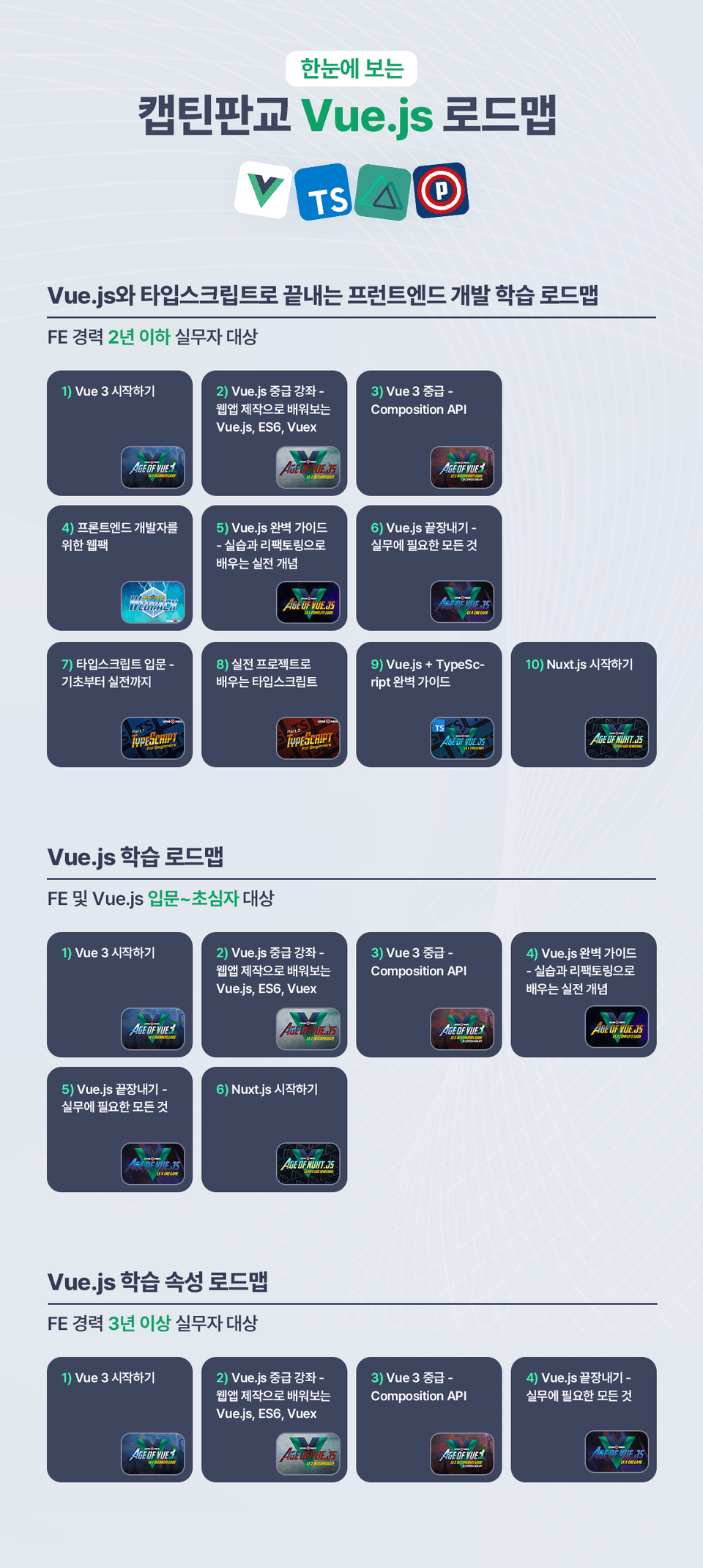
I signed up for all the lectures that you gave me the entire roadmap for before I even finished listening to the intermediate ones. Thank you for teaching me so well! I will diligently follow the remaining lectures!!!^ㅇ^
From the blog to this lecture, it was really helpful ㅎㅎ
But there are some parts that I regret as a beginner
First of all, it seems like the last lecture update was a while ago.
The last update date was February 2019, but it's been almost 2 years now ㅜㅜ Maybe that's why, although there is guidance in the middle of the lecture, there are sometimes parts that are different from the lecture, such as the Vue project start command, the basic file structure, etc., so it's confusing as a beginner.
And should I say NG? The part where the KakaoTalk alarm from the Infleun representative appears on the screen, ㅋㅋㅋ, the part where the words are tangled, the part where you create a file and then delete it thinking you don't need it, etc. If you cut and edit it, it would be better for concentration.















![A Solid Front-End Bootcamp for Full-Stack Developers (HTML, CSS, Vanilla JavaScript + ES6) [Full-Stack Part 2]Course Thumbnail](https://cdn.inflearn.com/public/course-326306-cover/4ea213de-f786-4af1-a9d0-b8932263885a?w=420)

![[Code Camp] Start with Pre-CampCourse Thumbnail](https://cdn.inflearn.com/public/courses/329913/cover/eee923cc-911b-4c2d-a445-9fddee8e5992/thumbnail-precamp.png?w=420)


![[Code Factory] [Introduction] Complete Code Factory's Javascript full course in just 9 hoursCourse Thumbnail](https://cdn.inflearn.com/public/courses/330969/cover/410fe1c7-4457-42c9-9710-296e402089db/Javascript Full Course.png?w=420)