Learning JavaScript by Focusing on the Essentials
sucoding

Javascript syntax that frontend beginners must learn! From basic to advanced, let's delve into the JavaScript language from A to Z!

Beginner
JavaScript
A roadmap collecting Sucoding's lectures has been released!
(📌 Click the image to go to the roadmap page)
A 30% discount is applied to the entire roadmap,
allowing you to take the courses at a much lower price than purchasing them individually.
Roadmap Link
➡ https://www.inflearn.com/roadmaps/9957 (HTML + CSS + JS + TS + React + Vue)
➡ https://www.inflearn.com/roadmaps/10015 (JS + TS + React)

Learn the necessary environment setup before starting your React journey.
We will look at how to install VSCode for each OS
and prepare for learning by installing Prettier and extensions.
In this chapter, we will cover how to start a React application using modern methods. You will configure a Vite-based development environment, which replaces Create React App (CRA), and learn the essential settings required for React development.
Comparison of CRA's limitations and Vite's advantages
Understanding the differences between Webpack and Vite and the trends in the ecosystem
Fast and intuitive React project setup using Vite
Improving code productivity through snippets and user snippets
Cleaning up the initial project structure and understanding the npm run dev execution flow
Additionally, it introduces the concept and characteristics of JSX syntax, which is the most important part of React. By understanding how JSX combines HTML and JavaScript and its specific syntactic features, you will build a foundation for learning components later on.
In React, a component is the smallest unit of a UI and a core concept. In this chapter, you will learn step-by-step what a component is, how it works, and how it is structured, along with actual code.
What is a component? And why is it important?
Requirements and composition methods for writing functional components
Removing unnecessary DOM using React.Fragment
How to create new components and design folder structures
Understanding the concepts of the root component and component tree structure
Additionally, through hands-on practice, you will develop a sense for component-based design by creating components yourself and placing them in appropriate locations.
Through this process, your perspective on components will change, and you will establish a foundation to naturally understand even complex React structures later on.
Now, we will dive into Props, one of the core concepts of React. In this chapter, you will learn how to pass and utilize data between components through various examples and hands-on exercises.
Understanding component relationships in React: Ancestor-Parent-Child structure
How to output primitive and reference type data within JSX
The basic principle of passing values to tag attributes
Various methods and patterns for passing data through props
Destructuring assignment for prop separation and improved readability
How to easily infer and clearly define props types based on TypeScript
Understanding how to pass props using the spread operator (...)
Expanding component reusability using the special prop called children
Comparing the differences in roles between props and children
Through this chapter, you will naturally understand the flow of data between React components and develop the ability to design props while considering both type safety and readability.
Event handling in React applications is the core of implementing user interaction. In this chapter, you will learn how to handle events in React, from button clicks to event propagation, from a systematic and practical perspective.
Event binding methods using JSX syntax
Event attributes and writing patterns for event handler functions
Various ways to pass parameters to handlers and recommended approaches
The flow of reading props inside a handler and practical examples
Structure of passing handlers as props from a parent component
Structure and usage of the event object (SyntheticEvent)
Differences and uses of target and currentTarget
Event propagation concepts: Understanding bubbling and capturing
How to prevent the default behavior of an event (e.preventDefault())
Finally, by creating a button component yourself and practicing handling various events, you will naturally internalize event handling patterns.
React's state management is a core feature that allows components to react and change based on user interactions. This chapter covers a wide range of state management topics, from concepts and usage to practical applications, focusing on useState and useReducer.
Why state is necessary and the basic concept of state values
From the basic usage of the useState hook to its practical application
Object and array state handling precautions and re-rendering behavior
setState update methods and functional updates
The concept of state independence and lifting state up
Separation of state management responsibility through encapsulation
Gradually strengthening state management skills by building a counter app from scratch
useReducer for structuring complex state logic
Transitioning to the reducer pattern and performing practical missions
By the end of this chapter, you will have grown into a React developer capable of reliably managing everything from simple state changes to complex data flows.
Actual user interfaces (UIs) are structured so that screens change conditionally depending on the situation and render multiple data points repeatedly. This chapter focuses on how to implement such UIs in React.
Various conditional expression methods such as if, switch, ternary operator (? :), and logical operators (&&)
Comparison of when to use each conditional method and their pros and cons
Practical exercises based on real-world scenarios such as traffic lights, login status, and message output
Providing practical tips such as nested conditions, readability, and component separation strategies
Iterative output of components using map() based on array data
Understanding the importance and scope of the key attribute in list rendering
Combining data selection using filter() and similar methods with conditional rendering
Mastering repetitive patterns through practical tasks such as rendering recipe lists
By the end of this chapter, you will be able to naturally implement complex conditions and repetitions in React, and you will have the skills to design dynamic UIs with excellent readability.
In this chapter, you will learn a wide range of various techniques for styling components in React.
From simple inline styles to CSS-in-JS, Tailwind, and image styling, you will master all the styling techniques frequently encountered in real-world frontend development through hands-on practice.
How to use inline styles and global CSS
Component-level style encapsulation through CSS Modules
Dynamic class management using the classnames utility
🧩 Mission: Experience and compare various styling methods by implementing a button group UI
styled-components syntax and basic usage methods
Dynamic styling using props
Advanced features such as keyframes and as, and how to use helper functions and mixins
Global style management and a collection of tips
🧩 Mission: Create a traffic light UI with styled-components
Tailwind's Core Philosophy and Directive System
How to apply conditional classes and practical application strategies
🧩 Mission: Complete the Calculator UI with Tailwind
🧩 Bonus Mission: Challenge yourself with advanced UI by adding practical Tailwind skills!
Considerations for image rendering and CSS adjustment methods
🧩 Mission: Implement an animated UI where the lamp lights up
Including a summary of how to apply Google Web Fonts.
Through this chapter, you will develop the eye to judge which styling tools are suitable for your project and gain the practical sense to implement beautiful and maintainable UIs.
This chapter is a practice-oriented project where you will directly implement a fully functional calculator application based on what you have learned so far. You will experience everything firsthand, from component design and state management to event handling, type separation, and UI composition.
An overview of the calculator's operating principles and structure before starting the project
UI design and component structuring
Organizing component roles and responsibilities through the refactoring process
🧩 Clearly separate state and operator types using TypeScript
Directly implementing key features such as numbers, operators, periods, and clear.
Learning the bug handling and debugging workflow frequently encountered in practice
Visualize the flow of state changes through how to install and use React Developer Tools
Improvement in real-time state tracking and component structure analysis skills
By the end of this chapter, you will go beyond simple functional implementation to experience component separation, state design, debugging, and type management all at once, and you will gain confidence in React through the “joy of seeing a feature you built yourself actually work.”
In this chapter, we have included practical considerations on how to handle forms in React. Beyond simple input processing, it covers everything from React 19's new features (ref forwarding) and reusing form logic through custom hooks to validation.
Hands-on practice with various controlled components including input, checkbox, radio, and textarea
Understanding the flow of state-connected input processing and re-rendering
🧩 Mission: Implementing a Form UI combining various controlled inputs
Input value access through ref and DOM-based control methods
Comparison of pros and cons between controlled/uncontrolled approaches and integration strategies
🧩 Mission: Batch processing multiple inputs using the uncontrolled component approach
ref as a prop: the new pattern (React 19)
Separating complex input processing into custom hooks and increasing reusability
Advanced Custom Hooks: Abstracting internal state and integrating custom validation
Basic validation implementation patterns for required values, length, format, etc.
Writing custom validation functions and integrating hooks
🧩 Mission: Completing the Login Form
→ Comprehensive form practice covering input control + validation + state handling
After completing this chapter, you will move beyond simple input processing and gain the
ability to construct complex form flows and manage them with a clean, maintainable structure.
This is a decisive opportunity to gain practical experience in input control and master the latest React techniques at a professional level.
In this chapter, based on the core React concepts learned so far, we will implement a functional Todo application.
This is a chapter where you can experience the practical React development workflow from start to finish, including component separation, state management, event handling, list rendering, and editing/deletion.
Setting up the basic structure, starting from project setup
Implementing the to-do registration feature via an input form
Displaying the to-do list with list rendering
Adding task completion marking via checkboxes and deletion functionality
🧩 Master state updates and UI control logic through implementing the todo edit function
Beyond simple API understanding, designing the separation of roles and data flow between multiple components
Implement the structure and flow of a state-driven React app from start to finish on your own.
The experience of personally building a small-scale CRUD app as a mission-like, complete project
By the end of this chapter, you will have your first confident project experience in designing and completing an app by combining various features of React.
In this chapter, we go beyond React components simply "rendering" to cover both side effect management, such as asynchronous tasks, browser events, and external API handling, and optimization strategies to reduce unnecessary rendering.
useEffect, useId, etc.)Improving accessibility and creating unique identifiers using the useId hook
🧩 Apply useId to a Todo app to gain practical experience with accessibility
Theory + practice on the timing of useEffect's execution, the principles of the dependency array, etc.
🧩 Apply useEffect to the Todo app to implement external data handling and state change reaction processing
React.memo, useCallback, useMemo)Preventing unnecessary re-renders through React.memo
Analysis of when memoization is broken and the reasons why
The difference between useCallback and useMemo and when to apply them
🧩 Experience optimization by applying React.memo and useCallback to a To-do list app
lazy, suspense, error-boundary)Basic concepts of lazy() and Suspense for lazy loading components
UI configuration during loading states and strategies for improving user experience
ErrorBoundary handling methods to protect the app from crashing when errors occur
By the end of this chapter, you will be able to personally implement designs that consider both performance and maintenance even within complex component structures, and you will develop the React app operational sense required for real-world services.
Want to handle deep data passing between components cleanly? Context API is the answer.
In this chapter, you will learn the core concepts and usage of the Context API as the foundation of global state management, and develop structured app development skills by applying them to real-world projects.
The necessity of global state to solve the props drilling problem
Basic global state design using createContext and useContext
Unnecessary rendering issues and structural improvement methods (memo, context separation)
Efficiently manage complex global states by combining with reducer
✅ Includes practice on patterns for using two or more Contexts together
Analyzing initial UserProfile code → Separating state into context objects
🧩 Manage user preferences such as font size, theme, notification settings, and language settings (i18n.ts) as global state
Utilize useLayoutEffect together to control rendering order and layout responsiveness
✅ Learning highly scalable global state structures through Context API + custom hook design
Introduce global state to the existing Todo app → Improve the state-sharing structure between components
Strengthen practical design skills by configuring multiple components to utilize the same state
Through this chapter, you will move beyond simple component-level state and be able to actually implement
global state flows and management strategies that look at the entire app.
If you have grasped the concept of global state with the Context API, now you will experience a more scalable and maintainable global state management structure with Redux Toolkit (RTK).
This chapter focuses on hands-on learning of the core features of Redux Toolkit to help you systematically manage complex states.
The background of Redux Toolkit's emergence and its differences from traditional Redux
Store creation and structuring slices through createSlice
Understanding the flow of state changes, action dispatching, and re-rendering.
✅ State debugging through Redux DevTools integration
Expanding to parameter passing and asynchronous processing logic using thunk
✅ Advanced structure practice for managing slices by separating and merging them
Reconstructing UserProfile state based on Redux
🧩 Structure font size, notification settings, and theme status into slice units
Experience a comparison of stronger structural control and maintainability compared to Context API
Transitioning the existing todo management app to Redux Toolkit.
✅ Implement Todo state and add/delete/edit logic in slice units
Strengthening the component-store separation strategy and code management experience in practice
Upon completing this chapter, you will move beyond simple state management and reach a level where you can
personally implement "structured global state management on a slice-by-slice basis."
This is a practical chapter highly recommended for those who have been curious about how Redux Toolkit is used in real-world professional environments.
Want to create global state quickly without complex configurations?
In this chapter, you will learn about Zustand, a lightweight and intuitive global state management library.
With a structure that is lighter than Redux and more powerful than Context, it is a state management alternative that is gaining increasing attention in the industry.
Concepts and philosophy of Zustand: “Global store with minimal boilerplate”
Basic usage and state definition methods
A structure that allows passing parameters to states and easily creating derived states
✅ persist feature for persistence storage such as local storage
✅ subscribeWithSelector Re-rendering optimization using
✅ Intuitive immutability management through immer
✅ devtools integration for easy debugging
Re-implementing the UserProfile state based on Zustand
Experience the differences in code volume, intuitiveness, and scalability compared to Redux/Context
Transition the existing Todo app to a Zustand-based implementation
✅ Directly implementing various ways for components to use global state
Provides the experience of implementing the flow of state change → UI rendering → save/restore with minimal code.
By the end of this chapter, as an expert who has experienced all three state management tools (Context API, Redux Toolkit, and Zustand), you will gain the
practical standards and intuition to judge and select the appropriate global state tool for any given situation.
Now it's time to turn your React app into a "living app."
In this chapter, you will learn how to communicate with a real server and directly connect it to the PostBrowser mini-project to complete the practical communication structure of a React app.
Basic concepts and structure of HTTP communication
json-server configuration for a local API server → 🛠 Building a practice-based API environment
API test automation using Thunder Client
📝 db.json file configuration notes provided to complete the practice-based setup
Learn the structure of basic requests (GET, POST, PUT, DELETE)
✅ Reflecting real-world elements such as loading states, error handling, and request cancellation (AbortController)
🧩 Understand the flow of React integration by implementing all practical CRUD operations with fetch
Summary of the entire CRUD flow, starting from the basic usage of axios
✅ Configuring a common instance via axios.create()
✅ Introduction to practical strategies such as interceptors, error handling, and response structure integration
Providing base code → Applying data integration to the React app
Sequential completion from post rendering → implementing paging → adding search functionality
✅ Experience state management, fetching flow, and UI update flow all comprehensively through hands-on practice
Upon completing this chapter, you will possess the ability to directly design and implement practical React applications that communicate with APIs, going beyond simple components.
This is the part that builds a solid foundation for expanding into TanStack Query or advanced state management later on.
In this chapter, focusing on the form and asynchronous APIs introduced in React 19,
you will learn how to optimize data communication from a user experience perspective through feature-specific hands-on practice and a TMDB real-world project.
Smooth UI state transition handling using useTransition
🧩 Experiential learning through hands-on comparison of before and after applying Transition
useActionState, form action, and useFormStatus
→ Learn new ways of form handling and Server Action flows
Implementing optimistic UI with useOptimistic
✅ Modern UX design that reflects UI changes immediately even before receiving a response from asynchronous operations
Direct Promise-based data handling and Suspense integration via use()
ErrorBoundary and Suspense combination to configure error + loading response strategies
Movie list rendering → Paging → Expanding to infinite scroll implementation
🧩 Building a high-quality movie app in practice using a combination of Suspense + use() + ErrorBoundary
✅ Experience the full cycle of server communication, including the integration of the signup flow
By the end of this chapter, you will reach a level where you can naturally integrate features that
lead the data UX of the React 19 era into real-world apps, going beyond simple fetch or axios calls.
This section is highly recommended for those who want to implement user-centered UI responsiveness and real-time app functionality.
In a React application, the router is the core responsible for page structure, data flow, and the user navigation experience.
In this chapter, we will design an SPA structure based on the latest APIs of React Router v7 and,
build a complete transition flow encompassing routing, data loading, and error handling.
Basic Installation and Router Setup
Configuring nested routes, index routes, and layout routes
✅ Learning practical path patterns such as route prefixes, dynamic/optional segments, and splats
UI-centered navigation control using NavLink and Link
Understanding React Router-based form handling with the <Form> component
Programmatic navigation handling using the navigate() function
✅ Experience the difference between traditional form submission methods and router-based approaches
loader property for designing route-level data fetching flows
Asynchronous requests occurring in loader → Loading processing → Error handling
✅ loader + suspense, loader + errorElement and other practical structure implementations
Upon completing this chapter, you will gain the
frontend design capabilities to independently design and operate the overall SPA structure, from page design to data flow and user experience of a React app.
This is the final stage of completing a React-based full-stack project that integrates everything learned so far, from component design, state management, data communication, and UX optimization to authentication and deployment.
In this chapter, you will directly implement and experience the deployment of a blog-style web application that functions like a real-world service.
MongoDB setup and backend API integration
✅ Kakao Login Implementation: From application registration to full OAuth flow configuration
✅ Implementation of custom sign-up/login: Form configuration + server integration + state management
Hands-on practice with token authentication, error handling, and debugging authentication flows
Post registration → Image attachment preset integration
✅ Complete the full CRUD flow, including edit, delete, and detail view functions.
Comment creation, deletion, and rendering logic → State synchronization and re-rendering processing
✅ Backend modifications are provided together in the lecture notes
Fetch the main post list by page
✅ Strengthen practical skills by designing the page navigation component yourself
Understanding structured paging strategies instead of infinite scroll
UI/UX improvements and addressing deficiencies tailored to user flow
✅ Practical deployment practice for both Frontend & Backend via Vercel
Based on real-world services, from domain configuration and image optimization to the final inspection
After completing this final chapter, you will go beyond simple practice and become a “developer who can independently build and operate user authentication-based web services.”
Verify your skills by integrating everything you've learned throughout the course into a single, complete service!
I'll introduce only the exercises with design applied, excluding those without!
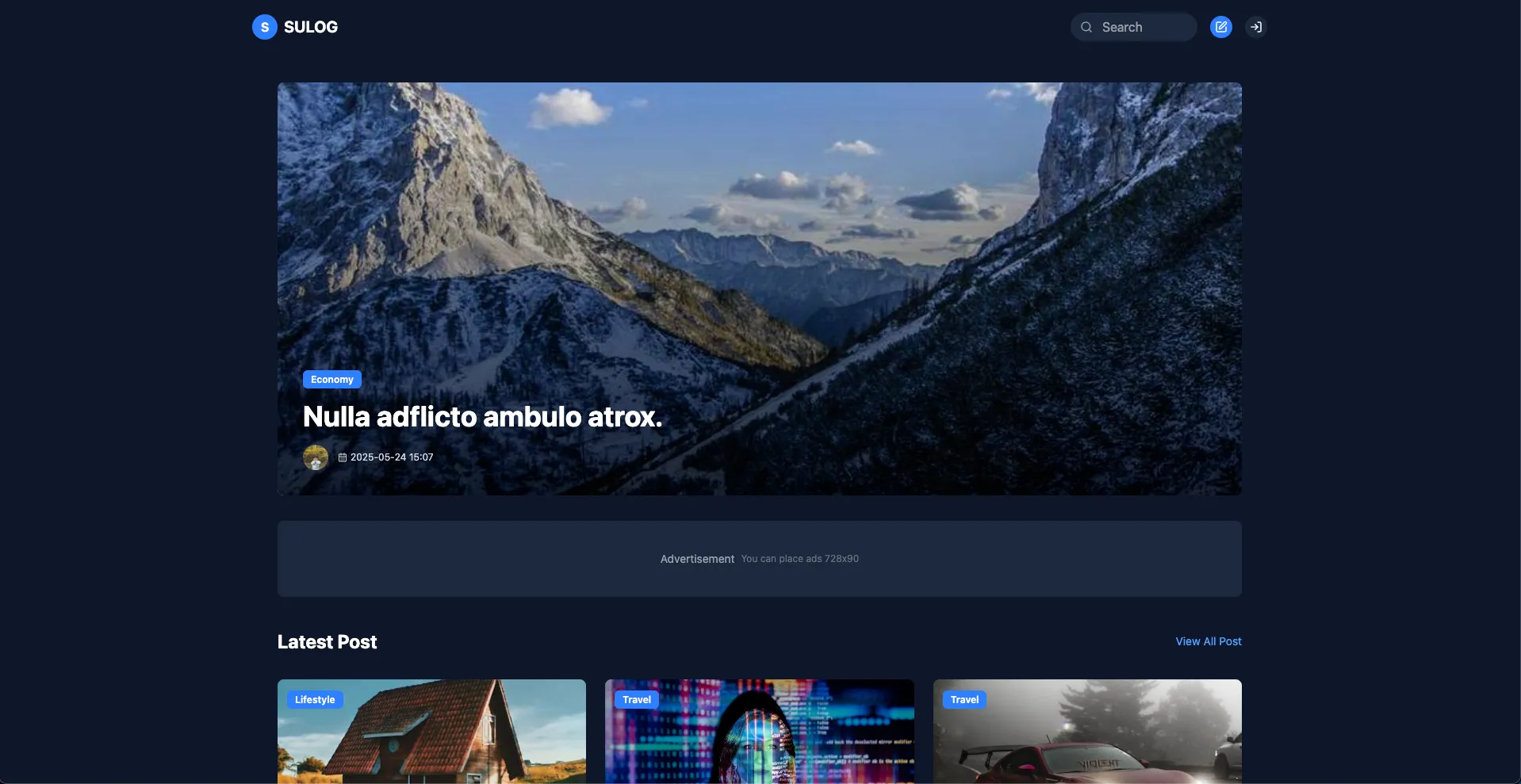
If you include examples without design applied, there are dozens +
All of these high-density examples will support your step-by-step learning
I am confident that it will help you perfectly.









css.png?w=420)

![# [Electron #1] Building a Timer App with Electron + React (With Zustand)Course Thumbnail](https://cdn.inflearn.com/public/files/courses/336817/cover/01jwx9ttbwnetdsbt5qrxgxb3x?w=420)