


iOS Clean Architecture & MVVM: Complete Mastery of RxSwift
dumveloper
It explains how to apply Clean Architecture and the MVVM pattern in practice, and covers essential technologies such as RxSwift and Concurrency.

초급
Swift, iOS, clean-architecture
Complex SwiftUI state management, Create clean and robust apps with TCA (The Composable Architecture). Learn the essentials quickly with practical project examples.
59 learners
Level Basic
Course period Unlimited

Understand TCA's core elements (State, Action, Reducer, Store) and learn how to systematically manage the complex data flow and state of SwiftUI apps.
Gain experience completing a practical project by integrating SwiftUI's latest Stack-based navigation and Apple's next-generation data framework, SwiftData, into the TCA architecture.
Learn how to safely handle asynchronous operations like an image picker in a Reducer, and modern dependency injection techniques utilizing swift-dependencies.
"My SwiftUI app, why is the code so complicated? State management is difficult? 🤯 "
For developers who are confused about data flow and state management in their growing SwiftUI projects, we have prepared a course that will completely conquer The Composable Architecture (TCA) .
This course does not simply explain the theory. It shows you step-by-step, in detail, through real-world project examples , how to cleanly and efficiently solve complex scenarios that can be encountered in real-world production environments using TCA + SwiftUI .
Junior developers developing SwiftUI apps: Anyone who is thirsty for complex state management patterns.
iOS developers interested in architecture: Anyone who wants to learn architecture that is highly maintainable and testable.
For those who are having difficulty studying TCA on their own: Those who want to bridge the gap between theory and practical application.
Anyone who wants to improve the quality of their side projects: Anyone who wants to build robust and scalable apps.
Complete understanding of TCA's core philosophy: You will understand exactly why State, Action, Reducer, and Store are necessary and how they work organically.
Solving Complex SwiftUI State Management: Learn how to manage complex UI states and data flows in a predictable and reliable manner with TCA. Learn how to cleanly organize your code with TCA's unidirectional data flow.
Modularizing components using Scope : Master how to separate large functionality into independent, reusable child components and safely connect state and actions between parents and children, maximizing the maintainability and scalability of your apps.
Ensure testability: Learn how to reduce bugs and develop stable apps by leveraging the powerful testing tools provided by TCA.
Designing a modern navigation architecture: Master both the 'Stack-based navigation' that pushes and pulls screens, and the 'Tree-based navigation' that handles sheets, popups, etc. Learn how to implement any complex screen flow clearly and efficiently by utilizing TCA's Scope , NavigationStackStore , ifLet , etc.
Designing a Scalable Architecture: Leverage the benefits of TCA in practice by reducing dependencies between components and increasing reusability.
Real-world project experience: Safely handle asynchronous tasks such as image pickers and API communication in Reducer , and learn the latest dependency injection techniques using swift-dependencies .
Beyond theoretical learning, we create ‘My Page’ and ‘Search’ functions that actually work from start to finish.
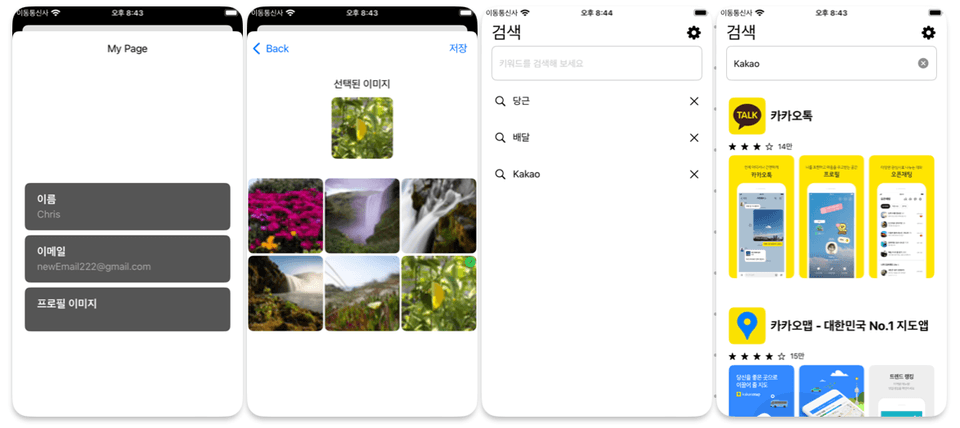
Basic UI and Data Integration: Building a list of settings using SwiftUI and SwiftData.
Stack-based navigation: Implement logic to navigate from the list to the detail page (edit name, edit email, change image).
Edit Name/Email: Use TextField binding and AlertState to edit user information and display a confirmation notification.
Change profile image: Integrate PhotosUI to select an image from the gallery, display it via LazyVGrid, and update the profile with the selected image.
Implement powerful search capabilities:
Asynchronous communication and state management: The logic to asynchronously retrieve search results based on the user's search terms is safely handled in Reducer .
Conditional UI with ifLet : An elegant way to display the results list UI only when there are search results is implemented using TCA's ifLet scope.
Tree-based navigation: Experience tree-based navigation logic that moves to the detail page of a search result item when tapped, and understand the differences from stack-based navigation.
Stop struggling with complex code! With this course, your SwiftUI app development skills will take a leap forward. Create robust and beautiful code with TCA ( swift-composable-architecture ) ! 🚀
Who is this course right for?
A developer, limited by SwiftUI state management (@State, @Binding, ObservableObject), seeks a more systematic architecture.
A developer wishing to experience TCA's theory and practice through project-based learning immediately applicable to real-world work.
A developer seeking to write scalable, maintainable, and testable code as apps grow.
Need to know before starting?
Swift Basics

469
Learners
30
Reviews
25
Answers
4.7
Rating
5
Courses
6년차 iOS 개발자 덤벨로퍼입니다
현업에서 바로 사용할수 있는 강의
초중급 레벨에게 필요한 강의를 만들겠습니다
All
36 lectures ∙ (5hr 3min)
Course Materials:
All
10 reviews
5.0
10 reviews

Reviews 4
∙
Average Rating 5.0
5
This was very helpful for project implementation :) Do you also take questions by any chance..??
Yes, of course! Please ask your questions! It's an honor to be able to help with your project!
Thank you! Even though it was my first time encountering TCA, the course was so well-made that although it took some time, I was able to understand it smoothly(?) and even apply it to actual projects. As covered in the course, single-depth screen navigation like My Page → [Email / Profile / Nickname] editing screens is well understood, and I'm implementing it well! However, in actual apps, like Instagram, there are often deeply nested screen navigation structures like: Post → User A Profile → User A's Follow List → User B Profile → User B's Follow List... and I'm having difficulties with this part. I'd like to get advice on whether I missed something from the course, or if these multi-layered(?), nested(?) navigation patterns are inherently somewhat tricky in TCA! Just in case, let me explain the method I currently implemented: I thought I could create a navigation structure for My Page and reuse it, but when I try to do that, it crashes, so now... If I assume the cases where you can navigate from My Page are [Follow/Following List, Posts] screens: For example, If Tab 1 is post-related, you eventually need to go to My Page, right? If Tab 2 is reels/shorts-related tab, you also eventually need to go to My Page from here too. But right now, I'm copying and pasting the exact same My Page screen transition cases in each tab screen 😢
Reviews 3
∙
Average Rating 5.0
Reviews 1
∙
Average Rating 5.0
Reviews 1
∙
Average Rating 5.0
Reviews 25
∙
Average Rating 4.2
Limited time deal ends in 2 days
$46.20
25%
$61.60
Check out other courses by the instructor!
Explore other courses in the same field!


![[iOS] Swift Modern Collection View & MVVM Pattern Guide강의 썸네일](https://cdn.inflearn.com/public/courses/330174/cover/6d62a451-cf7f-43cd-9679-9e2ce509136f/330174-eng.png?f=avif&w=420)

![Creating RPG Game Apps [iOS iPhone]강의 썸네일](https://cdn.inflearn.com/public/courses/324527/course_cover/90d24f33-c1fb-4d19-aec5-ec0a802e3ef1/onarcher_rpg.png?f=avif&w=420)


![[Apple Official Textbook] Swift Puzzles 1강의 썸네일](https://cdn.inflearn.com/public/courses/324061/course_cover/ebdc9143-bf06-469a-aa14-07a19a9c2831/inflearn-cover.jpg?f=avif&w=420)

![MAUI [Cross-Platform Applications & C#]강의 썸네일](https://cdn.inflearn.com/public/courses/332442/cover/89ee60dc-f139-4b63-ae28-abd8a6036cb8/332442-eng.png?f=avif&w=420)

