
inflearn logo

Smart Field Innovation Implemented with X-SCADA AI

Building a smart factory is difficult with theory alone, isn't it? I will show you how to apply it in the field using the IoT and SCADA practical know-how I've experienced firsthand.

2 learners are taking this course

Level Basic

Course period Unlimited

IoT
IoT
ISMS-P
ISMS-P
iocp
iocp
hci
hci
kicad
kicad
IoT
IoT
ISMS-P
ISMS-P
iocp
iocp
hci
hci
kicad
kicad

What you will gain after the course

  • Industrial device connectivity and data collection based on IoT sensors and the OPC UA protocol

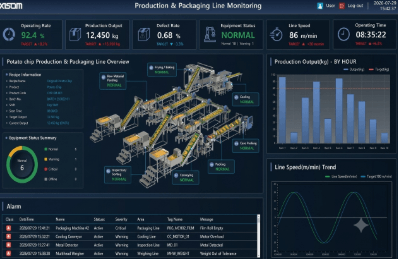
  • Real-time monitoring dashboard and HMI screen design based on the X-SCADA platform

  • Establishment of an integrated manufacturing management system featuring AI-based alarms, trend analysis, and camera integration

We have summarized the 'Key Learning Points of This Chapter' for each video so that you can immediately add them to the Inflearn course detail page (curriculum) and video description section.

01. How to Connect Devices Using the OPC UA Protocol

  • What you will learn:

    • Understanding the basic concepts of the OPC UA communication protocol

    • Setting up communication channels and binding between X-SCADA and PLC/smart factory equipment

    • Create device data tags and verify whether actual data is being received normally.

  • Recommended Summary: Learn the basic steps to perfectly integrate X-SCADA with external devices using OPC UA, the standard protocol for smart factories.

02. How to Configure Object Control

  • What you will learn:

    • Placing major objects (buttons, switches, text boxes, etc.) on the screen and defining their properties

    • Representing real-time status changes by linking Tag data with objects

    • Setting equipment control logic through control events (clicks, value inputs, etc.)

  • Recommended Summary: Learn the core techniques for applying data to objects placed on the screen and enabling students and operators to control them directly.

03. How to Apply Various Effects

  • What you will learn:

    • Applying object color changes, blinking, and hide/show effects based on specific conditions

    • Setting visual style responses for each data value range

    • Graphic production know-how for intuitive HMI screen configuration

  • Recommended Summary: Move beyond simple static screens and apply various visual effects that allow for intuitive monitoring of equipment status changes.

04. Page Control

  • What you will learn:

    • Multi-page (screen) configuration and main/sub-screen design methods

    • Implementing page transitions and navigation using buttons or event conditions

    • How to call pop-up windows and control layers

  • Recommended Summary: Learn overall screen structuring techniques to efficiently divide complex process screens and easily implement screen transitions.

05. Gauge Effects and Implementation

  • What you will learn:

    • Understanding the types of gauge components and their design elements

    • Binding real-time measurement data (temperature, pressure, flow rate, etc.) with gauges

    • Setting threshold (max/min) ranges and visualizing emergency situations

  • Recommended Summary: Create monitoring elements that allow numerical data to be understood at a glance using analog and digital gauges.

06. Animation

  • What you will learn:

    • Implementing movement, rotation, and scale adjustment animations of objects based on data changes

    • Simulation of actual process equipment movements, such as conveyor belts and motor operations

    • Setting animation scripts and timer conditions

  • Recommended Summary: Implement a realistic monitoring screen by recreating the actual movements of the factory floor on the screen.

07. Art Widget

  • What you will learn:

    • How to use the Art Widget library provided by X-SCADA

    • Advanced Graphic Elements and Custom Component Reuse

    • Know-how for configuring sophisticated and clean UI/UX monitoring screens

  • Recommended Summary: Learn tips for completing high-quality HMI designs in a short time by actively utilizing the provided graphic widgets.

08. Audio & Video

  • What you will learn:

    • Setting up audio/sound file (.wav, .mp3) playback for events and alarms

    • Integration and playback control of video/image files within the system

    • Maximizing user notifications using media elements

  • Recommended Summary: Enhance the visibility and safety of system operations by adding multimedia (voice/video) effects in addition to visual elements.

09. Alarms

  • What you will learn:

    • Setting alarm conditions (emergency stop, exceeding thresholds such as high temperature/high pressure, etc.) and severity levels

    • Configuration of real-time alarm summary window and historical alarm history

    • Mechanism for user awareness and acknowledgment (ACK) processing when an alarm occurs

  • Recommended Summary: Learn how to build an alarm system that prevents equipment accidents by immediately detecting and recording anomalies in the field.

10. Trend Charts & Views

  • What you will learn:

    • Creating Real-time and Historical Trend Charts

    • Overlapping multiple data graphs and configuring legends/axis settings

    • Querying trend data, zooming in/out, and exporting to external files such as Excel

  • Recommended Summary: Visualizes data trends over time into graphs to facilitate data analysis and process management.

11. Camera

  • What you will learn:

    • CCTV and real-time camera integration protocol settings

    • Displaying real-time field video streaming within the X-SCADA screen

    • Application for Camera Control and Monitoring Screen Integration

  • Recommended Summary: Complete a real-time remote control system by directly integrating physical site camera footage into the SCADA screen.

Recommended for
these people

Who is this course right for?

  • Field engineers and practitioners in charge of smart factory construction and digital transformation

  • Managers and facility personnel interested in the implementation and operation of IoT, SCADA, and AI-based manufacturing systems

  • Developers looking to strengthen their industrial IoT and AI solution development capabilities

  • Intermediate learners who want to enhance their practical skills in core smart factory technologies (IoT, SCADA)

Need to know before starting?

  • Understanding of basic manufacturing processes and equipment operation procedures

  • Software installation and basic operation skills in a Windows operating system environment

  • Basic knowledge of industrial automation or IoT systems

Hello
This is erickji8927

Hello, I am Sang-hoon Ji, an X-SCADA expert and knowledge sharer. While working with X-SCADA in the field, I have consistently conducted customized on-site lectures every month for the past 7 years since joining the company. In addition to internal employee training, I have been responsible for numerous external invitations and customized training sessions at the request of various companies and organizations. I understand better than anyone else where beginners struggle and get stuck in the field. I will teach you SCADA control and monitoring systems—which can feel complex and difficult—in the easiest and most practical way, incorporating my 7 years of lecturing know-how. Key Career & Experience Current) XISOM Co., Ltd. / Senior Manager Lead Instructor for X-SCADA internal regular training (conducted monthly for 7 consecutive years) Conducted customized X-SCADA training invited by external companies and organizations
More

Curriculum

All

11 lectures ∙ (1hr 45min)

Course Materials:

Lecture resources
Published: 
Last updated: 

Reviews

Not enough reviews.
Please write a valuable review that helps everyone!

Similar courses

Explore other courses in the same field!

Limited time deal

$16,500.00

50%

$26.40