Modern JavaScript Deep Dive Study
jaenam
Free
Basic / JavaScript
4.9
(40)
9,800+
This is a study video that follows the contents of the book "Modern JavaScript Deep Dive". It will be much easier if you study together!

Basic
JavaScript

Experience various perspectives and methods using Web APIs by creating representative UI elements in both React and pure JavaScript versions, and take your front-end development skills to the next level.
553 learners
Level Basic
Course period Unlimited
Reviews from Early Learners
5.0
이레
This is a fun and informative lecture. You can learn how to apply the basic concepts of React, TS, and JS to real-world scenarios. It was very beneficial because I was able to implement the same UI in many different ways and learn many good methods for each requirement. I think it's a lecture in the style of a professor who suggests realistic directions like a mentor, but also encourages thinking without telling you everything. So, when I listen to the lecture, I naturally think, "I think I would do it this way?" and I can enjoy listening while thinking, "Why did you write this part like this?" For example, in the part where the hidden attribute is written in capital letters because React forcibly type-converts it, I thought, "Since I accessed it with ref anyway, can't I just assign the attribute with the setAttribute method?" I had the opportunity to think, and I also learned a lot of practical tips, such as using closures and how to handle the type of GNB more safely and readably. Thank you for creating this great lecture. I'm learning a lot thanks to you!
5.0
보나
There were a lot of concepts I didn't know and things I wasn't familiar with, so it took a long time to study them, but it was not only that I gained confidence in creating UI elements, but it was also very good for studying React, Vanilla JavaScript, and TypeScript. And when creating UI elements, I used to get stressed because I didn't always have a clear standard for considering various situations and thinking about judgment criteria, but thinking about those things together in the lecture made me realize that thinking like that was the right thing to do, and thanks to the lecture, I think that kind of thinking process will be fun in the future. ㅎㅎ Since it was a study video, it was also very fun and informative to hear other students' opinions. I learned a lot. Thank you!
5.0
지니지니
As a lecture collector, I have taken many lectures, but this is the best lecture! First of all, the instructor is proficient in the latest TypeScript grammar and React grammar, so just by looking at it and thinking about when to use that, I feel like my skills are improving. Originally, I didn't understand it well just by looking at the book and the document, but I learned it again by thinking, "Oh, that's how to apply it like that." I think it would be better for juniors with 1-3 years of experience rather than beginners. First of all, the lecture itself can be applied directly to practice, and it even covers the advanced parts of React. I definitely recommend it to those who want to grow from juniors to mid-level developers by thinking about how to make better codes, not just simple implementations. Now, I feel confident that I can implement any UI I encounter. ㅋㅋㅋㅋ Even if I don't understand it 100%, I think it's great that I can apply it to practice by looking at the code organized by chapter again. Just by taking this lecture and having the completed UI code, I think it's worth the lecture. I hope the next part comes out soon!
Practical React Knowledge
DOM API
Ability to utilize various other Web APIs
🎉Get 25% off when you enroll via the roadmap🎉
Roadmap Link: https://inf.run/cNuxY
(Even if you are already taking only one of the two courses, a 25% discount will be applied to the remaining course.)
Create both pure JavaScript (vanilla-js) and React versions, and introduce as many different methods as possible.
Experience and compare the characteristics of various versions of components by writing them yourself.
Develop your practical skills by applying APIs that are widely used in the industry.

Frontend developers who lack confidence in development because they rely solely on libraries for UI components

Those who are not familiar with the latest HTML5 APIs and DOM APIs

Those who feel a thirst for improving their UI component development skills
With this single course, UI elements are covered! You will be able to build development knowledge on UI elements equivalent to that of a senior front-end developer.
By combining and evolving the elements covered in this course, you will gain the confidence to create any new UI elements on your own.
Accordion
Tab Menu
Tooltip
Responsive Text Box
Multi-line ellipsis
Lazy Loading
Infinite Scroll
Horizontal scroll box
Scrollspy
Snackbar
Modal
Popover
Image Slide
Carousel
Gallery
Select Box
Autocomplete
Drag-and-Drop List
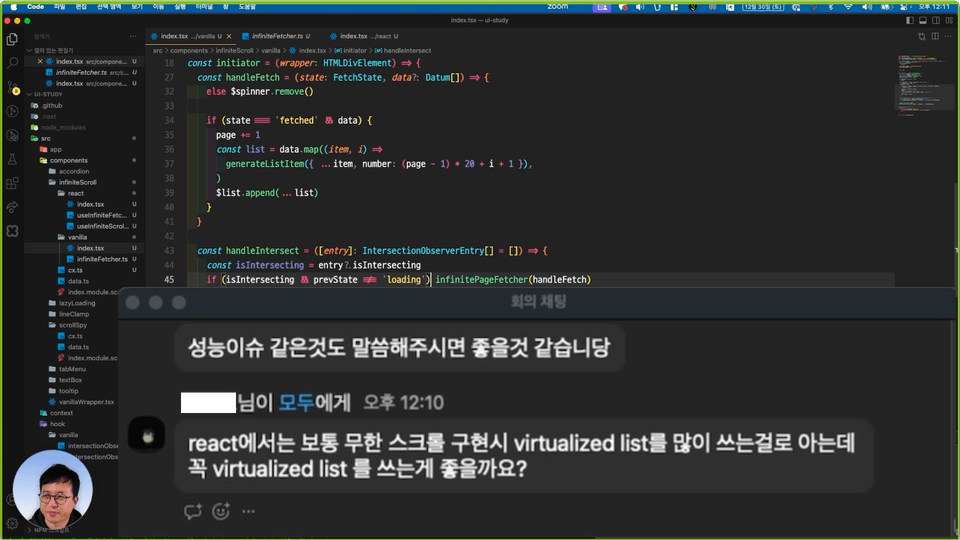
Vivid Live Coding
This course consists of unedited recordings and edits of live coding sessions conducted in an online study, offering the advantages of a vivid sense of presence and rapid feedback. I will present various perspectives that aren't confined to a fixed framework, and you will also be able to experience solutions to unexpected problems.
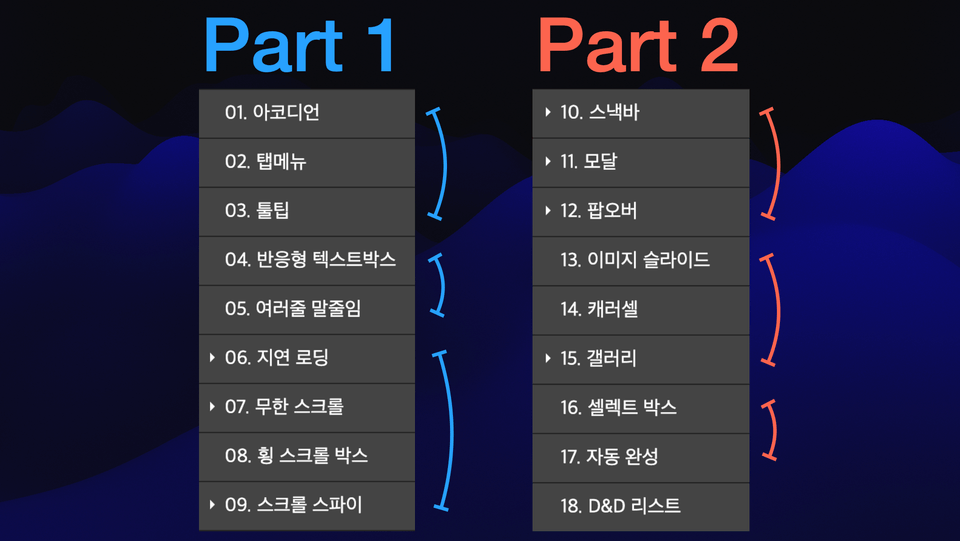
Step-by-step difficulty adjustment, introduction and application of the latest APIs
The course is structured by grouping elements with similar skill requirements and gradually increasing the difficulty level step-by-step. Additionally, the focus is on becoming familiar with various modern HTML5 and DOM APIs by introducing and applying them throughout the lessons.
It is sufficient if you have the following versions or higher installed.
Node.js 16
React 18
Next.js 13
TypeScript 4
Example code is provided in the form of a compressed file.
The course proceeds on the assumption that you are already familiar with basic HTML/CSS, JavaScript syntax, and React syntax.
Next.js and TypeScript were used merely as tools for convenience in the workflow and will not be covered in detail.
This course is a recorded and edited version of a study session conducted by the instructor.
Who is this course right for?
Aspiring Frontend Developer
Junior Frontend Developer
Need to know before starting?
HTML
CSS
JavaScript (ES6+)
React
TypeScript

33,532
Learners
708
Reviews
395
Answers
4.8
Rating
11
Courses
Hello, I am Jaenam Jung, a senior front-end developer.
I engage in various activities aiming for a healthy sharing culture where we help each other and grow together.
Author of: Core JavaScript
YouTube Channel: FE Jaenam
Articles and Interview Videos:
Wanted) New developers, what should you study? https://www.wanted.co.kr/events/22_02_s01_b01
Inflearn) To. Junior Developers https://www.inflearn.com/pages/for-junior-developers-20211207
Venture Dream) A candid talk show between senior and junior developers at ventures/startups https://youtu.be/6D7I4NNFHsU?si=nD6-F7EU_ZtYqDLI
Vanilla Coding) Frontend Developer Job Search Mindset https://youtu.be/zX68pyoLctI
All
49 lectures ∙ (12hr 7min)
Course Materials:
All
27 reviews
5.0
27 reviews

Reviews 4
∙
Average Rating 5.0
5
As a lecture collector, I have taken many lectures, but this is the best lecture! First of all, the instructor is proficient in the latest TypeScript grammar and React grammar, so just by looking at it and thinking about when to use that, I feel like my skills are improving. Originally, I didn't understand it well just by looking at the book and the document, but I learned it again by thinking, "Oh, that's how to apply it like that." I think it would be better for juniors with 1-3 years of experience rather than beginners. First of all, the lecture itself can be applied directly to practice, and it even covers the advanced parts of React. I definitely recommend it to those who want to grow from juniors to mid-level developers by thinking about how to make better codes, not just simple implementations. Now, I feel confident that I can implement any UI I encounter. ㅋㅋㅋㅋ Even if I don't understand it 100%, I think it's great that I can apply it to practice by looking at the code organized by chapter again. Just by taking this lecture and having the completed UI code, I think it's worth the lecture. I hope the next part comes out soon!
Thank you for your sincere review 😃 I'm glad and encouraged that what I expected while planning this lecture was conveyed well! I'll also work hard on editing the video for the next part so that I can open it as soon as possible 😂
Reviews 2
∙
Average Rating 5.0
5
It's so informative because it doesn't just teach you one way to implement it, but introduces several methods!! And it goes beyond simply implementing the basic behavior of UI elements, and it teaches you really detailed behaviors, such as the function that opens when you search with the accordion ctrl+F, and how to make tooltips appear on the screen. When I was developing a UI that I hadn't implemented before, I would follow along by Googling or YouTube, but after listening to the lecture, I got a sense that 'this UI should be implemented like this', and I think I gained a lot of confidence in implementing it. Considering the price, I think I can get a lot more out of it than other lectures. Part 1 was helpful, but I'm really looking forward to Part 2 after seeing the list of elements!!! It seems like the best lecture for junior front-end developers. Thank you for always giving great lectures :)
Minhye, thank you for your valuable lecture review! I think you introduced the lecture content better than I did. ㅎㅎ :D

Reviews 3
∙
Average Rating 5.0
Edited
5
This is a fun and informative lecture. You can learn how to apply the basic concepts of React, TS, and JS to real-world scenarios. It was very beneficial because I was able to implement the same UI in many different ways and learn many good methods for each requirement. I think it's a lecture in the style of a professor who suggests realistic directions like a mentor, but also encourages thinking without telling you everything. So, when I listen to the lecture, I naturally think, "I think I would do it this way?" and I can enjoy listening while thinking, "Why did you write this part like this?" For example, in the part where the hidden attribute is written in capital letters because React forcibly type-converts it, I thought, "Since I accessed it with ref anyway, can't I just assign the attribute with the setAttribute method?" I had the opportunity to think, and I also learned a lot of practical tips, such as using closures and how to handle the type of GNB more safely and readably. Thank you for creating this great lecture. I'm learning a lot thanks to you!
Irae, thank you for your heartfelt review! I'm thrilled to hear you were able to think for yourself while taking the course – that's exactly the kind of ideal student I'm hoping for! If you have any ideas for better methods along the way, please feel free to share them in the community; it would be a great help to everyone.
Reviews 1
∙
Average Rating 5.0
Reviews 8
∙
Average Rating 5.0
5
Actually, I'm not the type to write reviews often, but I thought this lecture was really good. In the beginning, it was about setting up a project as a preview of Next 14, and the methods you can think of when creating a left sidebar, and then, it explains well through live coding how to write vanilla code in React, and how to implement and think about each reusable component. I originally planned to listen to all the lectures and write a review, but I'm writing it now. ㅎㅎ I think it would be good to take just one component lecture a day~ Thank you for making such a great lecture!
Thank you for your sincere course review 😄 I'm worried that it will get harder as you go on, watching one component a day. I hope you can finish it steadily without overdoing it.
Check out other courses by the instructor!
Explore other courses in the same field!
25% off for new members
$43.90
25%
$53.90



![Everything About Structure Navigation and Manipulation - [Complete DOM Mastery Part 1]Course Thumbnail](https://cdn.inflearn.com/public/files/courses/338045/cover/01k1cvnt514nzd42eadka09p64?w=420)


![[PROKIT] Vibe Coding/Frontend Practice Workbook: Building a Timer AppCourse Thumbnail](https://cdn.inflearn.com/public/files/courses/339612/cover/01ke6d974hx4y1esmd9p80w7cx?w=420)
![[Renewal] TypeScript All-in-One: Part 1. Basic SyntaxCourse Thumbnail](https://cdn.inflearn.com/public/courses/329282/cover/08ece3d3-46fe-4a46-932b-8aca91135e8e/329282-eng2.png?w=420)
![[LottieFiles Official] LottieFiles for Webflow: Interactive Websites Completed with Lottie (Certificate Issued)Course Thumbnail](https://cdn.inflearn.com/public/files/courses/338262/cover/01k184j4m25b7qg0qwvgf250zy?w=420)

![[VOD] 6-Week Complete! High-Concentration Vibe Coding for Development Practice (Cursor AI, Figma)Course Thumbnail](https://cdn.inflearn.com/public/files/courses/338156/cover/01k4c77bftwd8ec4k0yakavbrc?w=420)