
inflearn logo

Introduction to CUDA Programming

GPGPU is no longer an unfamiliar technology. It has long been utilized in various fields such as scientific computation, simulation, and graphics processing, and today, it has established itself as the core foundation that determines the performance of AI technology. In this context, GPU programming skills serve as a powerful tool that expands a developer's capabilities to the next level. Moving beyond CPU-centric development to directly handling large-scale parallel computing means acquiring a new way of problem-solving and broader development possibilities. This course systematically covers CUDA programming—the de facto standard of GPGPU—from the basics to practical application. The curriculum focuses on content that can be immediately applied in practice, including understanding GPU architecture, parallel programming models, memory optimization, and kernel writing. The goal is to reach a level where you can design and implement GPU-based programs on your own after completing the course.

11 learners are taking this course

Level Intermediate

Course period Unlimited

C++
C++
CUDA
CUDA
gpgpu
gpgpu
C++
C++
CUDA
CUDA
gpgpu
gpgpu

What you will gain after the course

  • CUDA Parallel Programming Capability - You will understand GPU thread structures, memory hierarchies, and kernel execution models, and be able to write CUDA kernels yourself.

  • Computational acceleration code tens to hundreds of times faster than CPU - You can directly verify the performance difference by writing programs that accelerate actual operations such as vector operations and matrix multiplication with a GPU.

Expanding Development Capabilities with CUDA, the Start of GPU ProgrammingAn Introductory GPGPU Course for C/C++ Developers

GPU programming is no longer exclusive to specialized fields. Today, GPUs play a core role in almost every domain, including AI, simulation, image processing, and scientific computing, and the ability to utilize them has become a powerful weapon that significantly expands a developer's competitive edge. This course is designed for developers who have experience with C/C++ but have hesitated to start because GPU programming felt unfamiliar. We cover everything from basic CUDA concepts to understanding GPU architecture, parallel programming models, memory optimization, kernel writing, stream utilization, and image processing with a practical focus. After completing this course, you will be able to design and implement GPU-based programs on your own.

What you will learn

1. CUDA Overview

We will examine the evolution of GPUs from dedicated graphics devices to GPGPU (General-Purpose computing on Graphics Processing Units) and provide a comprehensive overview of the core hardware and software concepts necessary for understanding CUDA programming. This section lightly covers the foundations for future hands-on practice, including GPU architecture, parallel processing methods, and the CUDA execution model.


2. Installation and Environment Setup

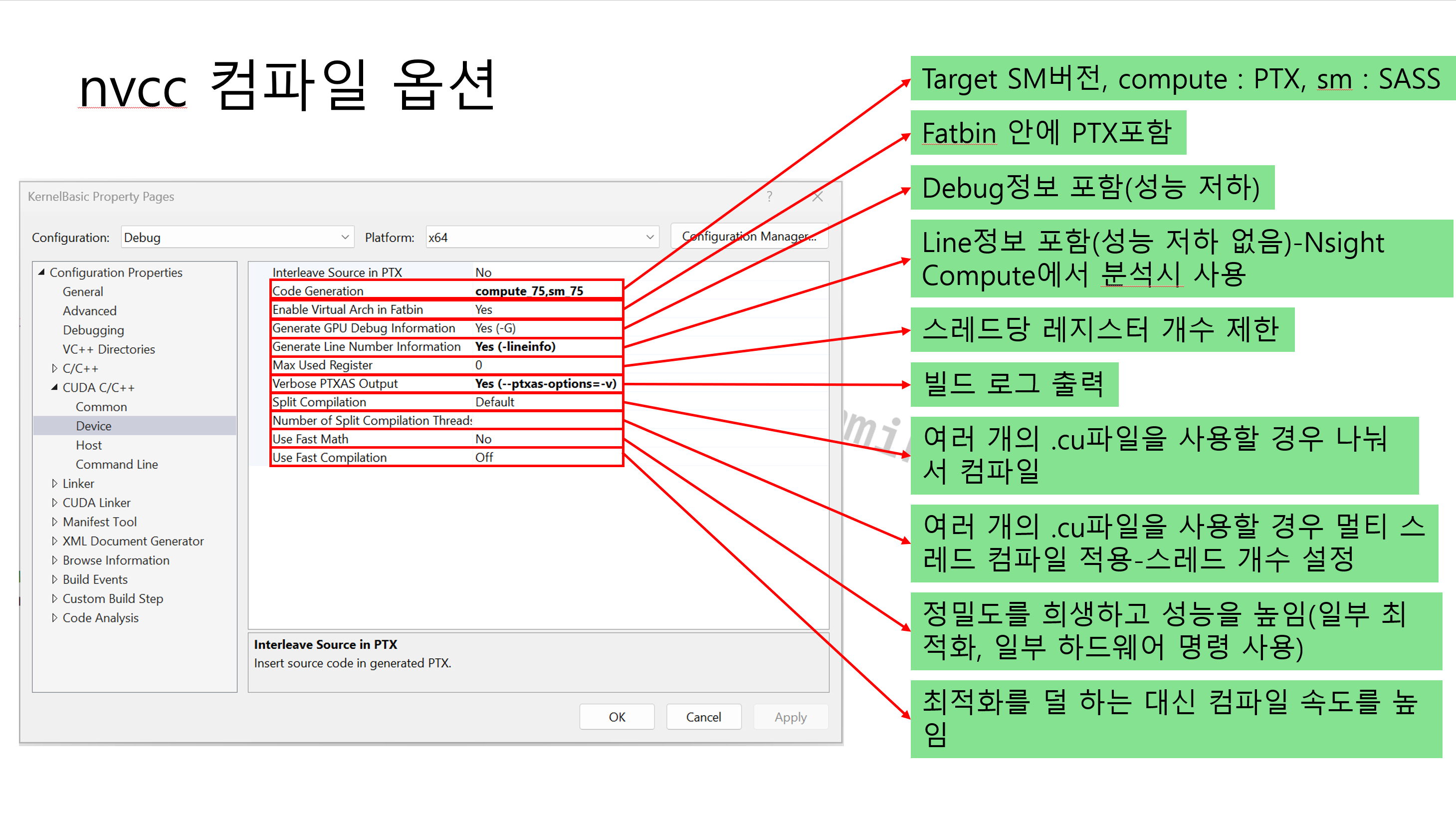
The biggest challenge when starting CUDA development is the initial environment setup. In this chapter, we will provide a step-by-step guide to the entire environment needed for development, from installing the CUDA Toolkit to configuring the compiler and IDE. We will explain how to build a practical development environment where you can run and debug the examples in the following chapters.


3. CUDA Programming Basics

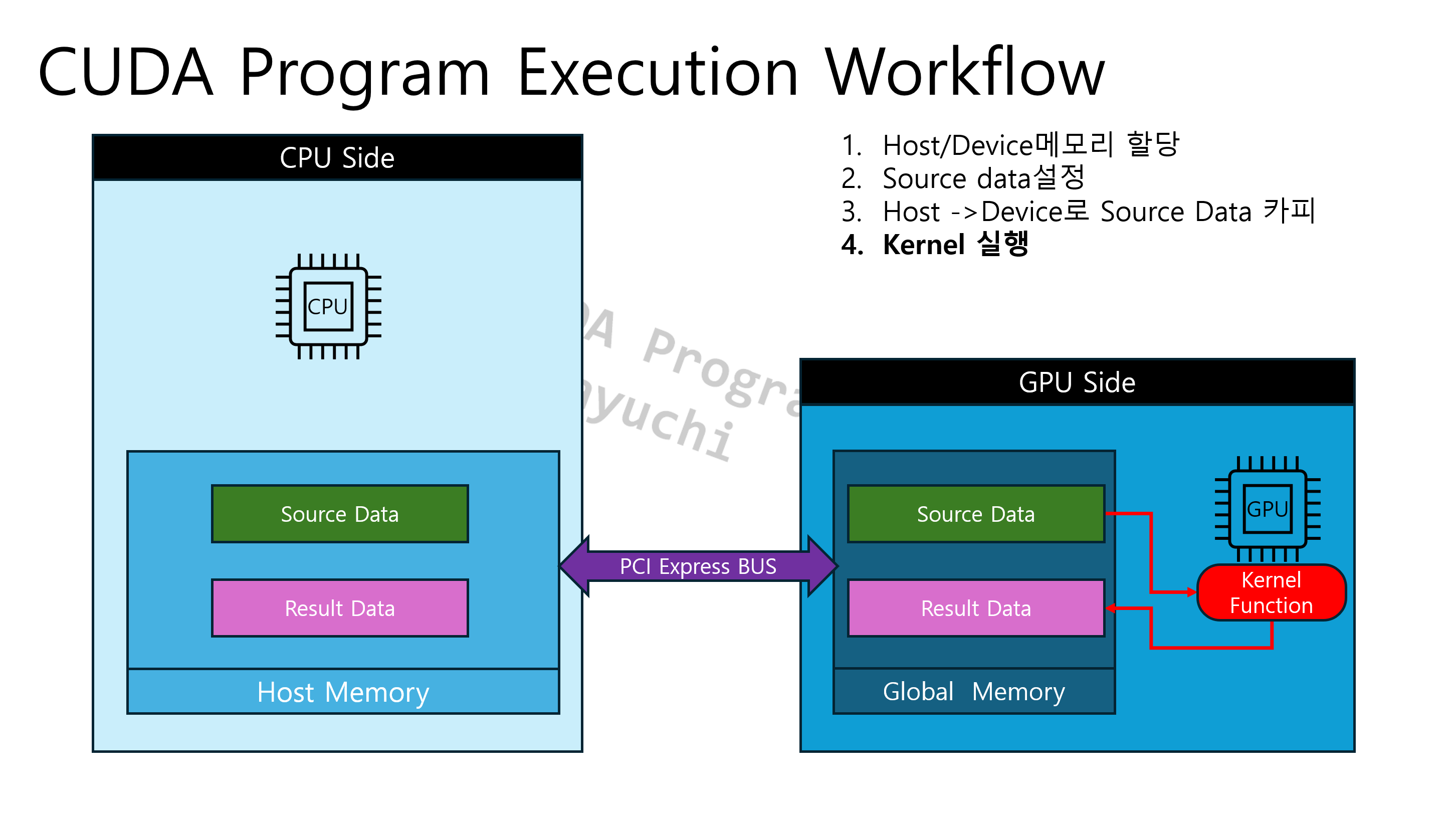
This explains the basic flow of how a CUDA program operates. It covers the process of initializing and terminating the CUDA environment, and provides a step-by-step explanation of the overall execution structure, which includes copying from host memory to device memory, kernel execution, and copying from device memory back to host memory. Additionally, it summarizes essential concepts that serve as the foundation for subsequent hands-on exercises, such as CUDA kernel invocation methods and the usage of core CUDA APIs.


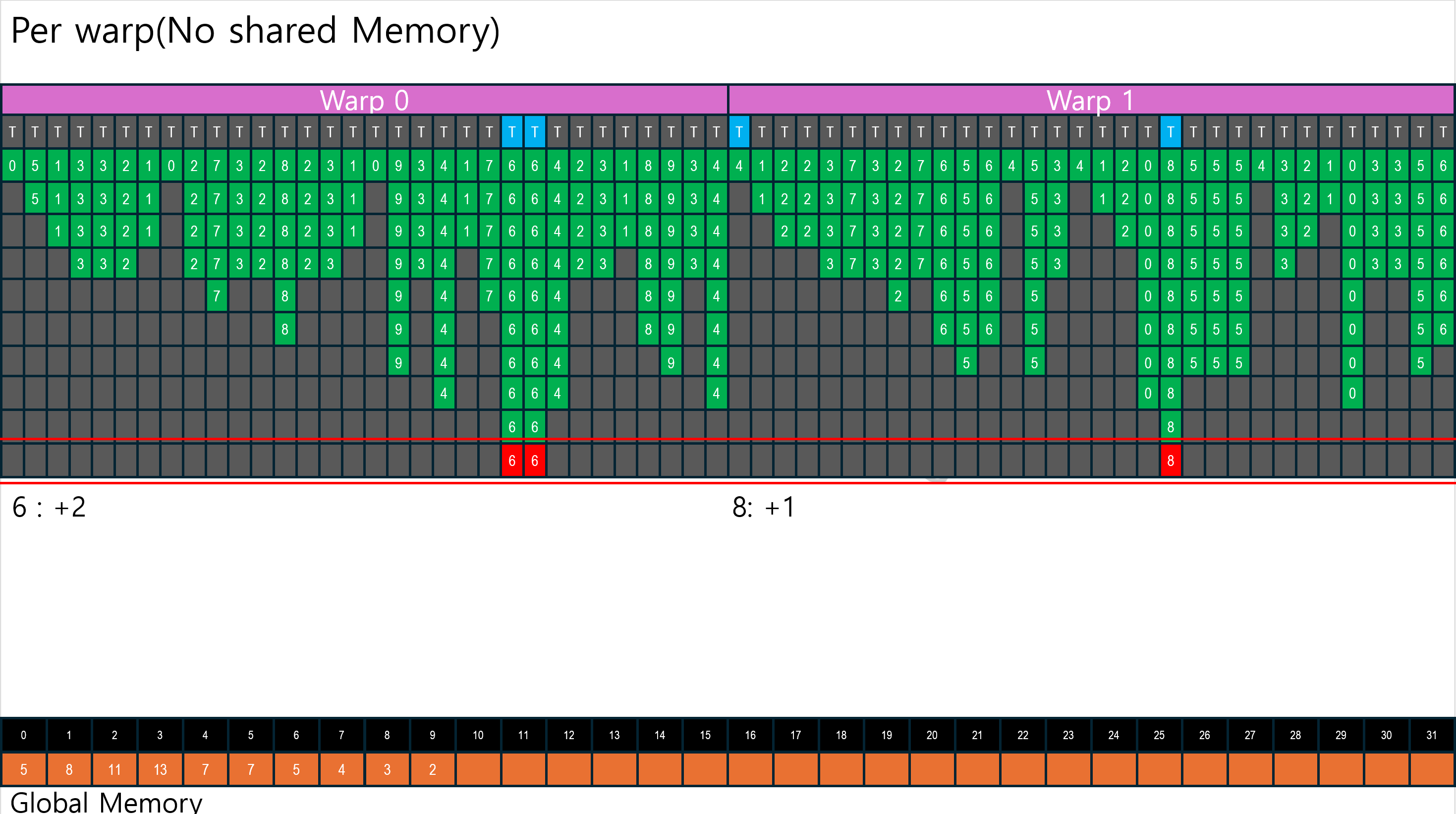
4. Global Memory Coalescing

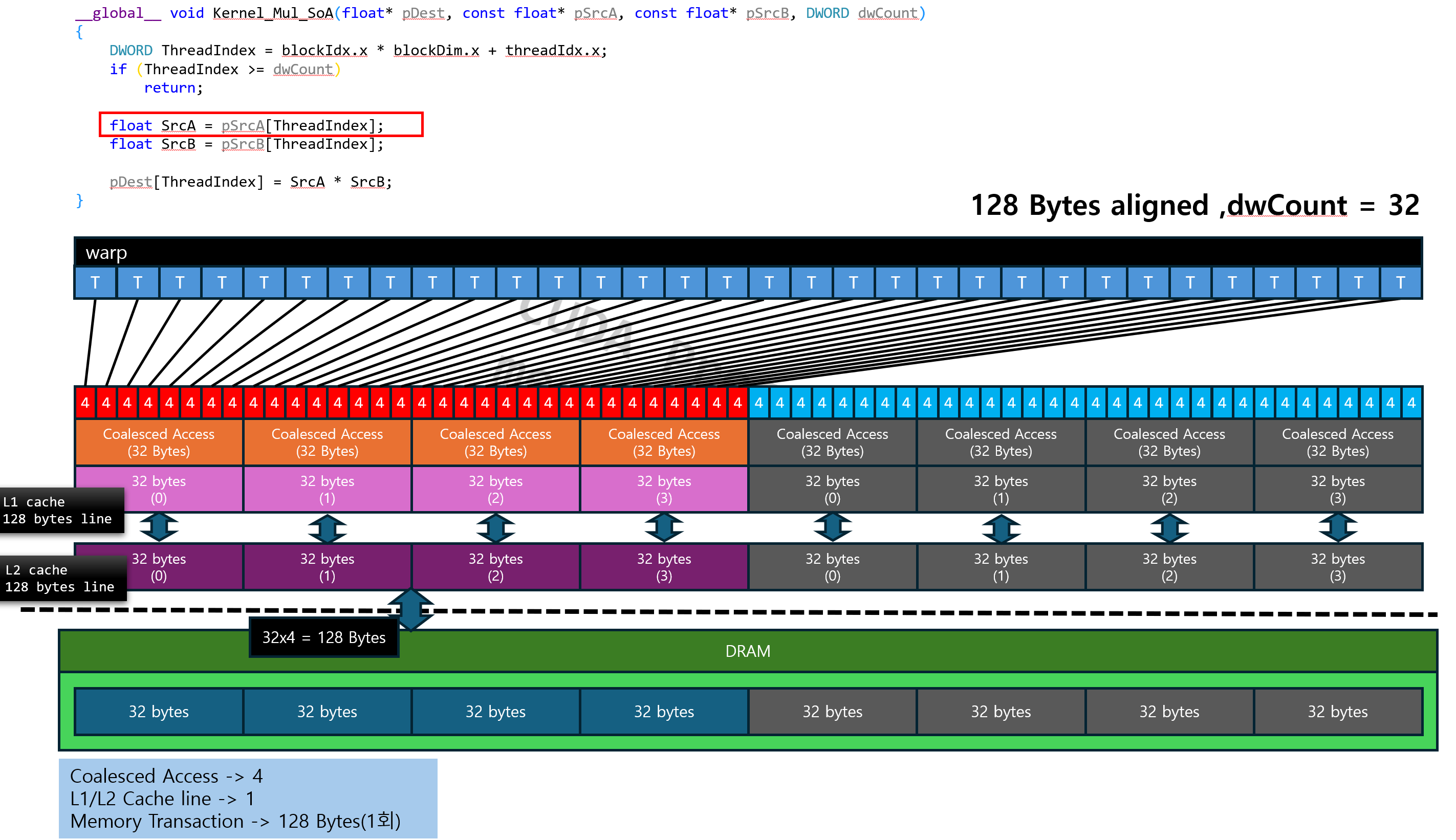
This section covers the concept of global memory coalescing, a key element of GPU performance optimization. It explains how hardware merges (coalesces) requests when threads access global memory and compares the differences between optimal and worst-case access patterns through real-world scenarios. Additionally, it outlines data layout strategies and thread configuration methods to maximize memory access performance, explaining essential optimization techniques for writing efficient CUDA kernels.


5. Thread Co-op within a Block

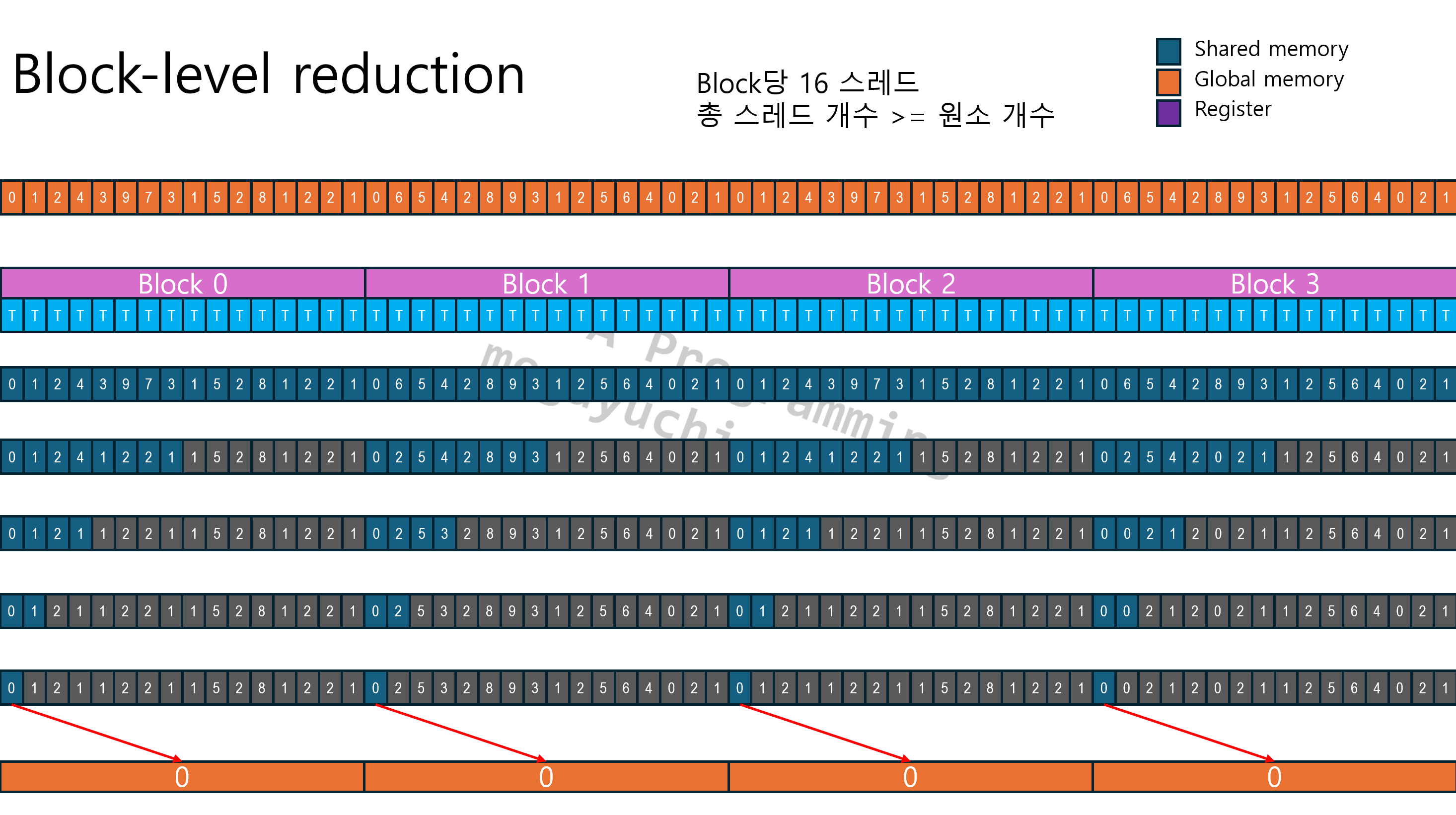
This covers how threads within a block can collaborate to achieve higher performance. It explains how to efficiently share data at the block level using Shared Memory, followed by techniques for collaboration between threads within a warp using warp level intrinsic. It discusses strategies for writing more optimized CUDA kernels by combining these two collaborative methods and implements the process of finding a minimum value using warp-level reduction and block-level reduction as practical examples.


6. Shared Memory - MatrixTranspose

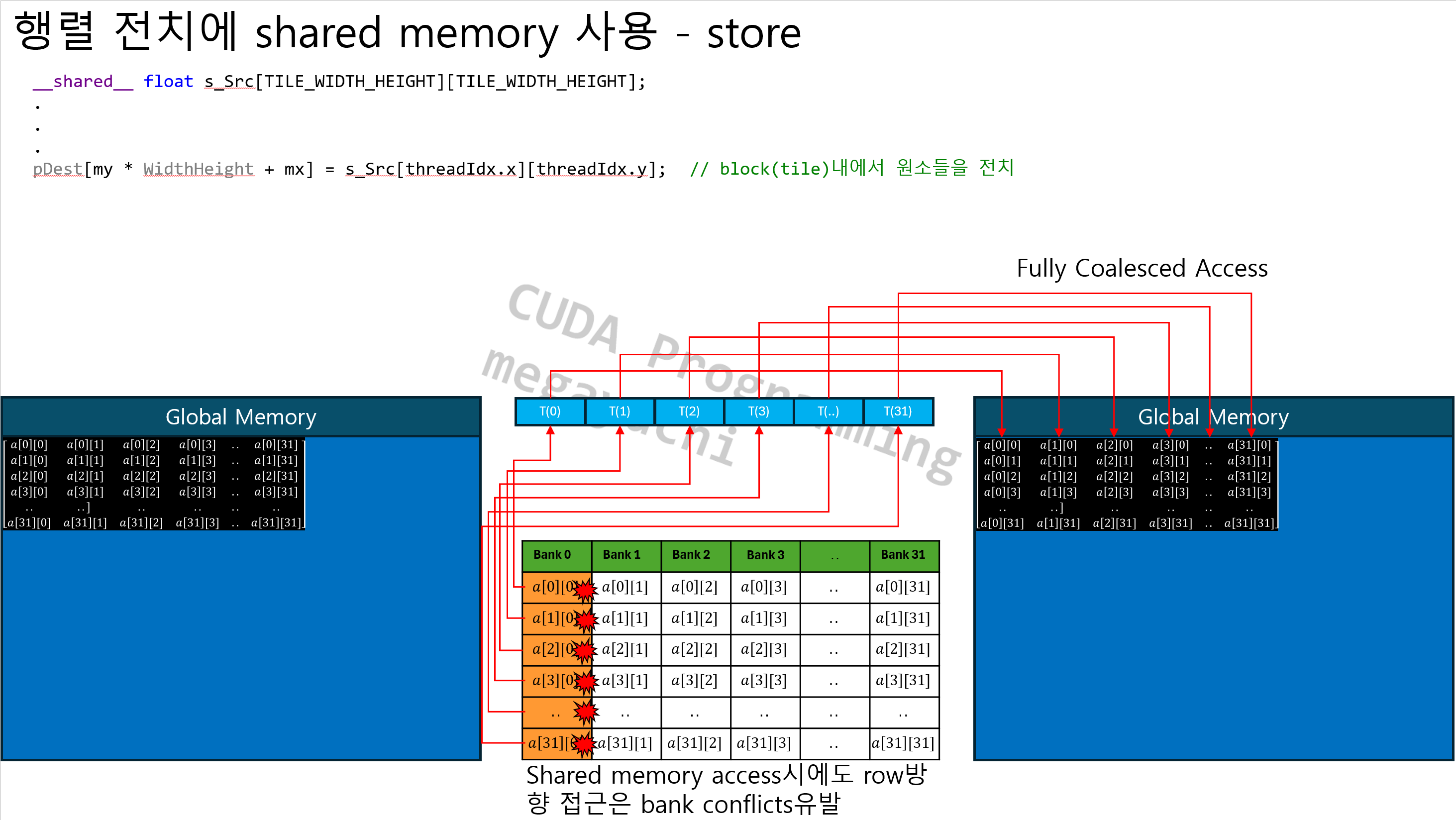
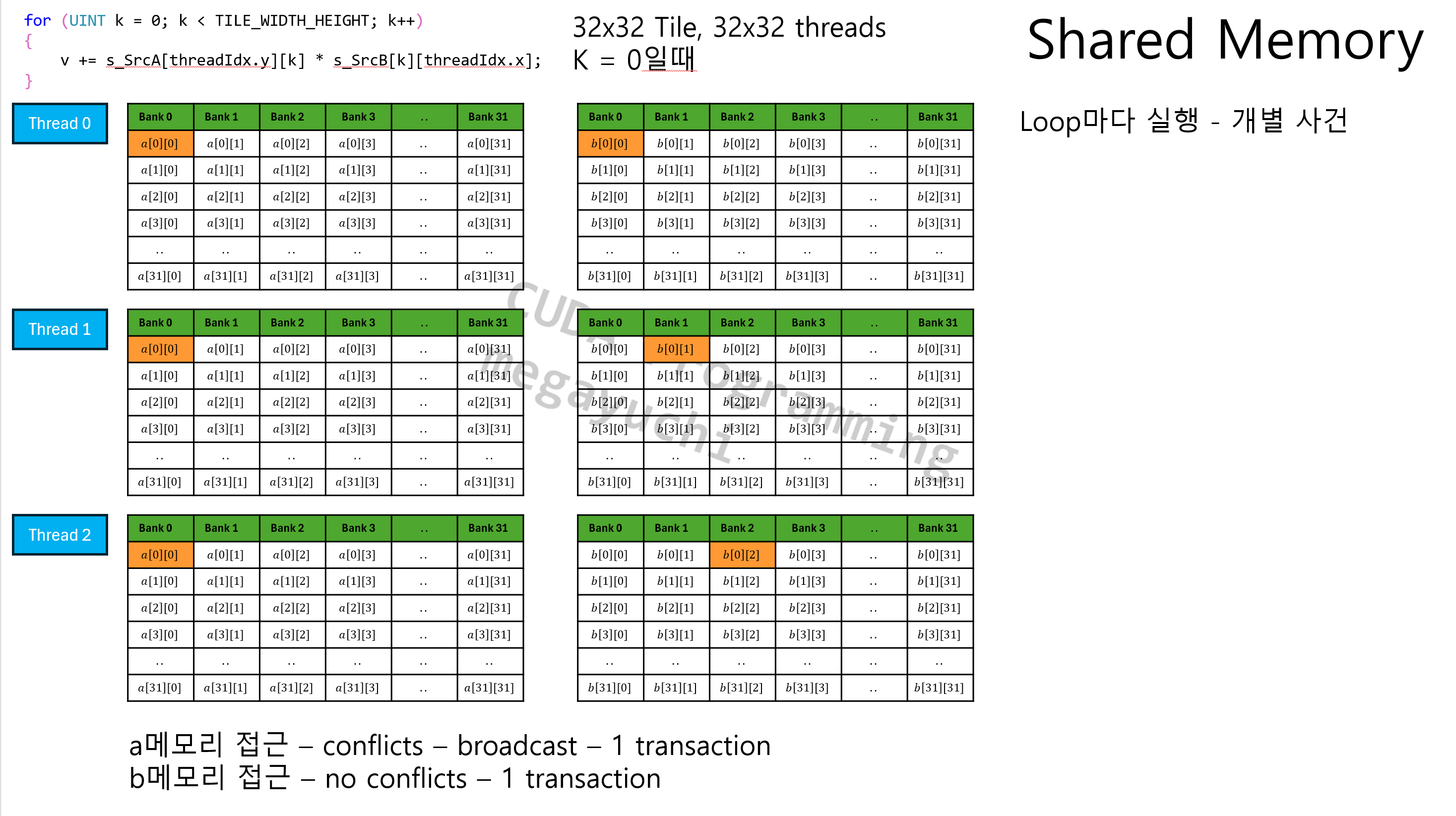
Learn the core concepts of utilizing Shared Memory through the process of transposing a matrix in CUDA. We will examine inefficient global memory access patterns that frequently occur during transpose operations and the resulting performance degradation, then explain how to optimize memory access using Shared Memory. Additionally, we cover techniques to resolve bank conflicts that can occur in Shared Memory, providing practical strategies for effectively using Shared Memory through matrix transposition examples.


7. Shared Memory - MatrixMultiply

Following the Matrix Transpose example, this section covers how to utilize Shared Memory even more effectively through a Matrix Multiplication case study. It explains the basic structure for processing large-scale matrix multiplication in CUDA and introduces the technique of dividing large matrices into smaller tile-based sub-matrices for computation. Additionally, it compares the memory access patterns of matrix multiplication—which are similar yet different from matrix transposition—and discusses strategies to maximize performance and reduce memory access bottlenecks using Shared Memory.


8. Occupancy

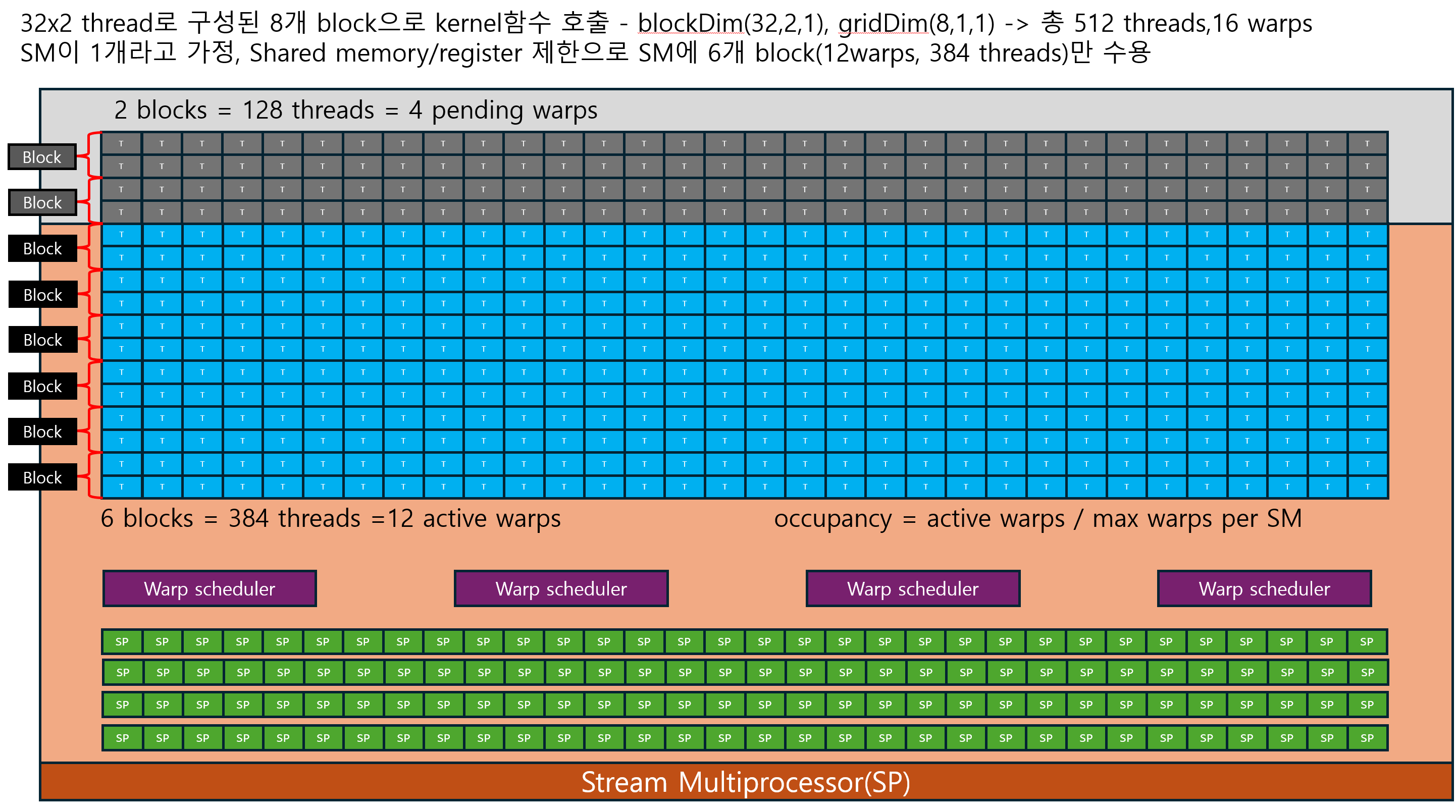
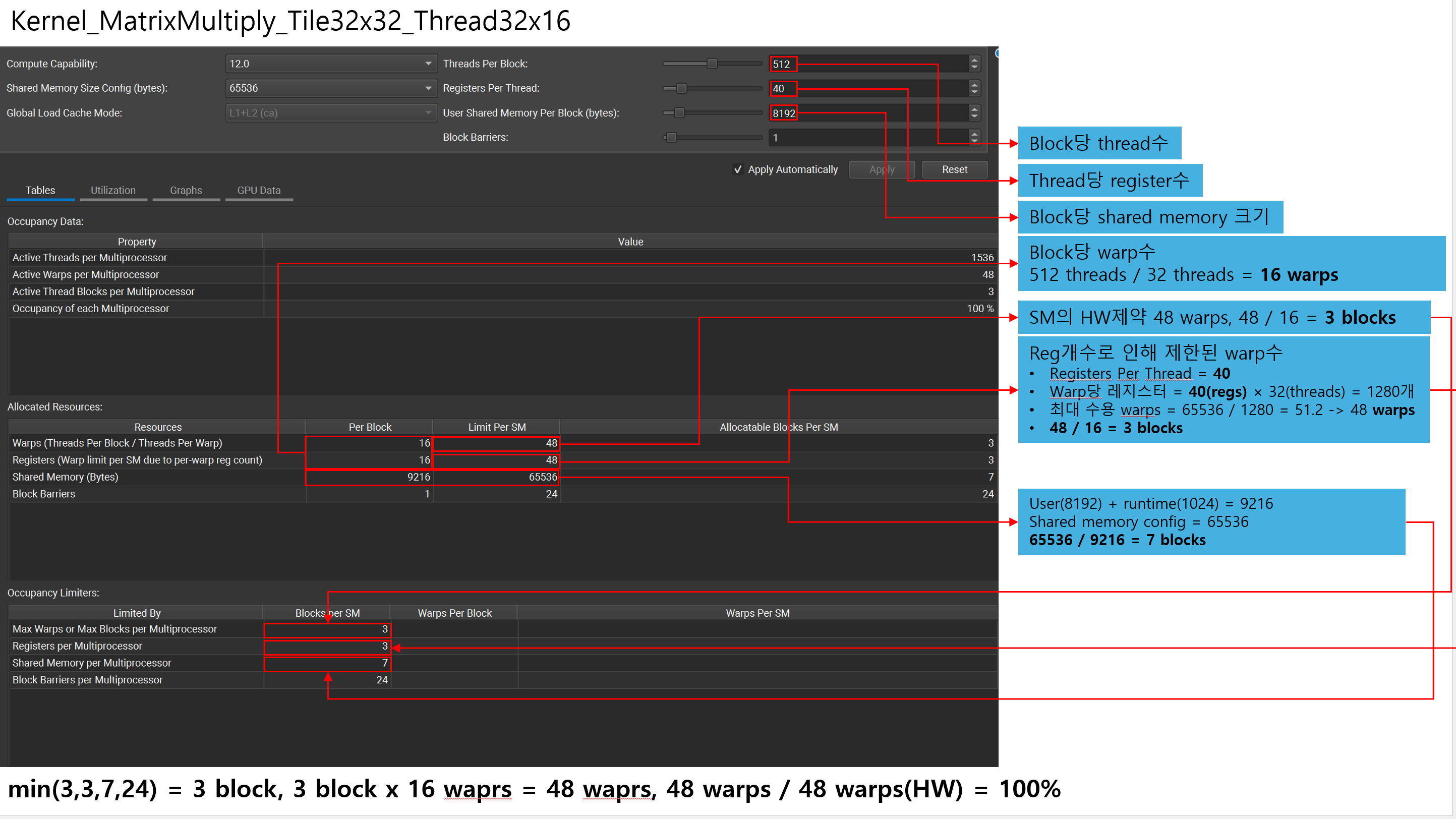
This covers how to boost GPU performance from the perspective of warp scheduling, rather than memory access optimization. It explains what occupancy is and why it is important how many warps the GPU can execute simultaneously. We will look at strategies for adjusting thread configuration, register usage, and shared memory usage to increase occupancy, and compare cases where high occupancy leads to good performance with cases where performance actually drops despite high occupancy.


9. cuda Stream

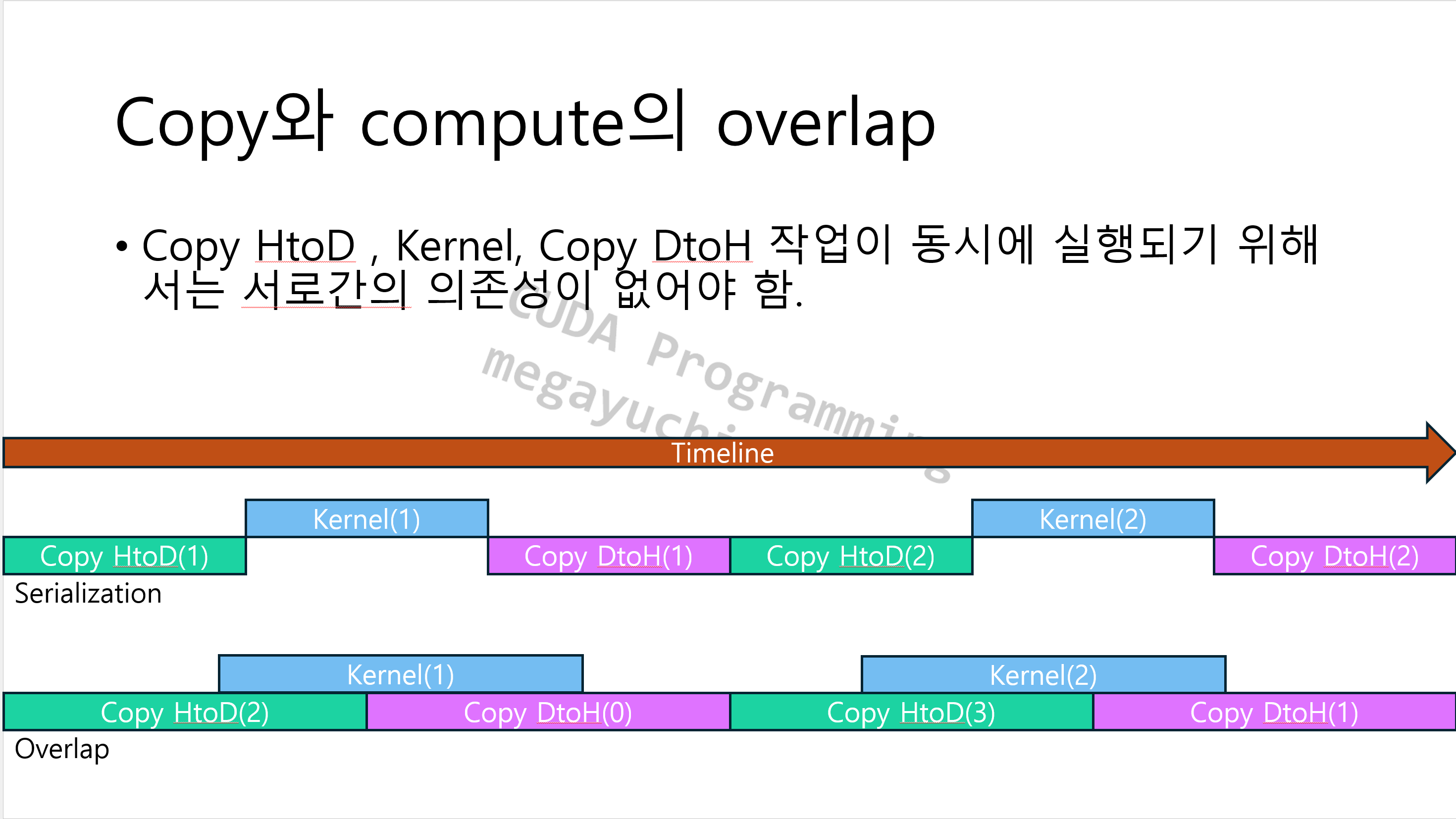
We cover the concept of cuda stream, which enables asynchronous execution in CUDA. After first understanding how the default stream—implicitly used in all CUDA programs—operates, we explain how to improve overall performance by overlapping computation and memory copies using multiple streams. Additionally, we use Nsight Systems to analyze the actual performance benefits provided by stream-based asynchronous execution.


10. Image Filter

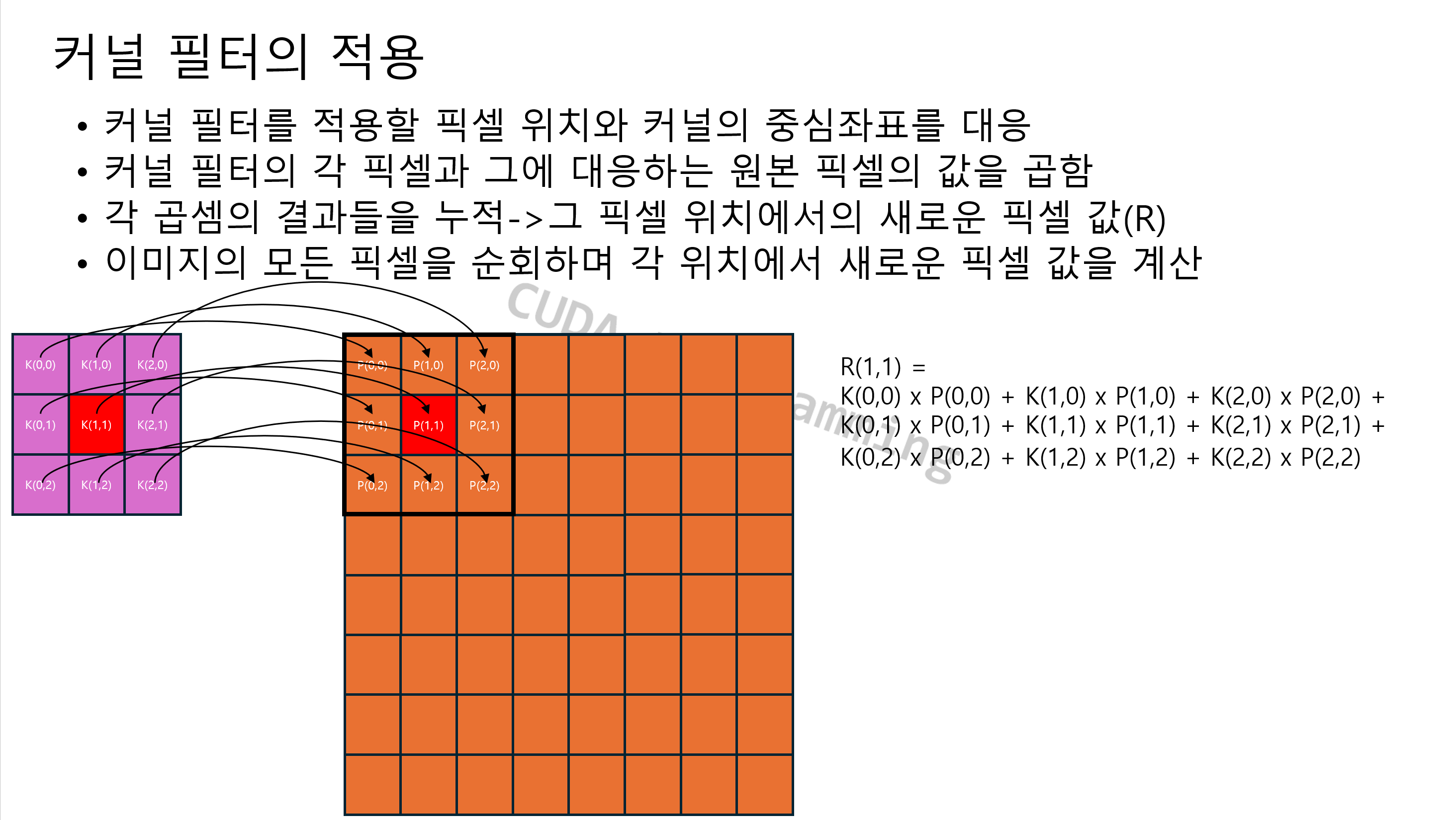
We introduce the concept of kernel filters, which are widely used in image processing, and learn the basics of GPU-based image processing by directly implementing Gaussian and Laplacian filters with CUDA.
We explain how to improve memory access efficiency using Texture Memory and Shared Memory, and provide a comparative analysis of the actual hardware performance differences that occur when the same algorithm is implemented with various memory structures.


11. Image Histogram

We will implement an image pixel distribution analysis tool, the histogram, using CUDA, and cover data accumulation methods in a parallel environment along with the resulting performance issues. We will examine the basic structure of calculating histograms in CUDA and explain the operating principles and performance degradation issues of atomic operations, which are essential in this process. Subsequently, we will cover optimization techniques for writing more efficient histogram calculation kernels by reducing atomic operation bottlenecks using Shared Memory and warp intrinsics.


12. CUDA-D3D12 interop

This covers how to combine the Direct3D 12 rendering pipeline with CUDA to utilize GPU graphics and GPGPU operations simultaneously. It explains how to map the Render Target and Depth Buffer of a simple D3D12 game framework as CUDA resources and synchronize the D3D12 timeline with the CUDA timeline.
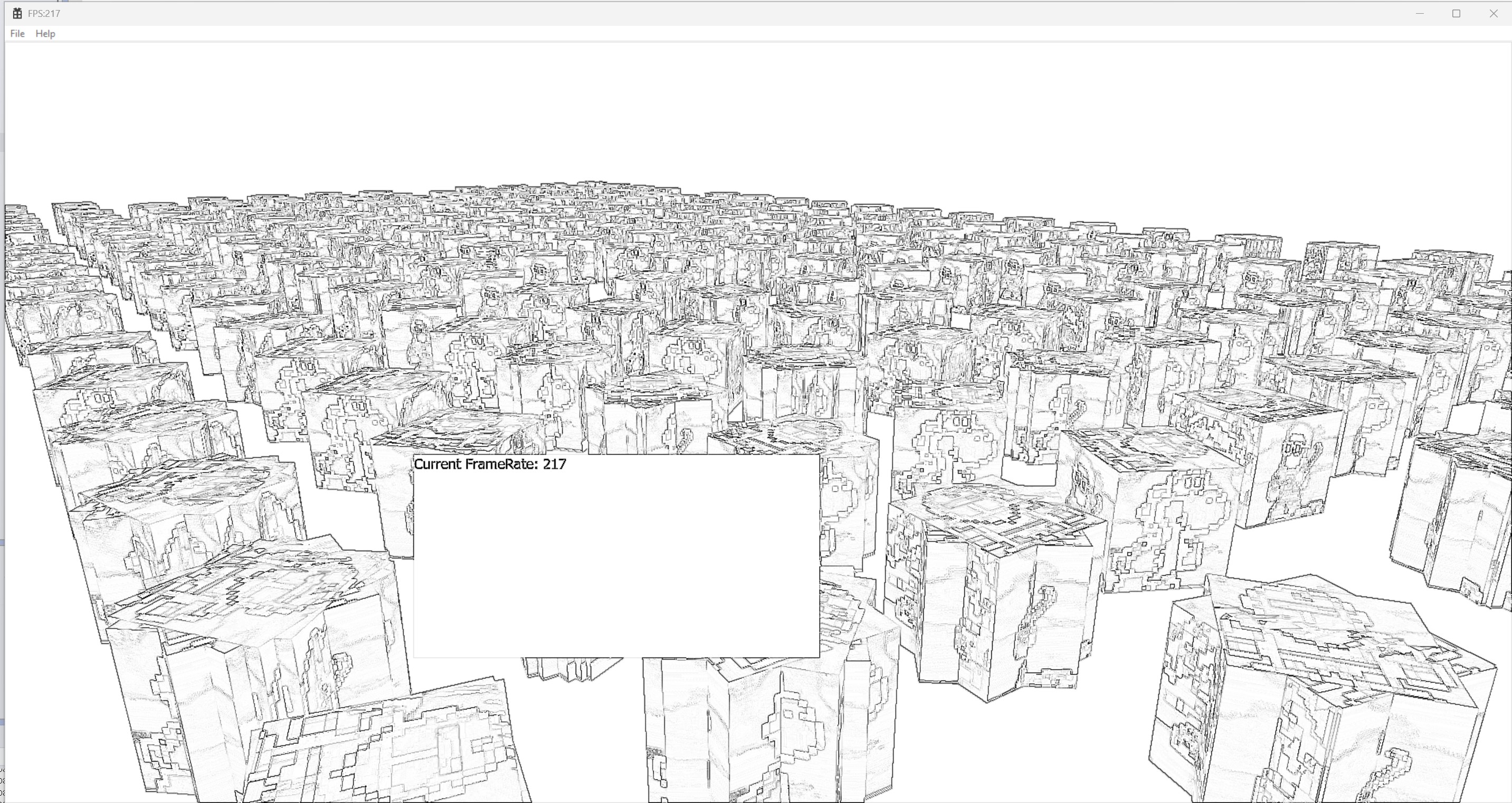
The example code implements functionality that takes textures mapped as CUDA resources as input, applies various image processing techniques such as Gaussian Blur, edge detection, normal map rendering, and depth value visualization, and outputs them to the final screen.


Notes before taking the course

Practice Environment

  • Operating System and Version (OS): Windows 10/11

  • Tools used: Visual Studio 2026

  • cuda Toolkit 13.2

  • nvidia GPU


Learning Materials

  • PDF provided

  • Source code provided via attachments

Prerequisite Knowledge

Precautions

  • A graphics card of the GTX 1600 series or higher is required.

  • Examples can be run on GTX 1000 series graphics cards as well, but project settings must be slightly modified. The modification method is covered in the 'Installation and Development Environment Setup' chapter.

  • You can also use the latest CUDA Toolkit, version 13.3 or higher. Again, you will need to slightly modify the project settings. The modification method is covered in 'Installation and Development Environment Setup'.

  • It does not cover AI technology. While matrix multiplication or applying kernel filters are related to AI technology, it does not directly deal with AI technology.


Recommended for
these people

Who is this course right for?

  • A programmer who is intimidated by GPU programming due to a lack of graphics experience but wants to utilize parallel computing.

  • Developers who want to directly accelerate AI, simulation, and scientific computing

Need to know before starting?

  • C/C++

  • Basic Windows Programming using Visual Studio

Hello
This is megayuchi

Inflearn Verified

Career Verified

3,307

Learners

95

Reviews

22

Answers

5.0

Rating

11

Courses

프로그래머

C++,x86/x64 ASM, DirectX9/11/12, Metal, OpenGL, CUDA, win32, winsock/bsd socket


인프런 강의

D3D12프로그래밍 기초편 - https://inf.run/7gJhS

D3D12프로그래밍 기초플러스 - https://inf.run/itHDW

DirectX Raytracing 프로그래밍 - https://inf.run/cQqx7

Windows System 프로그래밍 - https://inf.run/AwfCv

Windows Debugging Tips - https://inf.run/zL7E4


Blog : https://megayuchi.com

Youtube : https://youtube.com/megayuchi

LinkedIn : https://www.linkedin.com/in/megayuchi/


More

Reviews

Not enough reviews.
Please write a valuable review that helps everyone!

megayuchi's other courses

Check out other courses by the instructor!

Similar courses

Explore other courses in the same field!

25% off for new members

$129.40

25%

$169.40