
inflearn logo

How to install Inflearn MCP

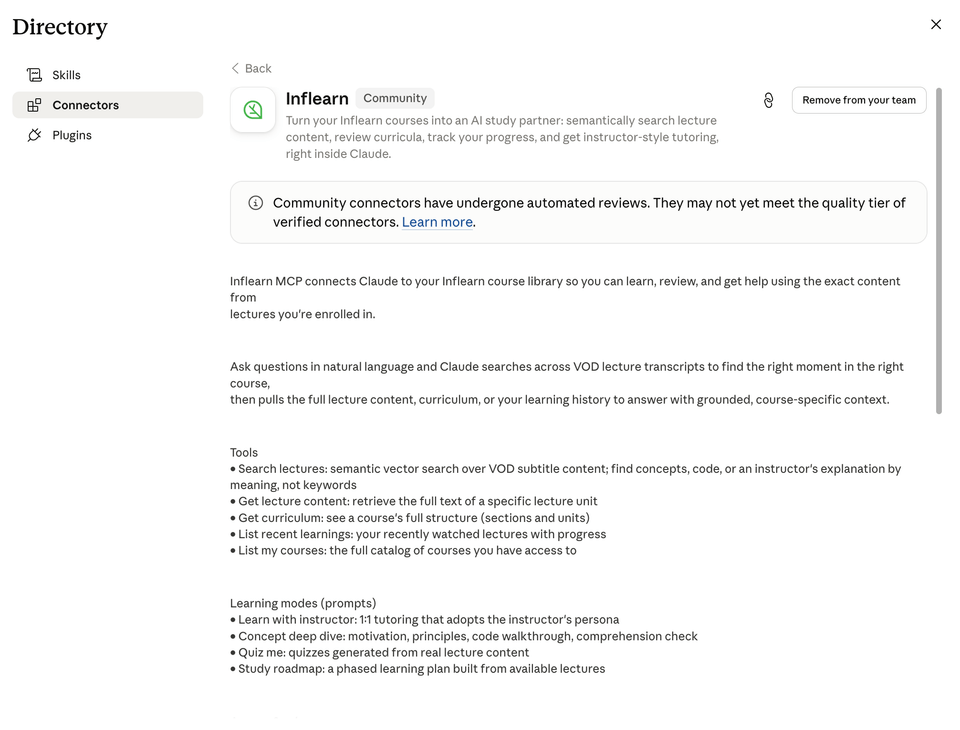
Inflearn's official MCP! Through MCP, you can retrieve the content of the courses you own. Connect quickly and feel free to apply the knowledge from your courses.

(4.7) 19 reviews

531 learners

Level Beginner

Course period Unlimited

ChatGPT
ChatGPT
Learning methods
Learning methods
Model Context Protocol
claude
claude
ChatGPT
ChatGPT
Learning methods
Learning methods
Model Context Protocol
claude
claude
Thumbnail

Reviews from Early Learners

4.7

5.0

ice28

100% enrolled

I didn't know I could use ChatGPT on the web too, it's so convenient!
5.0

KYUNG TAE BAE

100% enrolled

It was an excellent lecture that was truly helpful in the age of AI! Thank you for the wonderful lecture~!
5.0

카카

30% enrolled

Thanks to Inflearn MCP, organizing my studies has become more convenient, and the content has improved as well. I look forward to more features.

What you will gain after the course

  • The entire process of installing and integrating the Inflearn MCP into AI tools.

  • How to use the content of the lectures you are taking as reference material for AI tasks

Hello, this is Inflearn.

Have you ever experienced moments of inconvenience when trying to apply what you learned from a lecture to your actual work, having to search for the video again and follow along with the examples?


Now, by connecting Inflearn MCP, AI tools like Claude, Codex, ChatGPT, and Cursor can assist you by referencing the content of the lectures you are taking. From creating documents and reviewing code to setting up your work environment and refining your output, you can continue your work exactly as you learned in the lectures.

AI tools will create, review, and fix things
exactly as you learned in the lecture.

The name MCP might be unfamiliar, but it's simple to use.
When you connect the Inflearn MCP, the AI tool searches for lesson content closely related to what you are currently working on.
It then directly proceeds with documentation, coding, design, and automation tasks, referencing the sequence and standards learned in the lecture.
If you're curious about why it's done a certain way, it also provides the specific location of the referenced lesson.

For a detailed explanation of Inflearn MCP, please refer to the link!


What is covered in this course

How to install Inflearn MCP

1. How to install the official connector from the desktop app

2. How to install with a single command in the terminal

For CLI clients such as Claude Code, Codex, Cursor, and Antigravity, simply running the script below will automatically register the Inflearn MCP.

macOS / Linux

Open the terminal, paste the command below, and press Enter.

curl -fsSL https://inf.run/mcp | sh

Windows (PowerShell)

Start button → Run PowerShell → Paste the command below and press Enter.

irm https://inf.run/mcp.ps1 | iex


If it is difficult to follow with the above instructions alone,
please refer to the installation video in this lecture!!

(Audio is not provided)

Recommended for
these people

Who is this course right for?

  • Learners who want to apply what they learned in the lecture to their actual work

  • Developers who use AI tools but find it cumbersome to look up lecture content again

  • AI tool users who want to create a link between learning and practical work

Hello
This is inflearn

Inflearn Verified

739,403

Learners

8,827

Reviews

118

Answers

4.8

Rating

167

Courses

I believe that opportunities for learning should be free from economic and physical limitations.
We pursue equality in opportunities for growth.

Curriculum

All

10 lectures ∙ (14min)

Published: 
Last updated: 

Reviews

All

19 reviews

4.7

19 reviews

  • gkwoap5375님의 프로필 이미지
    gkwoap5375

    Reviews 9

    ∙

    Average Rating 5.0

    5

    30% enrolled

    Thanks to Inflearn MCP, organizing my studies has become more convenient, and the content has improved as well. I look forward to more features.

    • devkuka님의 프로필 이미지
      devkuka

      Reviews 341

      ∙

      Average Rating 5.0

      5

      100% enrolled

      It was an excellent lecture that was truly helpful in the age of AI! Thank you for the wonderful lecture~!

      • madwolves98님의 프로필 이미지
        madwolves98

        Reviews 8

        ∙

        Average Rating 4.6

        5

        100% enrolled

        I look forward to additional lectures using MCP!!

        • ice28님의 프로필 이미지
          ice28

          Reviews 6

          ∙

          Average Rating 5.0

          5

          100% enrolled

          I didn't know I could use ChatGPT on the web too, it's so convenient!

          • kukaeden님의 프로필 이미지
            kukaeden

            Reviews 558

            ∙

            Average Rating 5.0

            5

            30% enrolled

            inflearn's other courses

            Check out other courses by the instructor!

            Similar courses

            Explore other courses in the same field!

            Free