





강의

멘토링

커뮤니티

Game Dev

/

Game Art

Houdini Practical Introduction for Challenging Background Modelers

For background modelers who found Houdini daunting, this is a structure-focused introductory lecture created directly by a practitioner.

(5.0) 6 reviews

26 learners

  • furyedea255
houdini
3D모델러
게임개발
3d-modelling
procedural

Reviews from Early Learners

What you will gain after the course

  • How to procedurally design and create background modeling using Houdini

  • Practice creating practical objects (stones, chairs, etc.) often used.

  • Learn all processes from structural design to Houdini implementation

  • Beyond Node Combination, Procedural Thinking and Practical Process

  • Practical application of mathematical concepts dealing with form (Vector, Random, Repetition)

Houdini, where do you start?

For background modelers who find Houdini overwhelming,
This is a beginner's guide to Houdini, written by a practitioner.

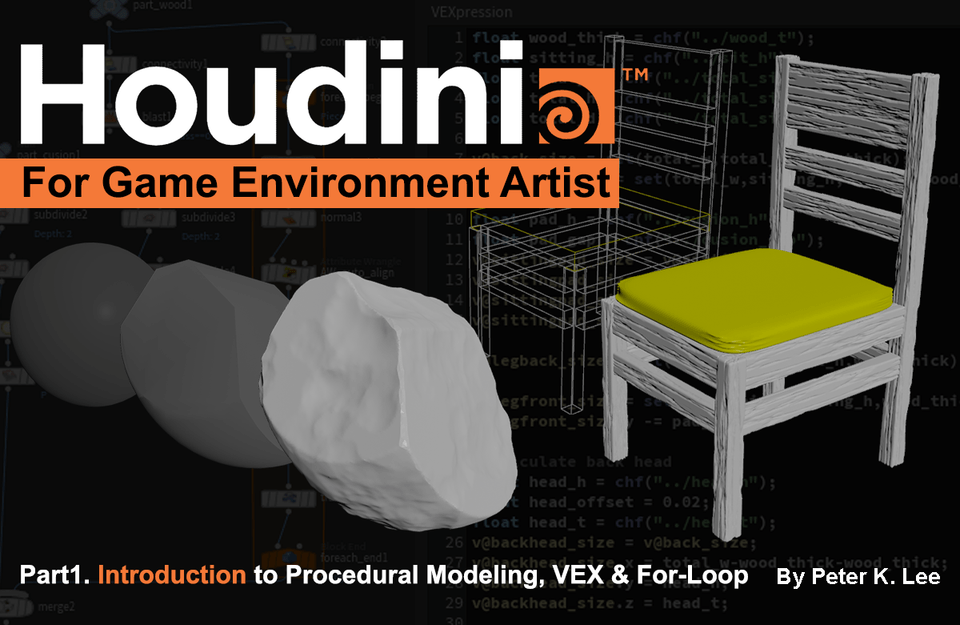
Houdini: A Practical Introduction for Difficult Background Modelers Part 1.

We will teach you step-by-step through practical exercises using frequently used background objects in games, such as stones and chairs, as examples.

I'll make it slowly so that you can follow along, and we'll figure out together "why it's made this way" and "what nodes are used to solve problems."

Before starting modeling, we will conceptualize the structure and cover procedural 3d-modeling using VEX and loops.

Created by a background modeler,
For background modelers,
Houdini tutorial for background modelers.

This course is intended for artists with background modeling experience.
Covers the fundamentals of procedural modeling in Houdini.
It is structured around content that can be directly applied to practice.

How the lecture is structured

It's structured around short, concise, hands-on examples.

1. Concept

Not just using simple tools,
First, think about “what to make” and “how to make it.”

2. Implementing the basic skeleton in Houdini

Based on the concept,
In background modeling, only essential nodes are selected and explained, and only the basic parts are structured in a simple manner.

3. Implementing details in Houdini

Based on a simple structure, we add details and convert it into a reusable form, a Houdini Digital Asset (HDA for short).

4. Check in game engine Unreal 5

Now that you've finished modeling, it's time to put it into the game engine! We'll talk about things to watch out for when exporting from Houdini.

After taking the lecture, you can create results like this.

Pebble

Learn Houdini's dotted lines and surfaces in a few easy steps, and use various nodes to trim edges and add details.
Learn how to use the basic For Loop.
By using random seeds, you can create HDAs and create variations.

chair

Using simple math, we create blockouts and then create chairs based on those blockouts. Using VEX, we do the calculations so that when you change the values, the shape of the chair changes.

Create an automatic UV tool that automatically flattens UVs using a few nodes.

This course is different.

Practical structure that learns through practice
→ Learn concepts while creating finished products and apply them directly to practice.
Explained in the language of modelers
→ It is structured around problem solving that modelers actually experience, not TAs or effects artists.
A structured approach based on practice
→ Learn practical, application-oriented processes such as iterative structural design and reuse of small elements.
Complex concepts explained step by step
→ Without omission, we explain VEX and mathematical concepts intuitively and specifically so that even beginners can understand .

Learning Contents

Why should we learn Houdini?

Houdini's Basics

  • Section 0: Why? Houdini?

  • Section 1: Why is it so hard for us to learn Houdini?

  • Section 2: Labeling, Material Graph Basics

  • Section 3: Laying the foundations - 3D isn't just points, lines, and planes?

Making a rock

  • Section 4: Designing a Pebble

  • Section 5: Pebbles 1 - Shaping the Basics

  • Section 6: Pebbles 2 - Detailing, HDA fabrication.

  • Section 7: Pebble 3 - Using For Loop to carve pebbles.

  • Section 8: Pebble 4 - UV layout, collider settings.

  • Section 9: Finishing the Pebbles

Stone making process shots

Here are some shots of the chair-making process.

Making a chair

  • Section 10: Designing a Chair

  • Section 11: Chair 1 - Shaping the Basics

  • Section 12: Chair 2 - Basic Shapes 2 and VEX Utilization

  • Section 13: Chair 3 - Basic Shapes 3 and HDA

  • Section 14: Chair 4 - Inserting the Bevel,

  • Section 15: Chair 5 - Adding UV to Bevel

  • Section 16: Chair 6 - Adding Details, and For Each

Expected effects after taking the course

  • It makes you think structurally.

  • Rather than blindly following it, you will actually understand 'why it is made this way' .

  • You will develop the ability to think , “I can make this with Houdini.”

Things to note before taking the class

Practice environment

  • Operating System and Version (OS): WINDOW,

  • Software version: Minimum Houdini 19.0 / Recommended Houdini 20.5

  • PC specifications: Intel or AMD x64 CPU with SSE 4.2 or higher, 16GB+ RAM, 5.0GB hard drive, GL 4.0 or higher graphics card with 12GB or more VRAM, latest graphics driver must be installed.


Learning Materials Provided

  • 6 hours of footage

  • Presentation file

  • Final Houdini working files (hiplc, hdalc)

Player Knowledge

  • Basic workflow for background modeling

  • Basic 3D concepts of points, lines, and planes

🚨 This course is based on the Houdini Indie license. In the Apprentice version, some nodes (rop, FilmboxFBX) may not work as in the course.

Recommended for
these people

Who is this course right for?

  • Background modeler: Knows nodes, practical use unclear.

  • Repeatedly creating similar assets, a practitioner who desperately needs an efficient method

  • A modeler who wanted to learn Houdini but felt VEX or loops were a barrier

  • Background modeler who needs to quickly create a large quantity of background objects in a small team

  • Practitioner seeking next-level modeling thinking

Need to know before starting?

  • Knowing just the basic concepts of 3D modeling like points, lines, and faces is enough.

  • You can follow along much more easily if you have experience with background modeling.

  • Don't fear math. I intuitively explain only the necessary parts.

Hello
This is

26

Learners

6

Reviews

3

Answers

5.0

Rating

1

Course

12년 차 배경 아티스트 Peter 규영입니다.
블리자드 재직 중 디아블로4, 와우, 워크래프트 럼블 제작에 참여했고,
라이엇 게임즈에서 신규 프로젝트도 경험했습니다.
2023년엔 인디게임 <RP7>을 출시했습니다.
2013년 Unearthly Challenge 3D 배경 부문 최우수상 수상,
2018년 NDC· 2022년 언리얼 서밋 등에서 강연 경험도 있습니다.

현재 시애틀 스타트업 StudioSai에서 배경 팀장을 맡고 있습니다.

Curriculum

All

22 lectures ∙ (6hr 44min)

Course Materials:

Lecture resources
Published: 
Last updated: 

Reviews

All

6 reviews

5.0

6 reviews

  • Eunpyoung Kim님의 프로필 이미지
    Eunpyoung Kim

    Reviews 3

    Average Rating 4.0

    5

    100% enrolled

    간단한 오브젝트라서 따라하기 좋네요. 좀 더 디테일하게 2탄도 빨리 나왔으면 좋겠어요

    • 귬규영
      Instructor

      우와 100% 수강하신 분은 처음입니다. 감사드립니다!

  • 박예정님의 프로필 이미지
    박예정

    Reviews 1

    Average Rating 5.0

    5

    32% enrolled

    정말 좋은 강의입니다 추천드려용

  • xxx님의 프로필 이미지
    xxx

    Reviews 4

    Average Rating 5.0

    5

    32% enrolled

    • ice님의 프로필 이미지
      ice

      Reviews 1

      Average Rating 5.0

      5

      63% enrolled

      어려운 후디니를 쉽게 풀어서 설명하시는게 저는 인상깊었습니다. 초보강의로서 좋은 강의라고 생각합니다!!

    • 한승원님의 프로필 이미지
      한승원

      Reviews 2

      Average Rating 5.0

      5

      32% enrolled

      어떤 의도로 어떤 노드를 배치하시는지 설명이 좋았습니다. 다른 강의도 물론 어느정도 있지만 배경작업자의 시선으로서는 요기서만 들을 수 있는 듯?합니다.

      • 귬규영
        Instructor

        감사합니다 승원님!

    $42.90

    Similar courses

    Explore other courses in the same field!