

My Own ESP32 IoT Device for Collecting Sensor Data - For Beginners and Arduino Users

In an era overflowing with digital content created by generative AI, what is your competitive edge? Data generated by the Internet of Things (IoT), which connects AI with physical phenomena, will become your competitive advantage. This course will help you stay ahead of others by building a foundation in IoT. This course is helpful for the following people: - Digital content creators using sensor data collection, interpretation, processing, and AI model generation - Entrepreneurs and educational content developers utilizing sensor data

(5.0) 8 reviews

52 learners

Level Basic

Course period Unlimited

Big Data
Big Data
IoT
IoT
Embedded
Embedded
hardware
hardware
esp32
esp32
Big Data
Big Data
IoT
IoT
Embedded
Embedded
hardware
hardware
esp32
esp32

Reviews from Early Learners

5.0

5.0

silmang

100% enrolled

I had been following others' ESP8266 projects, but I wanted to create a professional single PCB layout from a breadboard circuit just like they do. So, I was studying bits and pieces from foreign websites and YouTube. Right around that time, this course was uploaded to Inflearn, and since it perfectly matched my goals, I decided to take it. Before taking the class, I wanted to learn the following: 1. Basic setup for drawing schematics 2. How to design circuits 3. How to use KiCad 4. How to use BLE and WiFi on the ESP32 While points 1, 2, and 3 are available on YouTube, the information was often fragmented. I felt this course would help me build a solid foundation in a condensed manner. Regarding point 4, I wanted to learn it because I had failed in the past after blindly installing various libraries for BLE and WiFi without understanding the basics. The advantages I felt after taking the course are as follows: 1. It's in Korean. This is a huge advantage. 2. I gained the confidence to try making a PCB myself. 3. The flow of learning is natural as it connects everything from circuit design to firmware. 4. Using EEPROM to store/change WiFi SSIDs was a fresh idea I hadn't considered before. 5. It was not difficult to follow along. On the other hand, here are some points I found slightly lacking: 1. There was a part about connecting three diodes for ESD protection, but I was curious about why three were used and why they were only connected in one direction; however, there was no explanation for that. 2. This is a minor point, but the title bars of program windows or sub-windows were not visible, which felt a bit stifling at times. 3. I wish there was a highlight on the mouse cursor when clicking. I don't think there were any major drawbacks. However, I think someone with absolutely no foundation and only curiosity might need to watch it several times to fully grasp the content. In conclusion, I believe there is no other course as convenient and easy to follow as this one, provided you have the will. I look forward to follow-up lectures. Thank you.

5.0

오렌지

100% enrolled

While studying MCU, I was always curious about how to manufacture PCBs, so I decided to take this course. You explained everything in an easy-to-understand way, which made my studies very comfortable.

5.0

dongil.kim

100% enrolled

I didn't have any basics and only had a vague curiosity, but it was good to be able to learn the fundamentals and various other things. When right-clicking the mouse or selecting the top menu, it wasn't captured in the video recording... so I could only tell by listening to the sound. It was a bit difficult trying to follow along blindly without knowing. I downloaded the latest KiCad and it was version 10.0... So I re-downloaded version 9.0 to follow the lecture. They seemed a bit different... it was hard to follow without knowing the details.

What you will gain after the course

  • Automation of environmental data collection (temperature, humidity, illuminance, etc.) and remote monitoring - Basic IoT system development capability

  • Basics of product development based on a microcontroller (ESP32) capable of wireless communication

  • Specific methods for ordering, production, and shipping through the hardware manufacturer's website

  • How to use the open-source circuit editing tool KiCad for schematic configuration and PCB design

  • Firmware development methods including sensor operation and wireless communication (BLE, WiFi), internet connectivity, and HTTP communication

Create Your Own IoT Custom Development Board
with ESP32 and KiCad

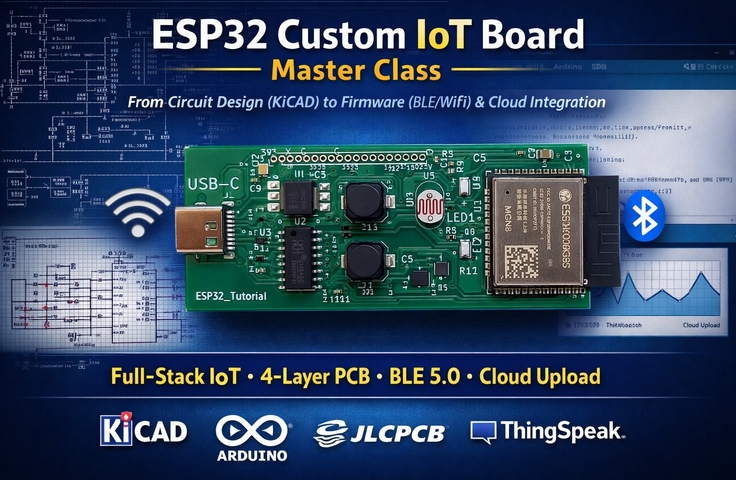
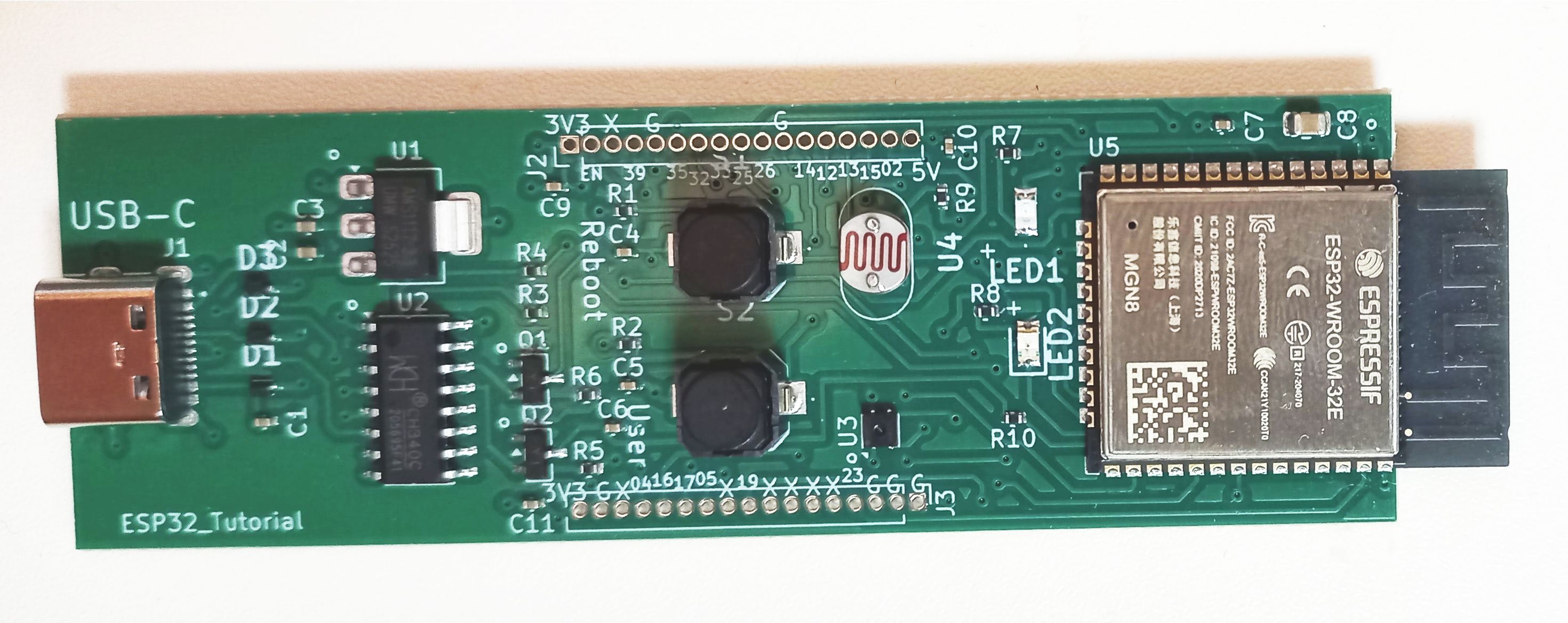
A photo of the actual board you will create in this course


In an era overflowing with digital content created by generative AI,
what is your competitive edge?

AI creates code, writes text, and generates images.
However, it still cannot create data from the physical world on its own.

Bridging this gap is
the technology that connects AI with reality, the Internet of Things (IoT).

Data collected through sensors is
not just simple information, but
a differentiated competitive advantage that only you can possess.

This course helps you become a creator who generates data,
rather than just a user following along
in the AI era.


🔧 Course Introduction

This course is a practice-oriented lecture on designing and manufacturing your own custom development boards using the ESP32, a representative IoT microcontroller.

  • We have lowered the tuition barrier so that even beginners can learn easily. Invest just 6 hours.


  • Arduino users can transition directly to ESP32 development without any sense of unfamiliarity. (Using the Arduino development environment)

Beyond simply using ESP32 hardware,
you will experience the entire process from circuit design using KiCad to PCB fabrication, firmware writing, and hands-on practice, developing the
ability to comprehensively understand hardware + software.

The course covers the following core technologies:

  • Building an Embedded System

  • Digital Input/Output (GPIO) via buttons and LEDs

  • Analog input and sensor data processing

  • PWM Control (Analog Output)

  • EEPROM data storage (non-volatile memory)

  • I2C Communication (Sensor Operation)

  • BLE communication (communication with mobile phones)

  • WiFi communication (Internet connection, Internet of Things)

🎯 What you will gain from this course

Through this course, you will be able to grow in the following directions:


  • A digital content creator who combines AI models based on sensor big data collection, interpretation, and processing


  • IoT-based startup and educational content developers who solve problems based on real-world data

This course is not simply about learning the ESP32.

This is the starting point for your transition from being
an “AI user
to an “AI data provider.”


🔥 Closing Remarks

Do not be someone who merely consumes content created by AI;
become someone who creates real-world data that AI cannot imitate.

💡What students will take away upon completing this course

  • How to create a schematic for an ESP32 development board using KiCad, and how to route using the PCB Editor

  • How to order custom manufacturing using KiCad output files, and your own custom-made development board (the same board as shown in the photo above; production costs are to be borne separately by the student)

  • How to install component libraries, how to write firmware, and how to operate the board through downloading

  • How to collect sensor data to create big data  

Caution: The manufacturing cost of the board is not included in the tuition fee for this course. (To be borne by the student)

Production is handled through the overseas manufacturer JLCPCB (https://jlcpcb.com), and after production, it is delivered to the student following shipping and customs clearance.

Example of production costs: As of March 2026, the exchange rate is 1,490 KRW per dollar, and the minimum production cost for the boards in this course (2 units) is as follows.

Production cost and period:

Manufacturing 5 PCBs (minimum order quantity), and using 2 of those boards to produce 2 units with completed component soldering (minimum production quantity)

It costs a total of $67, including $7 for the PCB and $60 for production, plus approximately $12 for shipping. Production takes 8 days excluding weekends. (Shipping takes a few additional days.)

If the production cost, including shipping, is less than $150, customs fees are waived; if it is $150 or more, customs fees will apply.


What you will learn

Hardware Basics and Design Theory

In this step, we introduce the core components and electrical concepts required to build a microcontroller board.

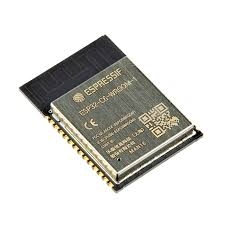
  • It covers custom board design based on the ESP32-WROOM-32 module, including power circuits, I/O interfaces, and sensor connections.

  • Explore key features including integrated Wi-Fi and Bluetooth functionality, a dual-core processor, and internal SRAM.

  • Explains when and why you should transition from an experimental development board to a custom board for an actual product.

  • Explains the power pins (3.3V, EN, GND) and bootstrap pins (GPIO0, 2, 5, 12, 15).

  • We explain the theory and practical implementation methods for eliminating floating voltage issues that can occur on input pins, as well as the design workflow from the Schematic Editor to the PCB Editor.


ESP32 WROOM Module

KiCad and Circuit Design

In this curriculum, you will use KiCAD, a free open-source EDA tool, to transform circuit ideas into professional design files.

  • We explain the design flow from the Schematic Editor to the PCB Editor.

  • We explain how to set up Footprints (the actual pad layout of a component) and how to add missing components using footprint search engines like SnapMagic.


  • USB-C connection circuit, 

    5V → 3.3V power conversion circuit (AMS1117), 

    Design a USB-to-Serial communication circuit (CH340).


  • Connect the temperature/humidity sensor (SHTC3) and the illuminance sensor (GL5528), and

    Implement a user-controllable LED and a reset button.


  • Decoupling capacitors to reduce power noise and

    Apply ESD protection diodes for electrostatic protection.


KiCad Logo

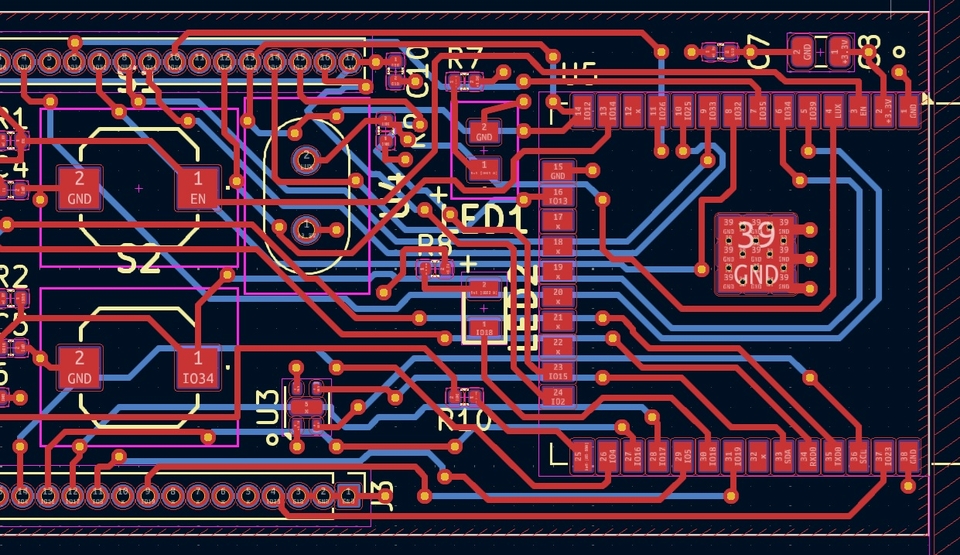
PCB Layout and Manufacturing

This stage covers the physical implementation and manufacturing process of the actual board.

  • Design a 4-layer PCB structure (Top / 3.3V / GND / Bottom) using FR4 material.

  • Set the constraints for the board and wiring according to the manufacturer's specifications.

  • Import the schematic into the PCB and strategically place the components on the board,

    Connect the components using multiple layers and

    Perform a DRC (Design Rule Check) to detect design errors.

  • Generate the following manufacturing files: 

    Gerber files, 

    Component placement files, 

    BOM(Bill of Materials)

  • We will explain the step-by-step process of ordering PCB fabrication through the manufacturer, JLCPCB.

    It also includes instructions on how to use a Personal Customs Clearance Code and perform production checks.


PCB Editor

Firmware Development (Level 1–11) 

The firmware course is organized into a step-by-step (Level) structure based on the Arduino IDE, gradually increasing in complexity.

  • Level 1–3: Basic GPIO and Interrupts

  • Level 4: Analog I/O and PWM (Pulse Width Modulation)

  • Level 5–6: I2C Communication and Environmental Monitoring

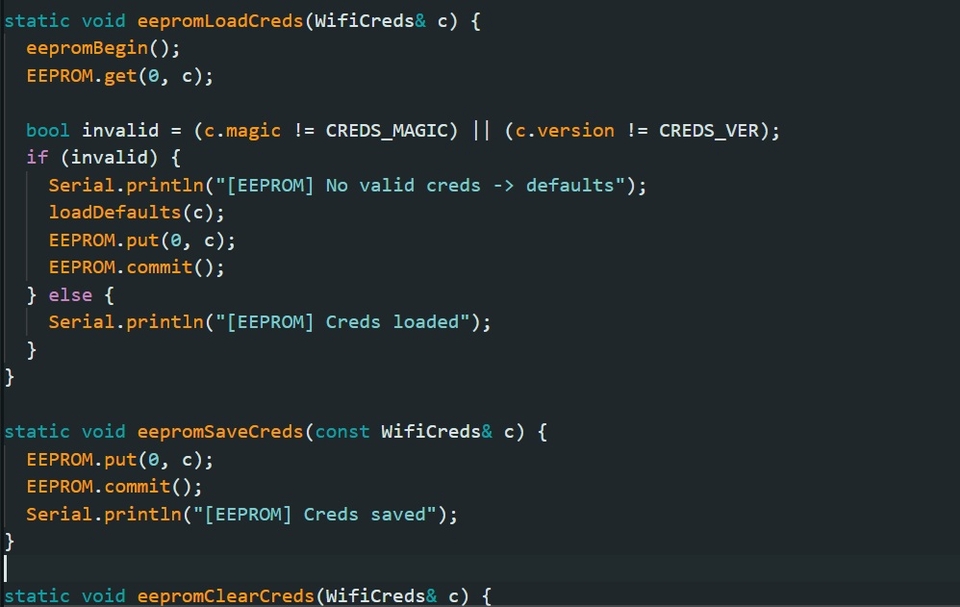
  • Level 7: EEPROM Memory, Permanent Storage

  • Level 8–9: BLE (Bluetooth Low Energy)

  • Level 10: WiFi and Credential Management

  • Level 11: Remote Server Data Integration

Arduino Editor Screen

Notes before taking the course

Practice Environment

  • Operating System and Version (OS): All OS types including Windows, macOS, and Linux are supported.

  • Tools used: Arduino IDE (Download: https://www.arduino.cc/), KiCad (Download: https://www.kicad.org/)

  • PC Specifications: A basic PC with internet access

Learning Materials

  • Lecture Videos: Each lecture is approximately 10 to 15 minutes long (24 lectures in total)

  • Provided Course Materials: PowerPoint slides for each lecture, firmware (Levels 1–11, 11 in total), KiCad project files (including Gerber files and BOM files)

Prerequisites and Notices

  • Experience with Arduino and C(C++) is beneficial, but it is not strictly required as prerequisite knowledge to run the firmware in this course.

  • The firmware is written in C and C++ and is provided as part of the learning materials; it can be downloaded and used immediately without the need for editing.


  • The copyright of this lecture belongs to the copyright holder, GreenTam, and unauthorized distribution or reproduction is prohibited. The learning materials are also copyrighted and may not be used for any purpose other than personal learning.

Recommended for
these people

Who is this course right for?

  • Someone preparing a hardware startup for the Internet of Things (IoT) that includes sensors

  • People who want to create digital content using production processes, methods, or sensor data

  • Makers, electronics hobbyists, or those interested in IoT (Internet of Things)

  • People who want to develop IoT devices that require wireless communication such as BLE and WiFi

  • Developers who want to go beyond the Arduino level and try "real embedded" development

  • Those who have used an ESP32 development board at least once but want to try making one themselves.

Need to know before starting?

  • Understanding of basic electronic circuits

  • Basic C and C++ languages

Hello
This is GreenTam

52

Learners

8

Reviews

2

Answers

5.0

Rating

1

Course

Hello.
I am an engineer who has been researching and developing electronic circuits and sensor systems.

I am creating educational content on the process of directly designing and manufacturing IoT devices and sensor systems.
In particular, I am producing lectures focused on ESP32-based IoT system design, PCB design (KiCad), sensor data collection, and cloud integration.

As the first in the "Follow-along" series, this course introduces how to design and manufacture an ESP32 development board based on actual development processes. Following this, the second and third series are also being planned to focus on utilizing the ESP32 board.

Meanwhile, I consistently share content regarding IoT device development, PCB design, and ESP32 project creation processes, as well as reviews of various electronic components, creator content, and solo entrepreneurship through social media.

Please visit if you are interested.

Naver Blog

https://blog.naver.com/greentam-

X (Twitter) page

https://x.com/GreenTam_

Facebook

https://www.facebook.com/profile.php?id=61587292040569

More

Reviews

All

8 reviews

5.0

8 reviews

  • ayinshahar님의 프로필 이미지
    ayinshahar

    Reviews 2

    Average Rating 5.0

    5

    100% enrolled

    While studying MCU, I was always curious about how to manufacture PCBs, so I decided to take this course. You explained everything in an easy-to-understand way, which made my studies very comfortable.

    • llilillliiiilil님의 프로필 이미지
      llilillliiiilil

      Reviews 4

      Average Rating 5.0

      5

      100% enrolled

      I had been following others' ESP8266 projects, but I wanted to create a professional single PCB layout from a breadboard circuit just like they do. So, I was studying bits and pieces from foreign websites and YouTube. Right around that time, this course was uploaded to Inflearn, and since it perfectly matched my goals, I decided to take it. Before taking the class, I wanted to learn the following: 1. Basic setup for drawing schematics 2. How to design circuits 3. How to use KiCad 4. How to use BLE and WiFi on the ESP32 While points 1, 2, and 3 are available on YouTube, the information was often fragmented. I felt this course would help me build a solid foundation in a condensed manner. Regarding point 4, I wanted to learn it because I had failed in the past after blindly installing various libraries for BLE and WiFi without understanding the basics. The advantages I felt after taking the course are as follows: 1. It's in Korean. This is a huge advantage. 2. I gained the confidence to try making a PCB myself. 3. The flow of learning is natural as it connects everything from circuit design to firmware. 4. Using EEPROM to store/change WiFi SSIDs was a fresh idea I hadn't considered before. 5. It was not difficult to follow along. On the other hand, here are some points I found slightly lacking: 1. There was a part about connecting three diodes for ESD protection, but I was curious about why three were used and why they were only connected in one direction; however, there was no explanation for that. 2. This is a minor point, but the title bars of program windows or sub-windows were not visible, which felt a bit stifling at times. 3. I wish there was a highlight on the mouse cursor when clicking. I don't think there were any major drawbacks. However, I think someone with absolutely no foundation and only curiosity might need to watch it several times to fully grasp the content. In conclusion, I believe there is no other course as convenient and easy to follow as this one, provided you have the will. I look forward to follow-up lectures. Thank you.

      • greentam
        Instructor

        Thank you for sharing your feedback on the areas that were lacking. To provide some clarification via this comment: 1. An ESD protection diode is a component that limits the input voltage to a certain level to prevent the circuit from being damaged by high voltage from human hands, clothing, etc. Therefore, diodes are placed on a total of three lines: the 5V line and the two data lines. Since these diodes operate bidirectionally, their orientation does not matter. Additionally, because USB-C can be plugged in normally or flipped, either DN1/DN2 or DP1/DP2 will always be connected, so the diode only needs to be placed on one of them. 2. I am currently using the free program OBS Studio for recording, but there are issues where the window title at the top does not appear, and the menu window is not visible when selecting menus with the mouse. I probably need to become more familiar with how to use it or switch to a different program. For now, I plan to resolve the issue of invisible menus by capturing the screen separately and inserting it into the existing video. 3. The mouse click highlight is also something I need to find a solution for. Thank you for your valuable feedback. I will make sure to improve these points in the next lecture. I am glad to hear that this was the lecture you were looking for and that it was helpful. Sincerely, Greentam

    • codo77173988님의 프로필 이미지
      codo77173988

      Reviews 16

      Average Rating 5.0

      5

      96% enrolled

      I took this course because I wanted to study embedded systems again after a long time. Since the course follows a hands-on practice approach, it helped me a lot in getting back into the swing of things. I am looking forward to the next lecture, and it would be great if you could cover some more advanced topics. Thank you.

      • greentam
        Instructor

        Thank you

    • lowlow님의 프로필 이미지
      lowlow

      Reviews 3

      Average Rating 4.7

      Edited

      5

      100% enrolled

      I looked into YouTube and books to try and make a custom board, but I felt lost because there wasn't as much information as I expected. The most helpful part of the course was the hands-on process of drawing the schematics and performing PCB routing myself using KiCad. Also, in Section 5, using the board I made along with the firmware source code allowed me to clearly grasp how data moves back and forth via BLE and Wi-Fi. Thank you so much.

      • greentam
        Instructor

        Thank you. Please feel free to ask if you have any questions.

    • dongilkim1245님의 프로필 이미지
      dongilkim1245

      Reviews 2

      Average Rating 5.0

      5

      100% enrolled

      I didn't have any basics and only had a vague curiosity, but it was good to be able to learn the fundamentals and various other things. When right-clicking the mouse or selecting the top menu, it wasn't captured in the video recording... so I could only tell by listening to the sound. It was a bit difficult trying to follow along blindly without knowing. I downloaded the latest KiCad and it was version 10.0... So I re-downloaded version 9.0 to follow the lecture. They seemed a bit different... it was hard to follow without knowing the details.

      • greentam
        Instructor

        Great job. I am also aware of the menu display issue. It happened because the screen capture program I use failed to capture the menu window. I will look for a solution. Still, I'm glad you were able to understand it through the audio at least. Thank you.

    Similar courses

    Explore other courses in the same field!