강의

멘토링

커뮤니티

Programming

/

Back-end

Docker Essentials - Getting a Feel for Containers & Docker

This is not a lecture that simply memorizes commands. It's a practical introductory course that helps you intuitively understand the 'flow' of technology - why containers emerged, how Docker creates and runs images based on what principles. Even if you're encountering Docker for the first time, after taking this course, you'll be able to explain "why containers are a necessary technology" on your own.

(5.0) 2 reviews

26 learners

Level Beginner

Course period Unlimited

  • skilleat
도커
도커
docker-compose
docker-compose
실습 중심
실습 중심
devops
devops
클라우드
클라우드
Docker
Docker
CI/CD
CI/CD
infrastructure
infrastructure
container
container
도커
도커
docker-compose
docker-compose
실습 중심
실습 중심
devops
devops
클라우드
클라우드
Docker
Docker
CI/CD
CI/CD
infrastructure
infrastructure
container
container

What you will gain after the course

  • Understanding the Internal Structure of Containers and Docker 'Step by Step'

  • Understand Docker's operating principles accurately without memorizing commands

  • Complete the Image-Container-Volume-Network Relationships Through Hands-on Practice

  • Master the practical skills of managing multiple containers 'at once' with Compose

In the AI era, why you need to understand Docker through 'principles' rather than 'commands'

In an era where technology changes too rapidly,
those who understand the flow and structure rather than detailed options will last longer.

This course teaches Docker not just as a simple execution tool,
but as the big picture of container technology (Why → How → Practice).

You'll learn content like this

1. Understand the big picture of why container technology emerged

In the infrastructure evolution from on-premises → virtualization → cloud,
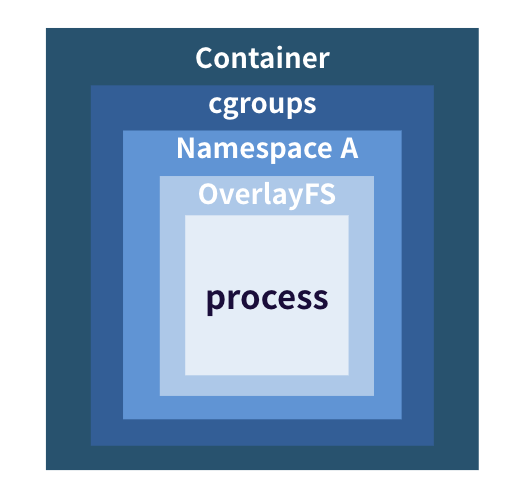
you'll understand at a glance why containers became necessary and what the differences are with VMs. We'll easily summarize the principles of how Namespace, Cgroups, and OverlayFS create a lightweight and fast execution environment.


2. How containers are created,

Digs deep into the principles of 'how it works'

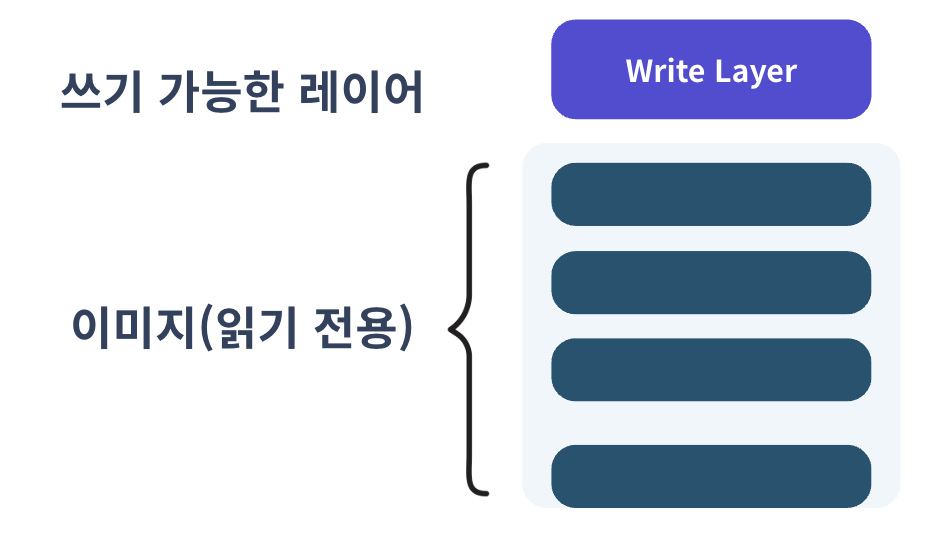
Containers are created with an Image Layer + Write Layer structure.
We'll understand the flow from Dockerfile → Image → Container through hands-on practice, and learn the principles by following the entire BUILD → SHIP → RUN process just as much as needed.


3. Through the final project practice, you will learn how to manage the entire service all at once.

We'll divide a simple mini blog application into frontend and backend and run them directly as containers.
Through this process, you can naturally learn network connections and data persistence (volume) concepts, and finally complete how to manage multiple containers at once using Docker Compose.

After taking this course, you'll experience these changes (Before → After)

  • I memorized Docker commands but couldn't actually utilize them well in practice

  • Images, containers, and layer structure are only vaguely understood

  • When trying to create a Dockerfile directly, you get stuck due to errors or not knowing the patterns

  • Volume and network concepts are not organized in my head

  • Always struggling with multi-container service configuration

  • Lack of ability to handle practical issues (port conflicts, volume permission problems, network connection failures, etc.)

  • Understanding commands through 'reasons and principles' enables accurate selection according to the situation

  • Can explain how images are created on a layer-by-layer basis

  • Can apply and optimize Dockerfile Best Practices on your own

  • Understanding Volume, Bind Mount, and network flow to a level where you can draw them

  • Launch the entire service at once with Compose and enable problem-solving capabilities

  • Able to identify the root causes of issues that arise in real-world practice and provide solution paths

Why this course can take you from 'beginner → professional' all at once

Curriculum designed with Why → How → Practice structure

Not just a simple list of commands
but follows a structure of why it's needed → how it works → hands-on practice.

You can follow along with the hands-on practice right away

All hands-on exercises are designed to be followed on both personal PCs and company PCs without distinction.
(Supports both Mac/Windows)

Explained based on practical standards

Dockerfile optimization, image capacity management, network troubleshooting, etc.
Contains only "the parts actually used in real work."

Complete internalization through assignments + assignment solutions

Not just simple following along
but "experiencing solving problems and making modifications on my own."

This course will save you time

We don't explain things unnecessarily complicated.
Only the core concepts used directly in practice,
structured so you can quickly understand them in a logical flow.

Whether you're learning Docker for the first time,
or you've used it before but found the principles confusing
this single course will organize the complete picture of Docker in your mind.

Start right now!

Recommended for
these people

Who is this course right for?

  • Someone who is new to Docker and feels overwhelmed about where to start

  • Those who want to build a solid Docker foundation for entering DevOps and cloud

  • Those who want to solidify their Docker fundamentals before learning Kubernetes

  • Beginner who wants to directly run a web service locally

Need to know before starting?

  • No prior knowledge is required.

  • Even those who say "I don't even know what Docker is" can follow along

  • We'll show you everything from concepts to hands-on practice as we proceed.

Hello
This is

50

Learners

5

Reviews

4

Answers

5.0

Rating

5

Courses

A tech trainer who helps you grasp the intuition of technology and builds your power to do it yourself,
Nuri Kim, the Tech Trainer who helps you get the hang of it.

Currently, I run a tech learning brand called Skilleat, where I create practice-oriented content that helps people "understand technology through intuition."

My lectures are not just about memorizing concepts, but are designed as a
process of building the strength to do it yourself.

A routine of reading → taking quizzes → practicing to build your 'intuition muscles',
through this process, I will help you get a feel for even the most complex technologies.

Previously, I worked as a Cloud Tech Trainer at a domestic CSP,
teaching Kubernetes, DevOps, and Cloud Infrastructure to numerous developers and engineers.
I also served as a Cloud Support Engineer at a NAVER affiliate,
gaining hands-on experience in operating and troubleshooting real-world cloud infrastructure environments.

With a learning routine that anyone can complete,
I will help you build the strength to grow on your own.

Curriculum

All

28 lectures ∙ (3hr 34min)

Course Materials:

Lecture resources
Published: 
Last updated: 

Reviews

All

2 reviews

5.0

2 reviews

  • vmfmgl1221님의 프로필 이미지
    vmfmgl1221

    Reviews 14

    Average Rating 4.6

    5

    100% enrolled

    • skilleat
      Instructor

      Wow, that's really amazing! You seem to have great concentration! You completed the course incredibly fast! Thank you so much for your review :) I hope it was helpful!

  • abcd123123님의 프로필 이미지
    abcd123123

    Reviews 327

    Average Rating 5.0

    Edited

    5

    33% enrolled

    I listened to this at 2x speed as a Docker review, and the instructor explains things very clearly and easily. Highly recommended! 😆

    • skilleat
      Instructor

      Wow, you completed the entire course in just 1-2 days after enrolling - that's amazing! Thank you for your review! :) Your determination to finish the course is truly impressive

$51.70

Similar courses

Explore other courses in the same field!