


Claude Code Harness & Graph Engineering: Advanced Claude Code CLI Harness Engineering in Practice

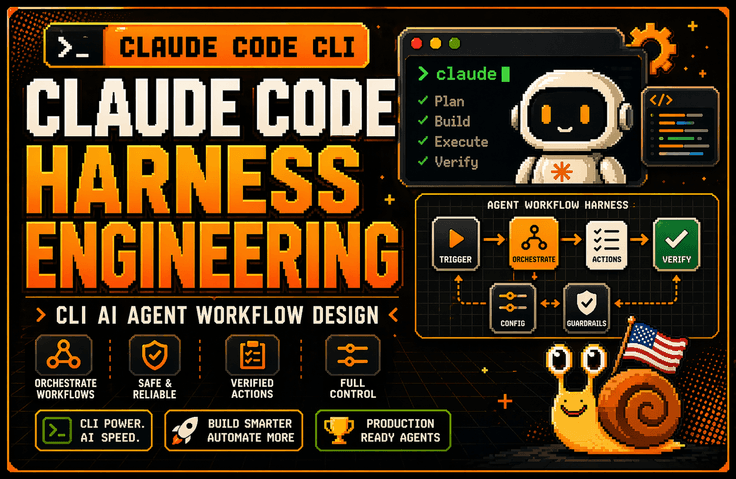
The lecture explains why the harness is more important than the model through the lens of Claude Code architecture. It also covers how to design a Claude Code work system around six structures: Context Harness, Permission Harness, Verification Harness, Tool Harness, Subagent & Worktree Harness, and Debugging Harness. It then connects these concepts to CLAUDE.md, session management, controlling large codebases, parallel worktree operations, error log analysis, and tracking environment variable and configuration scope issues, helping you establish practical standards for continuing to use Claude Code in real-world backend and DevOps work.

(4.4) 55 reviews

718 learners

Level Basic

Course period Unlimited

AI
AI
claude
claude
Vibe Coding
Vibe Coding
harness
harness
AI
AI
claude
claude
Vibe Coding
Vibe Coding
harness
harness

Reviews from Early Learners

4.4

5.0

이태용

61% enrolled

It's great because it allows for a solid understanding of the basic knowledge of harness engineering.

5.0

안준우

32% enrolled

It is great that you list many key words for each step and situation. It is also very helpful that you repeat those words.

5.0

김민재

61% enrolled

You explain how to use Claude Code so well! I love that you also explain the conceptual parts so that even non-majors can use it effectively! (Though I'm not sure if I'll understand everything...)

What you will gain after the course

  • Design Criteria for a Harness That Integrates Claude Code CLI into Real-World Projects

  • The ability to design a workspace for working on large codebases through CLAUDE.md, session management, and context control

  • The ability to design permissions / authorization policies that define the scope of actions Claude can take

  • Practical know-how for a Verification Harness that validates Claude’s output through tests, diffs, and counterexamples instead of trusting it as-is

  • Subagent & Worktree operational skills for safely isolating multiple tasks using worktrees and parallel sessions

  • Practical Debugging Harness skills for organizing error logs, environment variables, configuration scopes, and hard-to-reproduce bugs so Claude can solve them

Claude Code can be fun in a GUI.

However, in CLI harness design, Claude Code pays off.

This course does not introduce Claude Code CLI as merely an AI coding tool. Instead, it covers how to establish Claude Code within real backend and DevOps workflows through the lenses of Context, Permission, Verification, Tool, Subagent, and Debugging Harness. By connecting log analysis, bug fixes, test recovery, CLAUDE.md design, session management, and parallel worktree operations, you will learn how to design a work system that enables Claude to operate safely in real-world projects.

Recommended for people who…

Developers who have installed Claude Code but cannot continue using it in real-world projects

If you could ask questions and get answers conveniently through a GUI, but found yourself returning to the terminal in actual work to read logs, run tests, review diffs, and organize Git branches, you need this course. This course gives you the framework for turning Claude Code from a “tool you try out briefly” into a “tool you keep using in real projects.”


A non-CS developer who spent five hours on something Claude could do in 30 minutes in a large codebase

The problem is likely not simply the model’s performance, but insufficient design of what information Claude should see and within what scope it should operate. This course covers practical patterns for helping Claude get less lost in large codebases through Context Harnesses, CLAUDE.md, session management, and context redesign.

Developers and non-majors who want to go beyond merely “trying out AI coding tools” and elevate their skills to the level of operating them as a real-world system

Rather than a simple feature overview, this course is recommended for those who need practical criteria for deciding which tasks to delegate to Claude and which to judge themselves, which results to verify through tests and diffs, and which automations to extend with Hooks/MCP/Skills. It is especially suitable for backend developers, DevOps engineers, and tech leads.

After completing the course,

After completing this course, you will no longer see Claude Code as merely a tool for “entering good prompts.” Instead, you will be able to determine what Claude needs to see, how far it is allowed to act, how to verify the results, when to use clear/compact/restart if a session becomes polluted, and how to manage worktrees and parallel sessions.

Specifically, you will be able to structurally codify project rules and prohibitions in CLAUDE.md, organize logs, environment variables, and configuration scope issues into a form that Claude can solve, and review Claude’s proposed changes through testing, diff, and counterexample verification loops. In other words, you will elevate Claude Code from a GUI-based assistant to a level where it can be integrated into actual backend and DevOps workflows.

Features of This Course

1. Rather than simply explaining features, this course teaches from a “harness engineering” perspective based on research papers.

This course does not list Claude Code’s features like official documentation. Instead, it explains how to design Context, Permission, Verification, Tool, Subagent, and Debugging Harnesses so that Claude Code can work safely on real projects. As a result, you’ll be less affected by rapidly changing version information and retain principles that can be applied to actual projects.

2. We address large codebases and real-world work problems

Rather than simply building demo apps, this course covers how to keep Claude from getting lost in large codebases, reduce session contamination, safely operate worktrees and parallel sessions, and connect the GitHub Issue → PR workflow with Claude. It starts with the points where people actually get stuck in real-world work.

What you’ll learn

Getting Started with Claude Code CLI for Practical Work /

Architecture / Memory / CLAUDE.md / Plan Mode / Skills

In the first section, we clearly organize the differences between the GUI-based Claude and the CLI, starting with the basics. Rather than simply comparing interface differences, we explain why the GUI tends to stop at “asking questions and receiving answers,” while the CLI can connect all the way to actual logs, tests, Git, and deployment preparation. We then use the Claude Code architecture to understand why the harness is more important than the model, and explore the roles of memory across sessions and CLAUDE.md, as well as the differences between Plan/Thinking Mode and Subagents, and between Skills and tool use.

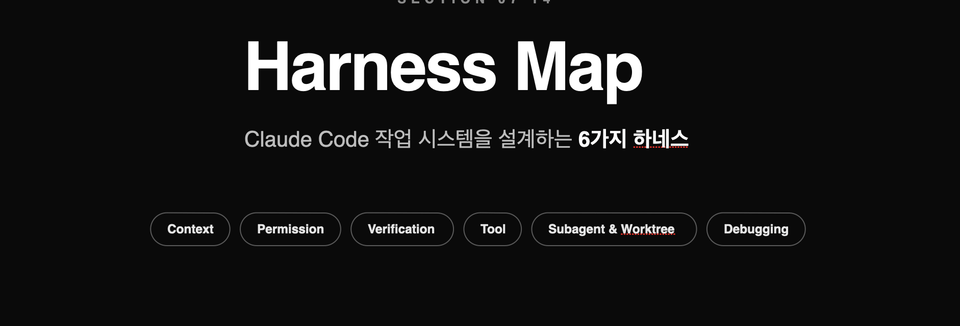
Harness Map / Context Harness / Permission Harness / Verification Harness / Tool Harness / Subagent & Worktree / Debugging Harness

The second section is the core of this course.

It explains the six harnesses needed to integrate Claude Code into real projects as a unified work system. It provides a big-picture view of what information Claude should see, how far it can act, how results should be verified, how tools should be connected and structured, how parallel work should be isolated, and how to turn logs and environment variables into a form that makes troubleshooting possible. In the hands-on section that follows, you will implement this map in practice.


Harness configuration files ready to copy and use immediately

We provide all the harness configurations you create in the course as complete files.
After taking the course, you can copy them into your own project and apply them right away without having to write them from scratch.

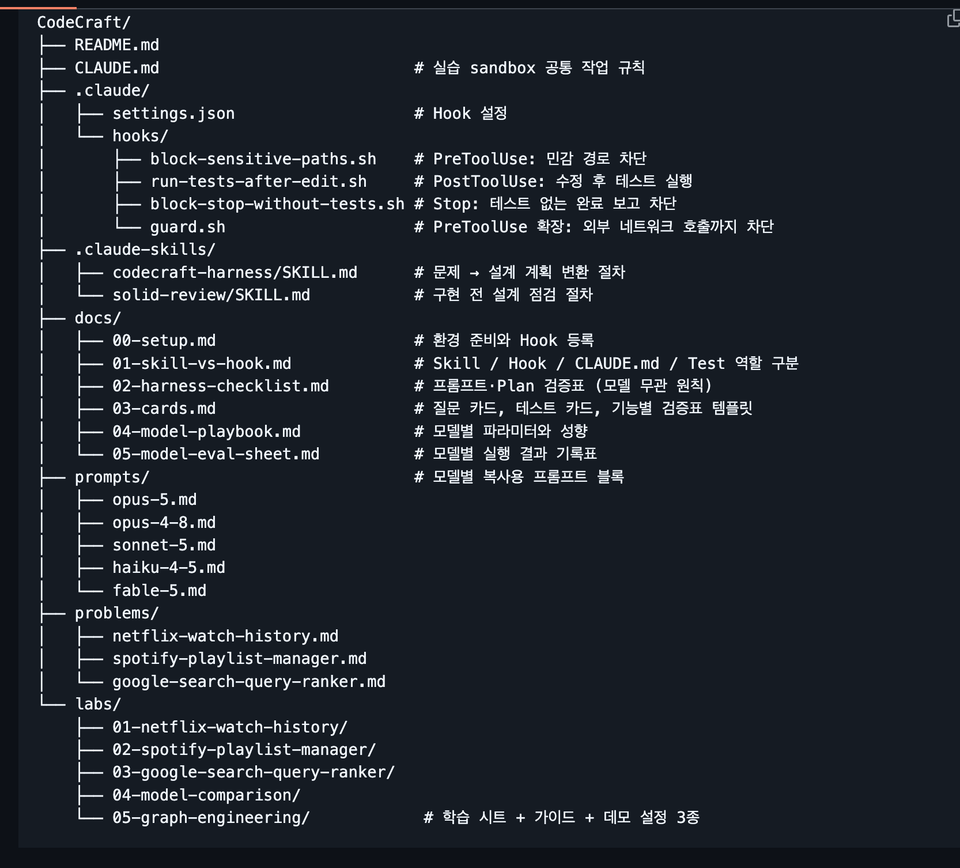
The provided settings are as follows.

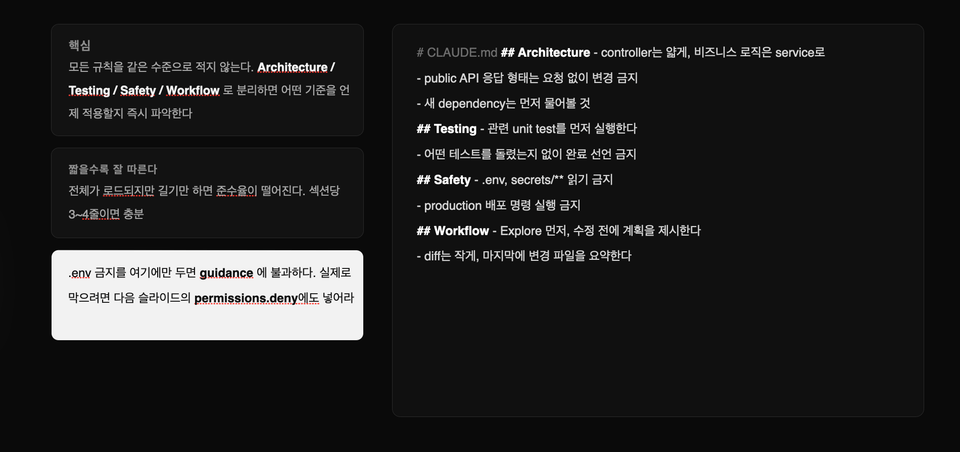
  • CLAUDE.md
    Defines the work rules Claude must follow in the project.

  • codecraft-harness/SKILL.md
    Transforms short, ambiguous, one-sentence requests into concrete designs and implementation plans.

  • solid-review/SKILL.md
    Before starting implementation, it checks whether responsibilities are properly separated and whether the design is unnecessarily complex.

  • block-sensitive-paths.sh
    Blocks access to sensitive files and paths such as .env, SSH keys, and parent project folders.

  • run-tests-after-edit.sh
    Automatically runs the relevant tests every time Claude modifies a file.

  • block-stop-without-tests.sh
    It prevents Claude from reporting a task as complete when tests have not been run or have failed.

  • guard.sh
    It blocks even unauthorized external network requests to create a secure execution environment.

The Hooks included in the course are not merely example code.
We ran them all in real-world environments and verified that they work.

Once you register the configuration file, tests will run automatically every time Claude modifies the code, and if the tests fail, it cannot arbitrarily end by saying, “The task is complete.”

In other words, you will learn how to go beyond asking Claude to validate through prompts and make the system enforce the execution of the validation process.


3. Model-Specific Prompt Playbook

Even when using the same harness, each model differs in which instructions it follows well and which ones it is likely to miss.

In this course, instead of using the same prompt for every model, we provide five copy-ready prompt blocks that outline which instructions to remove and which to add based on each model’s characteristics.

  • Opus 5
    Reduce instructions for validations the model performs itself to prevent unnecessary duplicate work.

  • Opus 4.8
    Makes the tool execution conditions more explicit so that the necessary tools are used at the right time.

  • Sonnet 5
    Covers how to specify in literal detail which files need to be modified and the scope of the changes.

  • Haiku 4.5
    Lay out the execution procedure step by step so you can work reliably even with models that do not have the effort option.

  • Fable 5
    We provide a reference approach that avoids giving the model excessive instructions and retains only the necessary guidance.

Each playbook also includes the following content.

  • Parameter combinations that cause a 400 Error when requested

  • Default parameters and behavioral differences by model

  • A log comparing results while changing the effort value

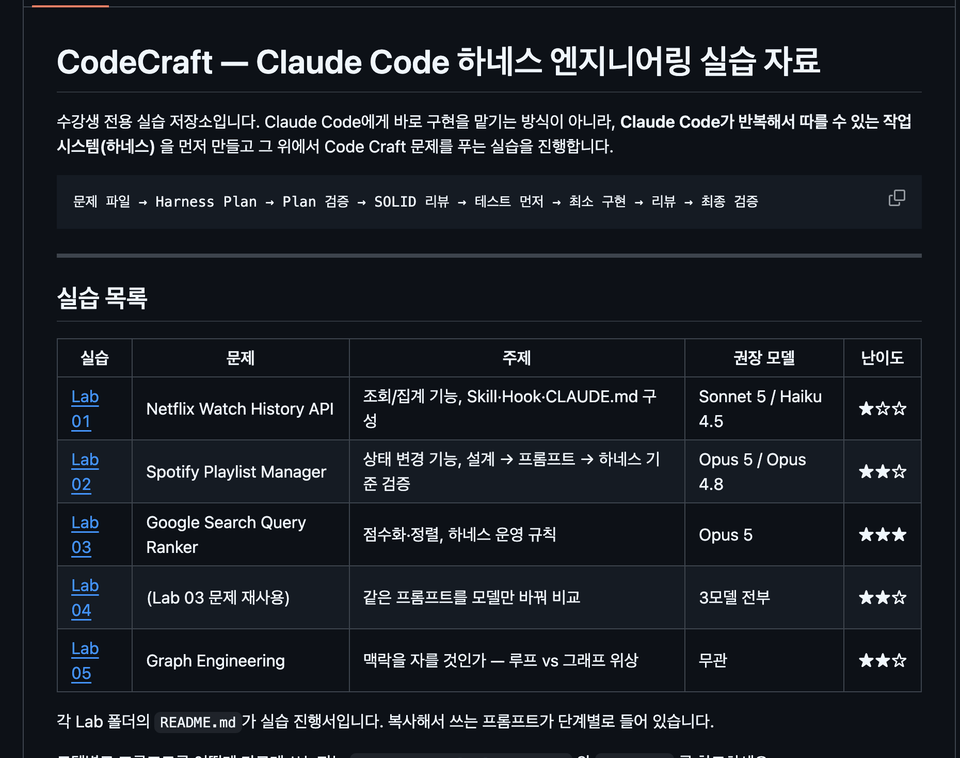
  • Run the same prompt on multiple models and compare the results in the Lab 04 exercise

Rather than simply explaining “which model is better,” you will learn how to find the optimal settings for each model yourself by repeatedly running the same task and recording the results.


Graph Engineering Hands-on Materials — Lab 05

You will directly compare handling a complex task sequentially in a single pass with the Graph Engineering approach, which divides multiple tasks according to their dependencies.

Interactive Learning Sheet

You can use it by opening the HTML file in a browser, without any separate installation or server setup.

You can play back step by step how the same request is handled differently in the following two approaches.

  • Repeating a single flow with loop-based execution

  • Graph-based execution that divides a task into multiple nodes and dependencies

By selecting each step, you can also view the configuration file that created the corresponding action, allowing you to immediately understand the relationship between the execution result and the configuration.

Step-by-Step Learning Guide

We provide a learning guide consisting of 645 lines in total.

Rather than explaining the theory at length from the beginning, it is structured in the following order.

Check the conclusion → 30-minute practice → core concepts → advanced theory

There are also separate learning paths for non-majors and for learners with development experience.

Even those using Claude Code for the first time through vibe coding can start with hands-on practice, while developers can learn more deeply, down to its internal workings and design principles.

Three Demo Projects You Can Run Yourself

Rather than just reading configuration files and stopping there, you will run claude in an actual project folder and directly observe how Hooks block and validate tasks.

Each project intentionally includes the following issues.

  • Type error

  • Test failure

  • Logic bugs that appear normal on the surface

Students will experience the following workflow firsthand.

Detect the problem → Block the task → Modify the code → Run the tests → Pass validation

Loop-based and graph-based projects use the same code, with only the harness configuration set up differently.

Therefore, you can accurately compare how results differ due to the way the work is organized, rather than differences in the code.


Reference document

Practical documentation is also provided so that you can refer to it when setting up projects or solving problems even after completing the course.

  • Environment Setup Guide
    This section covers preparing the execution environment, how to register Hooks, and common errors and their solutions.

  • Distinguishing the Roles of Skills / Hooks / CLAUDE.md / Tests
    Explains what each component is responsible for and which tool to use for which problem.

  • Harness Inspection Checklist
    Verify that nothing is missing from the prompt, design, implementation, testing, and completion criteria.

  • Question and test cards
    Provides questions to use when requirements are ambiguous, test design criteria, and a verification checklist template.

  • Model-Specific Playbook Documentation
    Organizes each model’s parameters, behavioral characteristics, and prompt-writing guidelines in one place.

  • Model evaluation log
    You can run the same task with multiple models and configurations, then compare and record the results.

These materials are not just supplementary course materials; they are organized as a Claude Code harness operations manual that you can reuse repeatedly in real-world projects.


The person who created this course

  • Silicon Valley Survivor | American Snail 

    Drawing on experience and expertise gained at the forefront of the global tech scene, this course shows non-majors how to overcome technical barriers and become the owners of their businesses.

    • Current) Founder of a Silicon Valley AI coding agent startup

      • Operating the self-developed AI tool 'Snailer CLI' (18K+ downloads)

      • Selected for the Google for Startups Program

    • Formerly an engineer at U.S. big tech companies and promising startups

      • Gave up at the final stage with Amazon to start a company

      • Silicon Valley AI Fintech Startup Engineer

      • OpenAI / Meta / Apple / Adobe / Amazon Full-Stack Fellowship

      • Domestic search engine portal, fintech development

      • AI startup AR/B2B/SDK development

    • Proven educational expertise

Do you have any questions?

Q. I’ve used Claude Code a little before—will this course still be helpful?

Yes. In fact, the more familiar you are with Claude Code—even if you have only used it briefly—the more valuable this course is likely to be. If it initially seemed convenient, but you found that Claude kept losing its way when you tried to apply it to a real project, or that you still had to handle the final steps—such as testing, Git, and deployment—yourself, this course addresses exactly those problems. Rather than simply introducing features, the course focuses on the “structure that makes you keep using it.”

Q. Can't I just refer to the official documentation?

Official documentation is the most up-to-date and accurate source of information. However, simply reading the official documentation makes it difficult to gain practical decision-making criteria, such as “when to use which feature,” “why things fail in a large codebase,” “which rules to put in CLAUDE.md and which to move to permissions,” and “how to get back on track when a session becomes compromised.” This course does refer to the official documentation, but it is based on the content of the paper. It provides structures and guidelines you can apply directly in real-world work

Q. What level does this course cover?

This course is not an introductory course on “quickly building an app.”

This is an intermediate, hands-on course designed to integrate the Claude Code CLI into workflows for real-world projects, mobile app development, backend, frontend, DevOps, and more. Accordingly, it will cover log analysis, session management, CLAUDE.md, context redesign, parallel worktree operations, and bonus lessons on topics such as model routing and context budget management.

Notes Before Taking the Course

Practice environment

  • macOS is the most recommended operating system, while Windows users are advised to use a WSL environment. Most of the exercises can also be followed in a similar way on Linux. The hands-on work will center around the Claude Code CLI, so having experience using the terminal will make things much easier. Since the course covers project structure and involves some use of Git/worktree, it is best to have a basic development environment set up beforehand.

Learning materials

  • PPT, Notion

  • The course provides materials centered on practical templates and criteria that can be applied directly at work, rather than just a collection of links. For example, resources such as the CLAUDE.md template, context pack examples, session summary prompts, a worktree operations playbook, and a model routing criteria table are designed so that you can review the material without having to replay the videos from the beginning.

  • Provided Materials


    ▎ GitHub repository exclusively for course participants (33 documents · 5,540 lines)


    ▎ - 5 hands-on exercises — step-by-step guides + 29 copy-ready prompts + sample data


    ▎ - Complete harness configuration — 2 Skills, 4 Hooks, and CLAUDE.md (verified to work)


    ▎ - 5 Model-Specific Prompt Blocks — Opus 5 / 4.8 / Sonnet 5 / Haiku 4.5 / Fable 5


    ▎ - Graph Engineering Materials — Interactive learning sheets + 3 runnable demo projects


    ▎ - 6 reference documents — environment setup, verification checklist, question and test cards, log sheet

Prerequisites and Important Notes

  • Basic development experience, experience using the CLI, and an understanding of Git concepts are ideal.

  • Rather than being a course for casually trying out Claude Code, this course provides harness engineering techniques suitable for all learners, regardless of their background, because it focuses on building a structure that can be used continuously in real-world projects.

Recommended for
these people

Who is this course right for?

  • Developers who installed Claude Code but couldn’t get themselves to keep using it in real projects

  • Developers who feel limited by GUI-based Claude and need practical CLI-based usage techniques

  • Those who want to learn CLAUDE.md, permissions, hooks, MCP, and subagents from a practical, hands-on perspective rather than through feature introductions

  • Developers who want to take AI coding tools beyond merely “trying them out” and up to the level of “operating them as a work system”

Need to know before starting?

  • Experience using LLMs such as ChatGPT or Claude is a plus.

Hello
This is americasnail

Inflearn Verified

1,968

Learners

111

Reviews

81

Answers

4.4

Rating

8

Courses

  • Silicon Valley Survivor | American Snail

    Drawing on experience and expertise gained at the forefront of the Global Tech Scene, I show non-majors how to overcome technical barriers and become the owners of their businesses.

    • Current) Founder of a Silicon Valley AI coding agent startup

      • Operating the internally developed AI tool 'Snailer CLI' (18K+ downloads)

      • Selected for the Google for Startups Program

    • Former engineer at U.S. big tech companies and promising startups

      • Gave up Amazon’s final-stage opportunity to found a startup

      • Silicon Valley AI Fintech Startup Engineer

      • OpenAI / Meta / Apple / Adobe / Amazon Full-Stack Fellowship

      • Domestic search engine portal, fintech development

      • AI startup AR/B2B/SDK development

    • Proven educational expertise

      • Dual major in Computer Engineering and Business Administration at a four-year university in Seoul, with extensive startup experience

      • Over 1,800 students taught cumulatively, with 4.5K+ followers on SNS Threads and 470+ Substack followers.

More

Curriculum

All

57 lectures ∙ (8hr 3min)

Course Materials:

Lecture resources
Published: 
Last updated: 

Reviews

All

55 reviews

4.4

55 reviews

  • jbsh님의 프로필 이미지
    jbsh

    Reviews 13

    Average Rating 5.0

    5

    32% enrolled

    It is great that you list many key words for each step and situation. It is also very helpful that you repeat those words.

    • americasnail
      Instructor

      Hello Junwoo Ahn, thank you for your detailed and valuable course review. I hope you have a great day today :)

  • kevinx64님의 프로필 이미지
    kevinx64

    Reviews 2

    Average Rating 5.0

    5

    61% enrolled

    You explain how to use Claude Code so well! I love that you also explain the conceptual parts so that even non-majors can use it effectively! (Though I'm not sure if I'll understand everything...)

    • americasnail
      Instructor

      Thank you for your valuable review. We are currently establishing an update plan based on various feedback. We will make sure to create it in a way that is easy for everyone to understand. Thank you. Have a great day.

  • wowmen17577817님의 프로필 이미지
    wowmen17577817

    Reviews 2

    Average Rating 5.0

    5

    61% enrolled

    It's great because it allows for a solid understanding of the basic knowledge of harness engineering.

    • americasnail
      Instructor

      Hello Taeyong Lee, thank you for your valuable course review. I hope you have a wonderful day today. Please look forward to this month's update as well!

  • jinp19933808님의 프로필 이미지
    jinp19933808

    Reviews 6

    Average Rating 5.0

    5

    32% enrolled

    I tried to apply Harness in practice but failed every time and only wasted time, so this was the first time I realized it needs to be built so systematically. In particular, I didn't know when to use things like agent skills or hooks and even asked AI to write those features for me, but now that I know their purpose and how to use them, I think I'll be able to utilize them much better.

    • americasnail
      Instructor

      Thank you so much for your valuable review. ☺️ I will continue to reinforce the content with practical methods for using Claude Code more stably in real-world tasks, based on research papers and actual case studies.

  • hoojunlee7658님의 프로필 이미지
    hoojunlee7658

    Reviews 1

    Average Rating 3.0

    Edited

    3

    37% enrolled

    The instructor's level of knowledge is high, but the delivery of the lecture fell short of expectations, so I am leaving feedback focused on drawbacks and areas for improvement. 1. The teaching materials are poor. Regarding the attached PPT materials: I can tell they were made with Claude, but shouldn't there at least be some post-editing for line breaks or broken blocks? (It's only a few pages, so it wouldn't even take 30 minutes.) The font in the video materials is too small to see clearly, and the focus keeps shifting, so I gave up trying to follow along visually. The explanation and the materials feel disconnected. 2. There is too much redundant and unnecessary theoretical explanation from the beginning through the middle. (It felt like being teased, wondering when we would finally get to the main point.) It seems like you have a lot of information to share, but from a learner's perspective, it is difficult to summarize or organize the core points. 3. I was expecting hands-on practice in the latter half, but it ultimately felt like just watching the instructor's demo presentation. It would be much better if you organized the curriculum to be more core-focused, added practical explanations, and guided students to actually type out sample code or markdown files while explaining. I've only skimmed parts of the latter half, but I still have high hopes and will definitely finish the course.

    • americasnail
      Instructor

      Hello jjun1004, First of all, thank you very much for your suggestions for improvement. We will review the points you mentioned and update the service by reflecting those improvements in the latter half of July. We apologize for any disappointment caused. Thank you for taking the course, and we wish you a wonderful day.

    • Now I understand what this review was about. I paid today and realized it after getting past three pages... I’ve already gone over 7%, so I can’t cancel it. Sigh... Ah... the text is way too hard to see...

americasnail's other courses

Check out other courses by the instructor!

Similar courses

Explore other courses in the same field!