

inflearn logo

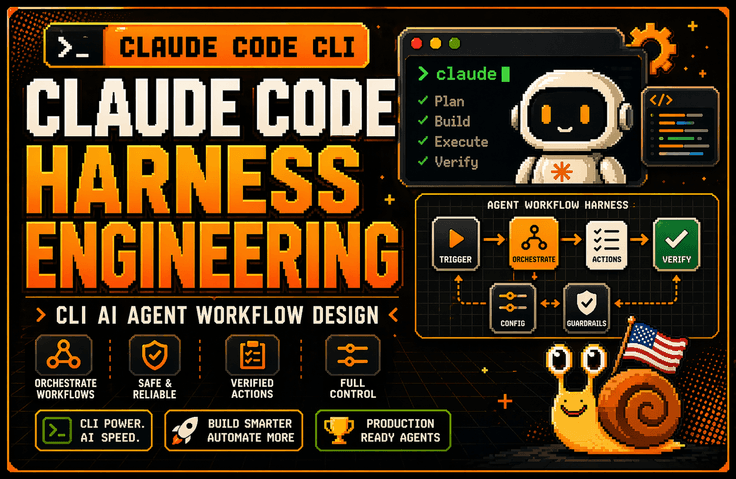
Claude Code Harness and Mods, Graph Engineering: Advanced CLI Harness Engineering in Practice

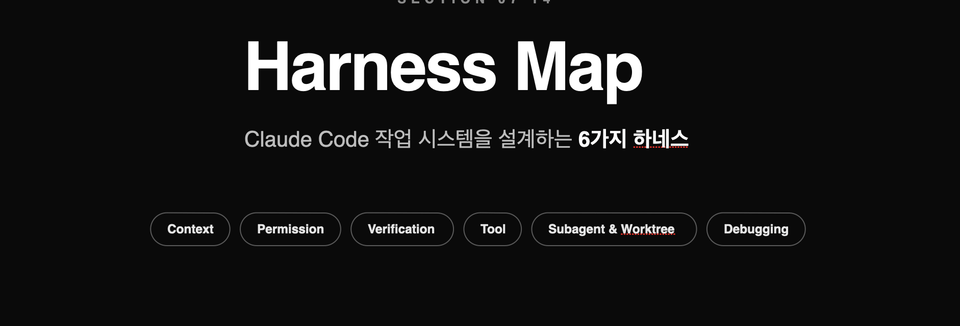
The lecture explains why the harness is more important than the model through the lens of Claude Code architecture. It also covers how to design a Claude Code work system around six structures: Context Harness, Permission Harness, Verification Harness, Tool Harness, Subagent & Worktree Harness, and Debugging Harness. It then connects these concepts to CLAUDE.md, session management, controlling large codebases, parallel worktree operations, error log analysis, and tracking environment variable and configuration scope issues, helping you establish practical standards for continuing to use Claude Code in real-world backend and DevOps work.

(4.4) 65 reviews

792 learners

Level Basic

Course period Unlimited

AI
AI
claude
claude
Vibe Coding
Vibe Coding
harness
harness
AI
AI
claude
claude
Vibe Coding
Vibe Coding
harness
harness

Reviews from Early Learners

4.4

5.0

wogml6026

100% enrolled

I now have a good understanding of the harness structure and how to use it in practice.

5.0

이태용

61% enrolled

It's great because it allows for a solid understanding of the basic knowledge of harness engineering.

5.0

안준우

32% enrolled

It is great that you list many key words for each step and situation. It is also very helpful that you repeat those words.

What you will gain after the course

  • Design Criteria for a Harness That Integrates Claude Code CLI into Real-World Projects

  • The ability to design a workspace for working on large codebases through CLAUDE.md, session management, and context control

  • The ability to design permissions / authorization policies that define the scope of actions Claude can take

  • Practical know-how for a Verification Harness that validates Claude’s output through tests, diffs, and counterexamples instead of trusting it as-is

  • Subagent & Worktree operational skills for safely isolating multiple tasks using worktrees and parallel sessions

  • Practical Debugging Harness skills for organizing error logs, environment variables, configuration scopes, and hard-to-reproduce bugs so Claude can solve them

Claude Code can be fun in a GUI.

However, Claude Code pays off in CLI harness design.

This course does not introduce Claude Code CLI as merely an AI coding tool. Instead, it covers how to establish Claude Code within real backend and DevOps workflows through the lenses of Context, Permission, Verification, Tool, Subagent, and Debugging Harness. By connecting log analysis, bug fixes, test recovery, CLAUDE.md design, session management, and parallel worktree operations, you will learn how to design a work system that allows Claude to operate safely in real-world projects.

Recommended for those who:

Developers who have installed Claude Code but cannot continue using it in real-world projects

If you could ask questions and get answers conveniently in the GUI, but found yourself returning to the terminal in actual work to read logs, run tests, review diffs, and organize Git branches, you need this course. This course gives you the framework for turning Claude Code from a “tool you try out briefly” into a “tool you continue using in real projects.”


A non-CS developer who spent 5 hours on something Claude could do in 30 minutes in a large codebase

The problem is likely not simply model performance, but insufficient design of what information Claude should see and within what scope it should operate. This course covers practical patterns for helping Claude navigate large codebases with less confusion through Context Harness, CLAUDE.md, session management, and context redesign.

Developers and non-majors who want to go beyond merely “trying out AI coding tools” and elevate their use to the level of operating them as a practical system

It is recommended for those who need practical standards rather than a simple feature introduction—such as deciding which tasks to delegate to Claude and which to handle themselves, determining which results should be verified through tests and diffs, and knowing which automations should be extended with Hooks/MCP/Skills. It is especially suitable for backend developers, DevOps engineers, and tech leads.

After completing the course,

After taking this course, you will no longer see Claude Code as merely a tool for “entering good prompts.” Instead, you’ll be able to determine what Claude needs to see, how far it can act, how to verify its results, when to use clear/compact/restart if a session becomes contaminated, and how to manage worktrees and parallel sessions.

Specifically, you will be able to structurally codify project rules and prohibitions in CLAUDE.md, organize log, environment variable, and configuration scope issues into a form Claude can solve, and review the changes Claude proposes through a loop of testing, diff inspection, and counterexample verification. In other words, you will elevate Claude Code beyond a GUI-based assistant to a level where it can be integrated into actual backend and DevOps workflows.

From Claude Code that needs to be instructed every time to Claude Code that works according to my rules

“Check the tests, too.”
“Ask me before running that command.”
“Don’t leave sensitive information in the logs.”

The more you use Claude Code in real-world work, the more often you find yourself repeating the same instructions. That’s because deciding which tasks to allow and what to verify before considering a task complete is just as important as writing code quickly.

In this Claude Code Mods section, you will implement these requirements in code. Following the eight lessons, you will gradually build a hands-on project called Harness Guard Kit.

  • Deciding Before Execution: Review tool calls and handle forwarding, approval requests, and rejections according to the established rules.

  • Managing sensitive information and work records: Redact sensitive information from logs and design records that allow work to be tracked.

  • Checking completion criteria: Configure a Completion Gate so that work does not end without performing all necessary validations.

  • Observing context and costs: Read context, cache, and cost information, and distinguish between observed and estimated values.

  • Testing behavior and sharing it with the team: Evaluate not only normal situations but also rejection and error scenarios, and cover the deployment, update, and rollback flows.

This goes beyond simply using installed features: it is a process of directly designing how Claude Code should behave for your project.

Recommended for developers who want to connect work principles to actual execution flows, developers who spend time repeatedly reviewing AI-generated results, and developers who want to turn their team’s work standards into reusable tools.

The hands-on exercises are conducted in a testing environment, where you’ll also learn how your custom-built Guard works together with Claude Code and your organization’s existing permission policies.


Features of This Course

1. Rather than explaining features, it teaches from a “harness engineering” perspective based on research papers.

This course does not simply list Claude Code’s features like official documentation. Instead, it explains how to design Context, Permission, Verification, Tool, Subagent, and Debugging Harness so that Claude Code can work safely on real-world projects. This makes you less affected by rapidly changing version information while leaving you with principles that can be applied to actual projects.

2. It is based on large codebases and real-world problems

Rather than simply building demo apps, this course covers how to keep Claude from getting lost in large codebases, reduce session contamination, safely manage worktrees and parallel sessions, and connect the GitHub Issue → PR workflow with Claude. It starts with the points where people actually get stuck in real-world work.

You’ll learn the following

Getting Started with Claude Code CLI for Practical Work /

Architecture / Memory / CLAUDE.md / Plan Mode / Skills

In the first section, we clearly lay out the differences between GUI-based Claude and the CLI, starting with the basics. Rather than simply comparing interface differences, we explain why GUI workflows tend to stop at “asking a question and receiving an answer,” while the CLI can connect all the way to actual logs, tests, Git, and deployment preparation. We then use Claude Code architecture to understand why the harness is more important than the model, and explore the role of memory across sessions and CLAUDE.md, as well as the differences between Plan/Thinking Mode and Subagents, and between Skills and Tool use.

Harness Map / Context Harness / Permission Harness / Verification Harness / Tool Harness / Subagent & Worktree / Debugging Harness

The second section is the core of this course.

This section explains the six harnesses needed to integrate Claude Code into real projects as a single work system. It provides a big-picture view of what information Claude should see, how far it can act, how to verify results, which tools to connect and in what structure, how to isolate parallel work, and how to turn logs and environment variables into a form that makes troubleshooting possible. In the hands-on section that follows, you will implement this map in practice.


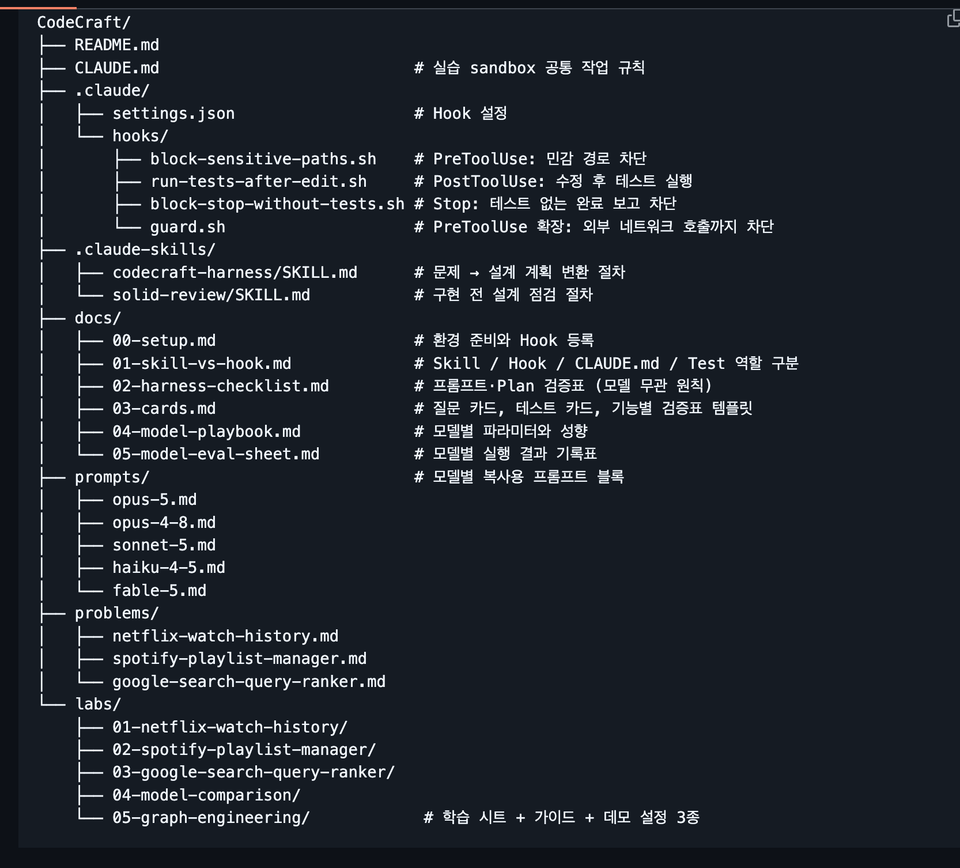
Harness configuration files you can copy and use right away

The harness configuration you create directly in the course is provided in full as completed files.
After taking the course, you can copy it into your own project and apply it right away without having to write it all again from scratch.

The provided settings are as follows.

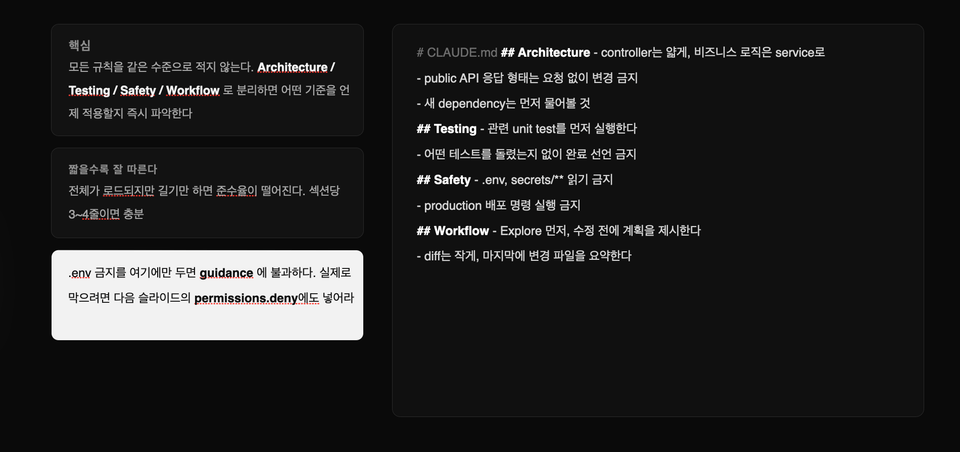
  • CLAUDE.md
    Defines the working rules Claude must follow in the project.

  • codecraft-harness/SKILL.md
    Transforms a short, ambiguous one-sentence request into a concrete design and implementation plan.

  • solid-review/SKILL.md
    Before starting implementation, check whether responsibilities are appropriately separated and whether the design is unnecessarily complex.

  • block-sensitive-paths.sh
    .env, SSH keys, project parent directories, and other sensitive files and paths are blocked from access.

  • run-tests-after-edit.sh
    Automatically runs the relevant tests every time Claude modifies a file.

  • block-stop-without-tests.sh
    Prevents you from reporting a task as complete when tests have not been run or have failed.

  • guard.sh
    It blocks even unauthorized external network requests, creating a safe execution environment.

The Hooks included in the course are not just sample code.
They were all run and verified in a real-world environment.

Once the configuration file is registered, tests run automatically every time Claude modifies the code, and when tests are failing, it cannot arbitrarily end by saying, “I’ve completed the task.”

In other words, rather than merely asking Claude to verify its work through prompts, you will learn how to make the system enforce the verification process.


3. Model-Specific Prompt Playbook

Even when using the same harness, the instructions each model follows well and those it tends to overlook differ.

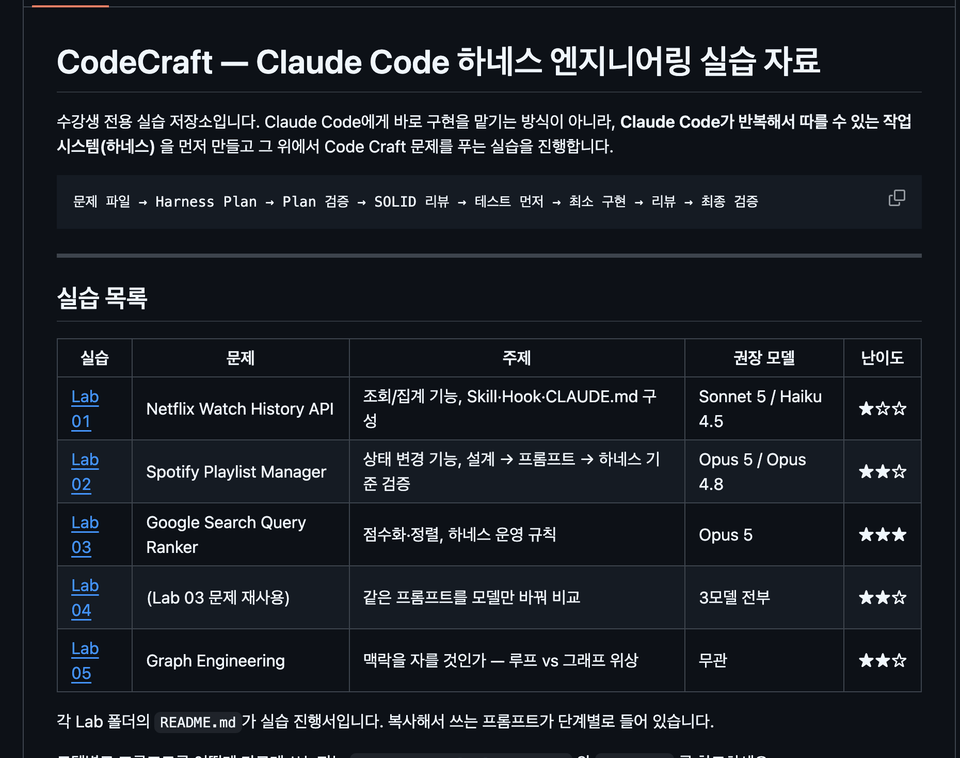
In this course, instead of using the same prompts for every model, we provide five copy-ready prompt blocks outlining which instructions to remove and which to add based on each model’s characteristics.

  • Opus 5
    Reduce the verification instructions the model performs on its own to prevent unnecessary duplicate work.

  • Opus 4.8
    Make the tool execution conditions more explicit so that the necessary tools are used at exactly the right time.

  • Sonnet 5
    This covers how to write, in literal and specific terms, the files that need to be modified and the scope of the changes.

  • Haiku 4.5
    It lays out the execution procedure step by step so you can work reliably even with models that do not have an effort option.

  • Fable 5
    We provide, for reference, an approach that avoids giving the model excessive instructions and retains only the necessary prescriptions.

Each playbook also includes the following content.

  • Parameter combinations that cause a 400 Error when requested

  • Default parameters and behavioral differences by model

  • A record sheet for comparing results while changing the effort value

  • Lab 04 exercise: Run the same prompt on multiple models and compare the results

Rather than simply explaining “which model is better,” you will learn how to find the optimal settings for each model yourself by repeatedly running the same task and recording the results.


Graph Engineering Practice Materials — Lab 05

You will directly compare the approach of processing complex tasks sequentially in one go with the Graph Engineering approach of dividing tasks according to their dependencies.

Interactive Learning Sheet

You can use it by opening the HTML file in a browser, without any separate installation or server startup.

You can play back step by step how the same request is handled differently in the following two approaches.

  • Repeating a single flow with loop-based execution

  • Graph-based execution that divides a task into multiple nodes and dependencies

When you select each step, you can also view the configuration file that created that action, allowing you to immediately understand the relationship between the execution result and the configuration.

Step-by-Step Learning Guide

We provide a learning guide totaling 645 lines.

Rather than explaining the theory at length from the start, it is organized in the following order.

Check the conclusion → 30-minute practice → core concepts → advanced theory

There are also separate learning paths for non-majors and for learners with development experience.

Even those using Claude Code for the first time through vibe coding can start with hands-on practice, while developers can delve deeper into its internal workings and design principles.

Three demo projects you can run yourself

Rather than simply reading configuration files, you will run claude in an actual project folder and directly observe how Hooks block and validate tasks.

Each project intentionally includes the following issues.

  • Type error

  • Test failure

  • A logic bug that appears normal on the surface

Learners will directly experience the following flow.

Detect the issue → Block the task → Fix the code → Run the tests → Pass validation

Loop-based and graph-based projects use the same code, with only the harness configuration set up differently.

Therefore, you can accurately compare how the results differ due to the way the work is organized, not differences in the code.


Reference documents

Practical documentation is also provided so that you can refer to it when setting up projects or solving problems even after completing the course.

  • Environment Setup Guide
    A summary of how to prepare the execution environment, register Hooks, and resolve common errors.

  • Distinguishing the Roles of Skills, Hooks, CLAUDE.md, and Tests
    Explains what each component is responsible for and which tool to use for each problem.

  • Harness Inspection Checklist
    Verify that nothing is missing from the prompt, design, implementation, tests, and completion criteria.

  • Question and test cards
    Provides questions to use when requirements are ambiguous, test design criteria, and verification table templates.

  • Model-Specific Playbook Documents
    Parameters, behavioral characteristics, and prompt-writing guidelines for each model are organized in one place.

  • Model Evaluation Record
    You can run the same task with multiple models and configurations, then compare and record the results.

These materials are not merely course supplements; they comprise a Claude Code harness operations manual that you can repeatedly use in real-world projects.


The person who created this course

  • Silicon Valley Survivor | American Snail 

    Drawing on experience and expertise gained at the forefront of the Global Tech Scene, this course shows non-majors how to overcome technical barriers and become the owners of their businesses.

    • Current) Founder of a Silicon Valley AI coding & local model fine-tuning agent startup

      • Development and operation of Closiro CLI/Mac Desktop (20K+ downloads)

      • Selected for the Google for Startups Program

      • Selected for the Anthropic for Startups Program

    • Former engineer at U.S. Big Tech companies and promising startups

      • Gave up the final stage at Amazon to start a company

      • Silicon Valley AI Fintech Startup Engineer

      • OpenAI / Meta / Apple / Adobe / Amazon Full-Stack Fellowship

      • Domestic search engine portal, fintech development

      • AI startup AR/B2B/SDK development

    • Proven educational expertise

Do you have any questions?

Q. I’ve used Claude Code a little before—will this course still be helpful?

Yes. In fact, those who have used Claude Code even briefly are likely to find this course especially valuable. It may have seemed convenient at first, but if you’ve ever been disappointed when Claude kept losing its way in a real project, or when you had to handle the final steps—such as testing, Git, and deployment—yourself again, this course addresses exactly those problems. Rather than focusing on feature introductions, this course focuses on “a structure that keeps you using it.”

Q. Can't I just refer to the official documentation?

Official documentation is the most up-to-date and accurate point of reference. However, simply reading the official documentation makes it difficult to gain practical decision-making criteria such as “when to use which feature,” “why things fail in a large codebase,” “which rules to put in CLAUDE.md and which to move to permissions,” and “how to get back on track when a session has become contaminated.” Although this course references the official documentation, it is based on the content of the paper. It provides structures and criteria you can apply directly in practice.

Q. What level does this course cover?

This course is not an introductory “let’s quickly build an app” course.

This is an intermediate, hands-on course designed to integrate the Claude Code CLI into workflows for real-world projects, mobile app development, backend, frontend, DevOps, and more. Accordingly, it will cover topics such as log analysis, session management, CLAUDE.md, context redesign, parallel worktree operations, and, as bonus lessons, model routing and context budget management.

Notes Before Taking the Course

Practice environment

  • macOS is the most recommended operating system, while Windows users are advised to use a WSL environment. Most of the exercises can also be followed in a similar way on Linux. The hands-on work centers on the Claude Code CLI, so having experience using the terminal will make things much easier. Since the course covers project structure and uses Git/worktree to some extent, it is best to have a basic development environment already set up.

Learning materials

  • PPT, Notion

  • The course provides more than just a collection of links—it offers materials centered around templates and checklists that can be applied directly in real-world work. For example, resources such as the CLAUDE.md template, context pack examples, session recap prompts, a worktree operations playbook, and a model routing checklist are designed so that you won’t need to rewatch the videos from the beginning when reviewing.

  • Provided Materials


    ▎ GitHub repository exclusively for students (33 documents · 5,540 lines)


    ▎ - 5 hands-on exercises — step-by-step guides + 29 copy-ready prompts + sample data


    ▎ - Complete harness configuration — 2 Skills, 4 Hooks, CLAUDE.md (operation verified)


    ▎ - 5 Prompt Blocks by Model — Opus 5 / 4.8 / Sonnet 5 / Haiku 4.5 / Fable 5


    ▎ - Graph Engineering Materials — Interactive learning sheets + 3 working demo projects


    ▎ - 6 reference documents — environment setup, verification checklist, question and test cards, and log sheet

Prerequisites and Important Notes

  • Basic development experience, experience using the CLI, and an understanding of Git concepts are ideal.

  • Rather than being a course where you casually “dip your toes into” Claude Code for fun, this course is designed to build a structure you can continue using in real-world projects, so it provides harness engineering techniques suitable for all students, regardless of their academic background.

Recommended for
these people

Who is this course right for?

  • Developers who installed Claude Code but couldn’t get themselves to keep using it in real projects

  • Developers who feel limited by GUI-based Claude and need practical CLI-based usage techniques

  • Those who want to learn CLAUDE.md, permissions, hooks, MCP, and subagents from a practical, hands-on perspective rather than through feature introductions

  • Developers who want to take AI coding tools beyond merely “trying them out” and up to the level of “operating them as a work system”

Need to know before starting?

  • Experience using LLMs such as ChatGPT or Claude is a plus.

Hello
This is americasnail

Inflearn Verified

2,140

Learners

130

Reviews

84

Answers

4.5

Rating

8

Courses

  • Silicon Valley Survivor | American Snail

    Drawing on experience and know-how gained at the forefront of the Global Tech Scene, I show non-majors how to overcome technological barriers and become the owners of their businesses.

    • Current) Founder of a Silicon Valley AI coding & local model fine-tuning agent startup

      • Development and operation of Closiro CLI/Mac Desktop (20K+ downloads)

      • Selected for the Google for Startups Program

      • Selected for the Anthropic for Startups Program

    • Formerly: Engineer at U.S. Big Tech Companies and Promising Startups

      • Gave up Amazon’s final stage to start a company

      • Silicon Valley AI Fintech Startup Engineer

      • OpenAI / Meta / Apple / Adobe / Amazon Full-Stack Fellowship

      • Domestic search engine portal, fintech development

      • AI startup AR/B2B/SDK development

    • Proven teaching expertise

      • Double major in Computer Science and Business Administration at a four-year university in Seoul, with extensive startup experience

      • Produced 2,100+ cumulative students, with 4.6K+ followers on SNS Threads and 500+ Substack followers.

More

Curriculum

All

59 lectures ∙ (8hr 34min)

Course Materials:

Lecture resources
Published: 
Last updated: 

Reviews

All

65 reviews

4.4

65 reviews

  • dolilu님의 프로필 이미지
    dolilu

    Reviews 12

    ∙

    Average Rating 4.8

    2

    23% enrolled

    I can't focus because the lecture materials are completely out of sync with the content. I honestly wonder what the intention was behind recording it this way—with all the zooming in, zooming out, and moving the materials around—it makes it impossible to immerse myself in the lecture. Many others have also pointed out issues with the lecture materials, to the point where I started wondering if you recorded the audio first and then used AI to match the visuals to it. I purchased this course with high expectations for the content, but I've stopped watching because I simply can't concentrate. I hope you can improve this.

    • americasnail
      Instructor

      Hello, Doriru. Thank you for your valuable feedback. As you mentioned, I fully understand your point that the lecture materials and screen layout made it difficult to focus on the content. Since many other students also expressed disappointment regarding the lecture materials, we have already distributed a completely revised set of new materials. While the core content of the lecture remains largely unchanged, leading us to prioritize video updates lower, we plan to continuously improve the screen layout and delivery methods. My intention was to help understanding by showing the explanation and materials together, but if it ultimately hindered immersion, I agree it is an area that needs improvement. I also noted your comment about it feeling like an AI voice was used. Because many people found the speaking style and pace in previous lectures uncomfortable, I have been recording and editing multiple times during the production process to enhance clarity and naturalness. However, if it felt that way from a student's perspective, I believe the delivery method is also something that needs to be improved. In the future, I will organize the materials to be easier to read and minimize screen transitions, zooming in, and zooming out so that you can focus more on the lecture content itself. I will actively reflect your feedback to create better lectures.

    • americasnail
      Instructor

      The improvement has been completed.

  • claid님의 프로필 이미지
    claid

    Reviews 10

    ∙

    Average Rating 4.2

    1

    8% enrolled

    Unlike the previous lectures, this PPT seems to have been created using an AI tool, so the text is too small to understand the content. In addition to the small font size, the text has borders around it on the PPT, which significantly reduces readability. The lecture materials you created yourself, as you did before, were much higher quality, so I’m somewhat disappointed with these materials.

    • americasnail
      Instructor

      Hello NPE, thank you for your feedback. We understand that you found the materials difficult to read at the 8% completion point. We will review the font size and layout you mentioned. However, this course is structured as a complete flow that includes hands-on exercises and additional materials in the latter half. If possible, we would appreciate it if you could continue a little further and then reevaluate the course as a whole.

  • kmsaa2862님의 프로필 이미지
    kmsaa2862

    Reviews 2

    ∙

    Average Rating 3.5

    2

    68% enrolled

    1. There is a lot of unnecessary content in the middle. 2. The target audience is unclear. - Is it for non-majors? Or for majors? - Is it for job seekers? Or for working professionals? - Etc. 3. Looking at the curriculum and titles, it seems like a course for professional developers, but the actual hands-on sessions are nothing more than just watching the instructor do it.

    • americasnail
      Instructor

      Hello Min-seok, thank you for your course review. 1. First, I will review and improve the unnecessary content in the middle to reflect your feedback. 2. When creating the course, the target audience was both non-majors and majors. 3. In the practical lectures, I made it possible to use the prompts directly from the class notes. I also divided the lectures so that you can practice at every step. I believe that if students do not actively participate, the practical lectures will just feel like watching. Nevertheless, to improve upon the feedback you provided, I will reinforce the course with checkpoints and missions so that students can follow along and create actual practical results. Thank you, and have a great day.

  • hoojunlee7658님의 프로필 이미지
    hoojunlee7658

    Reviews 1

    ∙

    Average Rating 3.0

    Edited

    3

    37% enrolled

    The instructor's level of knowledge is high, but the delivery of the lecture fell short of expectations, so I am leaving feedback focused on drawbacks and areas for improvement. 1. The teaching materials are poor. Regarding the attached PPT materials: I can tell they were made with Claude, but shouldn't there at least be some post-editing for line breaks or broken blocks? (It's only a few pages, so it wouldn't even take 30 minutes.) The font in the video materials is too small to see clearly, and the focus keeps shifting, so I gave up trying to follow along visually. The explanation and the materials feel disconnected. 2. There is too much redundant and unnecessary theoretical explanation from the beginning through the middle. (It felt like being teased, wondering when we would finally get to the main point.) It seems like you have a lot of information to share, but from a learner's perspective, it is difficult to summarize or organize the core points. 3. I was expecting hands-on practice in the latter half, but it ultimately felt like just watching the instructor's demo presentation. It would be much better if you organized the curriculum to be more core-focused, added practical explanations, and guided students to actually type out sample code or markdown files while explaining. I've only skimmed parts of the latter half, but I still have high hopes and will definitely finish the course.

    • americasnail
      Instructor

      Hello jjun1004, First of all, thank you very much for your suggestions for improvement. We will review the points you mentioned and update the service by reflecting those improvements in the latter half of July. We apologize for any disappointment caused. Thank you for taking the course, and we wish you a wonderful day.

    • Now I understand what this review was about. I paid today and realized it after getting past three pages... I’ve already gone over 7%, so I can’t cancel it. Sigh... Ah... the text is way too hard to see...

  • jonghun7lee0826님의 프로필 이미지
    jonghun7lee0826

    Reviews 1

    ∙

    Average Rating 2.0

    2

    32% enrolled

    • americasnail
      Instructor

      Hello, Jonghoon Lee. Thank you for leaving a course review. Since you gave a 2-star rating after completing 32% of the course, I take this to mean that there were areas that did not meet your expectations. However, as there are no specific comments provided, it is difficult for me to pinpoint exactly what needs improvement. If you could let me know which parts you found disappointing, I will actively reflect your feedback in future course updates. Currently, I am planning to update the CodeCraft Harness Engineering practice course to include new updates aligned with the release of the Opus 4.8 model. I will continue to improve the course to make it easier to understand and more applicable. Thank you.

americasnail's other courses

Check out other courses by the instructor!

Similar courses

Explore other courses in the same field!

25% off for new members

$48.20

25%

$68.20