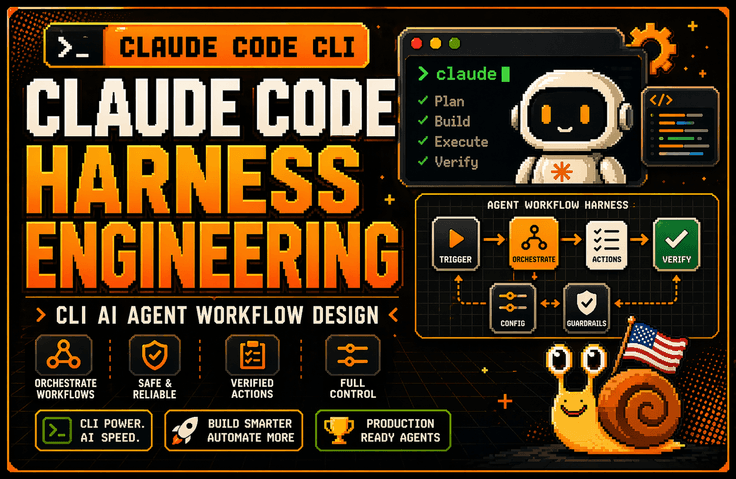


Claude Code Harness Engineering: Advanced CLI Harness Engineering Practice

The lecture explains why the harness is more important than the model through the Claude Code architecture. It covers how to design the Claude Code task system using six structures: Context Harness, Permission Harness, Verification Harness, Tool Harness, Subagent & Worktree Harness, and Debugging Harness. Afterward, it connects these concepts to CLAUDE.md, session management, large codebase control, worktree parallel operations, error log analysis, and tracking environment variables and configuration scope issues, establishing the standards for continuously using Claude Code in practical backend and DevOps workflows.

(4.4) 36 reviews

568 learners

Level Basic

Course period Unlimited

AI
AI
claude
claude
Vibe Coding
Vibe Coding
harness
harness
AI
AI
claude
claude
Vibe Coding
Vibe Coding
harness
harness

Reviews from Early Learners

4.4

5.0

이태용

61% enrolled

It's great because it allows for a solid understanding of the basic knowledge of harness engineering.

5.0

안준우

32% enrolled

It is great that you list many key words for each step and situation. It is also very helpful that you repeat those words.

5.0

김민재

61% enrolled

You explain how to use Claude Code so well! I love that you also explain the conceptual parts so that even non-majors can use it effectively! (Though I'm not sure if I'll understand everything...)

What you will gain after the course

  • Harness design criteria for integrating Claude Code CLI into real-world projects

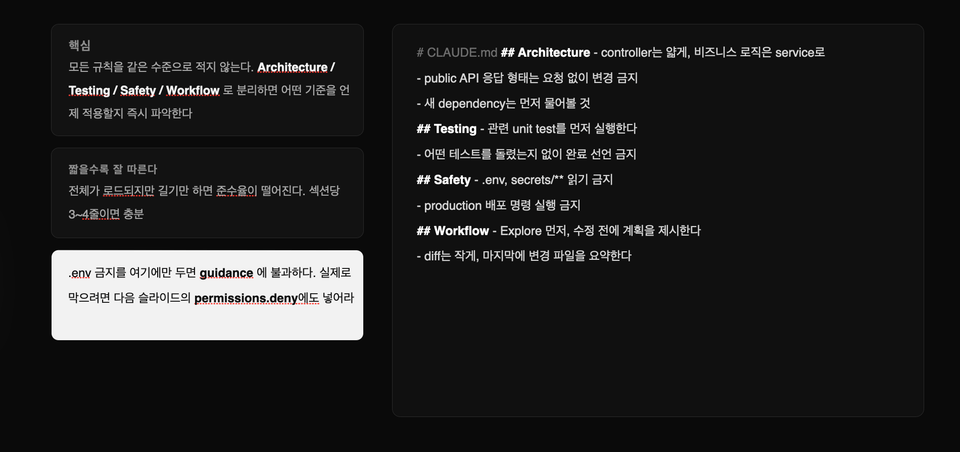
  • Ability to design workflows for large codebases through CLAUDE.md, session management, and context control

  • Ability to design permissions and authorization policies that define the scope of actions Claude can perform.

  • Practical sense of using a Verification Harness to verify Claude's outputs through tests, diffs, and counterexamples rather than trusting them blindly.

  • Subagent & Worktree operational capabilities to safely isolate multi-tasks using worktrees and parallel sessions

  • Practical skills in creating a Debugging Harness to organize error logs, environment variables, configuration scopes, and hard-to-reproduce bugs so that Claude can solve them.

Claude Code in the GUI can be fun.

However, in the harness design of the CLI, Claude Code becomes profitable.

This course does not introduce Claude Code CLI as just another AI coding tool. Instead, it covers how to integrate Claude Code into actual backend and DevOps workflows through the perspectives of Context, Permission, Verification, Tool, Subagent, and Debugging Harness. By connecting log analysis, bug fixes, test recovery, CLAUDE.md design, session management, and parallel worktree operations, you will learn how to design a working system where Claude can operate safely within real-world projects.

Recommended for these people

Developers who have installed Claude Code but find themselves unable to use it consistently in actual projects

If you found yourself comfortably asking and receiving answers in the GUI, only to return to the terminal in practice to read logs, run tests, review diffs, and organize Git branches, then you need this course. This course provides the standards to transform Claude Code from a "tool you try out briefly" into a "tool you use continuously in real-world projects."


A non-major developer who spent 5 hours on something Claude could have done in 30 minutes in a large codebase

The problem is likely not just model performance, but a lack of design regarding what information Claude should see and within what scope it should operate. This course covers practical patterns—including Context Harness, CLAUDE.md, session management, and context redesign—to prevent Claude from getting lost in large codebases.

Developers and non-majors who want to elevate their use of AI coding tools from "using them well" to "operating them at a professional system level"

I recommend this to those who need practical standards beyond simple feature introductions—such as deciding which tasks to delegate to Claude versus which to judge yourself, which results to verify through tests and diffs, and which automations to extend using Hooks, MCP, or Skills. It is particularly suitable for backend developers, DevOps engineers, and tech leads.

After taking this course,

After taking this course, you will no longer view Claude Code as merely a "tool for entering good prompts." Instead, you will be able to determine what Claude needs to look at, the extent of its permitted actions, how to verify specific results, when to clear/compact/restart if a session becomes contaminated, and how to manage worktrees and parallel sessions.

Specifically, you will be able to structurally fix project rules and prohibitions in CLAUDE.md, organize log, environment variable, and configuration scope issues into a format that Claude can solve, and review Claude's proposed fixes through a loop of testing, diffing, and counter-example verification. In other words, you will elevate Claude Code from a GUI-based auxiliary tool to a level where it can be integrated into actual backend and DevOps workflows.

Key features of this course

1. Instead of just explaining features, it teaches from a "Harness Engineering" perspective based on research papers.

This course does not simply list Claude Code's features like official documentation. Instead, it explains how to design Context, Permission, Verification, Tools, Subagents, and Debugging Harnesses so that Claude Code can work safely within real-world projects. As a result, you will be less affected by rapidly changing version updates and will be left with standards applicable to actual projects.

2. Covers large codebases and actual practical problems as the standard

We cover more than just building simple demo apps; we dive into how to prevent Claude from getting lost in large codebases, how to reduce session pollution, how to safely manage worktrees and parallel sessions, and how to connect the GitHub Issue to PR workflow with Claude. We start from the actual bottlenecks encountered in real-world practice.


What you will learn

Getting Started with Claude Code CLI in Practice /

Architecture / Memory / CLAUDE.md / Plan Mode / Skills

In the first section, we clearly define the differences between the GUI-based Claude and the CLI. Rather than simply comparing interface differences, we explain why the GUI often limits you to "asking and receiving answers," whereas the CLI allows you to connect directly to actual logs, testing, Git, and deployment preparation. Afterward, through the Claude Code architecture, you will understand why the harness is more important than the model itself. We will also examine the roles of session memory and CLAUDE.md, the differences between Plan/Thinking Mode and Subagents, and the distinctions between Skills and Tool use.

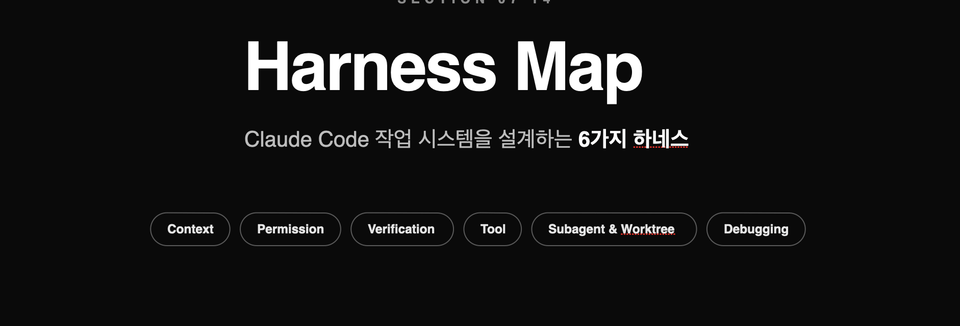
Harness Map / Context Harness / Permission Harness / Verification Harness / Tool Harness / Subagent & Worktree / Debugging Harness

The second section is the core of this lecture.

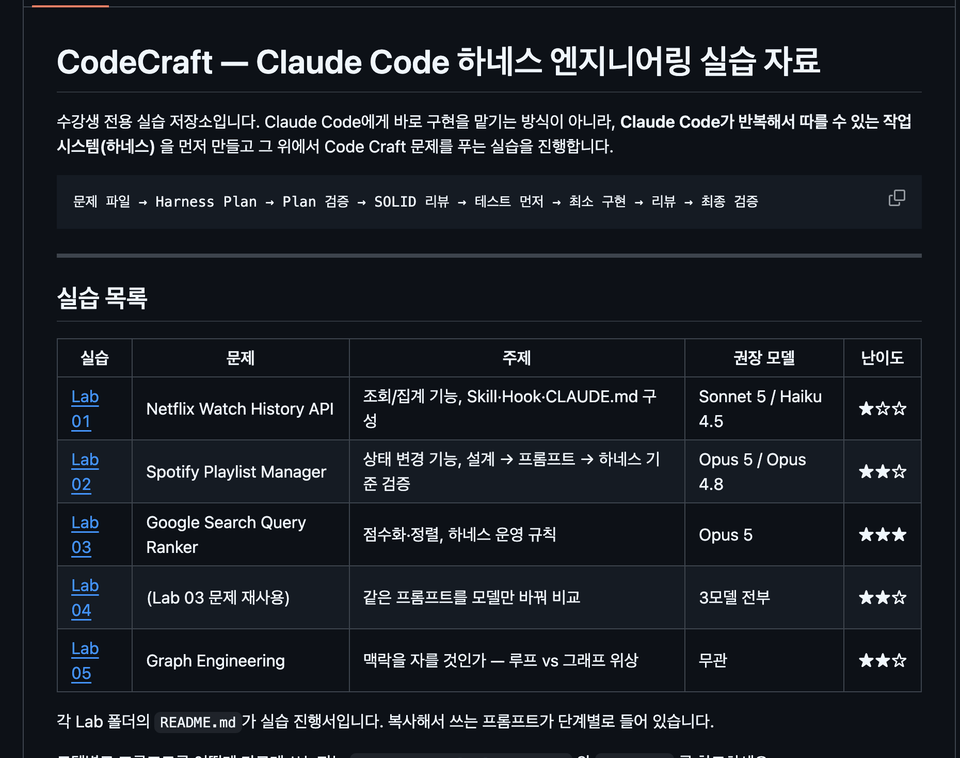
This explains the six harnesses required to integrate Claude Code into an actual project as a single unified operating system. It provides a big-picture overview of what information Claude needs to see, the extent of its permitted actions, how to verify results, what tools to attach and in what structure, how to isolate parallel tasks, and how to transform logs and environment variables into a format suitable for troubleshooting. You will then proceed to actually implement this map in the practical exercise section.

The person who created this course

  • Silicon Valley Survivor | US Snail

    Based on experience and know-how accumulated at the forefront of the Global Tech Scene, I present a path for non-majors to overcome technical barriers and become masters of their business.

    • Current) Founder of a Silicon Valley AI Coding Agent Startup

      • Operating self-developed AI tool 'Snailer CLI' (16K+ downloads)

      • Selected for the Google for Startups Program

    • Former) Engineer Career at U.S. Big Tech and Promising Startups

      • Reached the final stage at Amazon, but gave it up to start a business

      • Silicon Valley AI Fintech Startup Engineer

      • OpenAI / Meta / Apple / Adobe / Amazon Full-Stack Fellowship

      • Domestic search engine portal and fintech development

      • AI Startup AR/B2B/SDK Development

    • Proven Educational Capabilities

Do you have any questions?

Q. I've used Claude Code a little bit before; will this lecture still be helpful?

Yes. In fact, those who have already used Claude Code, even briefly, are likely to find this course even more impactful. If you’ve experienced the frustration of it seeming convenient at first, only to have Claude lose its way when applied to a real project, or felt the disappointment of having to manually handle the final steps like testing, Git, and deployment, this course addresses those exact issues. Rather than just introducing features, this course focuses on the "structure that makes you keep using it."

Q. Can't I just look at the official documentation?

Official documentation is the most up-to-date and accurate reference point. However, simply reading the documentation makes it difficult to gain practical judgment criteria, such as "when to use which feature," "why it fails in large codebases," "which rules should go into CLAUDE.md versus permissions," or "how to recover when a session becomes corrupted." While this course references official documentation, it is based on research paper content. It provides a structure and standards that can be immediately applied to real-world tasks.

Q. To what level does this course cover?

This course is not an introductory "build an app quickly" type of lecture.

This is an intermediate-level practical course designed to integrate the Claude Code CLI into actual projects and workflows such as mobile app development, backend, frontend, and DevOps. Therefore, it will cover topics including log analysis, session management, CLAUDE.md, context redesign, parallel worktree operations, and bonus lectures on model routing and context budget management.

Notes Before Taking the Course

Practice Environment

  • macOS is highly recommended for the operating system, and Windows users are encouraged to use a WSL environment. You can follow along similarly in a Linux environment as well. The practice sessions focus on the Claude Code CLI, so prior experience with terminal usage will make it much easier. Since we will be handling project structures and using Git/worktree to some extent, it is best to have a basic development environment already set up.

Learning Materials

  • PPT, Notion

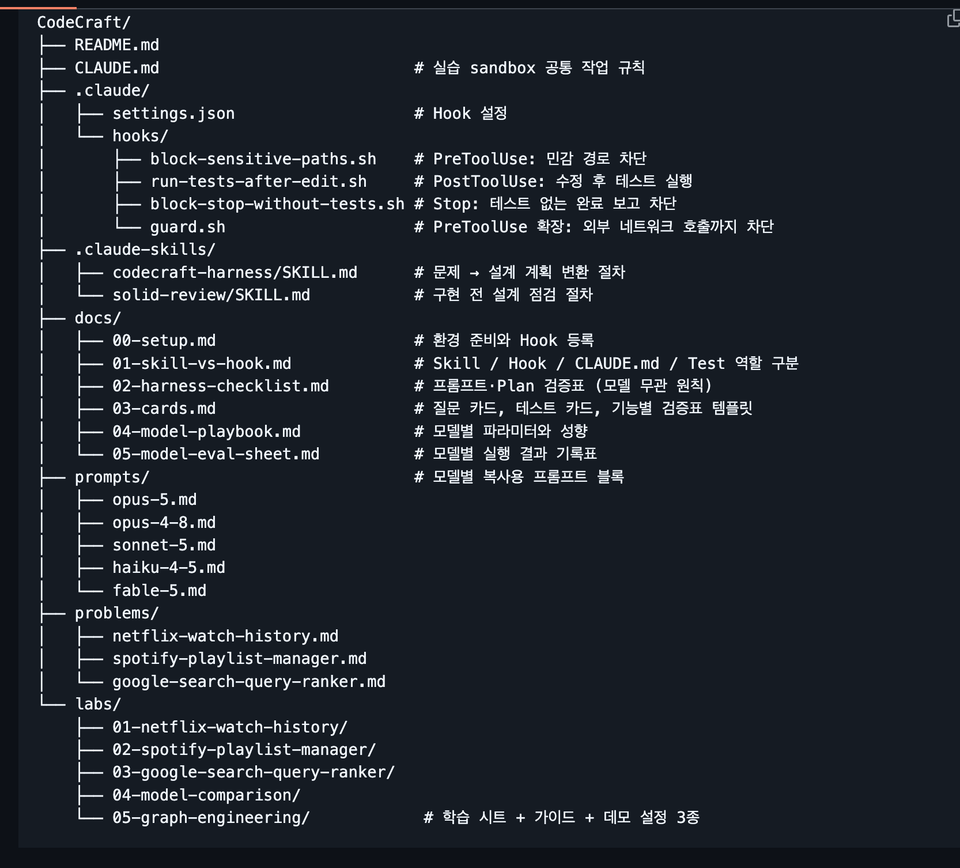
  • Rather than just a collection of links, the course provides materials centered on templates and reference tables that can be applied immediately to real-world tasks. For example, materials such as the CLAUDE.md template, context pack examples, session summary prompts, worktree operation playbooks, and model routing reference tables are structured so that you don't have to rewatch the videos from the beginning when reviewing.

Prerequisites and Notices

  • It is best if you have basic development experience, experience using CLI, and an understanding of Git concepts.

  • This course is not just about having fun "tasting" Claude Code, but rather a course on creating a structure that can be used continuously in real projects, so it provides harness engineering techniques suitable for all students, regardless of whether they are non-majors or majors.

Recommended for
these people

Who is this course right for?

  • Developers who have installed Claude Code but haven't been able to make it a consistent part of their actual projects.

  • Developers who feel limited by the GUI version of Claude and need practical CLI-based usage methods.

  • Those who want to learn about CLAUDE.md, permissions, hooks, MCP, and subagents based on practical application rather than just feature introductions.

  • Developers who want to elevate their use of AI coding tools from "just trying them out" to "operating them as a core workflow system."

Need to know before starting?

  • Experience using LLMs such as ChatGPT and Claude is preferred.

Hello
This is americasnail

Inflearn Verified

1,620

Learners

83

Reviews

75

Answers

4.4

Rating

6

Courses

  • Silicon Valley Survivor | American Snail

    Based on the experience and know-how accumulated at the forefront of the global tech scene, I provide a path for non-technical individuals to overcome technical barriers and take ownership of their businesses.

    • Current) Silicon Valley AI Coding Agent Startup Founder

      • Operating self-developed AI tool 'Snailer CLI' (16K+ downloads)

      • Selected for Google for Startups Program

    • Former career as an engineer at US Big Tech and promising startups

      • Reached the final stage at Amazon, but turned it down to start a business.

      • Silicon Valley AI Fintech Startup Engineer

      • OpenAI / Meta / Apple / Adobe / Amazon Full-stack Fellowship

      • Domestic search engine portal, fintech development

      • AI Startup AR/B2B/SDK Development

    • Proven educational capabilities

      • Double major in Computer Science and Business Administration at a 4-year university in Seoul, with experience founding multiple startups.

      • Produced 1,600+ cumulative students, 4.5K+ Threads followers / 470+ Substack followers

More

Curriculum

All

41 lectures ∙ (5hr 13min)

Course Materials:

Lecture resources
Published: 
Last updated: 

Reviews

All

36 reviews

4.4

36 reviews

  • kevinx64님의 프로필 이미지
    kevinx64

    Reviews 1

    Average Rating 5.0

    5

    61% enrolled

    You explain how to use Claude Code so well! I love that you also explain the conceptual parts so that even non-majors can use it effectively! (Though I'm not sure if I'll understand everything...)

    • americasnail
      Instructor

      Thank you for your valuable review. We are currently establishing an update plan based on various feedback. We will make sure to create it in a way that is easy for everyone to understand. Thank you. Have a great day.

  • jbsh님의 프로필 이미지
    jbsh

    Reviews 11

    Average Rating 5.0

    5

    32% enrolled

    It is great that you list many key words for each step and situation. It is also very helpful that you repeat those words.

    • americasnail
      Instructor

      Hello Junwoo Ahn, thank you for your detailed and valuable course review. I hope you have a great day today :)

  • wowmen17577817님의 프로필 이미지
    wowmen17577817

    Reviews 2

    Average Rating 5.0

    5

    61% enrolled

    It's great because it allows for a solid understanding of the basic knowledge of harness engineering.

    • americasnail
      Instructor

      Hello Taeyong Lee, thank you for your valuable course review. I hope you have a wonderful day today. Please look forward to this month's update as well!

  • jinp19933808님의 프로필 이미지
    jinp19933808

    Reviews 6

    Average Rating 5.0

    5

    32% enrolled

    I tried to apply Harness in practice but failed every time and only wasted time, so this was the first time I realized it needs to be built so systematically. In particular, I didn't know when to use things like agent skills or hooks and even asked AI to write those features for me, but now that I know their purpose and how to use them, I think I'll be able to utilize them much better.

    • americasnail
      Instructor

      Thank you so much for your valuable review. ☺️ I will continue to reinforce the content with practical methods for using Claude Code more stably in real-world tasks, based on research papers and actual case studies.

  • jim9199님의 프로필 이미지
    jim9199

    Reviews 1

    Average Rating 5.0

    5

    100% enrolled

    • americasnail
      Instructor

      Hello Jinwook Lee, thank you for your valuable review. I hope you have a wonderful day today. Please stay tuned for future updates. Thank you.

americasnail's other courses

Check out other courses by the instructor!

Similar courses

Explore other courses in the same field!