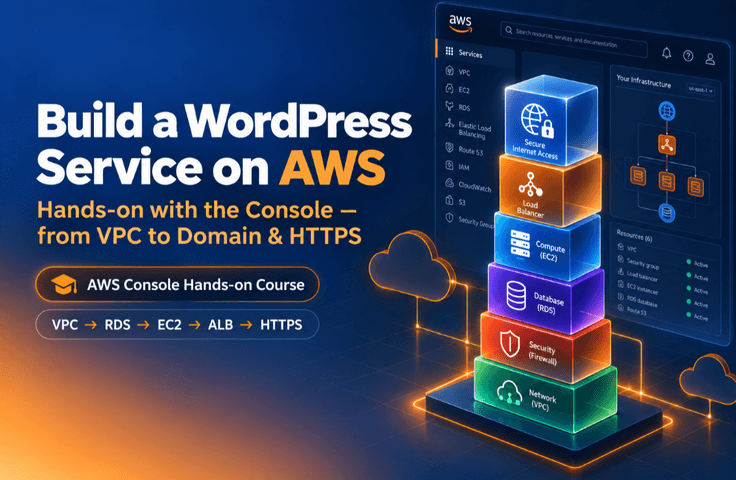

Building a WordPress Service on AWS: Completing a Practical Infrastructure from VPC to HTTPS

Starting from an empty VPC, you will build a three-tier architecture directly in the AWS Console by configuring subnets, routing, security groups, RDS, EC2, ALB, Route 53, and ACM. You will manually create a WordPress blog with HTTPS enabled on a real domain, gaining a solid understanding of network architecture and security principles while developing practical troubleshooting skills.

1 learners are taking this course

Level Beginner

Course period Unlimited

WordPress
WordPress
amazon-web-services
amazon-web-services
https
https
vpc
vpc
infrastructure
infrastructure
WordPress
WordPress
amazon-web-services
amazon-web-services
https
https
vpc
vpc
infrastructure
infrastructure

What you will gain after the course

  • Build a three-tier architecture separated into external and internal networks using a VPC, subnets, gateways, route tables, and security groups

  • Complete a WordPress service with HTTPS applied to an actual domain by connecting RDS, EC2, ALB, ACM, and Route 53.

  • Gain practical operational know-how—from keyless access with Session Manager to a five-point HTTPS checklist and cost breakdown.

🤔 "I managed to launch it with an automated setup tool… but I don't know why it works."

Launching a blog with WordPress may seem easy. But if you want to run it properly on AWS, it’s a different story. You have to decide everything yourself: how to divide the network, where to hide the database, and which door external users should enter through.

Many introductory materials skip this process with a single automated provisioning tool (automated templates such as CloudFormation and Terraform) that creates the VPC, server, and database all at once. That may get things “working,” but you never truly understand why they work. Without understanding the structure, adapting, modifying, or troubleshooting it becomes daunting.

This course takes the opposite approach. You will click each button yourself in the AWS Management Console and build the structure by hand.

📌 This course proceeds as follows (concepts in notes, hands-on practice in videos)

This is not a course that ends with just listening to concepts. It is a hands-on, practice-focused course where you follow along directly in the console and complete the end result. The roles of concepts and hands-on practice are clearly separated.

📝 Class Notes (Textbook) — Concept Explanations + Reference

This material is for reading and understanding the concepts and principles, configuration values, CIDR, ports, and checklists in each chapter. This note is solely responsible for teaching the concepts.

🎬 Hands-on lecture video — exclusively for following along with the practice

This is a hands-on session where you follow the console screen exactly from beginning to end. You complete it while watching “where to click right now.”

Read the concepts in the course notes, and follow the hands-on exercises through video.The concepts are presented in text you can open, read, and search anytime, while the hands-on exercises are shown in videos you can follow step by step—learn in the way that works best for you.

✨ Why this course is special

1. Complete the entire process hands-on, one console button at a time

Starting from an empty VPC, you will divide the space with subnets, create paths with gateways and routing, set up firewalls with security groups, launch RDS and EC2, connect them to the world with an ALB, domain, and HTTPS, and finally clean everything up so costs don’t leak—in other words, you will personally go through the entire cycle.

2. Understand everything through one principle

Whether it’s VPCs, routing, security groups, or server placement, the same principle is repeated everywhere: "Block the outside, and allow only the layer directly in front to pass through." Once you understand the principle instead of memorizing configurations, you won’t lose your way even when you encounter larger, more complex architectures.

3. Learn secure, keyless access

Instead of managing key files, open a terminal directly in your browser with an IAM role + Session Manager. Learn a safer, real-world approach from the very beginning.

🃏 4. Cheat Sheet — "Read the concepts in the notes and complete the hands-on work with videos" + "Work through failures yourself"

Course notes are dedicated to concepts and principles you can open and read anytime, while actual implementation is handled by hands-on videos that walk you through the console screen step by step. These aren't concepts that go in one ear and out the other as you listen—they are concepts preserved in writing for searching and review, and this isn't practice you merely watch—it is practice you complete with your own hands. It even includes an exercise where you “deliberately delete and then restore the ALB security group’s 443 rule,” allowing you to experience firsthand which settings cause which symptoms. When a real incident occurs, you’ll be able to identify the cause much faster.

🛠️ What you'll build in this course

  • One set of a three-tier architecture with separate external and internal layers consisting of onblog-product-* resources

  • A real WordPress blog on your own domain (oncodingschool.com) that can be accessed via HTTPS (🔒)

  • A WordPress web server that is automatically installed at boot via a user data script

  • Verify with dig and curl, troubleshoot issues using symptom-specific checklists, and the entire deployment experience—neatly organized in reverse order—becomes your portfolio.

🚀 Now, let’s build it ourselves

Don’t stop at simply reading and nodding along. As you grasp the concepts through the course notes and follow along with the videos, clicking through the console, you’ll soon have a secured WordPress site up and running on your own domain.
The course notes containing those concepts and configuration values will become your own reference to revisit for your next project.

Recommended for
these people

Who is this course right for?

  • A beginner who is new to AWS but wants to build and complete an entire service from start to finish independently

  • An entry-level engineer who has never built a three-tier architecture in a console and wants to learn network and security structures hands-on.

  • A developer seeking to gain hands-on experience in building AWS infrastructure and troubleshooting before entering practical work.

Need to know before starting?

  • Experience using basic Linux commands (cd, ls, sudo, etc.) even to a limited extent

  • Whether an AWS account can be created and the console can be accessed

Hello
This is oncoding

801

Learners

13

Reviews

20

Answers

4.3

Rating

10

Courses

Curriculum

All

37 lectures ∙ (3hr 50min)

Published: 
Last updated: 

Reviews

Not enough reviews.
Please write a valuable review that helps everyone!

oncoding's other courses

Check out other courses by the instructor!

Similar courses

Explore other courses in the same field!

Limited time deal

$13.20

25%

$17.60