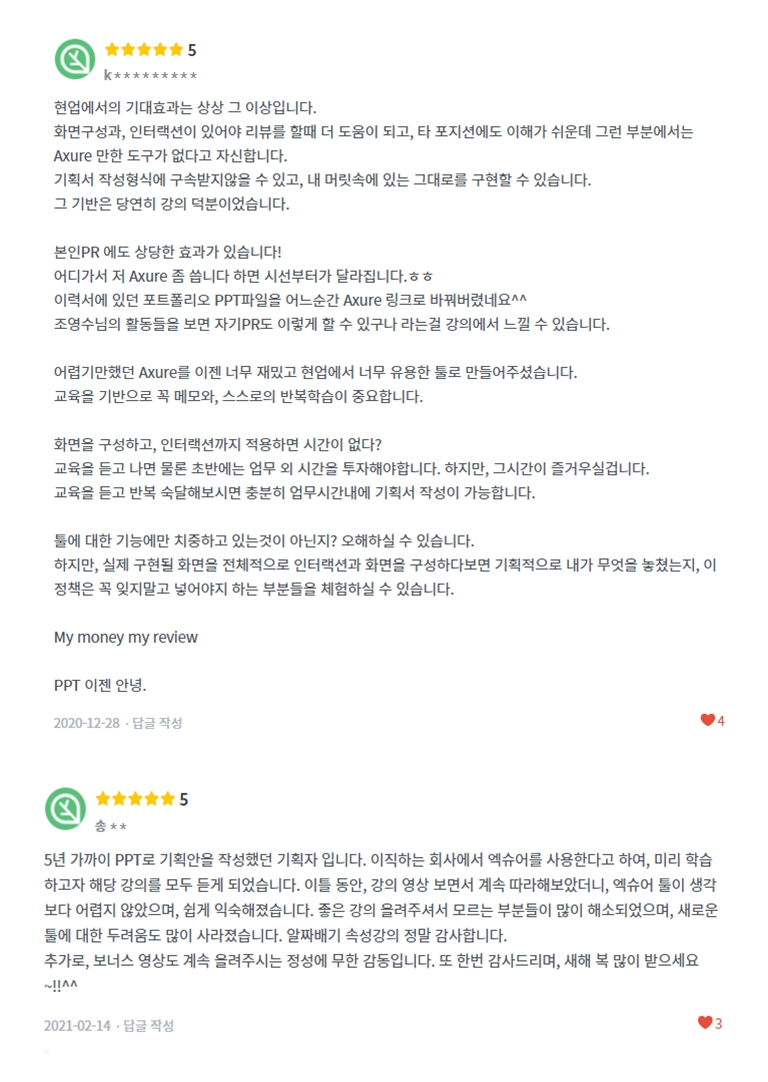
The expected effects in the field are beyond imagination.
Screen composition and interaction are more helpful when reviewing, and it is easy to understand for other positions, but I am confident that there is no tool like Axure in that area.
I can be free from the constraints of the planning document writing format and can implement what I have in my head.
Of course, the basis for this was the lecture.
It also has a significant effect on my PR!
If you go somewhere and say, "I use Axure," people will look at you differently. Haha
At some point, I changed the portfolio PPT file on my resume to an Axure link^^
Looking at Jo Young-soo's activities, you can feel from the lecture that you can do your PR like this.
Axure, which used to be difficult, has now become a very fun and useful tool in the field.
Based on the education, it is important to take notes and repeat your own learning.
If you configure the screen and apply the interaction, you won't have time?
After taking the education, of course, you will have to invest time outside of work in the beginning. However, you will enjoy that time.
If you listen to the training and repeatedly master it, you will be able to write a plan within working hours.
Are you only focusing on the functions of the tool? You may misunderstand.
However, if you organize the interaction and screens of the actual screens to be implemented, you will experience what I missed in terms of planning and the parts that you must not forget to include in this policy.
My money my review
Goodbye to PPT.
5.0
송프로
86% enrolled
I am a planner who has been writing business plans with PPT for nearly 5 years. Since the company I am transferring to uses Exsure, I listened to all the lectures to learn in advance. After watching the lecture videos and following along for two days, Exsure tools were not as difficult as I thought, and I got used to them easily. Thanks for uploading such a great lecture, many of the parts I didn't know were resolved, and my fear of new tools disappeared a lot. Thank you so much for the valuable lecture. In addition, I am infinitely touched by the sincerity in continuously uploading bonus videos. Thank you again, and Happy New Year~!!^^
5.0
Brian
37% enrolled
I am a fan of Damon and a subscriber to his channel. I first came to know about Exsure after watching Damon's lecture on YouTube, and I ended up giving up the Oven app, Photoshop, and PPT that I had used for various projects. I bought a MacBook Pro for sketching, but it was not the right tool for me, who was not yet deeply involved in the field of designers and publishers.
I was struggling to apply it to my ongoing project, referring to the English Exsure guide, so I am so grateful that you launched such an organized online lecture. In most small-scale companies with limited human resources, the boundaries between planners, designers, developers, and even managers/practitioners are often ambiguous. In fact, if there were multiple practitioners such as 'project managers' and 'product managers', it would no longer be a small business.
Exsure and Damon's teachings are very helpful to me, a non-major who has to cover various fields. Although most of the lecture content was self-study, I feel like my head is being organized neatly because Damon went through it from the basics. I hope you will continue to guide me so that I can grow into a great planner and manager.
Thank you. Happy New Year :)
What you will gain after the course
You can understand the characteristics and differences of each prototype released on the market.
You can create prototypes that function like actual services even without knowing design or coding.
You can learn the essential functions for practical design, covering everything from websites and back offices to mobile and responsive web.
※ Advance notice for students.
This course was created using Axure RP 9, so some features may function differently than in Axure RP 10. Please keep this in mind before deciding on your purchase! (Approximately 5% of the overall functionality has changed in terms of usability.)
Goodbye PowerPoint! Learning Axure Prototyping for Planners
Subject Introduction 📝
Since 2016, I have conducted offline classes for approximately 500 people, and I am now opening an online class that compiles the content from those sessions.
There are various prototyping tools on the market, such as Sketch, Figma, Adobe XD, ProtoPie, and Framer, but most of these are prototyping tools for designers and are not optimized for product managers (PM, PO, planners).
Axure, a Prototyping Tool for Planners ✒️
1️⃣ Optimization
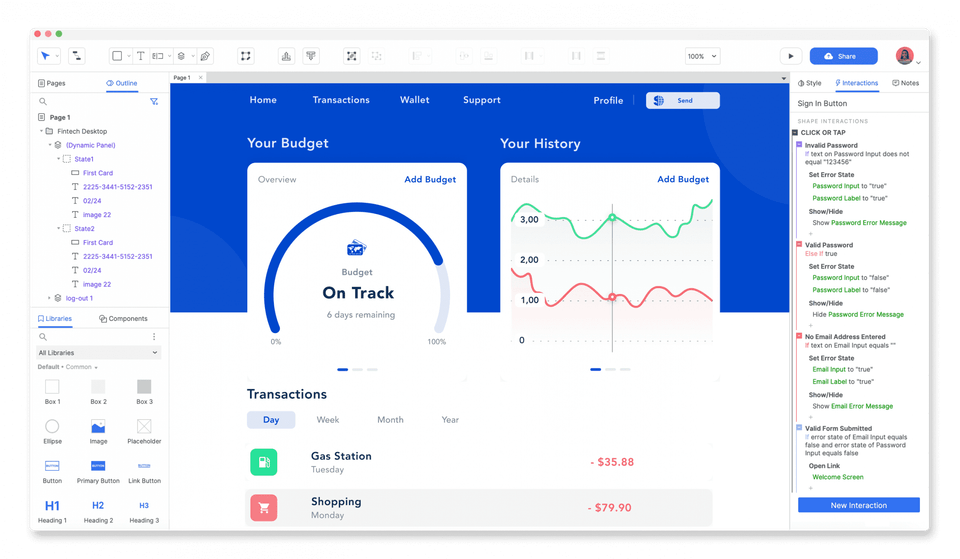
Axure is a tool optimized for the UI design field, allowing you to easily create UI mockups, flowcharts, and descriptions required for <storyboard> production, and implement interactions for prototyping very easily with just a few clicks.
2️⃣ Communication
Dynamic designs that couldn't be expressed in PowerPoint can be easily implemented, which helps improve communication efficiency with stakeholders.
3️⃣ Timeliness
Furthermore, it has been used for a long time by global corporations such as Amazon, Salesforce, and Microsoft, and is currently being used by leading domestic companies in Korea such as Samsung, LG, Kakao, NCSoft, and Cafe24, as well as various startups.
What you will learn in this course ✏️
Orientation
We compare the differences between various tools used by product managers (PO, PM, planners) and designers, and introduce the key features of Axure.
Section 1
We introduce the basic operation methods and various tips for Axure. Even those who are already using Axure can gain tips they weren't aware of.
Section 2
While creating a mobile prototype, you will learn the unique functions of basic widgets and implement simple interactions such as wishlist icons and YouTube/Google Maps integration.
Section 3
While creating an Admin prototype, you will learn the functions necessary for web page design. By using master templates and Form UI, you can experience a whole new world beyond PowerPoint.
Section 4
Learn various interactions and animations, which can be considered the highlight of prototyping tools. Even without knowing how to code, you can implement most of the interactions you imagine with just a few clicks.
Section 5
In Sections 1, 2, 3, and 4, we learned about the overall functions of Axure, and now we will learn additional features such as responsive web design, virtual database integration, and using icon fonts.
Section 6 - Bonus
Content not covered in this lecture and inquiries from the Q&A will be continuously updated. On and on!
Vivid Course Reviews 👍
Check out more reviews at the bottom of the page :)
I recommend this to the following people 🚩
This Axure class is a course designed for beginners and intermediate learners, and even non-majors can sufficiently learn it as long as they know how to use PowerPoint. It is recommended for startup CEOs, marketers, and product managers (planners) who want to effectively express their ideas.
Product Manager
Planner
Startup CEO
Marketer
Those who want to express their ideas effectively
Anyone who wishes to perform the above tasks
Download Axure 👩💻
You can download a 30-day trial version of Axure from the official website. It supports both Windows and Mac versions. https://www.axure.com/download
After working at agencies and mid-sized companies, I participated as a co-founder in two startups. Additionally, having served as a product lead for several startups, I am creating videos on practical know-how essential for product managers and service planners based on my actual hands-on experience.
Mentoring Guide
We offer mentoring for POs, PMs, and planners. For more details, please refer to the mentoring section within the course or the mentoring page.
I am a planner who has been writing business plans with PPT for nearly 5 years. Since the company I am transferring to uses Exsure, I listened to all the lectures to learn in advance. After watching the lecture videos and following along for two days, Exsure tools were not as difficult as I thought, and I got used to them easily. Thanks for uploading such a great lecture, many of the parts I didn't know were resolved, and my fear of new tools disappeared a lot. Thank you so much for the valuable lecture. In addition, I am infinitely touched by the sincerity in continuously uploading bonus videos. Thank you again, and Happy New Year~!!^^
Thank you for your review of Songpro. I am so happy that you followed the lecture well and that your fear of new tools has disappeared. We will continue to update the bonus section, so if you have any questions while working, please feel free to leave a question at any time ^^
I am a fan of Damon and a subscriber to his channel. I first came to know about Exsure after watching Damon's lecture on YouTube, and I ended up giving up the Oven app, Photoshop, and PPT that I had used for various projects. I bought a MacBook Pro for sketching, but it was not the right tool for me, who was not yet deeply involved in the field of designers and publishers.
I was struggling to apply it to my ongoing project, referring to the English Exsure guide, so I am so grateful that you launched such an organized online lecture. In most small-scale companies with limited human resources, the boundaries between planners, designers, developers, and even managers/practitioners are often ambiguous. In fact, if there were multiple practitioners such as 'project managers' and 'product managers', it would no longer be a small business.
Exsure and Damon's teachings are very helpful to me, a non-major who has to cover various fields. Although most of the lecture content was self-study, I feel like my head is being organized neatly because Damon went through it from the basics. I hope you will continue to guide me so that I can grow into a great planner and manager.
Thank you. Happy New Year :)
I can feel the real-life experience you have had in your writing! I am so proud and grateful that the videos I make have been helpful to you in your work. Along with the Axure class, I will continue to create many fun contents this year as well ^^
The expected effects in the field are beyond imagination.
Screen composition and interaction are more helpful when reviewing, and it is easy to understand for other positions, but I am confident that there is no tool like Axure in that area.
I can be free from the constraints of the planning document writing format and can implement what I have in my head.
Of course, the basis for this was the lecture.
It also has a significant effect on my PR!
If you go somewhere and say, "I use Axure," people will look at you differently. Haha
At some point, I changed the portfolio PPT file on my resume to an Axure link^^
Looking at Jo Young-soo's activities, you can feel from the lecture that you can do your PR like this.
Axure, which used to be difficult, has now become a very fun and useful tool in the field.
Based on the education, it is important to take notes and repeat your own learning.
If you configure the screen and apply the interaction, you won't have time?
After taking the education, of course, you will have to invest time outside of work in the beginning. However, you will enjoy that time.
If you listen to the training and repeatedly master it, you will be able to write a plan within working hours.
Are you only focusing on the functions of the tool? You may misunderstand.
However, if you organize the interaction and screens of the actual screens to be implemented, you will experience what I missed in terms of planning and the parts that you must not forget to include in this policy.
My money my review
Goodbye to PPT.
If you are a company that uses Axure for web app planning and UX, this course would be perfect for employee training!
The course is very informative. And the instructor has small functions and know-how that can help with the course, so he pays attention to maximizing the user experience of the students (zooming the screen when viewing small text, fast-forwarding simple repetitive tasks, attaching necessary lecture materials to the relevant class, and repeating the complex parts sequentially without skipping the process as much as possible). This course is worth the tuition. I highly recommend it!
<Tips on Axure subscription fees>
If you want to use it personally, you have to pay a certain amount,
If that is burdensome, try using a one-month free trial, and if you are a college student, a one-year free trial service is also provided, so please refer to it!
(Even if you are not a college student, you can ask an acquaintance or relative who is currently attending college!)
While looking for ways to quickly implement various ideas to MVP on my own, I learned coding, got used to no-code tools (Adalo), and learned Notion and Figma. In the end, I came to the conclusion that tools optimized for UI design and prototyping implementation were the key. 😅
I left a question on the instructor's YouTube channel and learned about the tool called Axure along with a friendly explanation, so I signed up for the course without hesitation. I regret that I could have saved a lot of time if I had found the instructor's channel earlier, but I'm glad I found out about it now. 😄
I quickly finished the course in 4 days, and the more I watched, the more I became convinced that Axure is a really good tool for implementing ideas. The explanations were calm and good, and the lecture reference materials were informative, so just by following along, I was able to create something and understand it well.
I personally found the contents that broadly explained how to integrate with other tools and how to plan/design in practice with Notion, Axure, and Figma really helpful.
I will actually implement the ideas one by one and learn the necessary related contents infinitely.
Thank you for the informative lecture😁
I am sure that this will be a choice you will not regret for those who are interested in prototyping👍👍














![[AI Practical Workflow] Create a Service Planning Figma UX Flow in Just 10 MinutesCourse Thumbnail](https://cdn.inflearn.com/public/files/courses/340323/cover/01kev8vd8z1tkyrehkk9k5s1x8?w=420)