강의

멘토링

커뮤니티

BEST
Productivity

/

Office

Useful tips for decorating Korean reports

Korean tips that you couldn't use because you didn't know them, not because they were difficult! A course that selects only useful Korean functions!

(4.9) 27 reviews

262 learners

Level Intermediate

Course period Unlimited

  • onwings
Hancom Office
Hancom Office
Hancom Office
Hancom Office

Reviews from Early Learners

Reviews from Early Learners

4.9

5.0

Jays fun fun 매뉴얼

100% enrolled

I was able to solve many of the things I had been curious about while working and had to do manually because I didn't know the functions through this lecture. I highly recommend this informative lecture~~

5.0

lovely6151

65% enrolled

I have a Word 1st grade certificate that I got 10 years ago, but it has become useless because I haven't used it. This is a lecture with rich content that can be applied to actual work!! Please give me the PowerPoint and the lectureㅠㅜㅜ

5.0

hattman

35% enrolled

Why didn't I sign up for this truly amazing Korean class sooner? I really regret it.

What you will gain after the course

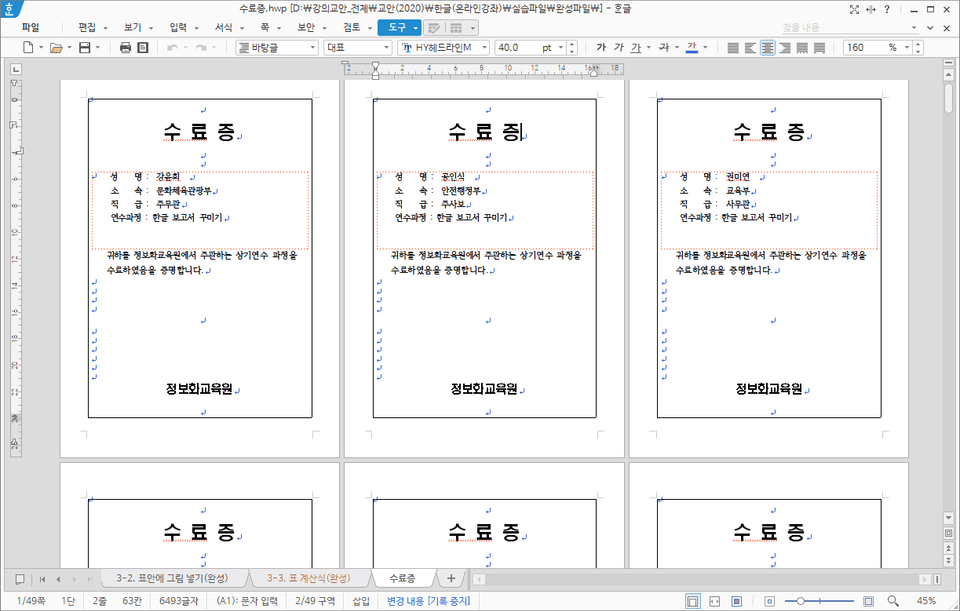
  • How to use reusable elements to quickly enter tables, images, and objects

  • How to set blocks and edit tables quickly using shortcuts

  • Create clean documents using paragraph numbers and tabs

  • Create frequently used report form styles as documents

  • Automatically calculate table numbers using Korean calculation formulas

  • Connect Excel data list to Korean document with Mail Merge

  • Insert Excel tables and PowerPoint slides into Korean documents without errors

Are you curious about the know-how for writing Korean documents that can be used right away at work?

In this lecture, you will learn techniques to skillfully edit Hangul documents, from how to change the basic environment settings to work comfortably on Hangul documents, to know-how to quickly input tables and objects that take up a lot of time when editing documents with a single shortcut key, to how to solve problems that occur when copying parts of documents written by other departments, and even how to quickly solve long documents with outline numbers and styles.

You can learn techniques to write Korean documents skillfully by learning useful tips that can be used when writing documents or preparing reports in Korean.

You can learn a variety of tips, from how to quickly input frequently used tables, figures, and objects as boilerplate instead of drawing them each time, to how to automatically solve calculation tasks in Hangul tables that used to depend solely on Excel, which can greatly reduce the work time when writing reports.

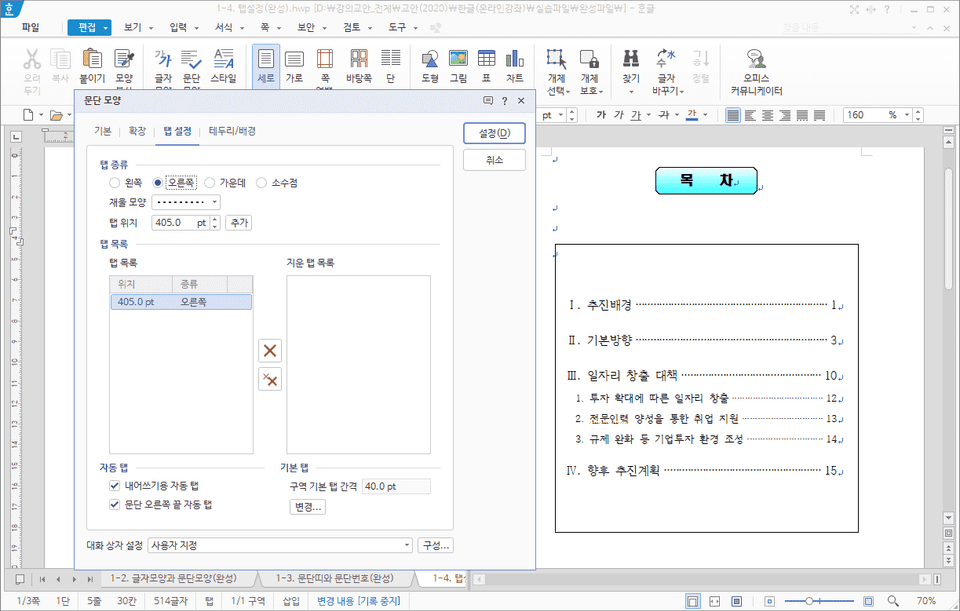
Set up a neat table of contents by setting tabs

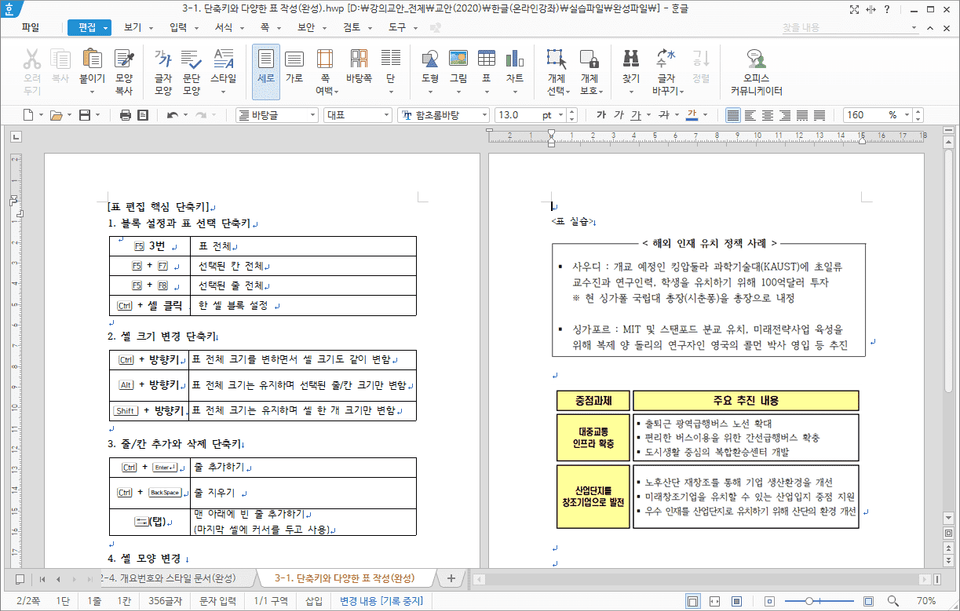
Create and edit tables quickly using shortcut keys

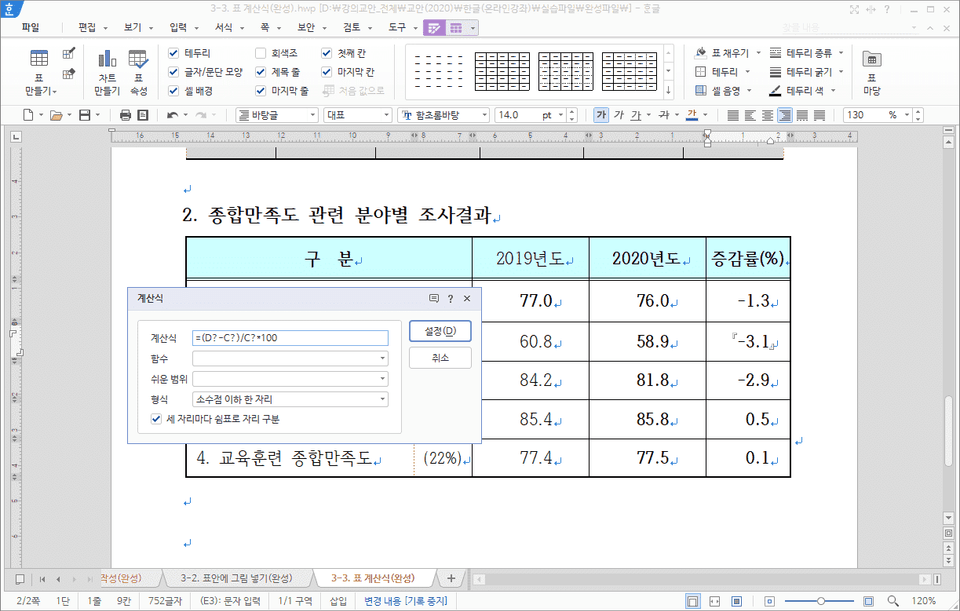
Copy by entering an absolute reference calculation formula like Excel

Create a mail merge by connecting Excel data

Recommended for
these people

Who is this course right for?

  • Those who want to use the Hangul program they use daily at work more conveniently

  • If you want to improve your work efficiency when editing documents in Korean

  • If you want to solve problems that you often encounter when using Korean

  • If you want to know some Korean tips for writing clean documents

Need to know before starting?

  • Basic Korean User

Hello
This is

6,606

Learners

677

Reviews

162

Answers

4.9

Rating

6

Courses

Kim Kyung-ja / CEO of Compeople, Adjunct Professor at Yeonsung University, Excel Goddess (http://blog.naver.com/onwings)

While working at the LG Electronics Learning Center, I began my career in IT education. Currently, I deliver lectures at organizations such as Samsung Group, Kia Group, Udemy, the Financial Supervisory Service, Kim & Chang, and the National Human Resources Development Institute. I am the CEO of Compeople, a company specializing in IT and information technology training, and I also serve as an adjunct professor at Yeonsung University.


- Excel Data Utilization and Analysis for the Workplace (Hanbit Media, 2025)
- Surviving with Excel at the Workplace (Hanbit Media, 2023)
- Excel Practical Functions + Formulas (Hanbit Media, 2021)
- Excel Practical Macros and VBA (Hanbit Media, 2020)
- Excel Practical Data Utilization + Analysis (Hanbit Media, 2019)
- Excel 2016 Basic + Practical Completion (Booksholic, 2018)
- Practical Lecture on Excel Functions for Professionals (Hanbit Media, 2017)
- Excel 2016 Macros and VBA for Empowering Workplace Tasks (Jungbo Munhwasa, 2016)
- Excel Data Utilization + Analysis Immediately Applicable at Work (Hanbit Media, 2016)
- Excel 2013 Basic Practical Completion (Booksholic, 2014)
- Keynote & Numbers Step-by-Step (Gilbut, 2014)
- Excel 2010 Macros and VBA (Youngjin.com, 2012)
- Excel 2010 Basic Practical Completion (Booksholic, 2011)
- Excel 2007 Macros & VBA Basic + Practical (Sungan-dang, 2009)
- Excel 2007 Basic + Practical (Sungan-dang, 2007)
- Strong Practical Excel Macros and VBA (Cyber Publishing, 2005)

Curriculum

All

17 lectures ∙ (3hr 14min)

Course Materials:

Lecture resources
Published: 
Last updated: 

Reviews

All

27 reviews

4.9

27 reviews

  • justice0050autob3310님의 프로필 이미지
    justice0050autob3310

    Reviews 1

    Average Rating 5.0

    5

    100% enrolled

    I was able to solve many of the things I had been curious about while working and had to do manually because I didn't know the functions through this lecture. I highly recommend this informative lecture~~

    • lovely61512500님의 프로필 이미지
      lovely61512500

      Reviews 1

      Average Rating 5.0

      5

      65% enrolled

      I have a Word 1st grade certificate that I got 10 years ago, but it has become useless because I haven't used it. This is a lecture with rich content that can be applied to actual work!! Please give me the PowerPoint and the lectureㅠㅜㅜ

      • onwings
        Instructor

        I'll also plan a PowerPoint lecture~^^ Thank you for your hard work.

    • hattman9841님의 프로필 이미지
      hattman9841

      Reviews 6

      Average Rating 4.5

      5

      35% enrolled

      Why didn't I sign up for this truly amazing Korean class sooner? I really regret it.

      • dpdms60051426님의 프로필 이미지
        dpdms60051426

        Reviews 5

        Average Rating 4.6

        5

        94% enrolled

        It was an easier program than I thought, but I didn't know how to use it well, so it was difficult to apply it practically. This lecture helped me a lot.

        • seoavid님의 프로필 이미지
          seoavid

          Reviews 14

          Average Rating 4.8

          5

          100% enrolled

          I'm going to learn Korean properly now, since it's the language I use the most but also the language I don't know the most.

          $26.40

          onwings's other courses

          Check out other courses by the instructor!