Chỉ chọn phần thực hành Excel cơ bản và hoàn thành trong 3 giờ
onwings
Chương trình đào tạo cho phép bạn học dễ dàng và nhanh chóng bằng cách chỉ chọn các hàm Excel thực tế cốt lõi mà bạn cần biết khi làm việc với Excel.
입문
Excel, MS-Office
Korean tips that you couldn't use because you didn't know them, not because they were difficult! A course that selects only useful Korean functions!
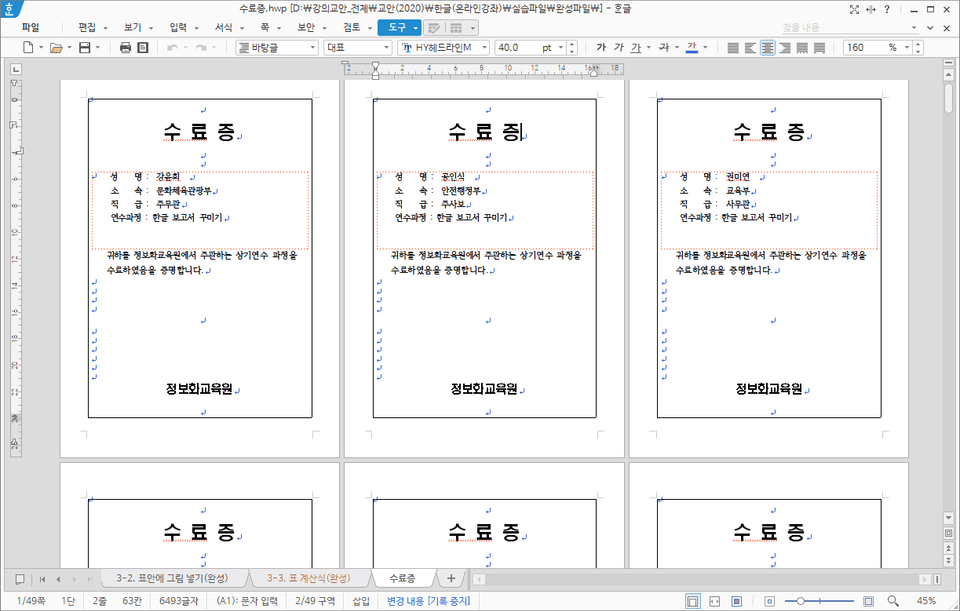
How to use reusable elements to quickly enter tables, images, and objects
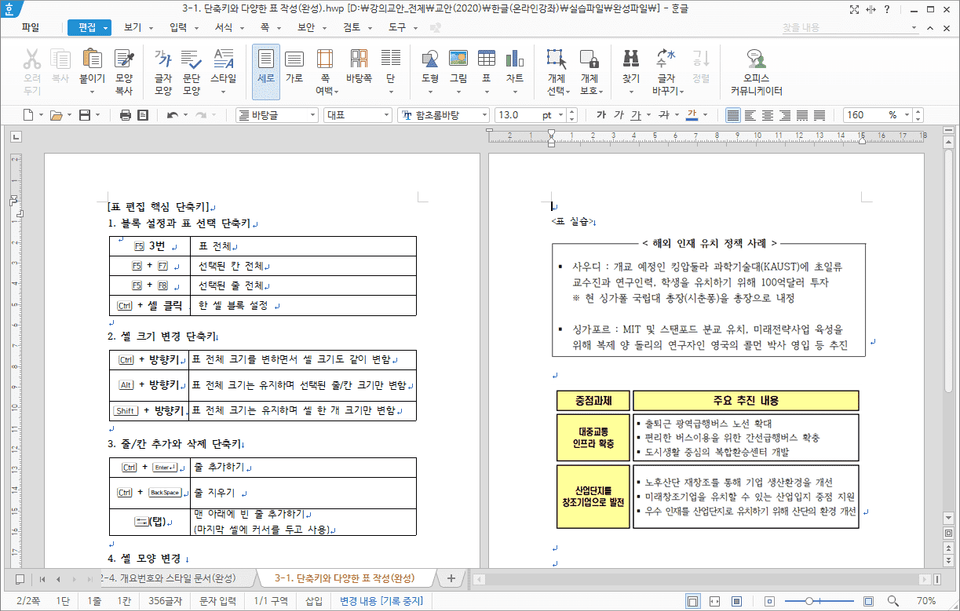
How to set blocks and edit tables quickly using shortcuts
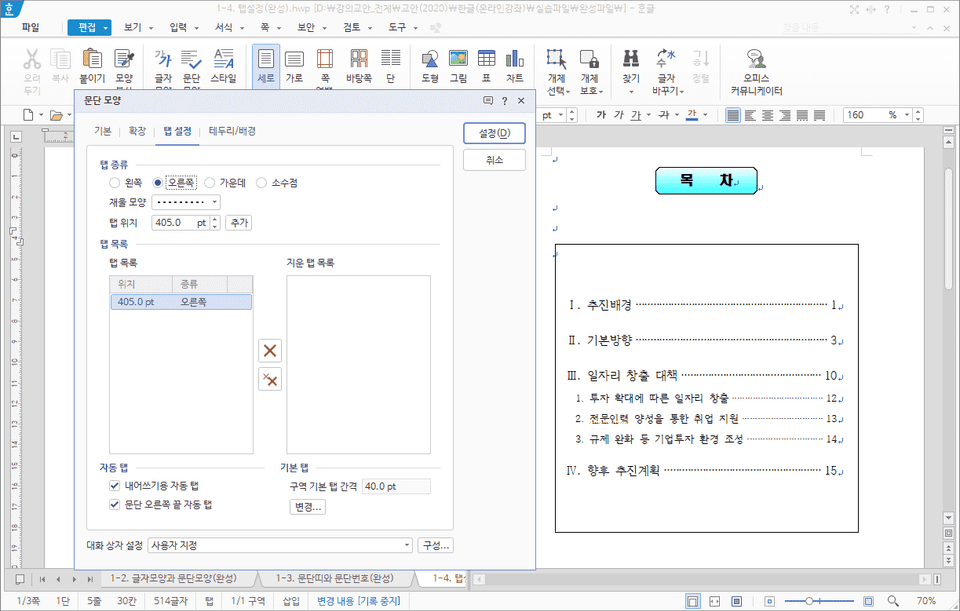
Create clean documents using paragraph numbers and tabs
Create frequently used report form styles as documents
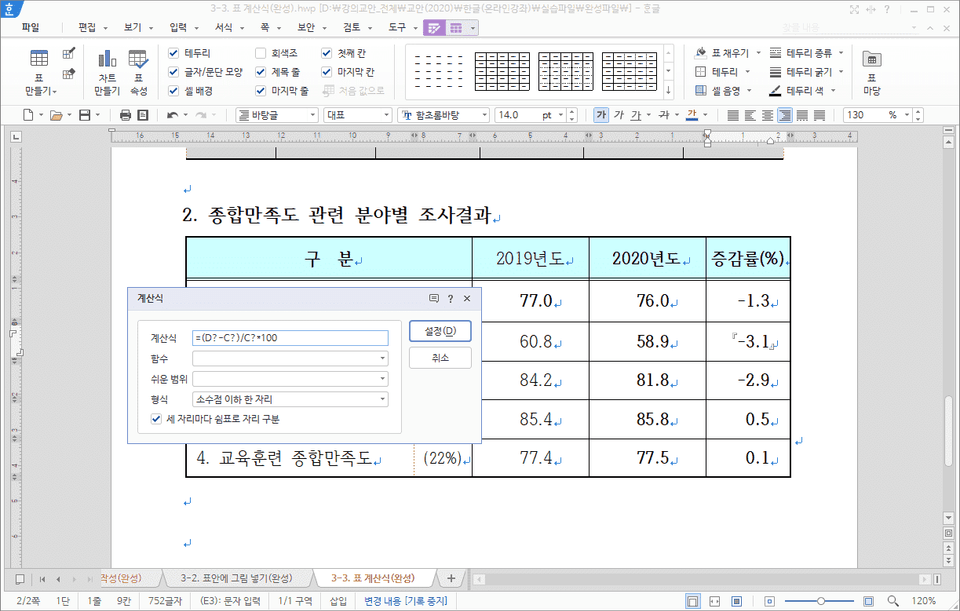
Automatically calculate table numbers using Korean calculation formulas
Connect Excel data list to Korean document with Mail Merge
Insert Excel tables and PowerPoint slides into Korean documents without errors
Are you curious about the know-how for writing Korean documents that can be used right away at work?
In this lecture, you will learn techniques to skillfully edit Hangul documents, from how to change the basic environment settings to work comfortably on Hangul documents, to know-how to quickly input tables and objects that take up a lot of time when editing documents with a single shortcut key, to how to solve problems that occur when copying parts of documents written by other departments, and even how to quickly solve long documents with outline numbers and styles.
You can learn techniques to write Korean documents skillfully by learning useful tips that can be used when writing documents or preparing reports in Korean.
You can learn a variety of tips, from how to quickly input frequently used tables, figures, and objects as boilerplate instead of drawing them each time, to how to automatically solve calculation tasks in Hangul tables that used to depend solely on Excel, which can greatly reduce the work time when writing reports.
Who is this course right for?
Those who want to use the Hangul program they use daily at work more conveniently
If you want to improve your work efficiency when editing documents in Korean
If you want to solve problems that you often encounter when using Korean
If you want to know some Korean tips for writing clean documents
Need to know before starting?
Basic Korean User
6,483
Learners
653
Reviews
159
Answers
4.9
Rating
6
Courses
김경자 / 컴피플 대표, 연성대학교 겸임교수, 엑셀여신(http://blog.naver.com/onwings)
LG전자 LearningCenter에 근무하면서 IT교육과 인연을 맺어 현재는 삼성그룹, 기아그룹, 유데미, 금융감독원, 김앤장, 국가공무원인재개발원 등에서 강의하고 있습니다. IT/정보화 교육 전문회사인 컴피플 대표이며 연성대학교 겸임교수로 재직중입니다.
<저서>
- 회사에서 통하는 엑셀 데이터 활용 분석(한빛미디어, 2025)
- 회사에서 엑셀로 살아남기 (한빛미디어, 2023)
- 엑셀 실무 함수 + 수식 (한빛미디어, 2021)
- 엑셀 실무 매크로와 VBA (한빛미디어, 2020)
- 엑셀 실무 데이터 활용+분석 (한빛미디어, 2019)
- 엑셀 2016 기본+실무완성 (북스홀릭, 2018)
- 실무통 엑셀 함수 실무 강의 (한빛미디어, 2017)
- 회사 실무에 힘을 주는 엑셀 2016 매크로와 VBA (정보문화사, 2016)
- 회사에서 바로 통하는 엑셀 데이터 활용+분석 (한빛미디어, 2016)
- 엑셀 2013 기본 실무완성 (북스홀릭, 2014)
- 키노트 & 넘버스 무작정 따라하기 (길벗, 2014)
- 엑셀 2010 매크로와 VBA (영진닷컴, 2012)
- 엑셀 2010 기본 실무완성 (북스홀릭, 2011)
- 엑셀 2007 매크로 & VBA 기본+실무 (성안당, 2009)
- 엑셀 2007 기본 + 실무 (성안당, 2007)
- 실무에 강한 엑셀 매크로와 VBA (사이버출판사, 2005)
All
17 lectures ∙ (3hr 14min)
Course Materials:
All
25 reviews
4.9
25 reviews
Reviews 1
∙
Average Rating 5.0
Reviews 1
∙
Average Rating 5.0
5
Tôi có bằng cấp 1 Word mà tôi có được mười năm trước, nhưng nó đã vô dụng từ lâu vì tôi không sử dụng. Đây là bài giảng có nội dung phong phú, có thể áp dụng vào thực tế!! Xin vui lòng cho tôi một bài giảng PowerPoint nữa.
Tôi cũng sẽ lên kế hoạch cho một bài giảng PowerPoint ~ ^^ Cảm ơn bạn đã làm việc chăm chỉ.
Reviews 6
∙
Average Rating 4.5
Reviews 5
∙
Average Rating 4.6
Reviews 14
∙
Average Rating 4.8
$26.40
Check out other courses by the instructor!
Explore other courses in the same field!