강의

멘토링

커뮤니티

Programming

/

Mobile Application Development

iOS15 SwiftUI Preview Techniques, In-App-Purchase, StoreKit 2 WWDC2021

Learn about Preview, a new practical UI technology for SwiftUI iOS development, and division of labor development techniques. You will also learn about Concurrency, an iOS 15 technique from WWDC2021, and StoreKit 2 for In-App-Purchase.

(4.0) 1 reviews

49 learners

  • keepspeed
3시간 만에 완강할 수 있는 강의 ⏰
iOS
SwiftUI
Swift

What you will gain after the course

  • iOS Programming

  • SwiftUI Design Programming

  • Preview Techniques in SwiftUI

  • iOS app development techniques by division of labor

  • Apple In-App-Purchase Development

  • New iOS 15 technologies at WWDC2021 (Concurrency, StoreKit 2)

Learn new technologies in short and thick lessons
Let's create an app with UI coding! 🦾

📢 Please check before taking the class!
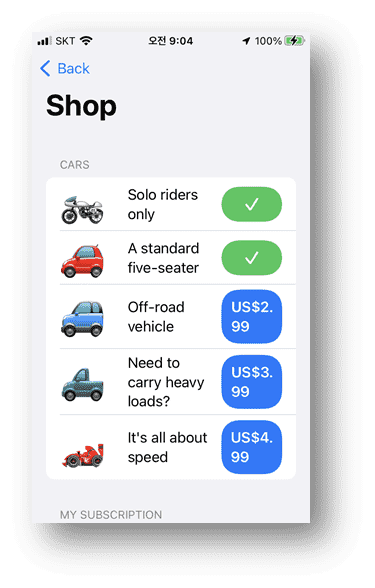
  • This course consists of a total of 4 lessons .


Learn the new technologies in iOS 15
Even an app creation project! 😁

  • SwiftUI design
    • Real-time Preview Technique
  • Developed by separating the engine and UI
    • Development techniques that allow teams to work independently without overlapping during actual team development.
  • iOS 15 Programming Techniques Unveiled at WWDC21
    • Concurrency, background tasks, and asynchronous UI refresh techniques
    • Apple In-App Purchase Techniques - Using StoreKit 2


People like this will like it 🙌

I learned the basics, but
People who find real life difficult

With SwiftUI Preview
People who find simultaneous coding difficult

Create an in-app payment app
Anyone who wants to make a profit

Separate development by code module
Anyone who wants to learn technology

Short but repetitive
Make this course your own! 📚

This lecture is not just a lecture that lists techniques.
We develop and complete a single project by explaining the entire process from start to finish of app creation.

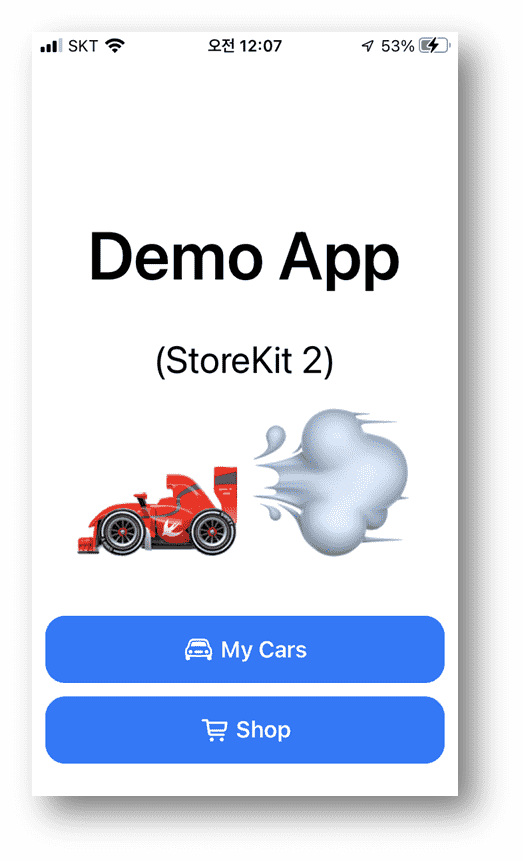
  • First, I explain the scenario while looking at the completed app,
  • Next, let's take a look at the UI in Preview,
  • Create a sample data model object and code only the UI so that it runs independently without an engine.
  • Only then can we attach StoreKit 2 and add the in-app purchase module.
  • We will demonstrate what to prepare during development for in-app purchases.
  • In-app purchases include examples of consumable/non-consumable products and automatic subscription payments.


Expected Questions Q&A 💬

Q. Will beginners be able to understand the lectures?

If you don't have a basic understanding, it might be difficult to understand right away. I believe you'll be able to fully grasp it if you learn at least the basics and then attend the lectures.

Q. How would you explain UI design techniques?

For minor fonts, colors, shapes, etc., each person will search on Google and use them, and in the lecture, we will focus on teaching the overall programming techniques.

Q. Is there a tutorial on how to register in-app purchase products in the App Store?

So far, we're only explaining the development process, and registration is a lot of business and administrative work, so we plan to produce a lecture later if possible.

Introducing the knowledge sharer ✒️

  • 30 years of experience
  • Work experience at a startup company in California's Silicon Valley
  • Experience as an adjunct professor at a university
  • Experience in numerous domestic large-scale projects
  • Experience in numerous domestic and international venture company projects
  • I've been using Visual C++ the longest, and I've also used C#, Java, Swift, SQL, etc.
  • Recently, we have developed an application server like Apache for Windows.

Recommended for
these people

Who is this course right for?

  • People who decided to become programmers as their career

  • Anyone who wants to experience the development process of a real programmer

  • Anyone who wants to include in-app purchases in their app

Need to know before starting?

  • Mac Basics

  • Basic knowledge of Swift, x-code, and SwiftUI

Hello
This is

  • 캘리포니아 실리콘벨리의 스타트업 기업에 소속 경험
  • 캐나다 토론토 연구소 근무
  • 대학 겸임교수 경력
  • 국내 대기업 프로젝트 다수 경력(현대중생산기획, 코롱물류, 삼성카드서버, SBS편성 등)
  • 국내외 벤처기업 프로젝트 다수 경력(플랫폼 및 앱)
  • 30년 경력 플랫폼 및 클라이언트 개발
  • Visual C++를 가장 오래했고, C#, java, Android, Swift, SQL등 사용.
  • 최근에 윈도우용 아파치같은 어플리케이션 서버 Winpache 직접 개발
    • https://github.com/Shuooang/Winpache
    • 고성능, 캐시, 클러스터링, API 개발, MariaDB연동, 윈도우 모니터링

Curriculum

All

4 lectures ∙ (2hr 12min)

Course Materials:

Lecture resources
Published: 
Last updated: 

Reviews

All

1 reviews

4.0

1 reviews

  • Yoonds님의 프로필 이미지
    Yoonds

    Reviews 7

    Average Rating 4.9

    4

    100% enrolled

    디테일한 설명보다는 큰단위로 설명해주시고 지나가서 입문자가 시청하기보다는 초중급, 중급자분들이 시청하는것이 적절해 보입니다. 메일전달 드렸습니다 확인 부탁드려요

    • 꼰대라떼
      Instructor

      죄송합니다. 발음이 안 좋아서 자막을 달았습니다. 이 강의는 중급 이상으로 설정 되어 있고, 빠른 진행이 특징이라 반복해서 듣거나 소스를 보고 참고 하도록 되어 있으며, `앱 내 결제` 및 새로운 기술인 `테스크`(비동기 작업)방법에 중점을 두다 보니 빠른 느낌이었나 봅니다. 다음엔 초보자 용 강의도 올리겠습니다. 질문이 있으면 이 메일로 주시면 성실히 답변 드리겠습니다. 이메일: keepspeed@gmail.com

$17.60

Similar courses

Explore other courses in the same field!