inflearn logo
Challenge
Ended

ChatGPT×Excel: Functions·Macros Master Challenge 2nd Edition

This is a challenge course where you can learn Excel functions frequently used in practical work and macros that reduce repetitive tasks all at once. Using ChatGPT, you'll learn SUM, SUMIF, SUMIFS, IF, and VLOOKUP functions to master essential calculation methods for practical work such as sum calculations, conditional sums, and data lookup. Following this, you'll create VBA code using ChatGPT to automate repetitive tasks in your work. By learning how to calculate quickly with functions and automate repetitive work with macros together, you'll acquire practical skills that can significantly reduce work time and increase efficiency. Anyone who can use Excel basics can take on this challenge, and after completing the course, you'll be able to work smarter by freely utilizing functions and macros.

Excel
functions
vba-macros
ChatGPT

7개 수업 학습

3회 미션 수행

라이브 1 회

성취의 증표, 수료증을 발급해요.

질문하고 즉시 답을 얻어요.

무제한 복습, 내 것으로 만들어요.

dmsgml1030님과 함께해요!

Career Verified

480

Learners

55

Reviews

1

Answers

4.9

Rating

20

Courses


I am teaching office certification courses to help students preparing for employment with their self-development.

And I teach practical Excel classes for office workers to help them improve their job competencies

CEO of Eunhee-ssam Class

■ Professional Qualifications

Vocational Training Teacher Level 2 (General Administration & Office Work) Ministry of Employment and Labor

Vocational Training Instructor (Information Technology Operation & Management) Level 3 Ministry of Employment and Labor

Vocational Training Teacher Level 3 (General Administrative Affairs) Ministry of Employment and Labor

Computer Literacy Level 1 Korea Chamber of Commerce and Industry

ITQ Professional Training Instructor (PTI) Korea Productivity Center

ITQ Hangul A, Excel A, PowerPoint A, Internet A Korea Productivity Center

Computer Utilization Ability Level 2 Korea Chamber of Commerce and Industry

Industrial Engineer Information Processing Human Resources Development Service of Korea

■ Publications

85 Excel Functions to Pick and Use Like a Dictionary & Everything About Analysis Tasks (Bookk 2020)

■ Teaching Experience

Taught OA and ITQ certification courses at the Daechi 4-dong Information Education Center in Gangnam-gu as a member of GIT Academy, commissioned by Gangnam-gu Office 2009.03

Lectured on OA and ITQ certifications for people with disabilities and seniors at Gunpo Welfare Center for the Disabled, March 2011

Conducted OA lectures at the Geumcheon-gu Office Computer Training Center as part of Hanbit Computing, entrusted by Geumcheon-gu Office, 2012.03

Taught OA and ITQ certification courses for people with disabilities and seniors at Seodaemun Welfare Center for the Disabled 2013.03

Taught Computer Literacy Level 2 and ITQ OA Master courses for office workers and the general public at the Hwaseong U&I Center (Women's Vision Center) 2015.01

Taught Computer Literacy Level 2 and ITQ OA Master courses as part of the vocational training program for the unemployed at the Gyeonggi Vocational Education Center, 2015.03

Lectured Computer Literacy Level 1 and 2, and ITQ OA Master courses as vocational training programs for the unemployed at Green Computer Academy 2016.04

Obtained "A" grade in Office Administration Trainee Evaluation, Dec 2018

Awarded Star Instructor at Green Computer Academy 2020.10

Selling practical Excel and certification courses on Inflearn 2022.03

[Teacher Eunhee's Class] Launch of an online lecture site specializing in employment certifications, September 2022

[Mapo Youth Naru] Youth Employment Competency ITQ Excel Special Lecture



More


Are your Excel tasks complex and time-consuming?


Excel essential for office work

ChatGPT×Excel: Functions·Macros Master Challenge

Meet them.


It will become a reliable assistant for your Excel work.


▣ Why did we apply ChatGPT to Excel work?

I teach Computer Skills Level 1 at a vocational training institution and conduct practical Excel courses for institutional and corporate employees

Excel is something that students inevitably encounter when they obtain certifications and work at companies, or if they are practitioners at institutions and businesses

Most people probably only know parts of the Excel functions they need for their work

As work gradually becomes more complex and increases in volume, you start to feel that your existing Excel knowledge alone is insufficient


How do you solve this kind of situation?


Most people search the internet, look on YouTube, or students who learned from me sometimes contact me via email


However, this method doesn't solve my problem immediately


It takes time to search, and when I see the email late, most of the time the deadline for resolution has already passed

I've always felt sorry about this part


What are some ways to provide immediate help when needed?


I usually make good use of ChatGPT What if I apply this ChatGPT to Excel?

So when I explained to ChatGPT about the work I needed to do and asked questions about the necessary Excel functions

ChatGPT provides more accurate answers than expected and even kindly explains how to use it

Among the various Excel features, I found it particularly helpful for using functions and macro work (VBA code)

If you have concerns about Excel functions and macros, ChatGPT could be very helpful

What was created this way is [VOD] Excel Functions and Macros (VBA Code) Using ChatGPT


This course is not just a lecture you listen to and finish, but is designed so that you can listen to the lecture, practice with hands-on examples, and solve given missions to make it 'your own'. It's structured as a challenge course where you can fill in your weak areas with professional feedback from Teacher Eunhee.


'ChatGPT×Excel: Functions & Macros Master Challenge'course consists of the following stages

  1. I learned how to apply ChatGPT to functions and create macros while taking online classes

  2. I am submitting the mission on functions and macros.

  3. You'll learn how to use functions and macros in ChatGPT while receiving professional feedback.


How to Complete Missions

A mission is prepared below the basic functions and macros lecture
Read the mission description, download the mission attachment file, solve it according to the instructions, and submit it


Receive professional feedback from Teacher Eunhee

When you receive feedback, you can discover shortcomings or habits that you might not notice on your own, and you can find faster solutions through other people's opinions rather than struggling alone.
Additionally, positive feedback gives you confidence, and advice on areas that need improvement provides motivation for growth.
In other words, you can feel a sense of achievement by further strengthening what you do well and supplementing what you lack.
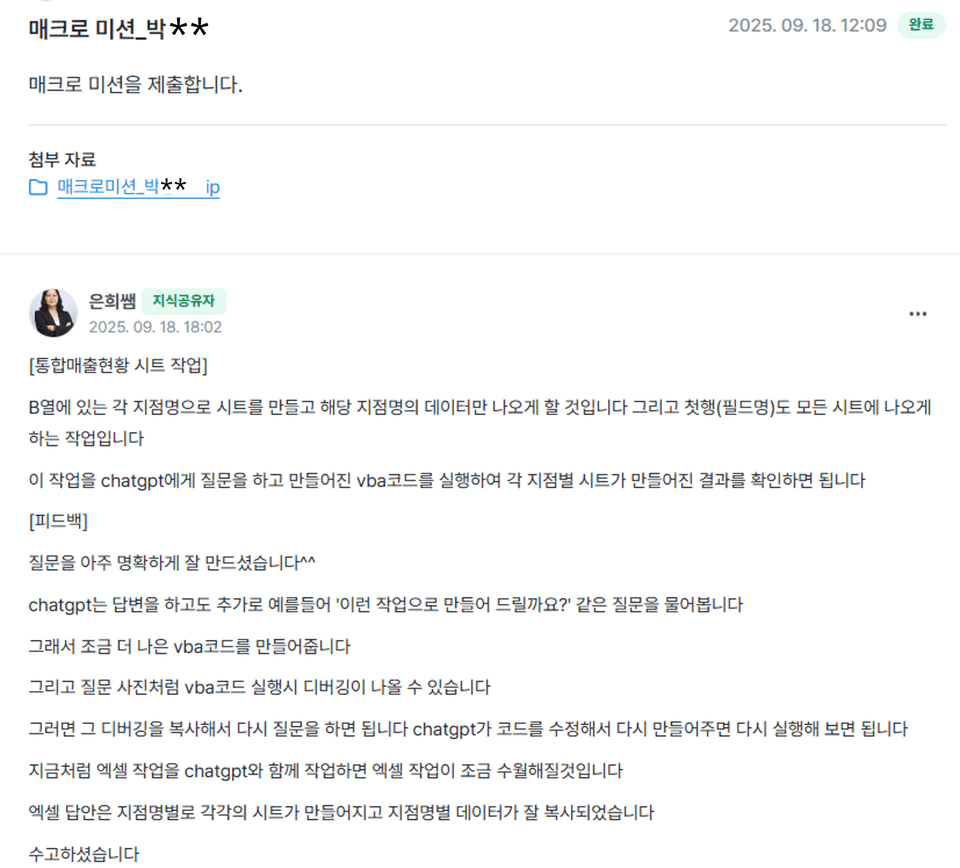
The missions you submit can help fill your shortcomings through Teacher Eunhee's meticulous feedback

The photo below is feedback on macro missions from the 1st challenge missions


By the time the challenge course is coming to an end, you'll understand functions and macros that once felt vague and abstract

You will discover that it can be easily solved using ChatGPT

Now you'll be able to finish your work quickly


🎁 Course Benefits

  • You can ask questions anytime during the course → The instructor will answer directly

  • When writing a course review, we provide the "Excel Tips PDF for Improving Work Efficiency (100 pages)" e-book and practice examples together


▣ Then please tell me specifically in what cases ChatGPT is helpful


1. If you've been searching the internet or asking colleagues about Excel functions or features you don't know while working with Excel, now ask ChatGPT instead.


ChatGPT provides detailed instructions on how to do it, so you can just follow along.

For example, when you're unsure about which function to use, if you ask a question that fits your work situation, ChatGPT will tell you the appropriate function to use. Then you can simply copy and paste the function it suggests.

Solve various problems you encounter in practice together with ChatGPT, and you'll reduce work time and have fewer occasions to feel sorry to colleagues or acquaintances because of Excel.


[Function Work Example]

Work situation: I need a function that calculates values based on multiple conditions.

ChatGPT Question:

"How do I write a formula that returns different results based on conditions?
For example, I want to sum the values in column J if the value in column B is 'Regular Member', and sum the values in column K if it's 'Non-member'."


ChatGPT's response:


2. If you have repetitive tasks in Excel, ask ChatGPT to create VBA code for you.


Did you know that you can write VBA code in Excel?

If you need to perform simple but infinitely repetitive tasks on large amounts of data?

For example, if you need to insert flights in the middle of 1000+ data entries, what would you do? Hmm..... you'd have to give up on leaving work on time.

In this case, VBA code is the correct answer. If you write and run VBA code, it will be finished in less than a minute
But I don't know VBA code....


Don't worry~~


We have ChatGPT

Even if I don't know VBA code, I can tell ChatGPT what task I want to accomplish and it will quickly create VBA code for me.


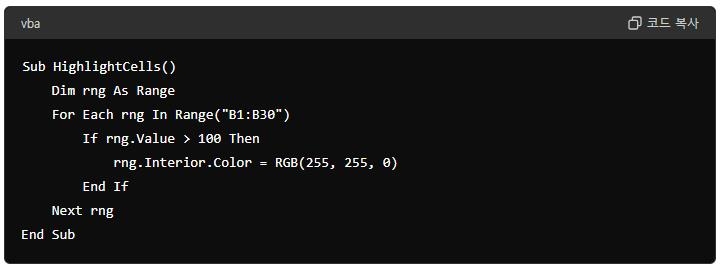
[VBA Code Work Example]

Work situation: Need to change the background color to yellow for cells in column B where the value is greater than 100


ChatGPT Question:
Please create a VBA code that changes the background color to yellow for cells in column B where the value is greater than 100.


ChatGPT's response:


▣ So how can we use ChatGPT effectively?


You need to ask good questions (prompts).

Generative AI like ChatGPT produces different results depending on the question, so techniques for asking appropriate questions are necessary.

Wait a minute!!!

I'm not sure how to ask questions?

Don't worry!!!

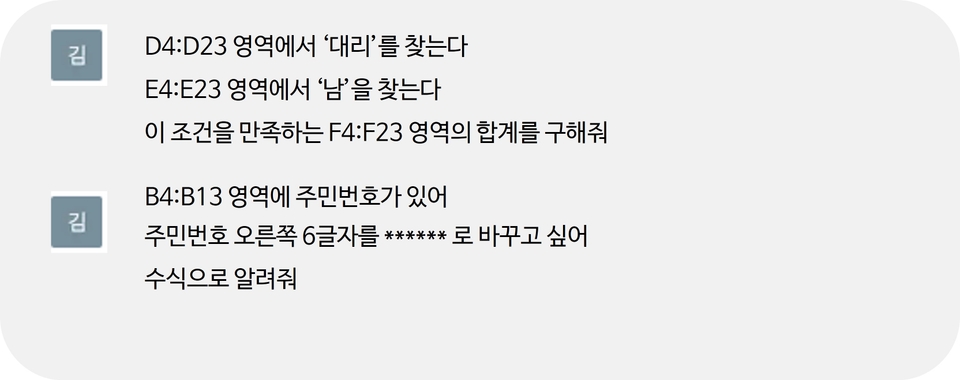
Teacher Eunhee shows you how to ask questions about your Excel work to get the answers you want in her e-book on how to ask good questions. By following the example questions in the e-book, you can learn how to ask questions to get the answers you want.


[Question Example]


▣ Is there anything I need to prepare to use ChatGPT?

1. Please prepare Excel 2016 or a later version.

2. First, sign up for ChatGPT and log in. (ChatGPT 4o free version)

https://openai.com/index/chatgpt/

3. Among the attached files, download the Excel Example.ZIP and extract it to an appropriate location.

4. ChatGPT를 활용한 엑셀 함수와 매크로(VBA 코드).PDF can be downloaded and displayed on screen for use, or printed out to use like a textbook.


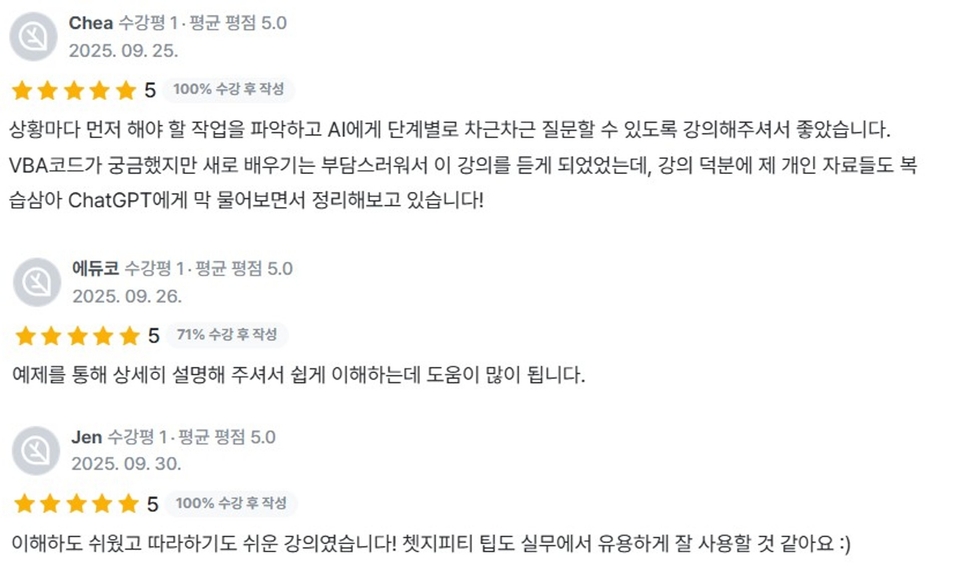
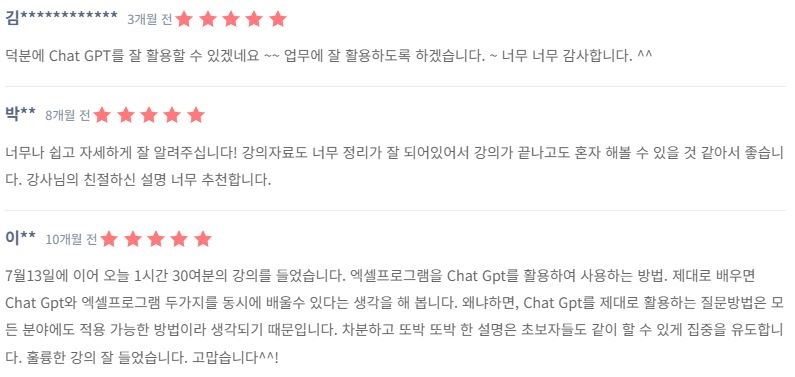
▣ Here are reviews from people who have already used ChatGPT in Excel
You can do it too

This is a review from Challenge Batch 1


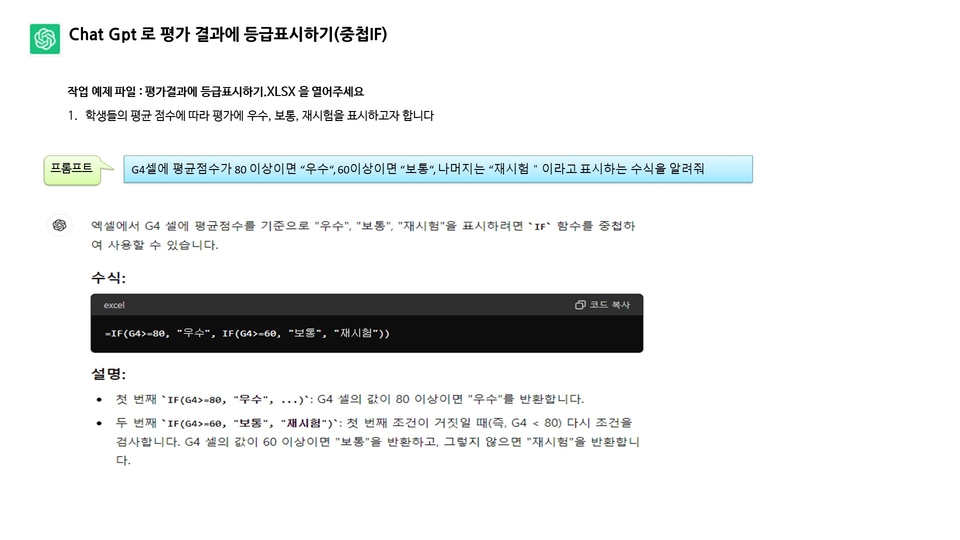
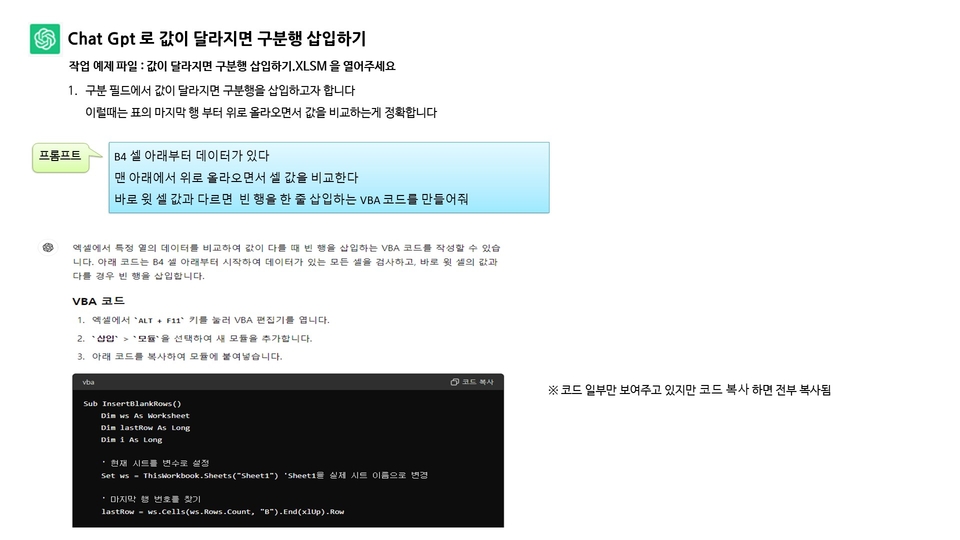
▣ Can I see examples of how the e-book PDF provided with the VOD explains how to use ChatGPT for Excel tasks?

Example of using nested IF functions with ChatGPT

Example of using ChatGPT to create VBA code that adds separator rows when values change

The PDF e-book contains even more content beyond the examples shown above, including functions and VBA code examples that can be utilized in actual work situations.


▣ How is the VOD structured?

Lesson 1: Explains how to prepare for practice using ChatGPT in Excel and methods for asking good questions

Lesson 2 Explains how to ask ChatGPT about Excel functions and how to apply the answers to Excel

Lesson 3 When creating macros for repetitive Excel tasks using VBA code that ChatGPT generates, this explains how to create and execute that code as a macro button in Excel


▣ Frequently Asked Questions Q & A

Q. Can non-majors also take this course?

Yes. Excel is a program widely used in all types of work, so it would be useful for anyone to know, regardless of their major or field of study.


Q. Why should I learn Excel functions?

Learning functions in Excel will allow you to use them in the right places at work, increasing work efficiency and enabling you to leave work on time.
In this video, you'll learn how to apply functions using ChatGPT, making it a bit easier and smoother to apply functions.


Q. What is a macro?

When working with Excel, you'll encounter repetitive tasks. If you create macros for these repetitive tasks, you can quickly solve them later by running the macros. The macro content is created as VBA code, and we use ChatGPT for this VBA code.


Q. Does this course provide PDFs for reference and practice examples that I can use while watching the videos?

Yes, detailed PDF explanations and Excel practice examples are also provided
You can follow along while watching the videos, which will help you understand much faster


The ChatGPT I've used feels like a good friend.


They were like a colleague and friend who would always try hard to find answers for me, no matter when I asked or how many bothersome questions I had.

Since Excel tasks vary for each user, I strongly recommend that you follow the instructions provided in the e-book and videos on how to ask questions and apply ChatGPT effectively for Excel work.


How about following along with this video and incorporating ChatGPT into your Excel work?


11월

16일

챌린지 시작일

2025년 11월 16일 PM 03:00

챌린지 종료일

2025년 11월 30일 PM 02:59

챌린지에서 배워요

  • You can learn how to ask ChatGPT questions effectively.

  • Chat GPT can suggest appropriate functions needed for my work, and I can apply those functions to my tasks.

  • You can apply the macro VBA code that Chat GPT provides to your work.

Recommended for
these people

Who is this course right for?

  • Office workers who want to increase their Excel practical work speed

  • A workplace that wants to learn functions and macros together

  • Excel users who want to integrate ChatGPT into their work

  • Someone who needs a friend who knows Excel well

Need to know before starting?

  • It would be good to know cell selection, data input/editing, sheet navigation, addition, and deletion.

  • Having experience with simple functions like SUM and AVERAGE would be even more beneficial.

Reviews

Not enough reviews.
Please write a valuable review that helps everyone!

이 강의의 지난 수강평

취소 및 환불 규정
챌린지는 지식공유자가 설정한 수업 최소 정원이 충족되지 않을 경우, 폐강 안내가 고지되며 결제 내역이 자동취소됩니다.

dmsgml1030's other courses

Check out other courses by the instructor!

$13.20