


d-day 오류
0
<!DOCTYPE html>
<html lang="ko">
<head>
  <script src="./js/calculator.js"></script>
  <link rel="stylesheet" href="./calculator.css">

  <title>D-Day</title>
</head>
<body>
  <h1>D-day</h1>
  <div id="d__day__container">
    <div class="d__day__child__container">
    <span id="days">0</span>
    <span>일</span>
    </div>
    <div class ="d__day__child__container">
      <span id="hours">0</span>
      <span>시간</span>
    </div>
    <div class ="d__day__child__container">
      <span id="min">0</span>
      <span>분</span>
    </div>
    <div class ="d__day__child__container">
      <span id="sec">0</span>
      <span>초</span>
    </div>
  </div>
  <div id="target-selector">
    <input id="year" type="text" placeholder="년도" class="day-caleander" size=5 maxlength="4">
    <input id="month" type="text" placeholder="월" class="day-caleander" size=5 maxlength="2">
    <input id="day" type="text" placeholder="일" class="day-caleander" size=5 maxlength="2">
  </div>
  <div id="target__selector">
    <button onclick="counterMake()" id="start__btn">카운트다운</button>
  </div>
</body>
</html>
const dateFormMaker = () => {
  const inputYear = document.getElementById("year").value;
  const inputMonth = document.getElementById("month").value;
  const inputDay = document.getElementById("day").value;

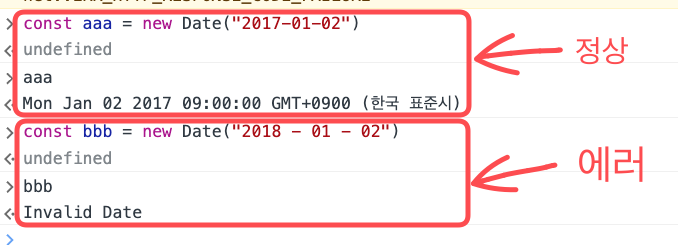
  const dateFormat = `${inputYear} - ${inputMonth} - ${inputDay}`;

  return dateFormat;
}

const counterMake = () => {
  const targetDateInput = dateFormMaker();
  const nowDate = new Date()
  const targetDate = new Date(targetDateInput);
  const remaining = (targetDate-nowDate) / 1000;
  if(remaining <=0) {
    console.log("타이머가 종료되었습니다.")
  }else if (isNaN(remaining)) {
    "유효한 시간 형식이 아닙니다"

  }

  const reaminingDate = Math.floor(remaining /3600 /24);
  const remainingHours = Math.floor (remaining/3600) & 24;
  const remainingMin = Math.floor(remaining/60) % 60;
  const remainingSec = Math.floor(remaining) & 60;

  const dDayCounter = `남은 시간 : ${reaminingDate}일 ${remainingHours}시 ${remainingMin}분 ${remainingSec}초`;
  console.log(dDayCounter)
  return dDayCounter;

}
console 하나하나 찍어가며 파악한 결과 targetDate에서 NaN이 뜨는데, 아무리 봐도 이유를 모르겠습니다 ㅠㅠㅠ
input 박스에 적은 값들도 잘 읽어오는데 갑자기 저기서 에러가 뜨니까 답답하네요 .
피드백 부탁드립니다.
fetchBoardsOfMine, fetchBoardsCountOfMine 에러 문의드립니다
0
70
1
댓글 기능 구현 중 질문드립니다.
0
86
1
쿠폰코드 발급
0
198
2
example 서버 플레이그라운드, API 접속 모두 안됩니다.
0
107
2
문의드립니다!! ㅠㅠ
0
118
2
graphql 백엔드 서버가 포폴용 빼곤 접속이 안됩니다.
0
90
2
_app.js 작성 이후로 에러가 발생하네요
0
106
2
학습자료
0
80
2
학습자료가 안열립니다.
0
60
2
플레이 그라운드 퀴즈 문제 질문이 있습니다.
0
65
0
기존강의 구매자, 업데이트 끝인가요?
0
118
3
업데이트 버전 수강
0
94
2
완벽한 프론트엔드
0
140
2
나만의 쇼핑몰 샘플 페이지 접속 확인부탁드립니다.
0
87
1
graphql 접속이 안됩니다.
0
105
2
const, let 사용 질문 드립니다.
0
78
2
싸이월드 만들기 1탄 피드백 부탁드립니다.
0
140
2
회원가입 과제 피드백 부탁드립니다.
0
88
2
styled.span / styled.input "CSS 자동완성"
0
50
1
쿠폰 발급 관련
0
175
2
서버 502 error
0
255
2
쿠폰 다시 부탁드려도 될가여?
0
146
2
a태그 패딩했을때 왜 크기가 줄어들지 않고 늘어나나요
0
190
2
2분 44초 질문
0
142
3