


리액트 포트폴리오 과제1 질문
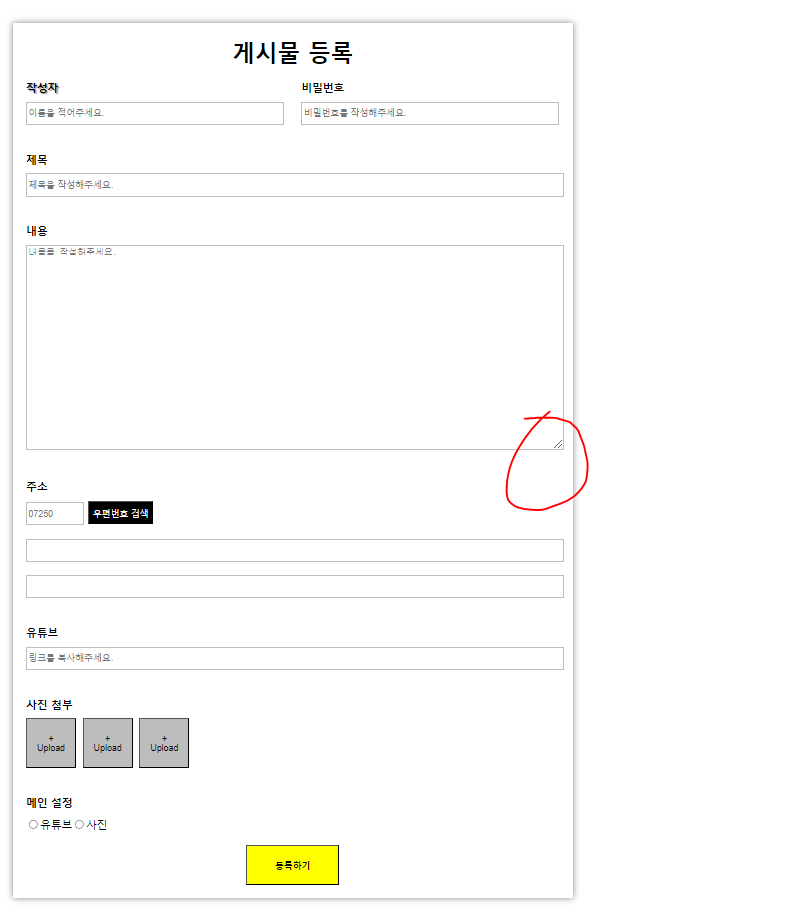
textarea를 적용시키니 칸을 줄이고 늘릴수 있는저런 요소가 생겼는데 못 없애나요?
그리고 리액트에선 예전에Css를 다뤘던것 처럼 마우스커서로 색깔을 마음대로 선택 할수 없던데
해결방법이 있나요?
HTML:
import {
  Wrapper,
  Project,
  Title,
  Label,
  Writer,
  Password,
  Contents,
  Address,
  WriterLabel,
  AddressNumber,
  AddressButton,
  YoutubeInput,
  InputWrapper,
  UserWrapper,
  TitleWrapper,
  ContentWrapper,
  AddressWrapper,
  YoutubeWrapper,
  ImageWrapper,
  UploadButton,
  UploadButtonText,
  SettingWrapper,
  RadioButton,
  RadioLabel,
  SubmitButton,
} from "../../../styles/01-freeboard";

export default function EmotionPage() {
  // 여기는 자바스크립트 쓰는곳

  return (
    <Wrapper>
      <Project>게시물 등록</Project>
      <UserWrapper>
        <InputWrapper>
          <WriterLabel>작성자</WriterLabel>
          <Writer placeholder="이름을 적어주세요." />
        </InputWrapper>
        <InputWrapper>
          <Label>비밀번호</Label>
          <Password type="password" placeholder="비밀번호를 작성해주세요." />
        </InputWrapper>
      </UserWrapper>
      <TitleWrapper>
        <InputWrapper>
          <Label>제목</Label>
          <Title placeholder="제목을 작성해주세요." />
        </InputWrapper>
      </TitleWrapper>
      <ContentWrapper>
        <InputWrapper>
          <Label>내용</Label>
          <Contents placeholder="내용을 작성해주세요." />
        </InputWrapper>
      </ContentWrapper>
      <AddressWrapper>
        <InputWrapper>
          <Label>주소</Label>
          <AddressNumber placeholder="07250" />{" "}
          <AddressButton>우편번호 검색</AddressButton>
          <Address />
          <Address />
        </InputWrapper>
      </AddressWrapper>
      <YoutubeWrapper>
        <InputWrapper>
          <Label>유튜브</Label>
          <YoutubeInput placeholder="링크를 복사해주세요." />
        </InputWrapper>
      </YoutubeWrapper>
      <ImageWrapper>
        <InputWrapper>
          <Label>사진 첨부</Label>
          <UploadButton>
            <UploadButtonText>+</UploadButtonText>
            <UploadButtonText>Upload</UploadButtonText>
          </UploadButton>
          <UploadButton>
            <UploadButtonText>+</UploadButtonText>
            <UploadButtonText>Upload</UploadButtonText>
          </UploadButton>
          <UploadButton>
            <UploadButtonText>+</UploadButtonText>
            <UploadButtonText>Upload</UploadButtonText>
          </UploadButton>
        </InputWrapper>
      </ImageWrapper>
      <SettingWrapper>
        <InputWrapper>
          <Label>메인 설정</Label>
          <RadioButton type="radio" name="radio_button" />
          <RadioLabel>유튜브</RadioLabel>
          <RadioButton type="radio" name="radio_button" />
          <RadioLabel>사진</RadioLabel>
        </InputWrapper>
      </SettingWrapper>
      <SubmitButton>등록하기</SubmitButton>
    </Wrapper>
  );
}
Css:
import styled from "@emotion/styled";

export const Wrapper = styled.div`
  margin: 50px;
  padding: 20px;
  width: 800px;
  /* border: 0.5px solid gray; */
  box-shadow: 0px 0px 10px gray;
  display: flex;
  flex-direction: column;
  align-items: center;
`;

export const Project = styled.div`
  font-size: 34px;
  font-weight: bold;
`;

export const InputWrapper = styled.div``;
export const Label = styled.div`
  font-size: 16px;
  font-weight: bold;
  margin-bottom: 10px;
`;

export const WriterLabel = styled.div`
  font-size: 16px;
  font-weight: 900;
  text-shadow: 2px 2px 2px gray;
  margin-bottom: 10px;
`;

export const UserWrapper = styled.div`
  display: flex;
  flex-direction: row;
  justify-content: space-between;
  width: 100%;
  margin-top: 20px;
  margin-bottom: 20px;
`;

export const Writer = styled.input`
  width: 380px;
  height: 30px;
  border: 1px solid #bdbdbd;
`;

export const Password = styled.input`
  width: 380px;
  height: 30px;
  border: 1px solid #bdbdbd;
`;
export const TitleWrapper = styled.div`
  width: 100%;
  margin-top: 20px;
  margin-bottom: 20px;
`;

export const Title = styled.input`
  width: 100%;
  height: 30px;
  border: 1px solid #bdbdbd;
`;

export const ContentWrapper = styled.div`
  width: 100%;
  margin-top: 20px;
  margin-bottom: 20px;
`;
export const Contents = styled.textarea`
  width: 100%;
  height: 300px;
  border: 1px solid #bdbdbd;
`;
export const AddressWrapper = styled.div`
  width: 100%;
  margin-top: 20px;
  margin-bottom: 20px;
`;
export const AddressNumber = styled.input`
  width: 80px;
  height: 30px;
  border: 1px solid #bdbdbd;
`;

export const Address = styled.input`
  width: 100%;
  height: 30px;
  border: 1px solid #bdbdbd;
  margin-top: 20px;
`;

export const AddressButton = styled.button`
  background-color: black;
  color: white;
  height: 35px;
  cursor: pointer;
`;

export const YoutubeWrapper = styled.div`
  width: 100%;
  margin-top: 20px;
  margin-bottom: 20px;
`;

export const YoutubeInput = styled.input`
  width: 100%;
  height: 30px;
  border: 1px solid #bdbdbd;
`;
export const ImageWrapper = styled.div`
  width: 100%;
  margin-top: 20px;
  margin-bottom: 20px;
`;
export const UploadButton = styled.button`
  background-color: #bdbdbd;
  width: 75px;
  height: 75px;
  cursor: pointer;
  margin-right: 10px;
`;

export const UploadButtonText = styled.div`
  display: flex;
  flex-direction: column;
`;

export const SettingWrapper = styled.div`
  width: 100%;
  margin-top: 20px;
  margin-bottom: 20px;
`;

export const RadioButton = styled.input`
  cursor: pointer;
`;
export const RadioLabel = styled.span`
  font-weight: 500;
`;

export const SubmitButton = styled.button`
  background-color: yellow;
  height: 60px;
  width: 140px;
  font-weight: bold;
  cursor: pointer;
`;
답변 1
1
안녕하세요! 현욱님!
textarea는 resize: none; 으로 해결해 보실 수 있어요!
기존에 다루셨던 css역시 emotion에서 동일하게 적용 가능합니다!^^
(javascript로 css를 변경하는 방법도 있는데, 해당 방법은 뒤쪽 props 관련 수업을 수강해 주세요!)
fetchBoardsOfMine, fetchBoardsCountOfMine 에러 문의드립니다
0
70
1
댓글 기능 구현 중 질문드립니다.
0
86
1
쿠폰코드 발급
0
198
2
example 서버 플레이그라운드, API 접속 모두 안됩니다.
0
107
2
문의드립니다!! ㅠㅠ
0
118
2
graphql 백엔드 서버가 포폴용 빼곤 접속이 안됩니다.
0
91
2
_app.js 작성 이후로 에러가 발생하네요
0
106
2
학습자료
0
80
2
학습자료가 안열립니다.
0
60
2
플레이 그라운드 퀴즈 문제 질문이 있습니다.
0
65
0
기존강의 구매자, 업데이트 끝인가요?
0
118
3
업데이트 버전 수강
0
94
2
완벽한 프론트엔드
0
140
2
나만의 쇼핑몰 샘플 페이지 접속 확인부탁드립니다.
0
87
1
graphql 접속이 안됩니다.
0
105
2
const, let 사용 질문 드립니다.
0
79
2
싸이월드 만들기 1탄 피드백 부탁드립니다.
0
140
2
회원가입 과제 피드백 부탁드립니다.
0
88
2
styled.span / styled.input "CSS 자동완성"
0
50
1
쿠폰 발급 관련
0
175
2
서버 502 error
0
255
2
쿠폰 다시 부탁드려도 될가여?
0
146
2
a태그 패딩했을때 왜 크기가 줄어들지 않고 늘어나나요
0
190
2
2분 44초 질문
0
142
3