


싸이월드 실습 4탄 질문이요 ㅠㅠ
462
작성한 질문수 15
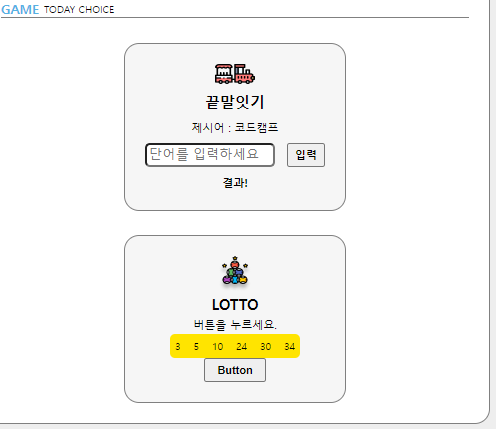
싸이월드 실습 4탄 하는 중인데
LOTTO 부분에 "특히 버튼과 숫자박스 부분"이 왜 세로로 다닥다닥 붙어있을까요..ㅠ
game__container 부분에
 flex-direction: column;
    align-items: center;
    justify-content: space-between;
    padding: 20px;
가 들어있고
lotto__text부분에도
display: flex;
    flex-direction: column;
    align-items: center;
    justify-content: space-between;
를 넣어봤으나 아무 변화가 없었습니다 ㅠ
game.html:
<!DOCTYPE html>
<html lang="ko">
<head>

    <title>Game</title>
    <link href="./styles/game.css" rel="stylesheet">
</head>
<body>
    <div class="wrapper">
        <div class="wrapper__header">
            <div class="header__title">
                <div class="title">GAME</div>
                <div class="subtitle">TODAY CHOICE</div>
            </div>
            <div class="divideLine"></div>
        </div>
        <div class="game__container">
            <img src="./images/word.png">
            <div class="game__title">끝말잇기</div>
            <div class="game__subtitle">제시어 : <span id="word">코드캠프</span> </div>
            <div class="word__text">
                <input class="textbox" id="myword" placeholder="단어를 입력하세요">
                <button class="search">입력</button>
            </div>
            <div class="word__result" id="result">결과!</div>

        </div>
        <div class="game__container">
            <img src="./images/lotto.png">
            <div class="game__title">LOTTO</div>
            <div class="game__subtitle"> 버튼을 누르세요. </div>
            <div class="lotto__text">
                <div class="number__box">
                    <div class="number1">3</div>
                    <div class="number1">5</div>
                    <div class="number1">10</div>
                    <div class="number1">24</div>
                    <div class="number1">30</div>
                    <div class="number1">34</div>
                </div>
                <button class="lotto_button">Button</button>
            </div>


        </div>

    </div>
</body>
</html>
game.css:
* {
    box-sizing: border-box;
    margin: 0px
}

html, body{
    width: 100%;
    height: 100%;
}

.wrapper {
    width: 100%;
    height: 100%;
    padding: 20px;
    display: flex;
    flex-direction: column; /* 박스가 wrapper안에 game__container 두개 총 세개*/
    align-items: center;
    justify-content: space-between;
}

.wrapper__header{
    width: 100%;
    display: flex;
    flex-direction: column;
}

.header__title{
    display: flex;
    flex-direction: row;
    align-items: center;
}

.title{
    color: #55b2e4;
    font-size: 13px;
    font-weight: 700;
}

.subtitle{
    font-size: 8px;
    padding-left: 5px;
}

.divideLine{
    width: 100%;
    border-top: 1px solid gray;
}

.game__container{
    width: 222px;
    height: 168px;
    border: 1px solid gray;
    border-radius: 15px;
    display: flex;
    flex-direction: column;
    align-items: center;
    justify-content: space-between;
    padding: 20px;
    background-color: #f6f6f6;
}


.game__title {
    font-size: 15px;
    font-weight: 900;
}

.game__subtitle {
    font-size:  11px;
}

.word__result {
    font-size: 11px;
    font-weight: 700;
}

.word__text {
    width: 100%;
    display: flex;
    flex-direction: row;
    justify-content: space-between;

}

.textbox {
    width: 130px;
    height: 24px;
    border-radius: 5px;
}

.search {
    font-size: 11px;
    font-weight: 700;
    width: 38px;
    height: 24px;
}

.number__box{
    width: 130px;
    height: 24px;
    border-radius: 5px;
    background-color: #FFE400 ;
    display: flex;
    flex-direction: row;
    justify-content: space-between;
    align-items: center;
}

.lotto__text {
    display: flex;
    flex-direction: column;
    align-items: center;
    justify-content: space-between;
}
.number1{
    font-size: 10px;
    font-weight: 700px;
    margin: 5px;
}

.lotto_button {
    font-size: 11px;
    font-weight: 700;
    width: 62px;
    height: 24px;
}답변 2
0
I am in awe of your ability to make complex concepts accessible to a wide range of readers, as you strike the perfect balance between intellectual rigor and clarity of expression, ensuring that your ideas resonate with Slope both experts and novices alike.
0
안녕하세요! 현욱님!
lotto__text 내부에 있는 녀석들은 세로로 놓고, space-between을 통해서 사이를 벌려 공간을 만들려고 하신 것 같아요!
여기까진 좋았는데, 문제는 lotto__text 자체에 높이가 없다보니, 그 안에있는 자식들이 만들 여유의 공간이 없는 것 같아요!^^
fetchBoardsOfMine, fetchBoardsCountOfMine 에러 문의드립니다
0
63
1
댓글 기능 구현 중 질문드립니다.
0
84
1
쿠폰코드 발급
0
196
2
example 서버 플레이그라운드, API 접속 모두 안됩니다.
0
106
2
문의드립니다!! ㅠㅠ
0
118
2
graphql 백엔드 서버가 포폴용 빼곤 접속이 안됩니다.
0
88
2
_app.js 작성 이후로 에러가 발생하네요
0
106
2
학습자료
0
80
2
학습자료가 안열립니다.
0
57
2
플레이 그라운드 퀴즈 문제 질문이 있습니다.
0
65
0
기존강의 구매자, 업데이트 끝인가요?
0
118
3
업데이트 버전 수강
0
94
2
완벽한 프론트엔드
0
139
2
나만의 쇼핑몰 샘플 페이지 접속 확인부탁드립니다.
0
87
1
graphql 접속이 안됩니다.
0
105
2
const, let 사용 질문 드립니다.
0
78
2
싸이월드 만들기 1탄 피드백 부탁드립니다.
0
138
2
회원가입 과제 피드백 부탁드립니다.
0
88
2
styled.span / styled.input "CSS 자동완성"
0
50
1
쿠폰 발급 관련
0
175
2
서버 502 error
0
255
2
쿠폰 다시 부탁드려도 될가여?
0
145
2
a태그 패딩했을때 왜 크기가 줄어들지 않고 늘어나나요
0
189
2
2분 44초 질문
0
138
3