


insta_web 질문 있습니다!
1698
작성한 질문수 5
안녕하세요! 선생님 혹시 에러가 나는데 봐주실 수 있을까요 ㅠㅠ 기본적으로 로그인부터 안됩니다 ㅠㅠ
에러
DevTools listening on ws://127.0.0.1:51221/devtools/browser/d2c4970f-37a8-4257-ad60-95407a9b0e45
cannot access local variable 'actions' where it is not associated with a value
[에러] insta_web_login > 에러 발생
Traceback (most recent call last):
File "c:\Users\문소희\Desktop\project\insta_auto\main.py", line 25, in <module>
insta_web.insta_web_work(driver,keyword,count)
File "c:\Users\문소희\Desktop\project\insta_auto\insta_web.py", line 117, in insta_web_work
insta_web_link_extract(driver,count)
^^^^^^^^^^^^^^^^^^^^^^^^^^^^^^^^^^^^
File "c:\Users\문소희\Desktop\project\insta_auto\insta_web.py", line 75, in insta_web_link_extract
WebDriverWait(driver, 10).until(EC.presence_of_element_located(
File "C:\Users\문소희\AppData\Local\Programs\Python\Python311\Lib\site-packages\selenium\webdriver\support\wait.py", line 95, in until
raise TimeoutException(message, screen, stacktrace)
selenium.common.exceptions.TimeoutException: Message:
Stacktrace:
Backtrace:
GetHandleVerifier [0x01086E73+48323]
(No symbol) [0x01019661]
(No symbol) [0x00F25308]
(No symbol) [0x00F50B45]
(No symbol) [0x00F50CDB]
(No symbol) [0x00F7E3D2]
(No symbol) [0x00F6A924]
(No symbol) [0x00F7CAC2]
(No symbol) [0x00F6A6D6]
(No symbol) [0x00F4847C]
(No symbol) [0x00F4957D]
GetHandleVerifier [0x012EFD5D+2575277]
GetHandleVerifier [0x0132F86E+2836158]
GetHandleVerifier [0x013296DC+2811180]
GetHandleVerifier [0x011141B0+626688]
(No symbol) [0x0102314C]
(No symbol) [0x0101F4B8]
(No symbol) [0x0101F59B]
(No symbol) [0x010121B7]
BaseThreadInitThunk [0x76A100C9+25]
RtlGetAppContainerNamedObjectPath [0x77907B4E+286]
RtlGetAppContainerNamedObjectPath [0x77907B1E+238]
main
import time
import uiautomator2 as u2
from selenium import webdriver

import insta_web
import insta_mobile


serial = "ce031713db01712d02"
device = u2.connect(serial)

options = webdriver.ChromeOptions()
options.add_argument('--user-agent= Mozilla/5.0 (Windows NT 10.0; Win64; x64) AppleWebKit/537.36 (KHTML, like Gecko) Chrome/113.0.0.0 Safari/537.36')
options.add_argument("--disanble-logging")
options.add_experimental_option("useAutomationExtension",False)
options.add_experimental_option('excludeSwitches',["enable-auttomation"])

driver = webdriver.Chrome(options=options)

keyword_list = ["골린이", "골프사랑", "골프중독","골프스윙", "골프레슨"]

for keyword in keyword_list:
    keyword = keyword.replace(" ","")
    count = 1000
    insta_web.insta_web_work(driver,keyword,count)
    insta_mobile.insta_mobile_work(device)
insta_web
import time, data
import chromedriver_autoinstaller
chromedriver_autoinstaller.install()

from selenium import webdriver
from selenium.webdriver.common.by import By
from selenium.webdriver.support.ui import WebDriverWait
from selenium.webdriver.support import expected_conditions as EC
from selenium.webdriver.common.keys import Keys
from selenium.webdriver import ActionChains
import pyperclip


def insta_web_login(driver):
    try:
        driver.get("https://www.instagram.com/")
        # time.sleep(2)
        id_selector = "#loginForm > div > div:nth-child(1) > div > label > input"

        WebDriverWait(driver, 10).until(EC.presence_of_element_located(
            (By.CSS_SELECTOR, id_selector)
        ))

        id_input = driver.find_element(By.CSS_SELECTOR,id_selector)
        id_input.click()
        time.sleep(5)

       # ctrl + c 동작
        pyperclip.copy(data.id)
        # ctrl + v 동작
        actions.key_down(Keys.CONTROL).send_keys('v').key_up(Keys.CONTROL).perform()

        # id_input.send_keys(data.id)
        time.sleep(5)

        pw_selector = "#loginForm > div > div:nth-child(2) > div > label > input"
        pw_input = driver.find_element(By.CSS_SELECTOR,pw_selector)
        pw_input.click()
        time.sleep(5)
        actions = ActionChains(driver)

        # ctrl + c 동작
        pyperclip.copy(data.pw)
        # ctrl + v 동작
        actions.key_down(Keys.CONTROL).send_keys('v').key_up(Keys.CONTROL).perform()

        time.sleep(5)
        login_btn_selector = "#loginForm > div > div:nth-child(3) > button"
        login_btn = driver.find_element(By.CSS_SELECTOR, login_btn_selector)
        login_btn.click(5)
    except Exception as e:
        print(e)
        print('[에러] insta_web_login > 에러 발생')


def insta_web_hashtag_search(driver,keyword):
    try:


        time.sleep(50)
        from urllib import parse
        keyword = "골프사랑"
        keyword = parse.quote(keyword)
        driver.get(f"https://www.instagram.com/explore/tags/{keyword}/")
    except Exception as e:
        print(e)
        print["[에러] insta_web_hashtag_search > 해시태그 검색중 에러 발생"]


def insta_web_link_extract(driver, count=100):
    time.sleep(5)
    all_posting_sel = "div[id^='mount_0_0'] > div > div > div.x9f619.x1n2onr6.x1ja2u2z > div > div > div > div.x78zum5.xdt5ytf.x10cihs4.x1t2pt76.x1n2onr6.x1ja2u2z > div.x9f619.xnz67gz.x78zum5.x168nmei.x13lgxp2.x5pf9jr.xo71vjh.x1uhb9sk.x1plvlek.xryxfnj.x1c4vz4f.x2lah0s.x1q0g3np.xqjyukv.x1qjc9v5.x1oa3qoh.x1qughib > div.xh8yej3.x1gryazu.x10o80wk.x14k21rp.x1porb0y.x17snn68.x6osk4m > section > main > article > div:nth-child(3) > div"
    WebDriverWait(driver, 10).until(EC.presence_of_element_located(
        (By.CSS_SELECTOR, all_posting_sel)
    ))

    all_posting_box = driver.find_element(By.CSS_SELECTOR, all_posting_sel)
    time.sleep(5)

    '''링크 100개 추출'''

    links = []
    while len(links) < count :
        try:
            for _ in range(6):
                driver.execute_script("window.scrollBy(0,600);")
                time.sleep(5)

            all_posting_box = driver.find_element(By.CSS_SELECTOR, all_posting_sel)
            posk_links = all_posting_box.find_elements(By.TAG_NAME,"a")

            for eachLink in posk_links:

                link = eachLink.get_attribute('href')
                links.append(link)


            links = set(links)
            links = list(links)

        except Exception as e:
            print(e)
            print("insta_web_link_extract > while 에러 발생")


    with open('links.txt',"a") as f:
        for link in links:
            # print(link)
            f.write(f"{link}\n")

def insta_web_work(driver,keyword,count):
    insta_web_login(driver)
    insta_web_hashtag_search(driver, keyword)
    insta_web_link_extract(driver, count)
insta_ mobile
import time, data
import chromedriver_autoinstaller
chromedriver_autoinstaller.install()

from selenium import webdriver
from selenium.webdriver.common.by import By
from selenium.webdriver.support.ui import WebDriverWait
from selenium.webdriver.support import expected_conditions as EC
from selenium.webdriver.common.keys import Keys
from selenium.webdriver import ActionChains
import pyperclip


def insta_web_login(driver):
    try:
        driver.get("https://www.instagram.com/")
        # time.sleep(2)
        id_selector = "#loginForm > div > div:nth-child(1) > div > label > input"

        WebDriverWait(driver, 10).until(EC.presence_of_element_located(
            (By.CSS_SELECTOR, id_selector)
        ))

        id_input = driver.find_element(By.CSS_SELECTOR,id_selector)
        id_input.click()
        time.sleep(5)

       # ctrl + c 동작
        pyperclip.copy(data.id)
        # ctrl + v 동작
        actions.key_down(Keys.CONTROL).send_keys('v').key_up(Keys.CONTROL).perform()

        # id_input.send_keys(data.id)
        time.sleep(5)

        pw_selector = "#loginForm > div > div:nth-child(2) > div > label > input"
        pw_input = driver.find_element(By.CSS_SELECTOR,pw_selector)
        pw_input.click()
        time.sleep(5)
        actions = ActionChains(driver)

        # ctrl + c 동작
        pyperclip.copy(data.pw)
        # ctrl + v 동작
        actions.key_down(Keys.CONTROL).send_keys('v').key_up(Keys.CONTROL).perform()

        time.sleep(5)
        login_btn_selector = "#loginForm > div > div:nth-child(3) > button"
        login_btn = driver.find_element(By.CSS_SELECTOR, login_btn_selector)
        login_btn.click(5)
    except Exception as e:
        print(e)
        print('[에러] insta_web_login > 에러 발생')


def insta_web_hashtag_search(driver,keyword):
    try:


        time.sleep(50)
        from urllib import parse
        keyword = "골프사랑"
        keyword = parse.quote(keyword)
        driver.get(f"https://www.instagram.com/explore/tags/{keyword}/")
    except Exception as e:
        print(e)
        print["[에러] insta_web_hashtag_search > 해시태그 검색중 에러 발생"]


def insta_web_link_extract(driver, count=100):
    time.sleep(5)
    all_posting_sel = "div[id^='mount_0_0'] > div > div > div.x9f619.x1n2onr6.x1ja2u2z > div > div > div > div.x78zum5.xdt5ytf.x10cihs4.x1t2pt76.x1n2onr6.x1ja2u2z > div.x9f619.xnz67gz.x78zum5.x168nmei.x13lgxp2.x5pf9jr.xo71vjh.x1uhb9sk.x1plvlek.xryxfnj.x1c4vz4f.x2lah0s.x1q0g3np.xqjyukv.x1qjc9v5.x1oa3qoh.x1qughib > div.xh8yej3.x1gryazu.x10o80wk.x14k21rp.x1porb0y.x17snn68.x6osk4m > section > main > article > div:nth-child(3) > div"
    WebDriverWait(driver, 10).until(EC.presence_of_element_located(
        (By.CSS_SELECTOR, all_posting_sel)
    ))

    all_posting_box = driver.find_element(By.CSS_SELECTOR, all_posting_sel)
    time.sleep(5)

    '''링크 100개 추출'''

    links = []
    while len(links) < count :
        try:
            for _ in range(6):
                driver.execute_script("window.scrollBy(0,600);")
                time.sleep(5)

            all_posting_box = driver.find_element(By.CSS_SELECTOR, all_posting_sel)
            posk_links = all_posting_box.find_elements(By.TAG_NAME,"a")

            for eachLink in posk_links:

                link = eachLink.get_attribute('href')
                links.append(link)


            links = set(links)
            links = list(links)

        except Exception as e:
            print(e)
            print("insta_web_link_extract > while 에러 발생")


    with open('links.txt',"a") as f:
        for link in links:
            # print(link)
            f.write(f"{link}\n")

def insta_web_work(driver,keyword,count):
    insta_web_login(driver)
    insta_web_hashtag_search(driver, keyword)
    insta_web_link_extract(driver, count)
답변 3
1
actions.key_down(Keys.CONTROL).send_keys('v').key_up(Keys.CONTROL).perform()

        # id_input.send_keys(data.id)
        time.sleep(5)

        pw_selector = "#loginForm > div > div:nth-child(2) > div > label > input"
        pw_input = driver.find_element(By.CSS_SELECTOR,pw_selector)
        pw_input.click()
        time.sleep(5)
        actions = ActionChains(driver)

        # ctrl + c 동작
        pyperclip.copy(data.pw)
        # ctrl + v 동작
actions.key_down(Keys.CONTROL).send_keys('v').key_up(Keys.CONTROL).perform()1
안녕하세요, 인프런 AI 인턴이에요.
에러 메시지를 보면 로그인 관련 에러가 아니라 insta_web_link_extract 함수에서 발생한 TimeoutException 에러 같습니다. 해당 함수에서는 EC.presence_of_element_located 메소드를 사용하여 element가 나타날 때까지 기다렸다가 실행하는데, TimeoutException은 element가 일정 시간 내에 나타나지 않을 때 발생하는 예외입니다.
해당 에러를 해결하기 위해서는 대기 시간을 늘리거나, 나타날 element의 selector를 정확히 지정하여 대기 시간을 줄이는 등 다양한 방법이 있을 수 있습니다.
현재 드라이버가 정상적으로 동작하는지부터 확인해보시고, 위 방법을 시도해보시길 권장드립니다. 만약에 원하시는 결과가 나오지 않는다면, insta_auto 관련 다른 질문들도 같이 게시글에 올리시면 더욱 적극적인 답변이 가능할 것 같아요.
이상입니다. 좋은 하루 되세요!
0
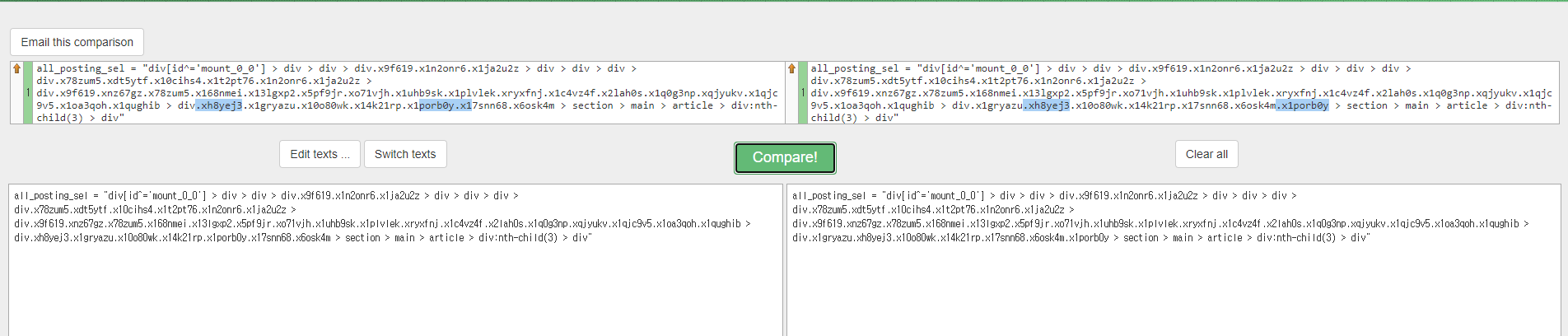
text compare 결과입니다
75번째 라인 코드인
all_posting_sel = "div[id^='mount_0_0'] > div > div > div.x9f619.x1n2onr6.x1ja2u2z > div > div > div > div.x78zum5.xdt5ytf.x10cihs4.x1t2pt76.x1n2onr6.x1ja2u2z > div.x9f619.xnz67gz.x78zum5.x168nmei.x13lgxp2.x5pf9jr.xo71vjh.x1uhb9sk.x1plvlek.xryxfnj.x1c4vz4f.x2lah0s.x1q0g3np.xqjyukv.x1qjc9v5.x1oa3qoh.x1qughib > div.x1gryazu.xh8yej3.x10o80wk.x14k21rp.x17snn68.x6osk4m.x1porb0y > section > main > article > div:nth-child(3) > div"코드 부분을 수정하셔야하는데
[해결방법]
아래 사진과 같이 최근사진들의 box가 전체 선택되도록 css_selector를 한번 더 가져오셔야합니다
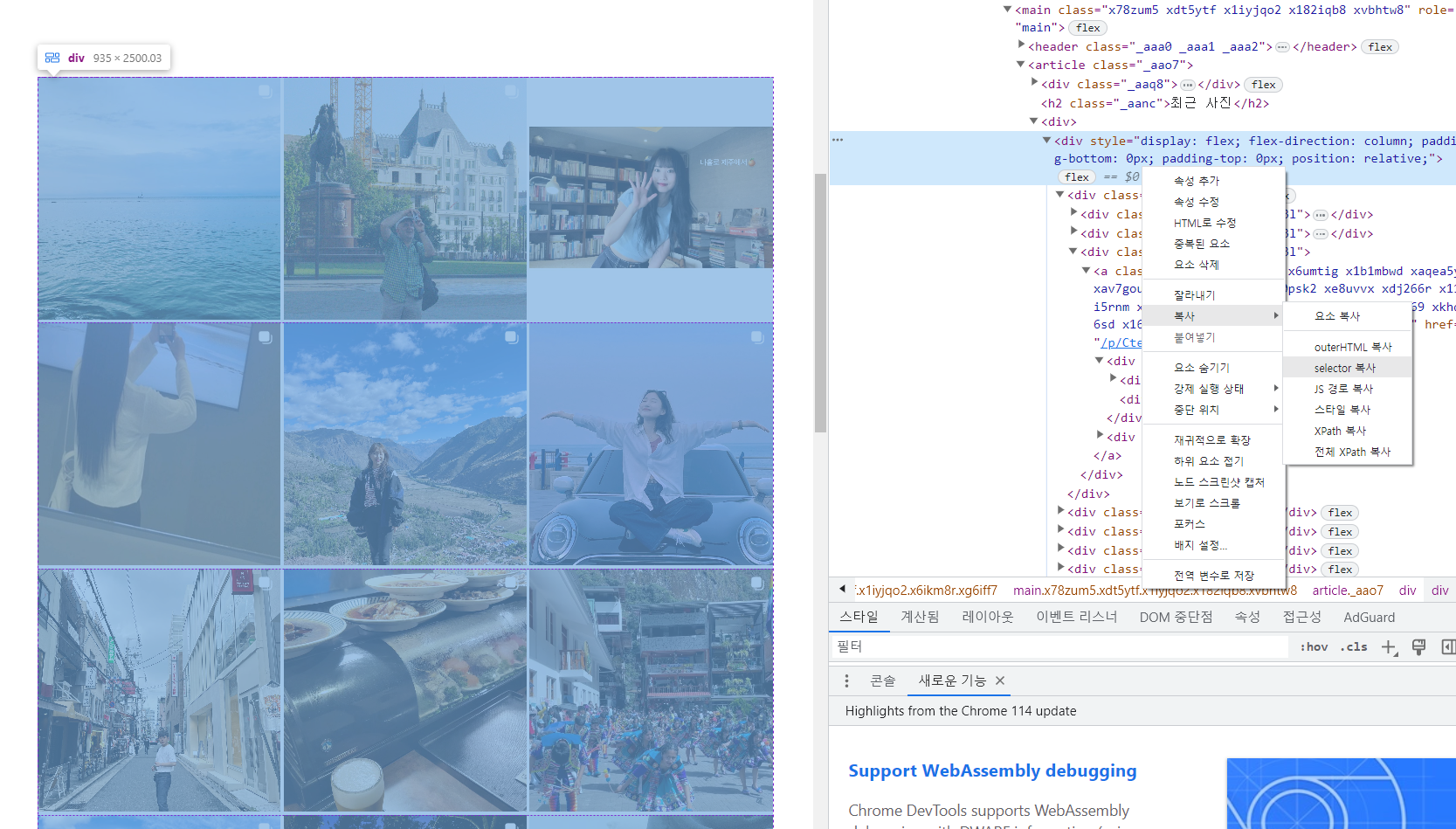
박스 selector 다시 긁어오셔서 all_posting_sel 변수에 넣어주시면 코드 작동합니다 !
0
위에서 말씀해주신대로 css_selector을 긁어와서 all_posting_sel 변수에 넣었습니다.
근데 헤시태그 검색후 인기 게시물이 보이고 프로그램이 종료되고있습니다...
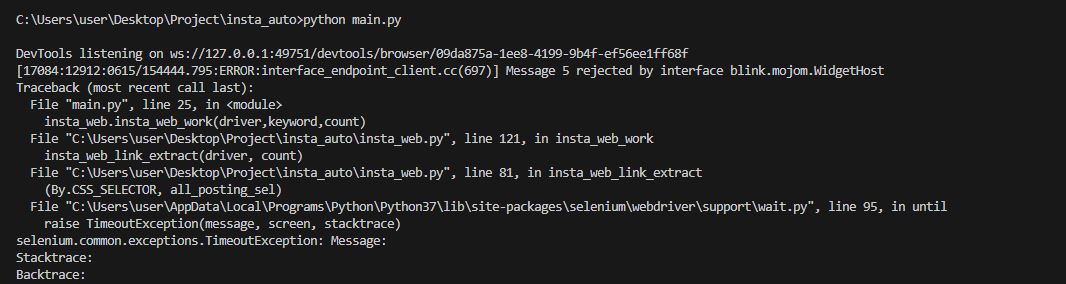
site:instagram.com -inurl:explore/tags -inurl:p -inurl:reel intitle:'{keyword}'" 이 코드는 이제 최신게시물을 불러오지 못합니다.
0
253
1
weditor에서
0
306
2
핸드폰으로 자동 클릭안됩니다.
0
643
2
로긴할 때 폰으로 보안코드 보낸거 입력하라는거요..
0
264
1
insta_mobile.py 링크만 무한루프 뜹니다. 왜 그런가요?
0
465
2
폰에 atx라는 자동차 모양 아이콘의 앱이 설치되었어요.
0
425
2
팔로워 리스트 추출완료 count 관련 문의드립니다.
0
474
2
휴대폰 로그인 패턴
0
338
2
리스트 추출만 반복
0
453
2
해시태그 검색 후 최근게시물 없음
0
2695
2
에러 확인 좀 부탁드립니다.
0
370
2
해시태그 검색 결과가 수강 내용과 달라서 올려주신 최종 코드가 적용되지 않고 오류가 납니다.
0
590
2
아직 질문 해결이 되지 못했습니다.
0
448
2
https://www.instagram.com/explore/tags/{keyword} 이상해요
0
587
2
윈도우와 맥 환경이 다른 점이 많아서 초기 환경설정부터 막혀있습니다 ㅜ
1
748
2
인스타 검색 부분이 변경 되어서...
1
541
2
Web 태그 접속후, 최근 사진 없습니다.?
0
434
2
계속 안됩니다..
1
366
2
섹션6-3 '댓글' 질문드립니다!
1
397
2
해시태그 추출
1
786
1
인스타그램 로그인 완료 후 검색 부분 (섹션 5 -3)
1
450
1
로그인 이후 발이 묶여서 멈추고 더이상 넘어가지 못하고 있습니다.
1
1154
3
MVWAER 질문 있습니다
0
351
1
모바일 인스타그램 접속 관련 질문
1
363
1