


[리뉴얼] 파이썬입문과 크롤링기초 부트캠프 [파이썬, 웹, 데이터 이해 기본까지] (업데이트)
프로젝트: 크롤링 + 엑셀 보고서까지 자동으로 만들며 익히는 프로그래밍3 (업데이트)
하이퍼링크 관련 질문 드립니다
552
작성한 질문수 3
안녕하세요~ <크롤링과 엑셀 파일까지 한번에 프로그램 만들기> 강의 수강 중 하이퍼링크 관련 질문이 있습니다. 엑셀 파일을 생성하는 함수를 정의하여 코드를 작성해보았는데, 하이퍼링크 생성 코드 작성 시, 데이터가 없는 엑셀 파일이 생성되었습니다. (아래 코드 참조)
그래서 하이퍼링크 코드가 제가 정의한 함수가 아닌, 크롤링 코드 내 (for 문) 에 있어야 할 것 같다고 생각했는데.. 그러면 excel_sheet 가 정의되지 않았다는 에러가 납니다. (아래 이미지 참조)하이퍼링크 생성 코드는 어디에 작성되어야 할까요?
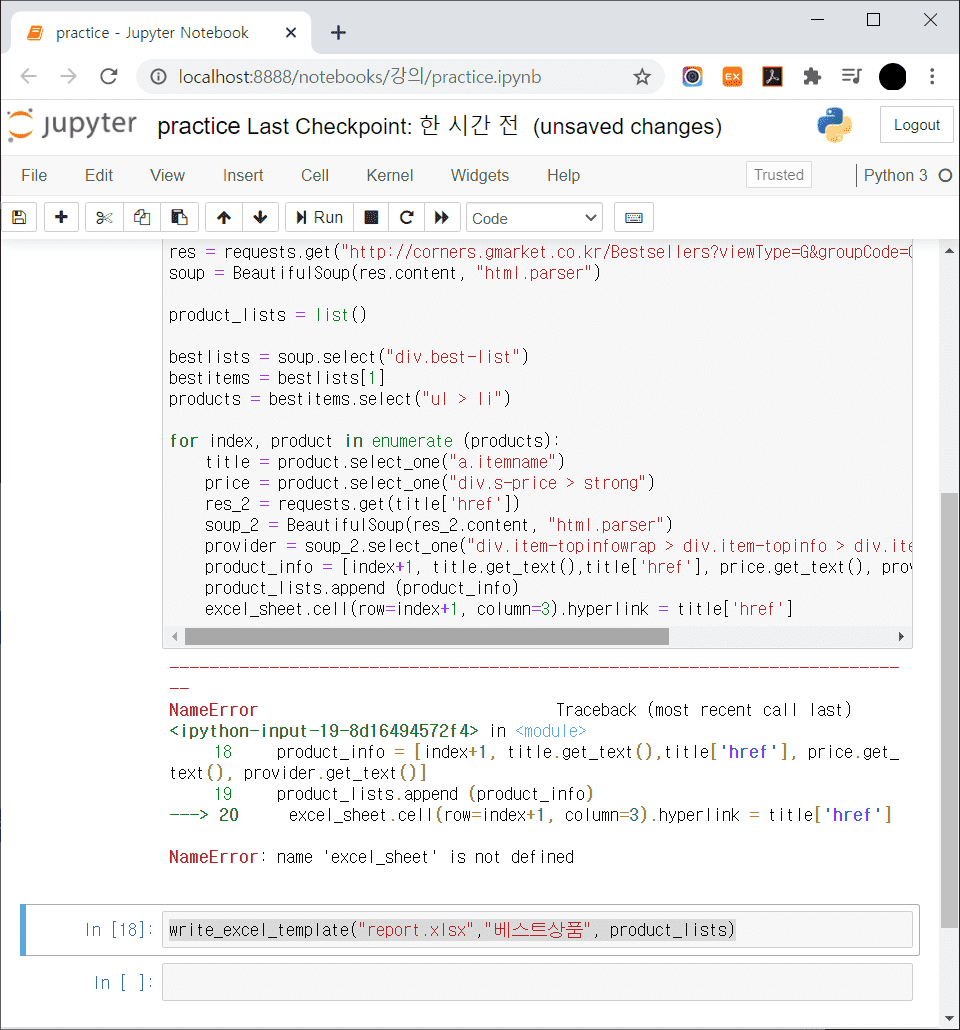
# 엑셀 파일 생성 함수 정의
import openpyxl

def write_excel_template(filename, sheetname, listdata):
    excel_file = openpyxl.Workbook()
    excel_sheet = excel_file.active
    excel_sheet.column_dimensions["B"].width = 60
    excel_sheet.column_dimensions["C"].width = 70

# (다음 코드를 추가하였습니다) 하이퍼링크 생성 코드
    excel_sheet.cell(row=index+1, column=3).hyperlink = title['href']

    excel_sheet.title = sheetname
    for item in listdata:
        excel_sheet.append(item)

    excel_file.save(filename)
    excel_file.close()

# 크롤링 코드
import requests
from bs4 import BeautifulSoup
res = requests.get("http://corners.gmarket.co.kr/Bestsellers?viewType=G&groupCode=G06")
soup = BeautifulSoup(res.content, "html.parser")

product_lists = list()

bestlists = soup.select("div.best-list")
bestitems = bestlists[1]
products = bestitems.select("ul > li")

for index, product in enumerate (products):
    title = product.select_one("a.itemname")
    price = product.select_one("div.s-price > strong")
    res_2 = requests.get(title['href'])
    soup_2 = BeautifulSoup(res_2.content, "html.parser")
    provider = soup_2.select_one("div.item-topinfowrap > div.item-topinfo > div.item-topinfo_headline > p > a > strong")
    product_info = [index+1, title.get_text(),title['href'], price.get_text(), provider.get_text()]
    product_lists.append (product_info)

# 함수 호출
write_excel_template("report.xlsx","베스트상품", product_lists)답변 1
0
안녕하세요. 어떤 코드가 어디에 위치해야 하느냐는 전체 코드를 어떻게 작성하셨는지에 따라 다릅니다.
그래서, 코드 작성시 에러가 나면 막연히 정상동작을 안했다보다,
해당 에러가 왜 났는지, 이 부분부터 보시는 것이 좋을 것 같습니다.
우선 현재 에러는 excel_sheet 는 함수 안에서만 정의를 해놓으시고, 함수 밖에서 excel_sheet 을 호출하였기 때문에 에러가 난것이고요. 함수 안에서 정의된 변수는 해당 함수 밖에서는 삭제됩니다. 이 부분이 이해가 안가신다면, 기본 함수 작성 방법부터 한번 검토를 해보시는 것이 좋을 것 같습니다. 각 하이퍼링크는 각각의 데이터마다 있을테니, 기본적으로는 반복문 안에서 다음 전체 코드와 같이 넣어지는 것이 일반적으로 보여집니다.
감사합니다.
----------
import requests, openpyxl
from bs4 import BeautifulSoup
import re # 2020.07.25 업데이트 (지마켓 일부 상품 태그 변경, 공지사항 참조부탁드림)
link_re = re.compile('^http://') # 2020.07.25 업데이트 (지마켓 일부 상품 태그 변경, 공지사항 참조부탁드림)
excel_file = openpyxl.Workbook()
excel_sheet = excel_file.active
excel_sheet.append(['랭킹', '상품명', '판매가격', '상품상세링크', '판매업체'])
excel_sheet.column_dimensions['B'].width = 80
excel_sheet.column_dimensions['C'].width = 20
excel_sheet.column_dimensions['D'].width = 80
excel_sheet.column_dimensions['E'].width = 20
res = requests.get('http://corners.gmarket.co.kr/Bestsellers?viewType=G&groupCode=G06')
soup = BeautifulSoup(res.content, 'html.parser')
bestlists = soup.select('div.best-list')
bestitems = bestlists[1]
products = bestitems.select('ul > li')
for index, product in enumerate(products):
title = product.select_one('a.itemname')
price = product.select_one('div.s-price > strong')
if link_re.match(title['href']): # 2020.07.25 업데이트 (지마켓 일부 상품 태그 변경, 공지사항 참조부탁드림)
res_info = requests.get(title['href'])
soup_info = BeautifulSoup(res_info.content, 'html.parser')
provider_info = soup_info.select_one('div.item-topinfo > div.item-topinfo_headline > p > a > strong')
print(index + 1, title.get_text(), price.get_text(), title['href'], provider_info.get_text())
excel_sheet.append([index + 1, title.get_text(), price.get_text(), title['href'], provider_info.get_text()])
excel_sheet.cell(row=index+2 , column=4).hyperlink = title['href']
cell_A1 = excel_sheet['A1'] # 셀 선택하기
cell_A1.alignment = openpyxl.styles.Alignment(horizontal='center') # 중앙정렬하기
cell_A1.font = openpyxl.styles.Font(color="01579B") # 폰트 색깔 바꾸기
# 색상값 찾기: https://material.io/design/color/#tools-for-picking-colors
cell_B1 = excel_sheet['B1'] # 셀 선택하기
cell_B1.alignment = openpyxl.styles.Alignment(horizontal='center') # 중앙정렬하기
cell_B1.font = openpyxl.styles.Font(color="01579B") # 폰트 색깔 바꾸기
# 색상값 찾기: https://material.io/design/color/#tools-for-picking-colors
cell_C1 = excel_sheet['C1'] # 셀 선택하기
cell_C1.alignment = openpyxl.styles.Alignment(horizontal='center') # 중앙정렬하기
cell_C1.font = openpyxl.styles.Font(color="01579B") # 폰트 색깔 바꾸기
# 색상값 찾기: https://material.io/design/color/#tools-for-picking-colors
cell_D1 = excel_sheet['D1'] # 셀 선택하기
cell_D1.alignment = openpyxl.styles.Alignment(horizontal='center') # 중앙정렬하기
cell_D1.font = openpyxl.styles.Font(color="01579B") # 폰트 색깔 바꾸기
# 색상값 찾기: https://material.io/design/color/#tools-for-picking-colors
cell_E1 = excel_sheet['E1'] # 셀 선택하기
cell_E1.alignment = openpyxl.styles.Alignment(horizontal='center') # 중앙정렬하기
cell_E1.font = openpyxl.styles.Font(color="01579B") # 폰트 색깔 바꾸기
# 색상값 찾기: https://material.io/design/color/#tools-for-picking-colors
excel_file.save('BESTPRODUCT_COM_GMARKET.xlsx')
excel_file.close()
33강 9:51 excercise55.
0
35
1
섹션2 - 32강 연습문제 48번 질문
0
41
0
주피터 노트북 사용법 강의 관련
0
45
1
exercise 20. 데이터 구조(리스트)
0
40
0
65강 소리
0
50
1
섹션 5 CSS selector사용해서 클로링하기2의 커리큘럼 일정 부재?
0
71
2
크롤링, 영상을 따라해도 제미나에게 물어봐도 안되요
0
67
1
정규표현식 및 여러 코드 꼭 외워야 하나요?
0
75
1
리스트 함수형도 정수 데이터 받을 수 있나요?
0
73
1
크롤링 관련 질문
0
86
1
문제 답이 없는 버전은 없나요?
0
98
1
requests, BeautifulSoup 임포트 부분에 대해 문의드립니다.
0
108
1
업데이트 강의
0
138
2
선생님 강의중에서 sqlite3 강의를 제공한 강의가 있나요?
0
168
2
연습용 예제 파일
0
99
1
lxml 관련 오류
0
131
1
SAVE Request 창 띄우는 법
0
115
1
포스트맨 사용법이 바뀌어서 강의를 따라가지 못하겠습니다. 2
0
101
1
포스트맨 사용법이 바뀌어서 강의를 따라가지 못하겠습니다.
0
133
1
예제 2, 4, 6에 대한 풀이 방식 질문.
0
115
1
문제 파일
0
100
1
pdf 파일 내 코드 복붙시 공백
0
328
1
데이터 저장 강좌 문의 건
0
116
1
" " 와 ' '의 차이를 알고 싶습니다
0
288
1