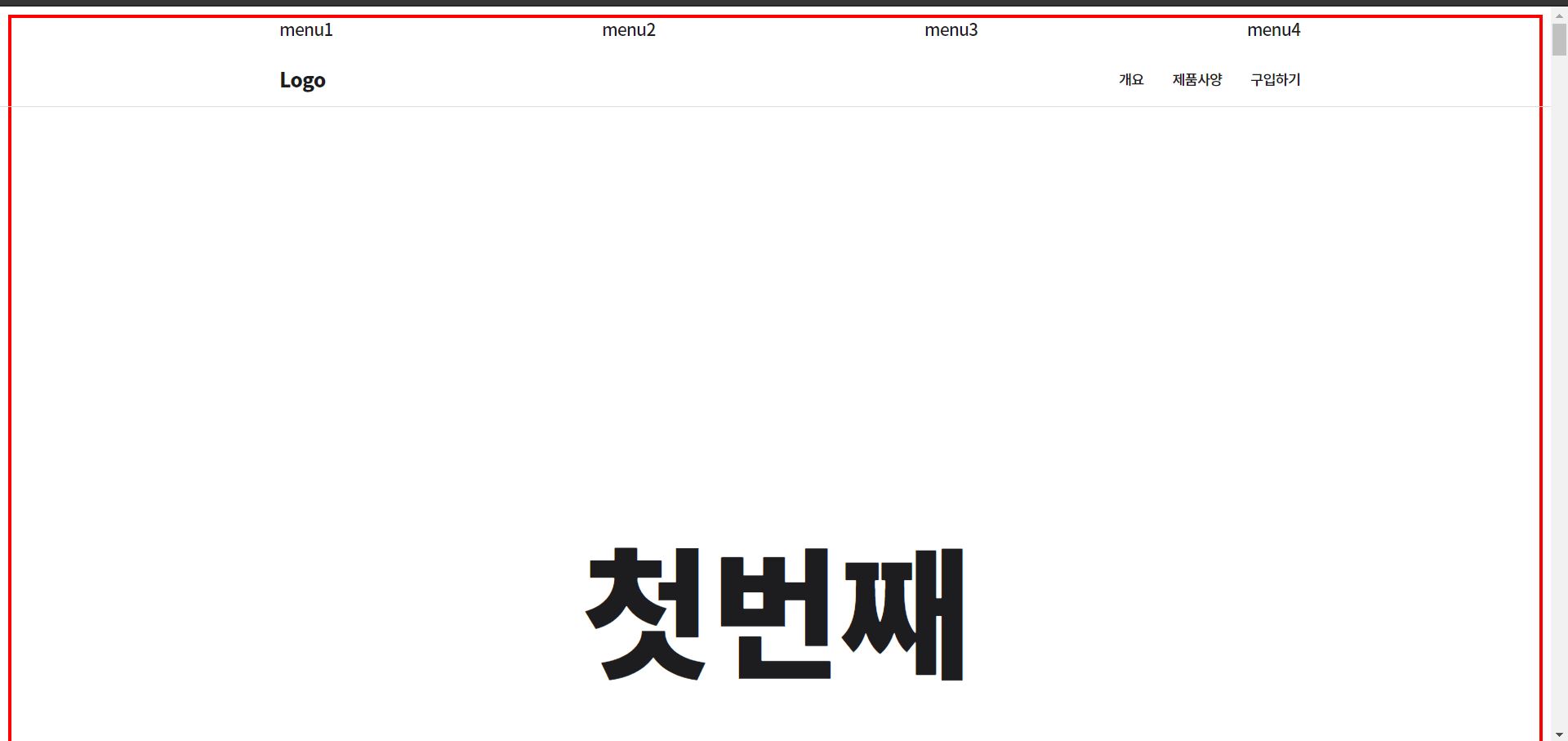
빨간 테두리도 메인화면에서 브라우저에 선생님처럼 꽉 차게 나오지 않고..
(() => {
let yOffset = 0 ;
let prevScrollHeight = 0 ; // 현재 스크롤 위치(yOffset)보다 이전에 위치한 스크롤 섹션들의 스크롤 높이 합
let currentScene = 0 ; // 현재 활성화된 scroll-section
const sceneInfo = [
{ // currentScene 0
type : 'sticky' ,
heightNum : 5 , // 브라우저 높이의 5배로 총 scrollHeight 세팅
scrollHeight : 0 ,
objs : {
container : document .querySelector ('#scroll-section-0' )
}
},
{ // currentScene 1
type : 'normal' ,
heightNum : 5 ,
scrollHeight : 0 ,
objs : {
container : document .querySelector ('#scroll-section-1' )
}
},
{ // currentScene 2
type : 'sticky' ,
heightNum : 5 ,
scrollHeight : 0 ,
objs : {
container : document .querySelector ('#scroll-section-2' )
}
},
{ // currentScene 3
type : 'sticky' ,
heightNum : 5 ,
scrollHeight : 0 ,
objs : {
container : document .querySelector ('#scroll-section-3' )
}
}
];
function setLayout () {
// 각 스크롤 섹션의 높이 세팅
prevScrollHeight = 0 ;
for (let i =0 ; i <sceneInfo .length ; i ++) {
sceneInfo [i ].scrollHeight = sceneInfo [i ].heightNum * window .innerHeight ;
sceneInfo [i ].objs .container .style .height = ` ${ sceneInfo [i ].scrollHeight } px` ;
}
}
function scrollLoop () {
prevScrollHeight = 0 ;
for (let i =0 ; i <currentScene ; i ++) {
prevScrollHeight += sceneInfo [i ].scrollHeight ;
}
if (yOffset > sceneInfo [currentScene ].scrollHeight + prevScrollHeight ) {
currentScene ++;
}
if (yOffset < prevScrollHeight ) {
currentScene --;
}
console .log (`prevScrollHeight = ${ prevScrollHeight } , pageYOffset= ${ yOffset } , currentScene= ${ currentScene } ` );
}
// 리사이징 하면 그에 맞는 높이 다시 세팅
window .addEventListener ('resize' , setLayout );
window .addEventListener ('scroll' , () => {
yOffset = window .pageYOffset ;
scrollLoop ();
});
setLayout ();
})();
@charset 'utf-8' ;
html {
font-family : 'Noto Sans KR' , sans-serif ;
font-size : 14px ;
}
body {
overflow-x : hidden ;
color : rgb (29 , 29 , 31 );
letter-spacing : -0.05em ;
background : white ;
}
p {
line-height : 1.6 ;
}
.global-nav {
position : absolute ;
top : 0 ;
left : 0 ;
width : 100% ;
height : 44px ;
padding : 0 1rem ;
}
.local-nav {
position : absolute ;
top : 45px ;
left : 0 ;
width : 100% ;
height : 52px ;
padding : 0 1rem ;
border-bottom : 1px solid #ddd ;
}
.global-nav-links ,
.local-nav-links {
max-width : 1000px ;
display : flex ;
align-items : center ;
height : 100% ;
margin : 0 auto ;
}
.global-nav-links {
justify-content : space-between ;
}
.global-nav-links a {
font-size : 1.2rem ;
}
.product-name {
margin-right : auto ;
font-size : 1.4rem ;
font-weight : bold ;
}
.local-nav-links a:not (.product-name ) {
margin-left : 2em ;
font-size : 1rem ;
}
a {
color : rgb (29 , 29 , 31 );
text-decoration : none ;
}
.scroll-section {
padding-top : 50vh ;
border : 3px solid red ;
}
#scroll-section-0 h1 {
font-size : 4rem ;
text-align : center ;
}
.main-message {
display : flex ;
align-items : center ;
justify-content : center ;
margin : 5px 0 ;
height : 3em ;
font-size : 2.5rem ;
}
.main-message p {
line-height : 1.2 ;
font-weight : bold ;
text-align : center ;
}
.main-message small {
display : block ;
margin-bottom : 0.5em ;
font-size : 1.4rem ;
}
#scroll-section-2 .main-message {
font-size : 3.5rem ;
}
.description {
max-width : 1000px ;
margin : 0 auto ;
padding : 0 1rem ;
font-size : 1.2rem ;
color : #888 ;
}
.description strong {
float : left ;
margin-right : 0.2em ;
font-size : 3rem ;
color : rgb (29 , 29 , 31 );
}
.desc-message {
font-weight : bold ;
width : 50% ;
max-width : 385px ;
}
.pin {
width : 1px ;
height : 100px ;
background-color : rgb (29 , 29 , 31 );
}
.mid-message {
max-width : 1000px ;
margin : 0 auto ;
padding : 0 1rem ;
font-size : 2rem ;
color : #888 ;
}
.mid-message strong {
color : rgb (29 , 29 , 31 );
}
.canvas-caption {
max-width : 1000px ;
margin : 0 auto ;
padding : 0 1rem ;
color : #888 ;
font-size : 1.2rem ;
}
.footer {
display : flex ;
align-items : center ;
justify-content : center ;
height : 7rem ;
background-color : tan ;
color : white ;
}
.sticky-elem {
display : none ;
position : fixed ;
top : 0 ;
left : 0 ;
width : 100% ;
}
#show-scene-0 #scroll-section-0 .sticky-elem ,
#show-scene-1 #scroll-section-1 .sticky-elem ,
#show-scene-2 #scroll-section-2 .sticky-elem ,
#show-scene-3 #scroll-section-3 .sticky-elem {
display : block ;
}
@media (min-width : 1024px ) {
#scroll-section-0 h1 {
font-size : 9vw ;
}
.main-message {
font-size : 4vw ;
}
.description {
font-size : 2rem ;
}
.description strong {
font-size : 6rem ;
}
#scroll-section-2 .main-message {
font-size : 6vw ;
}
.main-message small {
font-size : 2vw ;
}
.desc-message {
width : 20% ;
}
.mid-message {
font-size : 4vw ;
}
.canvas-caption {
font-size : 2rem ;
}
}
답변 3
6
1분코딩
2020-09-09T16:30:17.804Z
혹시 default.css 연결 하셨나요?box-sizing: border-box;
2
앗 선생님 말씀대로 default 파일이 빠져서 그런거였네요ㅠㅠㅠ감사합니다!!
0
#scroll-section-* 의 height값에 padding-top 50vh 준것만큼 + 되어서 yOffset이랑 맞지 않는 것 같아요.
예를 들어 각각의 section height가 4000 이라고 치면 한 섹션 당 4000+400+6px(보더값) 으로 4406px 이 지나야 한 섹션이 바뀌는데 (빨간 보더도 4400px을 기준으로 감싸고있음) yOffset은 4000을 height로 인식해서 (실제 section style속성 height도 4000이라 적혀있음ㅠㅠ) 400px을 남겨놓고 currentScene이 바뀝니다.. 한씬 한씬 바뀔때마다 누적되구요.. padding-top값은 height에 포함이 안되는 건가요?ㅠㅠ 어떻게 해결해야 하나요..