Object.values requires that input parameter not be null or undefined.
해결된 질문
388
0
IconButton 만들기에서 Object.values requires that input parameter not be null or undefined. 라는 오류가
나타나는데 왜 그런걸까요 ? 도움 부탁드립니다.
IconButton.propTypes = {
icon: PropTypes.oneOf(Object.values(icons)).isRequired,
onPress: PropTypes.func,
};
위 코드를 빼니까 정상적으로 동작하네요 .. icons를 undefined으로 인식하는데 무엇이 잘못된걸까요?
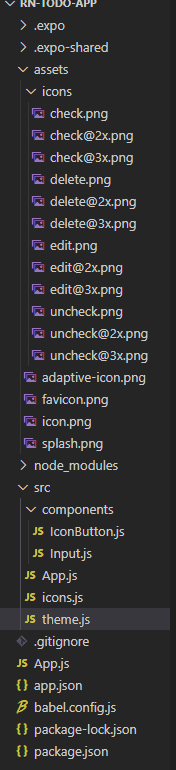
* 파일구조
theme.js
export const theme = {
background: '#111111',
itemBackground : '#333333',
main: '#778bdd',
text: '#eeeeee',
done: '#666666'
};
Input.js
import React from 'react';
import styled from 'styled-components/native';
import {Dimensions, useWindowDimensions} from 'react-native';
import PropTypes from 'prop-types';
const StyledInput = styled.TextInput.attrs(({theme}) => ({
placeholderTextColor: theme.main,
}))`
width: ${({width}) => width - 40}px;
height: 60px;
margin: 3px 0;
padding: 15px 20px;
border-radius: 10px;
font-size: 25px;
background-color: ${({theme}) => theme.itemBackground}
color: ${({theme}) => theme.text};
`;
const Input = ({placeholder, value, onChangeText, onSubmitEditing}) => {
// const width = Dimensions.get('window').width;
const width = useWindowDimensions().width;
return <StyledInput width={width} placeholder={placeholder} maxLength={500}
autoCorrect={false}
autoCapitalize="none"
returnKeyType="done"
keyboardAppearance="dark"
onChangeText={onChangeText}
onSubmitEditing={onSubmitEditing}
value={value}></StyledInput>
}
Input.propTypes = {
placeholder: PropTypes.string,
value: PropTypes.string.isRequired,
onChangeText: PropTypes.func.isRequired,
onSubmitEditing: PropTypes.func.isRequired
}
export default Input;
App.js
import { StatusBar } from 'react-native'
import React, {useState} from 'react';
import styled, {ThemeProvider} from 'styled-components/native';
import {theme} from './theme';
import Input from './components/Input'
import IconButton from './components/IconButton'
import { icons } from './icons';
/** Styled Component */
const Container = styled.SafeAreaView`
flex: 1;
background-color: ${({theme}) => theme.background};
align-items: center;
justify-content: flex-start;
`;
const Title = styled.Text`
font-size: 40px;
font-weight: 600;
color: ${({theme})=> theme.main};
width: 100%;
align-items: flex-end;
padding: 0 20px;
`;
export default function App() {
const addTask = () => {
alert(newTask);
setNewTask('');
}
const [newTask, setNewTask] = useState('');
return (
<ThemeProvider theme={theme}>
<Container>
<Title>TODO List</Title>
<Input placeholder="+ Add a Task" value={newTask}
onChangeText = {text => setNewTask(text)}
onSubmitEditing={addTask}></Input>
<StatusBar
barStyle= "light-content"
backgroundColor={theme.background}
/>
<IconButton icon={icons.check} onPress={()=>alert('check')}></IconButton>
{/* <iconButton icon={icons.uncheck} onPress={()=>alert('uncheck')}></iconButton>
<iconButton icon={icons.edit} onPress={()=>alert('edit')}></iconButton>
<iconButton icon={icons.delete} onPress={()=>alert('delete')}></iconButton> */}
</Container>
</ThemeProvider>
);
}
icon.js
import Check from '../assets/icons/check.png';
import Delete from '../assets/icons/delete.png';
import Uncheck from '../assets/icons/uncheck.png';
import Edit from '../assets/icons/edit.png';
export const icons = {
check: Check,
uncheck: Uncheck,
edit: Edit,
delete: Delete,
};
iconButton.js
import React from 'react';
import {TouchableOpacity, View} from 'react-native';
import styled from 'styled-components/native';
import PropTypes from 'prop-types';
import icons from '../icons'
const Icon = styled.Image`
width: 30px;
height: 30px;
margin: 10px;
tint-color: ${({theme})=> theme.text};
`;
const IconButton = ({icon, onPress}) => {
return (
<TouchableOpacity
onPress={onPress}>
<View>
<Icon source={icon}></Icon>
</View>
</TouchableOpacity>
);
};
IconButton.propTypes = {
icon: PropTypes.oneOf(Object.values(icons)).isRequired,
onPress: PropTypes.func,
};
export default IconButton;
답변 1
0
김범준
안녕하세요 권도영님,
IconButton.js 파일에서 icons 가져올때
import { icons } from ...
으로 가져오셔야 합니다.
영상을 천천히 다시 보면서 설명을 다시 듣고, 코드를 비교하면 조금 더 수월하게 오타를 찾을 수 있습니다.
혹은 깃헙에 있는 전체 코드(link)와 비교하는 방법으로 차이점을 조금 더 쉽게 발견할 수 있습니다.
단, 깃헙에 있는 코드를 복붙하지는 마시고 직접 타이핑 해보시기 바랍니다.
마지막으로, 질문을 올릴때 작업중인 코드를 깃헙에 올리고 해당 저장소 링크를 남겨주시기 바랍니다.
저장소 링크와 어느 부분이 문제인지 조금 더 상세한 내용을 남겨주시면 확인이 수월합니다.
즐거운 하루 되세요
감사합니다
0
권도영
감사합니다!
맥북 m4에서 nvm으로 설치불가
expo 사용하지 않고 앱 실행 시, 데이터 불러오기
리덕스강의는 없나요?
선생님 도와주세요 ㅠㅠ (로그인, 회원가입, 콘솔 에러)
버젼 업데이트
expo start중 metro bundler가 같이 실행되지 않아요
모바일 expo 실행오류
안드로이드에서 expo실행이 안되요
터미널 다운 및 사용방법
expo init 에러
안녕하세요. 스택네비게이션 문제 질문드립니다 ㅜ
배포중 에러 해결이 안되네요.. ㅜㅜ
안녕하세요! 강의 Chat App - Part 1 회원가입 부분에서 firebase 관련 에러가 납니다.
styled-components 에러
OS 네이트브 코드를 개발하면서 UI 를 리액트 네이티브로
저장하면 바뀐값들 보여야하는데 재렌더링이 안일어납니다..
안드로이드스튜디오 EXPO 어플 튕깁니다 ㅠㅠ
styled component를 사용하면 터집니다 ㅠㅠ
attrs, 속성, props 가 혼란스럽습니다.
안녕하세요, 강의 잘 들었습니다 :) RN과 파이어베이스 관련해서 질문드릴게 있습니다!
자꾸 The request timed out 에러가 뜹니다 .
코드 좀 봐주세요 버튼 두개가 생성이 안되요
expo 실행시 스타일 속성 바로 보려면 어디서 보나요?
자바스크립트 () => 의미는요???



