


@modelattribute , setter관련 질문
2340
작성한 질문수 9
혼자 개인 프로젝트를 진행하는데 궁금증이 생겨 질문드립니다.
@modelattribute를 사용해서 바인딩하려면 dto에 setter가 구현이 되어있어야 하는걸로 알고있습니다.
그런데 혼자 프로젝트를 끄적이다가 한dto는 setter를 구현안했음에도 바인딩이 되길래 궁금증이 생겨 질문드려요!
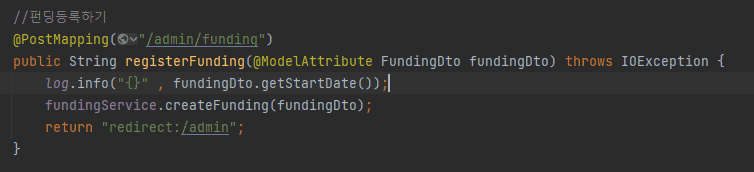
--------fundingDto를 입력받는 폼------------
<form class="validation-form" novalidate th:action th:object="${fundingDto}" method="post" enctype="multipart/form-data">

                <div class="mb-3">
                    <label for="restaurantName">가게이름</label>
                    <input type="text" class="form-control" id="restaurantName" placeholder="restaurantName" th:field="*{restaurantName}" th:errorclass="field-error" required>
                </div>

                <div class="mb-3">
                    <label for="menu">메뉴</label>
                    <input type="text" class="form-control" id="menu" placeholder="menu" th:field="*{menu}" th:errorclass="field-error" required>

                </div>

                <div class="mb-3">
                    <label for="information">가게정보</label>
                    <input type="text" class="form-control" id="information" placeholder="information" th:field="*{information}" th:errorclass="field-error" required>
                </div>

                <div class="mb-3">
                    <label for="introduction">가게소개</label>
                    <input type="text" class="form-control" id="introduction" placeholder="introduction" th:field="*{introduction}" th:errorclass="field-error" required>

                </div>

                <div class="mb-3">
                    <label for="notice">가게 공지사항</label>
                    <input type="text" class="form-control" id="notice" placeholder="notice" th:field="*{notice}" th:errorclass="field-error" required>
                </div>

                <div class="mb-3">
                    <label for="discountPrice">할인가격</label>
                    <input type="text" class="form-control" id="discountPrice" placeholder="discountPrice" th:field="*{discountPrice}" th:errorclass="field-error" required>
                </div>

                <div class="mb-3">
                    <label for="price">가격</label>
                    <input type="text" class="form-control" id="price" placeholder="price" th:field="*{price}" th:errorclass="field-error" required>
                </div>

                <div class="mb-3">
                    <label for="minFundingCount">최소펀딩수</label>
                    <input type="text" class="form-control" id="minFundingCount" placeholder="minFundingCount" th:field="*{minFundingCount}" th:errorclass="field-error" required>

                </div>

                <div class="mb-3">
                    <label for="maxFundingCount">최대펀딩수</label>
                    <input type="text" class="form-control" id="maxFundingCount" placeholder="maxFundingCount" th:field="*{maxFundingCount}" th:errorclass="field-error" required>
                </div>

                <div class="mb-3">
                    <label for="startDate">펀딩 시작 날짜</label>
                    <input type="datetime-local" class="form-control" id="startDate" placeholder="startDate" th:field="*{startDate}" th:errorclass="field-error" required>
                </div>

                <div class="mb-3">
                    <label for="endDate">펀딩 종료 날짜</label>
                    <input type="datetime-local" class="form-control" id="endDate" placeholder="endDate" th:field="*{endDate}" th:errorclass="field-error" required>

                </div>

                <div class="mb-3">
                    <label for="mainImage">메인 이미지</label>
                    <input type="file" class="form-control" id="mainImage" placeholder="mainImage" multiple="multiple" th:field="*{mainImage}" th:errorclass="field-error" required>
                </div>

                <div class="mb-3">
                    <label for="imageFiles">이미지</label>
                    <input type="file" class="form-control" id="imageFiles" placeholder="imageFiles" multiple="multiple" th:field="*{imageFiles}" th:errorclass="field-error" required>
                </div>

                <button class="btn btn-primary btn-lg btn-block" type="submit">펀딩 등록</button>
            </form>
-------------------------------------------------------------------------
fundingDto
@Getter
@Builder
@AllArgsConstructor
public class FundingDto {

    private Long id;
    private String restaurantName;
    private String menu;
    private String information;
    private String introduction;
    private String notice;
    private Integer discountPrice;
    private Integer price;
    private Integer minFundingCount;
    private Integer maxFundingCount;
    private Integer nowFundingCount;
    private MultipartFile mainImage;
    private List<MultipartFile> imageFiles;
    private List<Image> imageList;

    @Enumerated(EnumType.STRING)
    private FundingStatus fundingStatus;

    @DateTimeFormat(pattern = "yyyy-MM-dd'T'HH:mm")
    private LocalDateTime startDate;

    @DateTimeFormat(pattern = "yyyy-MM-dd'T'HH:mm")
    private LocalDateTime endDate;

    public void setMainImage(MultipartFile mainImage) {
        this.mainImage = mainImage;
    }
}
다른 dto는 @setter를 달아주지않으면 null이 바인딩 되는데 이 객체는 왜 바인딩이 성공하는지 잘 모르겠어요..
그리고 한가지 더 질문이 있는데 @modelattribute 를 사용함에 있어 @Setter를 사용하지 않고는 사용이 불가능한가요?
@Setter를 되도록 사용하지 않는게 좋다고 들어가지고 질문드립니다.
답변 1
0
안녕하세요. 박시균님
modelattribute Setter로 구글에 검색해보시면 원하시는 답을 찾으실 수 있을거에요^^
https://minchul-son.tistory.com/546
감사합니다.
테스트 질문, 어떤것을 사용할것인것에 대해서
0
57
1
setter 사용하지 않기
0
70
1
안녕하세요 치킨 디도스 이벤트 보고 흉내내보려 들어왔습니다..
0
94
2
OrderServiceTest 상문주문 테스트 시 update 쿼리 문의
0
78
1
sdk 설정 오류
0
149
2
오탈자 - @Transactional
0
104
1
src/test/resources 테스트 경로 문제
0
112
1
상품 등록후 H2 db 출력 순서 바꿀 수 있나요?
0
102
1
MemberRepositoryTest 실행오류
0
148
1
boot 4.x >>> trasasction rolled back log & p6spy(영한님, 수업 자료 업데이트 해주시면 감사하겠습니다!!)
1
262
2
강의 마지막 QueryDSL 사용 부분 질문있습니다
2
208
2
클라이언트에서 isbn과 author 수정 요청을 한 경우에 대해 질문드립니다.
0
85
1
도메인 모델 패턴 vs 트랜잭션 스크립트 패턴
0
132
1
기본 생성자
0
96
1
h2 DB 연결시 jdbc url 변경 이유가 궁금합니다.
0
148
1
멤버서비스테스트 부분에서 막힙니다.
0
245
4
실무에서도 EntityManager를 이용해서 많이 작업하는 편일까요?
0
166
1
초반에 h2 다운로드 과정 꼭 필요한가요?
0
180
2
자신 필드에도 get으로 접근하는 이유가 있을까요?
0
182
1
24분 27초 연관관계 편의 메서드 위치
0
147
1
단건 주문만 가능하게 한건 의도한 부분이신가요?
0
148
2
빌드 툴, Gradle
0
106
1
h2연결은 된 것 같은데 엔티티 테이블까지 작성 후 확인해보아도 테이블이 안보입니다
0
108
2
Repository에서 EntityManager 주입 방식 차이
0
130
1