


아놀드 denoiser
693
작성한 질문수 3
답변 주신대로 디노이저 셋팅하고 production mode에서는 렌더링은 잘 되는데
activeshade mode에서 렌더링 하면 아래 메세지가 나오면서 안됩니다.
SYSTEM: Active Shade renderer is changed to Arnold. Previous messages are cleared.
[Arnold]: 00:00:00 1773MB WARNING | [color_manager_ocio] unable to find default OCIO config, expected in c:\programdata\autodesk\applicationplugins\maxtoa_2022\..\ocio\configs\arnold\config.ocio
This material is not supported: 02 - Default (Standard (Legacy)). An approximation will be used.
[Arnold]: 00:00:00 1932MB WARNING | [ginstance] /Object004: trying to clone a NULL object
[Arnold]: 00:00:00 1935MB WARNING | [color_manager_ocio] could not find a valid config
[Arnold]: 00:00:03 3098MB ERROR | [gpu] an error happened during rendering. OptiX error is: Unknown error (Details: Function "_rtContextLaunch2D" caught exception: Encountered a CUDA error: cudaDriver().CuEventSynchronize( m_event ) returned (700): Illegal address, file: <internal>, line: 0)
GPU 0 had 5661MB free before rendering started and 3354MB free when crash occurred
GPU errors are sometimes due to a GPU not having enough remaining free memory. To see if this is what happened here, try simplifying your scene or running on a GPU with more free RAM to see if it solves the crash. Otherwise, upgrading to the latest nvidia gpu driver and Arnold core (available from www.arnoldrenderer.com) might fix the crash
[Arnold]: 00:00:00 3001MB WARNING | [color_manager_ocio] unable to find default OCIO config, expected in c:\programdata\autodesk\applicationplugins\maxtoa_2022\..\ocio\configs\arnold\config.ocio
This material is not supported: 02 - Default (Standard (Legacy)). An approximation will be used.
[Arnold]: 00:00:00 3009MB ERROR | [gpu] Fatal GPU error occurred, please restart the host application
[Arnold]: 00:00:00 3019MB WARNING | Aborted by user: received abort signal
activeshade mode에서는 안되는 건가요?
답변 1
1
안녕하세요!
역시 버전에 관련된 내용입니다. 최근에 아놀드렌더러가 계속 버전업되고 있는 것에 따른 현상입니다.
Active 창을 띄우는 방법은 크게 2가지입니다.
1. 맥스 화면에서 바로 설정
아래 그림처럼 뷰포트 좌측 상단을 클릭하여 설정합니다

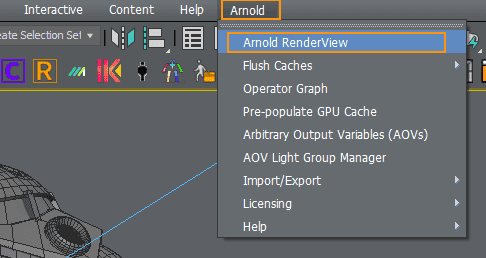
2. 아놀드 전용 렌더창을 이용합니다. ( 이 방법 추천)
상단 메뉴바 Arnold > Arnold Render View 선택
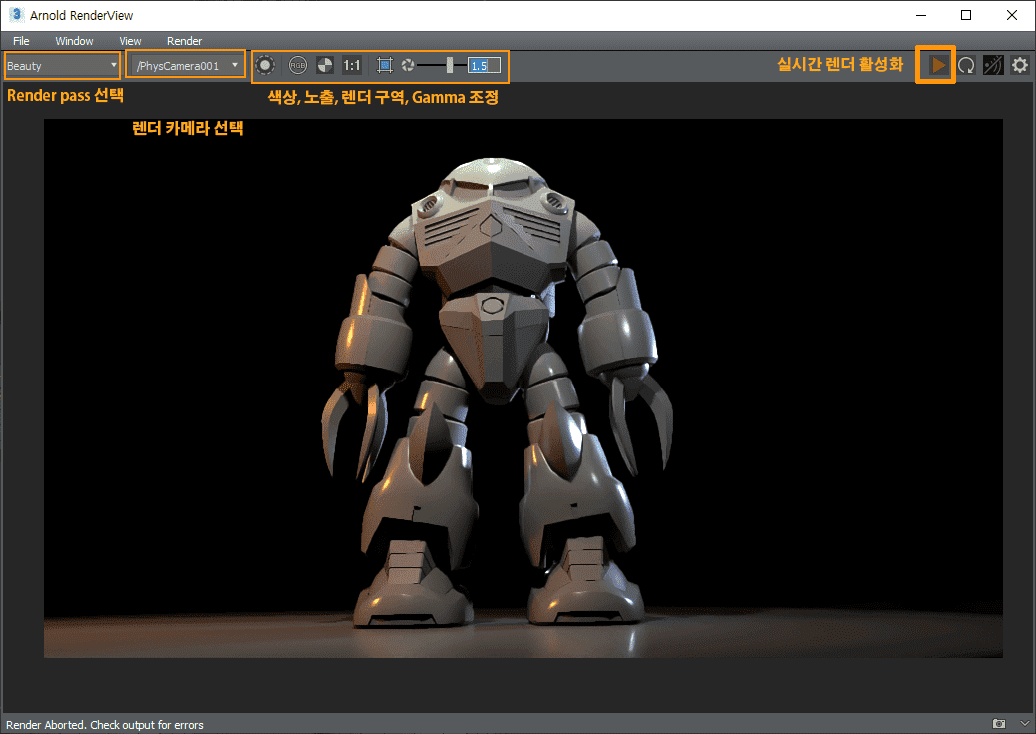
아래와 같은 전용 창이 나타납니다. 상단 오른쪽 좌측에 플레이버튼을 누르면 실시간으로 렌더되는 화면을 보여줍니다. 렌더링과 아웃풋에 필요한 많은 기능을 내장하고 있으며 아놀드로 보통 렌더링작업을 할때는 이 창을 사용하게 됩니다.
영상들 소리가 다 너무작아요
0
101
1
브릿지 연결이 안돼요..
0
437
1
리셋엑세스폼질문
0
270
1
단축키 ctrl+/ , ctrl * ctrl+x 가 안먹네요...
0
924
1
pdf 문서 파일
0
288
1
단위환산 질문입니다.
0
482
2
회전할 때 각도 숫자가 보이지 않아요.
0
533
1
13문 19초 스플릿 질문입니다
0
376
1
5분에서 엣지 선택하고 늘리기 질문입니다!
0
433
2
단축키 리스트
0
449
1
자동차만들기(12) 11:51 단축키 질문
0
295
1
detach 사용하고나서 다시 한 오브젝트로 붙일떄
0
375
1
로컬축으로 해도 각도가 미세하게 안맞습니다
0
321
1
리셋x폼 하고난후 형태찌그러져요
0
412
0
5:47
0
219
0
3:42 질문
0
258
1
단축키 문서로 정리해서 볼 수 있을까요??
0
531
2
단축키 파일이 열리지 않습니다.
0
322
1
max 2010 버전 렌더링 오류 질문드립니다.
0
745
1
브릿지가 작동을 안합니다.
0
330
1
마우스 커서 움직일 때 노란색 십자모양이 나타나요(사진 첨부)
0
2263
1
R(스케일) 사용할때 한 방향으로만 적용이 됩니다
0
587
1
컷이나 슬라이스 웰드 등을 사용할 때 자꾸 의도하지 않은 곳으로 잘립니다.
1
194
2
단위 환산부분 이해가 어렵습니다! ㅠㅠ
1
304
1