
inflearn logo
강의

강의

N
챌린지

챌린지

멘토링

멘토링

N
클립

클립

로드맵

로드맵

지식공유

비전공자를 위한 진짜 입문 올인원 개발 부트캠프

안되는 부분 코드 검토 부탁드립니다.

141

JJJIN J

작성한 질문수 2

1

- 학습 관련 질문을 남겨주세요. 상세히 작성하면 더 좋아요!
- 먼저 유사한 질문이 있었는지 검색해보세요.
- 서로 예의를 지키며 존중하는 문화를 만들어가요.
- 잠깐! 인프런 서비스 운영 관련 문의는 1:1 문의하기를 이용해주세요.
1.아래 빨간footer 화면이 영상과 다르게 제품과 붙어 있습니다.
2. 아바타 그랩 중간 정렬이 되지 않습니다.
html 코드
<html>
<head>
<title>그랩마켓</title>
<link href="index.css" type="text/css" rel="stylesheet" />
</head>
<body>
<div id="header">
<div id="header-area">
<img src="images/icons/logo.png" />
</div>
</div>
<div id="body">
<div id="banner">
<img src="images/banners/banner1.png" />
</div>
<h1>판매되는 상품들</h1>
<div id="product-list">
<div class="product-card">
<div>
<img class="product-img" src="images/products/basketball1.jpeg" />
</div>
<div class="product-contents">
<span class="product-name">농구공 1호</span>
<span class="product-price">50000원</span>
<div class="product-seller">
<div>
<img class="product-avatar" src="images/icons/avatar.png"/>
<span>그랩</span>
</div>
</div>
</div>
</div>
</div>
<div id="footer"></div>
</body>
</html>
css코드 * {
margin: 0;
padding: 0;
}

#header {
height: 64px;
border-bottom: 1px solid gray;

display: flex;

justify-content: center;
}
#body {
height: 100%;
width: 1024px;

margin: 0 auto;
padding-bottom: 24px;
}

#footer {
height: 200px;
background-color: red;
}

#banner {
height: 300px;
background-color: yellow;
}
#header-area {
width: 1024px;
height: 100%;

display: flex;
align-items: center;
}

#header-area > img {
width: 128px;
height: 36px;
}

#banner > img {
width: 100%;
height: 300px;
}
#body > h1 {
margin-top: 16px;
}

#product-list {
display: flex;
flex-wrap: wrap;
}

.product-card {
width: 180px;
height: 300px;

margin-right: 12px;
margin-bottom: 12px;
border: 1px solid rgb(230, 230, 230);
border-radius: 12px;
}

.product-img {
width: 100%;
height: 210px;
}

.product-contents {
display: flex;
flex-direction: column;
padding: 8px;
}

.product-name {
font-size: 14px;
}

.product-price {
font-size: 16px;
font-weight: 600px;
}

.product-seller {
display: flex;
align-items: center;
}
.product-avatar {
width: 24px;
}

react express nodejs 머신러닝 배워볼래요? javascript HTML/CSS tensorflow react-native

답변 1

0

그랩

현재 크롬 개발자도구에서 보면 id#footer 태그가 id#body안에 들어가있습니다. 
div에 대한 closing tag(</div>)가 하나 빠져있어서 그렇네요.
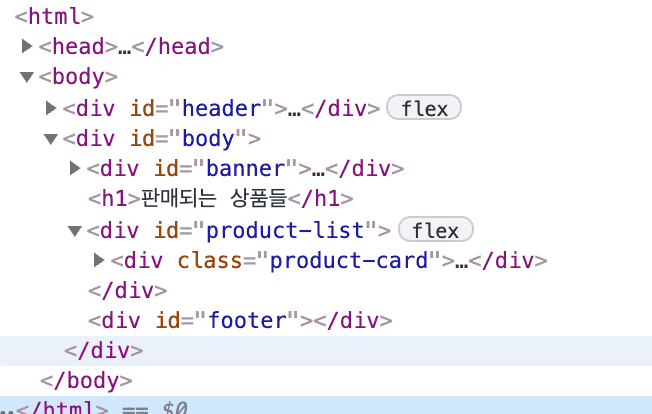
아래 코드를 보시면 product-seller 코드 바로 아래에 <div> 태그가  들어가서 구조가 깨진 것 같아 보여요. 삭제해주시면 될 것 같습니다

<div class="product-seller">

<div>

<img class="product-avatar" src="images/icons/avatar.png"/>

<span>그랩</span>

</div>

[해결]그랩님 답변 주세요.

0

192

2

그랩님의 답변을 기다립니다/102강 전반적인 에러

0

165

2

[그랩님께]101강 안드로이드 에러들(Key prop)해결방법 궁금합니다.

0

139

2

[재질문][그랩님 답변 부탁드립니다]101강

0

163

2

[그랩님 답변 부탁드립니다]101강 Axios 에러와 502 Bad Gateway 질문

0

120

2

Ngrok 설치 후 forwarding Url 에러

0

148

2

[그랩님께,Ngrok 악성코드 인식 해결방법]질문 드립니다.

0

252

2

Ngrok 설치 후 forwarding Url로 연결 불가

0

158

1

그랩님,[꼭] 답변 부탁드립니다.

0

76

1

[꼭][[꼭] 그랩님, 답변 부탁드립니다], Failed to load resource: the server responded with a status of 404 (Not Found) 상품 상세 페이지 질문입니다.

0

162

1

6강/7강 수업

0

56

1

그랩님, 상품 상세 페이지 에러와 의문점 질문드립니다.

0

105

2

그랩님, 해결되지 않은 에러 메시지 [꼭] 답변 부탁 드립니다.

0

148

2

[재 질문]Cannot read properties of undefined (reading 'map') TypeError: Cannot read properties of undefined (reading 'map') 에러 해결 어떻게 하나요?

0

95

1

Cannot read properties of undefined (reading 'map') TypeError: Cannot read properties of undefined (reading 'map') 에러 해결 어떻게 하나요?

0

134

2

일반적인 css 꾸미기에서 width와 height의 값?

0

98

2

Windows에서의 업로드 후 홈화면 상품이미지 오류 해결방법

0

204

1

그랩마켓 웹화면 구현하기 -2 질문입니다.

0

127

1

react에 반영이 되지 않습니다.

0

252

1

터미널 npm install -g create-react-app 작성 후 오류

0

430

1

create-react-app my app 실행 시 에러

0

358

2

포스트맨 질문

0

105

1

<꼭 답변 부탁 드립니다>그랩선생님, [컴포넌트 사용하기] 강의에서 질문 있습니다.

0

269

2

그랩선생님, 질문 답변 부탁 드립니다.vscode에서 npm install -g create-react-app 입력 후 에러 입니다.

0

492

2