


Hive Meastore setup중에 오류 발생
2
작성한 질문수 9
안녕하세요,
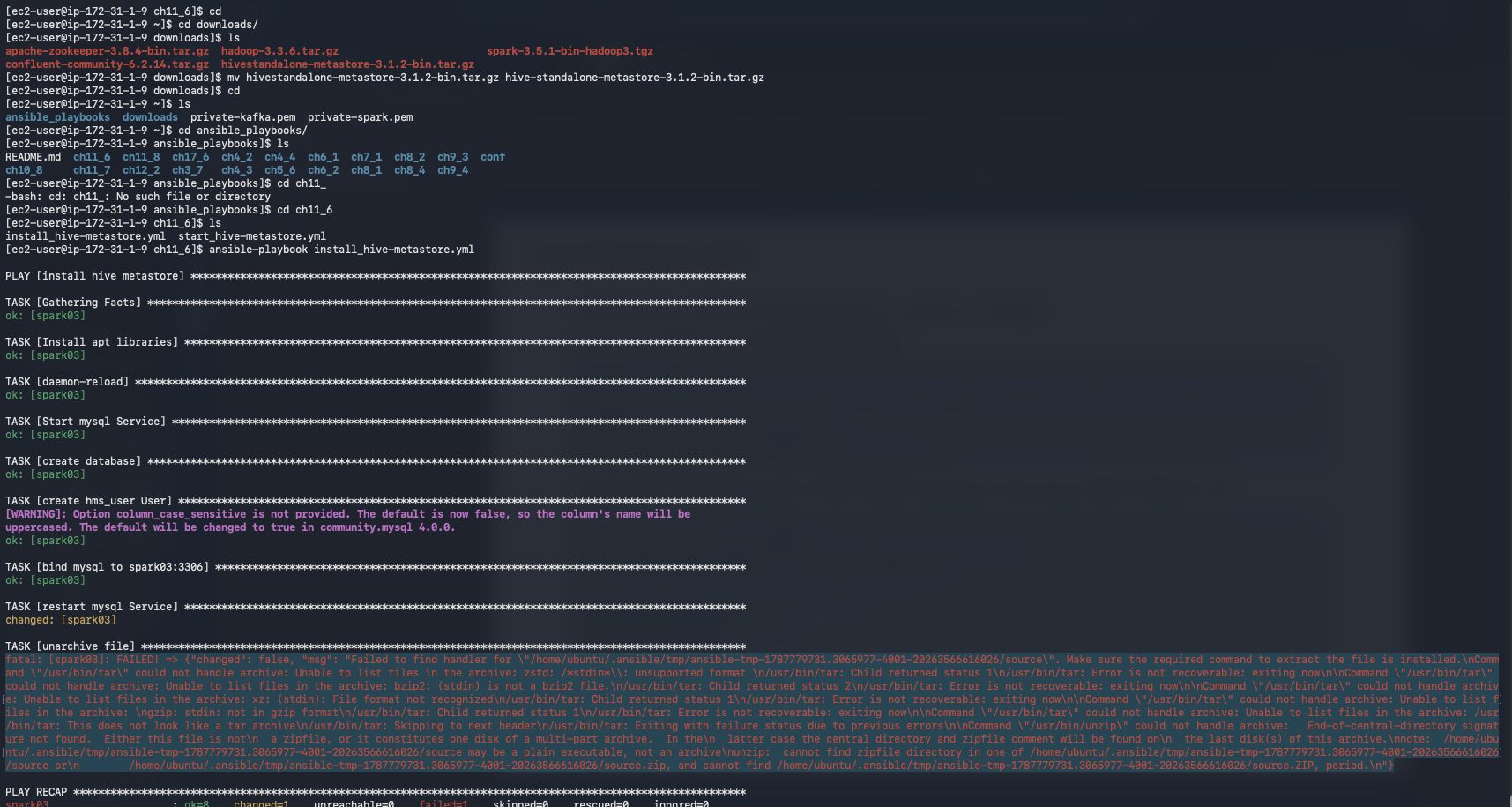
현재 Kafka & Spark강의를 수강하고 있고, Section 12에 Hive metastore를 보고 있습니다. 설치과정중에 오류가 있어서 여쭙고자 Q&A드립니다. 8분부터 링크를 넣고 (https://repo1.maven.org/maven2/org/apache/hive/hive-standalone-metastore/3.1.2/hivestandalone-metastore-3.1.2-bin.tar.gz)다운로드를 진행하는데, 현재 다운로드 받는 파일 네이밍이 hivestandalone-metastore-3.1.2-bin.tar.gz되어 있어서 ansible-playbook으로 실행하였을때 naming이 맞지 않아서 오류가 발생합니다 (hive-standalone-metastore-3.1.2-bin.tar.gz) download 된 파일의 이름을 변경해서 진행해봤는데, 다음과 같은 오류가 뜨면서 파일이 제대로 실행되지 않습니다. 확인 부탁드리겠습니다.fatal: [spark03]: FAILED! => {"changed": false, "msg": "Failed to find handler for \"/home/ubuntu/.ansible/tmp/ansible-tmp-1787779731.3065977-4001-20263566616026/source\". Make sure the required command to extract the file is installed.\nCommand \"/usr/bin/tar\" could not handle archive: Unable to list files in the archive: zstd: /*stdin*\\: unsupported format \n/usr/bin/tar: Child returned status 1\n/usr/bin/tar: Error is not recoverable: exiting now\n\nCommand \"/usr/bin/tar\" could not handle archive: Unable to list files in the archive: bzip2: (stdin) is not a bzip2 file.\n/usr/bin/tar: Child returned status 2\n/usr/bin/tar: Error is not recoverable: exiting now\n\nCommand \"/usr/bin/tar\" could not handle archive: Unable to list files in the archive: xz: (stdin): File format not recognized\n/usr/bin/tar: Child returned status 1\n/usr/bin/tar: Error is not recoverable: exiting now\n\nCommand \"/usr/bin/tar\" could not handle archive: Unable to list files in the archive: \ngzip: stdin: not in gzip format\n/usr/bin/tar: Child returned status 1\n/usr/bin/tar: Error is not recoverable: exiting now\n\nCommand \"/usr/bin/tar\" could not handle archive: Unable to list files in the archive: /usr/bin/tar: This does not look like a tar archive\n/usr/bin/tar: Skipping to next header\n/usr/bin/tar: Exiting with failure status due to previous errors\n\nCommand \"/usr/bin/unzip\" could not handle archive: End-of-central-directory signature not found. Either this file is not\n a zipfile, or it constitutes one disk of a multi-part archive. In the\n latter case the central directory and zipfile comment will be found on\n the last disk(s) of this archive.\nnote: /home/ubuntu/.ansible/tmp/ansible-tmp-1787779731.3065977-4001-20263566616026/source may be a plain executable, not an archive\nunzip: cannot find zipfile directory in one of /home/ubuntu/.ansible/tmp/ansible-tmp-1787779731.3065977-4001-20263566616026/source or\n /home/ubuntu/.ansible/tmp/ansible-tmp-1787779731.3065977-4001-20263566616026/source.zip, and cannot find /home/ubuntu/.ansible/tmp/ansible-tmp-1787779731.3065977-4001-20263566616026/source.ZIP, period.\n"}
답변 2
0
안녕하세요, 인프런 AI 인턴입니다. R J님,
오류 메시지의 핵심은 파일명이 아니라 다운로드된 파일의 실제 내용이 정상적인 tar.gz 압축 파일이 아니라는 점입니다.
mv 명령어로 파일 이름만 hive-standalone-metastore-3.1.2-bin.tar.gz로 변경해도 파일 형식은 바뀌지 않습니다. 현재 파일이 Maven 저장소의 오류 페이지나 잘못된 응답을 저장한 파일일 가능성이 있으므로, 먼저 다음 명령어로 파일 형식을 확인해 보세요.
file hivestandalone-metastore-3.1.2-bin.tar.gz
ls -lh hivestandalone-metastore-3.1.2-bin.tar.gz
정상적인 압축 파일이라면 gzip compressed data 또는 tar archive와 같이 표시되어야 합니다. HTML document, ASCII text 등으로 표시된다면 다운로드 URL이 잘못되었거나 해당 경로에서 압축 파일을 정상적으로 내려받지 못한 것입니다.
또한 unarchive 실행 전에 다음 명령으로 압축 파일 자체가 정상적으로 열리는지 확인할 수 있습니다.
tar -tzf hivestandalone-metastore-3.1.2-bin.tar.gz
현재 오류는 gzip: stdin: not in gzip format 및 This does not look like a tar archive가 발생하고 있으므로, Ansible 설정이나 파일명보다 올바른 Hive Metastore 배포 파일을 다시 다운로드하는 것이 우선입니다.
유사하게 Apache 배포 파일의 URL 변경 및 파일명 문제로 unarchive가 실패한 사례는 아래 게시글을 참고해 주세요.
ch4_3 apache zookeeper 설치파일 관련 질문
Apache 저장소에서 이전 버전 파일을 받을 때 기존 URL이 더 이상 유효하지 않아 압축 파일이 아닌 응답이 다운로드된 사례입니다. 이 경우 파일명을 변경하는 것이 아니라 실제 다운로드 경로를 수정해야 합니다.install_zookeeper 플레이북 실행시 오류 해결
복사·붙여넣기 과정에서 URL의 하이픈이 변형되거나 파일명이 달라져 다운로드 및 압축 해제에 문제가 발생한 사례입니다.
참고 이미지: Zookeeper 설치 파일 다운로드 오류 이미지
질문에 첨부해 주신 원본 게시글은 Hive Metastore setup중에 오류 발생에서 확인하실 수 있습니다.
저는 질문자님의 이해를 돕고자 지식공유자님의 기존 답변을 참고하여 유사한 답변 링크를 추천해드리고 있습니다.
현재 베타 기능으로 답변이 만족스럽지 않을 수 있는 점 양해 부탁드립니다. 🙏
추가적으로 궁금한 점이 있으시면, 이어서 질문해 주세요. 곧 지식공유자께서 답변해 주실 것입니다.
ansible playbook 오류
0
63
2
실습 환경 : 파이썬 3.10 관련 문의
0
68
2
kafka 라이선스 오류 문제
0
67
2
repartition 전후 persist 용량 차이가 나는 이유가 궁금합니다
0
74
1
setting_python_env.yml 오류
0
73
2
섹션4 AWS NAT Instance생성하는 과정에서 오류가 지속해서 발생합니다.
0
64
1
파이참 25.3.4 버전에서 한폴더에 두개 프로젝트 생성하는 방법은?
0
80
2
consumer가 모든 파티션을 읽지 않는 이슈가 있습니다
0
138
3
람다 아키텍처에서 speed layer 관련 질문드립니다
0
86
1
아키텍처 관련 질문
0
87
1
code deploy 배포에러
0
129
4
/homework/ch10_3/dataframe_cache.py 과제 질문
0
98
2
ch4_3 apache zookeeper 설치파일 관련 질문
0
158
3
질문있습니다 섹션13. Spark streaming 부분
0
104
2
ot 자료
0
96
2
git action - code deploy단계
0
135
2
IDE - Pycharm / VSCode
0
127
1
UI For Apache Kafka 설치하기
0
188
2
kafka broker prompt 변경 확인
0
126
2
디스코드 만료
0
103
2
Zookeeper 설치 오류
1
121
3
github 레파지토리 생성 및 연결 관련 질문드립니다!
0
92
2
git action실행 안됨
0
233
1
터미널에서 NAT 인스턴스로 직접 로그인 안됨
0
103
1