


12.11 강의 ) export 후 경고 문구 & 콘솔창 데이터 출력 안됨
'12.11) Home 페이지 구현하기 2. 기능' 강의의 9분 17초에서 App 컴포넌트의 context를 Home 컴포넌트로 보내주기 위해 DiaryStateContext와 DiartDispatch를 익스포트 해주는데요.
문제 1) 저는 익스포트하게 되면 아래 사진과 같이 오류가 뜨고 [문제 2]에서 설명드린 부분도 실행이 되지 않습니다. (Home 컴포넌트에서 임포트 후 다시 App 컴포넌트로 돌아와 익스포트를 작성해주긴 했습니다 => 작성 순서 바뀜)

이미지의 오류 문구 (refresh only works when a file exports components. Move your react context to a separate file.)
문제 2) 그리고 강의 영상에선 익스포트 후 Home 컴포넌트에 App 컴포넌트에서 익스포트한 것 들을 import 해주고 필터를 통해 각 달에 해당하는 일기 데이터를 추출 후 콘솔창에 출력해줍니다. (강의 16:07)
하지만 저는 아래 사진과 같이 콘솔창에 현재 월에 대한 데이터가 아무것도 뜨지 않습니다. 위에서 설명드린 익스포트가 제대로 되지 않은 문제로 인해 안 뜨는 것일까요?
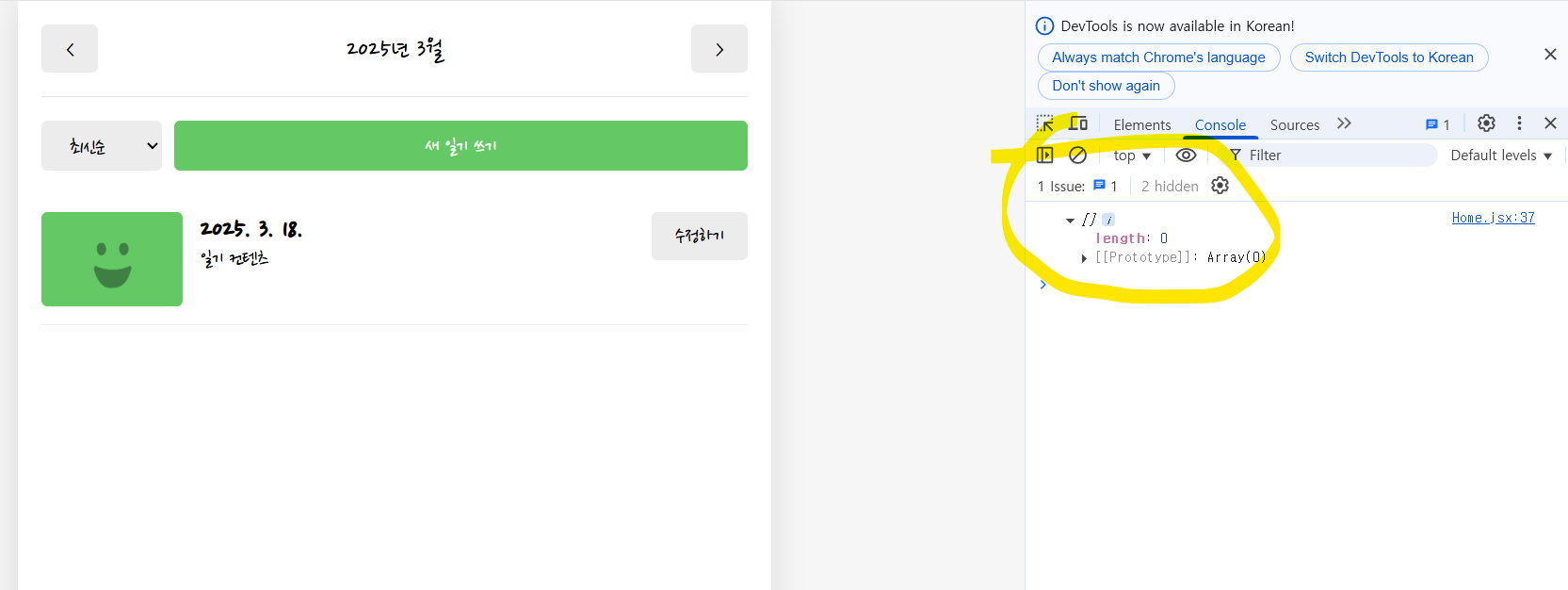
+ 추가로 context들을 파일을 따로 만들고 App 컴포넌트에 임포트하고 새로고침해봤더니 아무것도 뜨지 않았습니다.. 이 내용은 깃허브에 업로드 되어있습니다.
App과 Home 컴포넌트의 코드는 아래에 남겨두었습니다.
(깃허브 : https://github.com/hsyo830/Section12.git )
[App.jsx]
import "./App.css";
import { useReducer, useRef, createContext } from "react";
import { Routes, Route } from "react-router-dom";
// /입력 시 Home, /new new, /diary diary 각각의 페이지를 가져오도록 하기 위함
import Diary from "./pages/Diary";
import Home from "./pages/Home";
import New from "./pages/New";
import Edit from "./pages/Edit";
import Notfound from "./pages/NotFound";

const mockData = [
  {
    id: 1,
    createDate: new Date("2025-03-14").getTime(),
    emotionId: 1,
    content: "1번 일기 내용",
  },
  {
    id: 2,
    createDate: new Date("2025-03-13").getTime(),
    emotionId: 2,
    content: "2번 일기 내용",
  },
  {
    id: 3,
    createDate: new Date("2025-02-25").getTime(),
    emotionId: 3,
    content: "3번 일기 내용",
  },
];

function reducer(state, action) {
  switch (action.type) {
    case "CREATE":
      return [action.data, ...state];
    case "UPDATE":
      return state.map((item) =>
        String(item.id) === String(action.data.id) ? action.data : item
      );
    case "DELETE":
      return state.filter((item) => String(item.id) !== String(action.id));
    default:
      return state;
  }
}

// 일기 데이터를 공급할 Context
export const DiaryStateContext = createContext();
export const DiaryDispatchContext = createContext();

function App() {
  const [data, dispatch] = useReducer(reducer, mockData); // 여러가지 일기 데이터를 가져야해서 []와 같이 빈 배열
  const idRef = useRef(3);

  // 새로운 일기 추가
  const onCreate = (createDate, emotionId, content) => {
    dispatch({
      type: "CREATE",
      data: {
        id: idRef.current++,
        createDate,
        emotionId,
        content,
      },
    });
  };

  // 기존 일기 수정
  const onUpdate = (id, createDate, emotionId, content) => {
    dispatch({
      type: "UPDATE",
      data: { id, createDate, emotionId, content },
    });
  };

  // 기존 일기 삭제
  const onDelete = (id) => {
    dispatch({
      type: "DELETE",
      id,
    });
  };

  return (
    <>
      <DiaryStateContext.Provider value={data}>
        <DiaryDispatchContext.Provider value={{ onCreate, onUpdate, onDelete }}>
          <Routes>
            <Route path="/" element={<Home />} />
            <Route path="/new" element={<New />} />
            <Route path="/diary/:id" element={<Diary />} />
            <Route path="/edit/:id" element={<Edit />} />
            <Route path="*" element={<Notfound />} />
          </Routes>
        </DiaryDispatchContext.Provider>
      </DiaryStateContext.Provider>
    </>
  );
}

export default App;
[Home.jsx]
import { useState, useContext } from "react";

import { DiaryStateContext } from "../App";
import Header from "../components/Header";
import Button from "../components/Button";
import DiaryList from "../components/DiaryList";
import { data } from "react-router-dom";

const getMonthlyData = (pivotDate, data) => {
  const beginTime = new Date(
    pivotDate.getFullYear(),
    pivotDate.getMonth(),
    1,
    0,
    0,
    0
  ).getTime();

  const endTime = new Date(
    pivotDate.getFullYear,
    pivotDate.getMonth() + 1,
    0,
    23,
    59,
    59
  ).getTime();
  return data.filter(
    (item) => beginTime <= item.createdDate && item.createdDate <= endTime
  );
};

const Home = () => {
  const data = useContext(DiaryStateContext);
  const [pivotDate, setPivotDate] = useState(new Date());

  const monthlyData = getMonthlyData(pivotDate, data);
  console.log(monthlyData);

  const onIncreaseMonth = () => {
    setPivotDate(new Date(pivotDate.getFullYear(), pivotDate.getMonth() + 1));
  };
  const onDecreaseMonth = () => {
    setPivotDate(new Date(pivotDate.getFullYear(), pivotDate.getMonth() - 1));
  };

  return (
    <div>
      <Header
        title={`${pivotDate.getFullYear()}년 ${pivotDate.getMonth() + 1}월`}
        leftChild={<Button onClick={onDecreaseMonth} text={"<"} />}
        rightChild={<Button onClick={onIncreaseMonth} text={">"} />}
      />
      <DiaryList />
    </div>
  );
};

export default Home;
답변 1
1
안녕하세요 이정환입니다
우선 문제 1번의 경우 기능적인 오류가 아닌 단순한 경고로 기능에 영향을 주지 않으니 무시하셔도 괜찮습니다. 문제2 와의 연관성은 없습니다
문제2에 대해서는 보내주신 코드를 기반으로 살펴보았습니다.
원인은 Home 컴포넌트의 getMonthlyData 함수 있었는데요 여기서능 item.createDate를 통해 날짜를 필터링하지만
정작 더미데이터가 설정된 App.jsx 에서는 cratedDate라고 설정 해 두셨습니다. 오타를 확인하시어 수정하시면 문제가 해결될 듯 합니다
존재하지 않는 일기 url입력 시 alert이 두 번 떠요
0
33
1
교재(3쇄)와 강의 내용 문의
0
34
2
12.13) 하단 여백 스타일링 관련 질문 드립니다.
0
67
2
에러 질문드립니다
0
63
2
VSCode 설정 문의
0
70
2
PPT 코드 관련 질문
0
49
2
useEffect와 lifecycle문의
0
65
2
프론트엔드 학습 수준 문의
0
82
2
리액트 챕터별 코드에서 eslint 설정파일이 없어요
0
73
2
데이터 로딩중 화면만 계속 나와요!!
0
73
2
퍼블리셔일경우 어느정도 수준까지 강의를 들어야할까요
0
103
2
이후의 커리큘럼 문의
0
126
2
실슬환경 설정에서 save후 console.log 부분이 새로고침이 안되는현상입니다.
0
73
2
최적화 관련 질문있습니다 (useMemo 등)
0
103
3
프로바이더 컴포넌트의 위치는 어떤 기준인가요?
1
96
3
Date 객체에 관련하여 질문드립니다.
0
97
2
리액트 개정판 교재 질문
0
76
2
예제코드가 안나와요!
0
86
2
select a variant 선택에서 javascript와 javascript+react compiler 중 무엇을 선택해야하나요? com
0
131
2
onMouseEnter 관련 문의 드립니다
0
111
3
배열의 렌더링 관련 질문 드립니다.
0
84
2
2:40초 refObj를 콘솔로 출력시 오류가 발생합니다.
0
136
2
TS, 리액트 강의중에 뭘 먼저 수강하는게 좋을까요?
0
153
2
useCallback 적용한 onCreate, onUpdate, onDelete 함수..
0
73
1