


판다스 기초 1 수업
학습 관련 질문을 남겨주세요. 상세히 작성하면 더 좋아요!
질문과 관련된 영상 위치를 알려주면 더 빠르게 답변할 수 있어요
먼저 유사한 질문이 있었는지 검색해보세요
안녕하세요
판다스 기초 1 - 8분
df type 확인할때 아래와 같은 에러가 뜹니다
이전 코드들도 다 동일하게 run 하고
runtime 모두 실행으로 돌려도 에러가 발생하고
type(df), type(df['가격']) 모두 동일합니다
# 데이터 프레임 type 확인
type(df)
pandas.core.frame.DataFrame
def __init__(data=None, index: Axes | None=None, columns: Axes | None=None, dtype: Dtype | None=None, copy: bool | None=None) -> None/usr/local/lib/python3.10/dist-packages/pandas/core/frame.pyTwo-dimensional, size-mutable, potentially heterogeneous tabular data.
Data structure also contains labeled axes (rows and columns).
Arithmetic operations align on both row and column labels. Can be
thought of as a dict-like container for Series objects. The primary
pandas data structure.
Parameters
----------
data : ndarray (structured or homogeneous), Iterable, dict, or DataFrame
Dict can contain Series, arrays, constants, dataclass or list-like objects. If
data is a dict, column order follows insertion-order. If a dict contains Series
which have an index defined, it is aligned by its index. This alignment also
occurs if data is a Series or a DataFrame itself. Alignment is done on
Series/DataFrame inputs.
If data is a list of dicts, column order follows insertion-order.
index : Index or array-like
Index to use for resulting frame. Will default to RangeIndex if
no indexing information part of input data and no index provided.
columns : Index or array-like
Column labels to use for resulting frame when data does not have them,
defaulting to RangeIndex(0, 1, 2, ..., n). If data contains column labels,
will perform column selection instead.
dtype : dtype, default None
Data type to force. Only a single dtype is allowed. If None, infer.
copy : bool or None, default None
Copy data from inputs.
For dict data, the default of None behaves like ``copy=True``. For DataFrame
or 2d ndarray input, the default of None behaves like ``copy=False``.
If data is a dict containing one or more Series (possibly of different dtypes),
``copy=False`` will ensure that these inputs are not copied.
.. versionchanged:: 1.3.0
See Also
--------
DataFrame.from_records : Constructor from tuples, also record arrays.
DataFrame.from_dict : From dicts of Series, arrays, or dicts.
read_csv : Read a comma-separated values (csv) file into DataFrame.
read_table : Read general delimited file into DataFrame.
read_clipboard : Read text from clipboard into DataFrame.
Notes
-----
Please reference the :ref:`User Guide <basics.dataframe>` for more information.
Examples
--------
Constructing DataFrame from a dictionary.
>>> d = {'col1': [1, 2], 'col2': [3, 4]}
>>> df = pd.DataFrame(data=d)
>>> df
col1 col2
0 1 3
1 2 4
Notice that the inferred dtype is int64.
>>> df.dtypes
col1 int64
col2 int64
dtype: object
To enforce a single dtype:
>>> df = pd.DataFrame(data=d, dtype=np.int8)
>>> df.dtypes
col1 int8
col2 int8
dtype: object
Constructing DataFrame from a dictionary including Series:
>>> d = {'col1': [0, 1, 2, 3], 'col2': pd.Series([2, 3], index=[2, 3])}
>>> pd.DataFrame(data=d, index=[0, 1, 2, 3])
col1 col2
0 0 NaN
1 1 NaN
2 2 2.0
3 3 3.0
Constructing DataFrame from numpy ndarray:
>>> df2 = pd.DataFrame(np.array([[1, 2, 3], [4, 5, 6], [7, 8, 9]]),
... columns=['a', 'b', 'c'])
>>> df2
a b c
0 1 2 3
1 4 5 6
2 7 8 9
Constructing DataFrame from a numpy ndarray that has labeled columns:
>>> data = np.array([(1, 2, 3), (4, 5, 6), (7, 8, 9)],
... dtype=[("a", "i4"), ("b", "i4"), ("c", "i4")])
>>> df3 = pd.DataFrame(data, columns=['c', 'a'])
...
>>> df3
c a
0 3 1
1 6 4
2 9 7
Constructing DataFrame from dataclass:
>>> from dataclasses import make_dataclass
>>> Point = make_dataclass("Point", [("x", int), ("y", int)])
>>> pd.DataFrame([Point(0, 0), Point(0, 3), Point(2, 3)])
x y
0 0 0
1 0 3
2 2 3
Constructing DataFrame from Series/DataFrame:
>>> ser = pd.Series([1, 2, 3], index=["a", "b", "c"])
>>> df = pd.DataFrame(data=ser, index=["a", "c"])
>>> df
0
a 1
c 3
>>> df1 = pd.DataFrame([1, 2, 3], index=["a", "b", "c"], columns=["x"])
>>> df2 = pd.DataFrame(data=df1, index=["a", "c"])
>>> df2
x
a 1
c 3
답변 1
0
아~ 당황했을 것 같네요
에러가 아니라 pandas 라이브러리의 DataFrame에 관한 설명입니다.
코랩 판다스가 최신 업데이트 되면서 설명이 함께 출력되네요! pandas DataFrame의 생성 방법, 사용 가능한 메소드, 생성자의 매개변수 등에 대한 설명이 포함된 문서입니다
시험 환경의 판다스는 구 버전이라 강의와 같이 출력됩니다 🙂 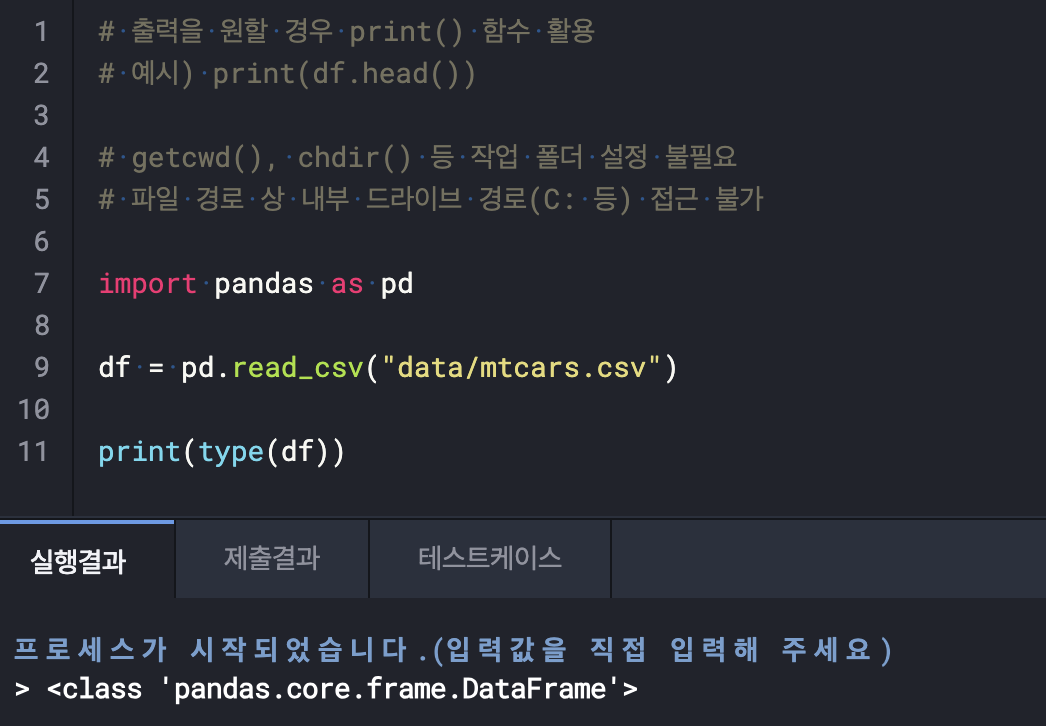
실기시험 제출관련
0
98
2
6.20 작업형 2 과적합
0
116
3
코딩팡 장업형2 베이스 라인 인코딩 종류 질문
0
34
2
로지스틱회귀, 회귀
0
43
2
회귀 문제를 풀때 질문입니다.
0
43
1
불균형 처리 후 성능이 더 낮아졌다면,
0
54
2
실기 체험 제2유형 에러 문의
0
48
1
LIGHTGBM 으로 하면 pred값이 소수점 6자리까지 나오는게 맞나요
0
43
2
3번문제 등분산 가정
0
42
2
작업형3 target 형 변환 질문
0
32
2
[작업형1] 연습문제 섹션1 ~ 10 의 section4
0
30
3
원핫인코딩과 레이블 인코딩에서 concat
0
49
2
제2유형 질문입니다.
0
45
2
C()
0
43
2
작업형 2에서 strafity 적용 유무
0
49
2
수강 기간 연장 가능 여부 문의드립니다.
0
53
1
ols
0
43
2
2유형 작성관련 질문(일반 심화)
0
37
2
2유형 작성관련 질문
0
38
2
2유형 object컬럼 개수 다르면
0
45
2
코딩팡질문이요ㅠㅠ
0
44
2
관찰값과 기대값의 개념이 헷갈립니다.
0
25
2
작업형2 ID 컬럼 삭제 질문
0
44
2
2유형 작성관련 질문
0
31
2