


주사위앱 관련해서 질문 있습니다!
291
작성자 없음
작성한 질문수 0
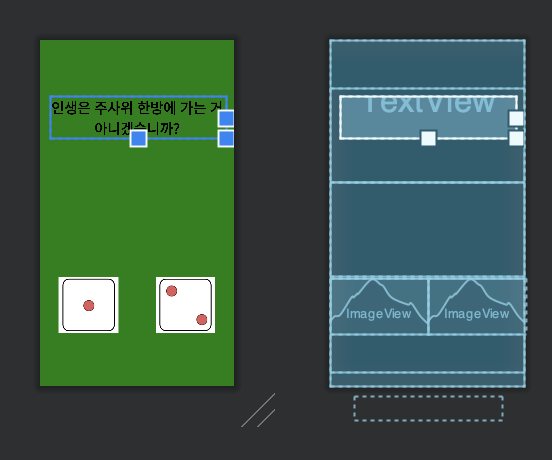
안녕하세요?
오늘도 선생님 강의와 똑같이 따라한 것 같은데
주사위가 선생님 버전보다 밑에 있고 버튼은 더 밑에 있어서 보이지 않습니다.
혹시 해결 방법을 알고 계시면 알려 주시면 감사하겠습니다.
풍요로운 한가위 보내시기를 바라고 항상 감사드립니다.
그리고 제 코드는
<?xml version="1.0" encoding="utf-8"?>
<LinearLayout
    xmlns:android="http://schemas.android.com/apk/res/android"
    xmlns:app="http://schemas.android.com/apk/res-auto"
    xmlns:tools="http://schemas.android.com/tools"
    android:layout_width="match_parent"
    android:layout_height="match_parent"
    android:background="#008000"
    android:orientation="vertical"
    tools:context=".MainActivity">

    <LinearLayout
        android:layout_width="match_parent"
        android:layout_height="200dp"
    android:layout_marginTop="100dp">

        <TextView
            android:layout_width="match_parent"
            android:layout_height="wrap_content"
            android:textSize="30sp"
            android:textColor="@color/black"
            android:layout_margin="20dp"
            android:gravity="center"
            android:textStyle="bold"
            android:text="인생은 주사위 한방에 가는 거 아니겠습니까?"/>

    </LinearLayout>

    <LinearLayout
        android:layout_width="match_parent"
        android:layout_height="200dp">
    </LinearLayout>

    <LinearLayout
        android:layout_width="match_parent"
        android:layout_height="200dp"
        android:weightSum="2">

        <ImageView
            android:src="@drawable/dice_1"
            android:layout_width="120dp"
            android:layout_height="120dp"
            android:layout_weight="1"/>

        <ImageView
            android:src="@drawable/dice_2"
            android:layout_width="120dp"
            android:layout_height="120dp"
            android:layout_weight="1"/>

    </LinearLayout>

    <Button
        android:text="인생 고고"
        android:layout_width="match_parent"
        android:background="@color/black"
        android:textColor="@color/white"
        android:layout_height="50dp"
        android:layout_margin="50dp"/>

</LinearLayout>
입니다!
답변 1
0
안녕하세요 즐거운 한가위 보내세요~
중간에
<LinearLayout
    android:layout_width="match_parent"
    android:layout_height="200dp">
</LinearLayout>
이 부분을 삭제해보시겠어요?
0
해결이 되었습니다. 감사합니다.
그런데 이번에는 버튼이 보이니 백그라운드 색이 보라색으로 보여서
제가 #000000과 #2F2F2F로 바꿔 보았는데도 안 되는데요,
혹시 이것도 알려주시면 감사하겠습니다!
추석에 귀찮게 해 드려서 죄송합니다ㅠㅠ

1
https://www.inflearn.com/course/%EC%95%88%EB%93%9C%EB%A1%9C%EC%9D%B4%EB%93%9C-%EC%BD%94%ED%8B%80%EB%A6%B0-%EB%AA%A8%EB%B0%94%EC%9D%BC%EC%95%B1
섹션 0. 강의소개 및 개발환경 세팅
왕초보 필수시청 - 3 색상 적용이 안될 때
의 방법으로 하셔도 안되시면 전체 프로젝트를 압축 후, 구글드라이브를 통해 공유해주세요~
주사위앱 소개 및 레이아웃 설정 문제
0
81
2
안드로이드 에뮬레이터가 실행이 안 되요...ㅠ
0
135
2
30 강 소스 좀 올려 주십시요
0
95
2
onBackPressed 함수가 동영상 하고 다르게 동작합니다.
0
107
2
ListView 초기 실행 안됩니다.
0
109
2
코딩을 완료하고난후 앱 실행시 자동 종료
0
84
2
datavinding에서 오류가 납니다.
0
63
1
안드로이드 스튜디오 버전 차이로 초기 empyt activity 선택하면 안됩니다.
0
136
2
context의 구별에 대하여
0
84
2
"프롤로그에서 ..." 오류 관련해 직전 질문에 대한 추가 질문입니다.
0
80
2
"프롤로그에서 콘텐츠가 허용되지 않습니다." 오류
0
184
3
해결완료
1
201
2
databinding 설정후 run하면 에러(해결)
0
234
2
databinding 설정 이후 실행시 에러
0
293
4
안드로이드 입문하는 사람입니다.
0
76
1
Firebase uid
0
90
3
activity_main 화면 다름
0
126
2
강의화면과 다른데 맞게진행되는것인가요...????
0
115
2
파이어베이스 질문
0
84
2
ActivityMainBinding에 오류가 납니다
0
145
2
선생님 onBackPressed 작동이 안되는거 같습니다
0
128
2
>app>res>layout 이 존재하지 않습니다.
0
123
2
안드로이드 스튜디오 미어캣 버전 사용 한글 깨짐
0
780
2
안드로이드 스튜디오 오류 발생 시 대처 방법은 요?
0
306
2