


최신 spring security 기준 web.ignoring 관련 질문입니다
현재 최신 spring security 및 spring 3.2.1 버전을 사용중입니다.
강의 섹션 3-2번강의에서 web.ignoring 설정이 현재 SecurityFilterChain에는 어떻게 적용해야 될지 몰라 찾아보던 중 아래와 같은 자료를 발견하였습니다.
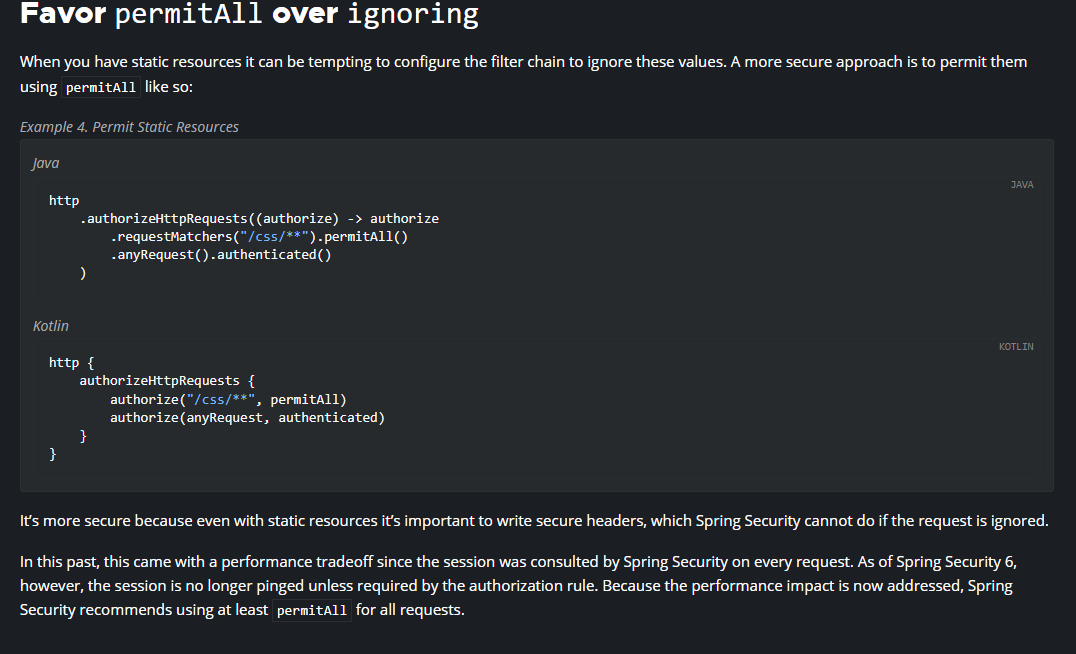
해당 자료는 spring security 관련
위의 주소에서 확인하였는데 이부분과 관련하여 질문드립니다. 최신 버전에서는 위의 사진과 같이 코드를 사용하는게 좋을까요? 만약 위와 같이 사용한다면 달라지는 부분이 있는지 궁금하여 질문드립니다. 현재 제가 작성한 코드는 아래와 같습니다.
추가한 부분은 css, js, img, favcon.ico, webjars 입니다
http
        .authorizeHttpRequests(Authorize ->
                Authorize
                        .requestMatchers("/mypage").hasRole("USER")
                        .requestMatchers("/messages").hasRole("MANAGER")
                        .requestMatchers("/config").hasRole("ADMIN")
                        .requestMatchers("/css/**").permitAll()
                        .requestMatchers("/js/**").permitAll()
                        .requestMatchers("/img/**").permitAll()
                        .requestMatchers("/favcon.ico").permitAll()
                        .requestMatchers("/webjars").permitAll()
                        .requestMatchers("/").permitAll()
                        .anyRequest().authenticated()
        );
전체 부분
@Configuration
@EnableWebSecurity
@Slf4j
public class SecurityConfig{


    @Autowired
    public void configureGlobal(AuthenticationManagerBuilder auth) throws Exception {
        auth.inMemoryAuthentication().withUser("user").password(new BCryptPasswordEncoder().encode("1111")).roles("USER");
        auth.inMemoryAuthentication().withUser("manager").password(new BCryptPasswordEncoder().encode("1111")).roles("MANAGER","USER");
        auth.inMemoryAuthentication().withUser("admin").password(new BCryptPasswordEncoder().encode("1111")).roles("ADMIN","MANAGER","USER");
    }


    @Bean
    public PasswordEncoder passwordEncoder() {
        return new BCryptPasswordEncoder();
    }

    @Bean
    protected SecurityFilterChain filterChain(HttpSecurity http) throws  Exception {


        http
                .authorizeHttpRequests(Authorize ->
                        Authorize
                                .requestMatchers("/mypage").hasRole("USER")
                                .requestMatchers("/messages").hasRole("MANAGER")
                                .requestMatchers("/config").hasRole("ADMIN")
                                .requestMatchers("/css/**").permitAll()
                                .requestMatchers("/js/**").permitAll()
                                .requestMatchers("/img/**").permitAll()
                                .requestMatchers("/favcon.ico").permitAll()
                                .requestMatchers("/webjars").permitAll()
                                .requestMatchers("/").permitAll()
                                .anyRequest().authenticated()
                );

        http.formLogin(
                formLogin ->
                        formLogin
                                .successHandler(new AuthenticationSuccessHandler() {
                                    @Override
                                    public void onAuthenticationSuccess(HttpServletRequest request, HttpServletResponse response, Authentication authentication) throws IOException, ServletException {
                                        RequestCache requestCache = new HttpSessionRequestCache();      // 이걸 이용해 세션에 원래 가고자 하는 경로 저장되어 있음
                                        SavedRequest savedRequest = requestCache.getRequest(request, response);     //여기에 저장되어있음
                                        String redirectUrl = savedRequest.getRedirectUrl();
                                        log.info("redirectUrl : " + redirectUrl);
                                        response.sendRedirect(redirectUrl);
                                    }
                                })
                                .permitAll()
        );


        http

                .csrf(csrf ->
                        csrf.
                                csrfTokenRepository(CookieCsrfTokenRepository.withHttpOnlyFalse())
                );

        return http.build();
    }
}
답변 1
1
네
작성하신 코드로 설정하시면 될 것 같습니다
참고로 정적파일 무시하는 방법은 다음과 같습니다
@Bean
    public WebSecurityCustomizer webSecurityCustomizer() {
        return (web) -> web.ignoring()
                .requestMatchers(PathRequest.toStaticResources().atCommonLocations());
    }
시큐리티 공부 버전 질문
0
242
1
[해결 방법] MethodSecurityConfig.customMethodSecurityMetadataSource() 호출하지 않는 이슈
0
235
1
AbstractSecurityInterceptor.class.beforeInvocation()를 2번 실행하는 경우
0
214
1
강의 코드가 왜이렇게 뒤죽박죽인가요...
0
310
1
메인 페이지로 접속해도 login url로 리다이렉트가 되지 않습니다..
0
290
1
파라미터값이 넘어가지 않습니다 ....
0
422
1
security filterChain 설정 질문이 있습니다.
0
363
1
소스 부분 질문 드립니다.
0
243
2
섹션4 7번 강의 문제가 있는거 같네요.
0
396
2
파일이 수시로 이름이 바껴있네요 ㄷㄷ
0
348
1
HttpSessionSecurityContextRepository를 사용안하는 문제
0
609
2
error , exception 이 잘 안됩니다.
0
330
2
thymeleaf tag 질문합니다.
0
238
2
버전업하면서 deprecated된 것들이 너무많아요
0
510
1
spring security 패치 관련
0
470
1
모바일을 사용할때 토큰말고 세션
0
922
2
DB 연동한 인가 부분에 대한 질문입니다!
0
296
1
Ajax방식도 똑같이 Session방식을 사용하는건가요?
0
350
1
Config 파일 생성 시 질문이 있습니다.
0
280
1
강사님 몇일동안 구글 검색만 100개 했는데도 이유를 모르겠습니다..
1
479
2
403 에러 뜹니다.
0
874
2
login_proc의 존재에 대한 간략한 설명입니다
0
309
1
top.html에 로그인 링크를 만들어서 로그인을 해봤습니다
0
326
2
안녕하세요. DB에 저장될 때 이해 안 가는 값이 있어서 질문드립니다!
0
221
1