Tailwind CSS 実践ポートフォリオの公開
codingworks
[Tailwind CSS実践ポートフォリオパブリッシング]は、Tailwind CSSを活用して26種類以上の実践例を製作する過程です。実践例を素早く多様に制作することで、その中で必須の理論を説明します。この講義は、開発者とパブリッシャーが作成するTailwind CSSスタイリングを中心に作成されました。

初級
TailwindCSS, HTML/CSS


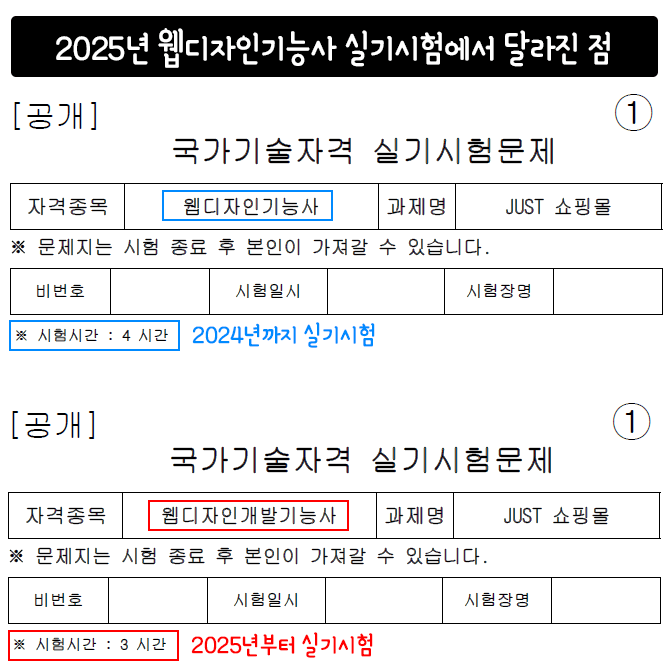
ウェブデザイン開発技能士の公式サイトに新しく掲載された2026年基準の公開問題をダウンロードして、2024年の公開問題と比較してみました。試験内容で変わった点は一つもなく、変更点は2つです。
一つ目は、実技試験の時間を従来の4時間から3時間に短縮し、試験の難易度を上げました。
二つ目は、資格種目名が従来の「ウェブデザイン技能士」から「ウェブデザイン開発技能士」に変更されました。
2026年の試験における追加事項はありません。万が一、2026年の変更事項や追加事項がある場合は、可能な限り迅速にアップデートされる予定であり、追加費用は一切かかりません。(2026年1月6日基準)
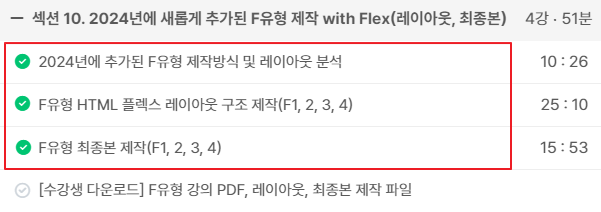
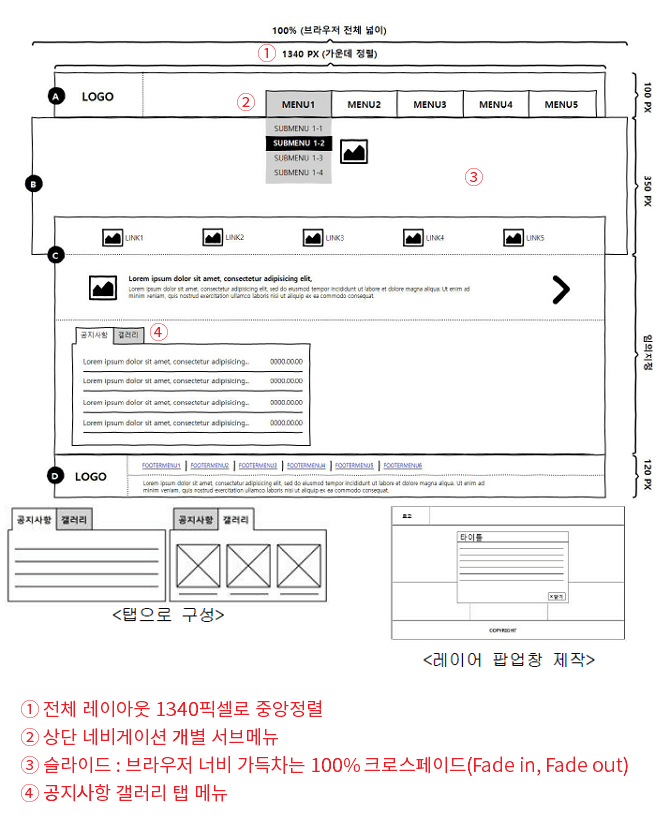
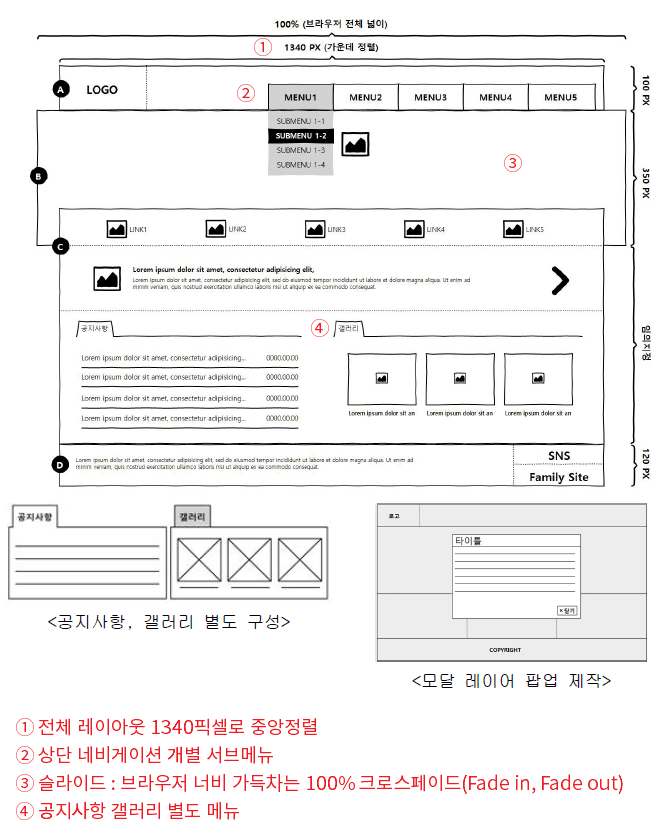
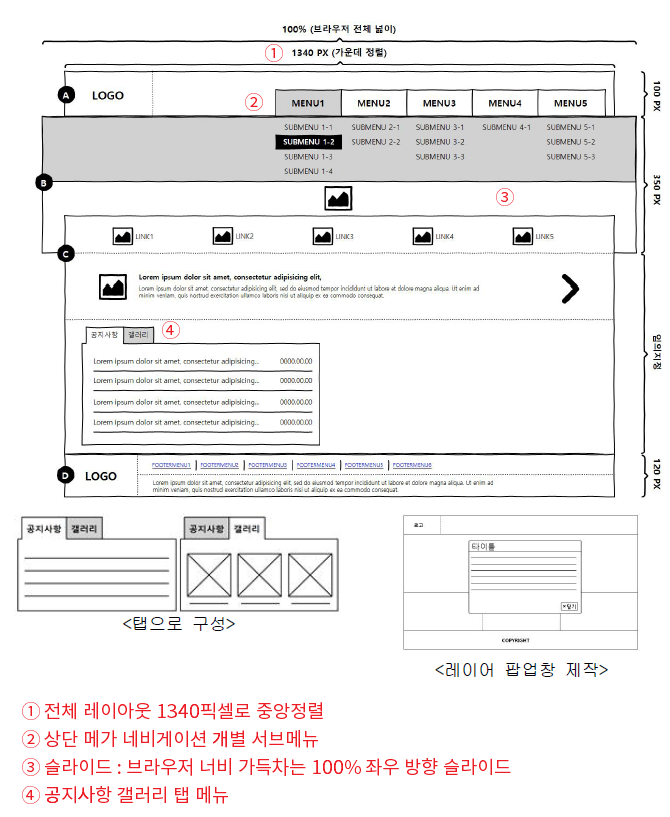
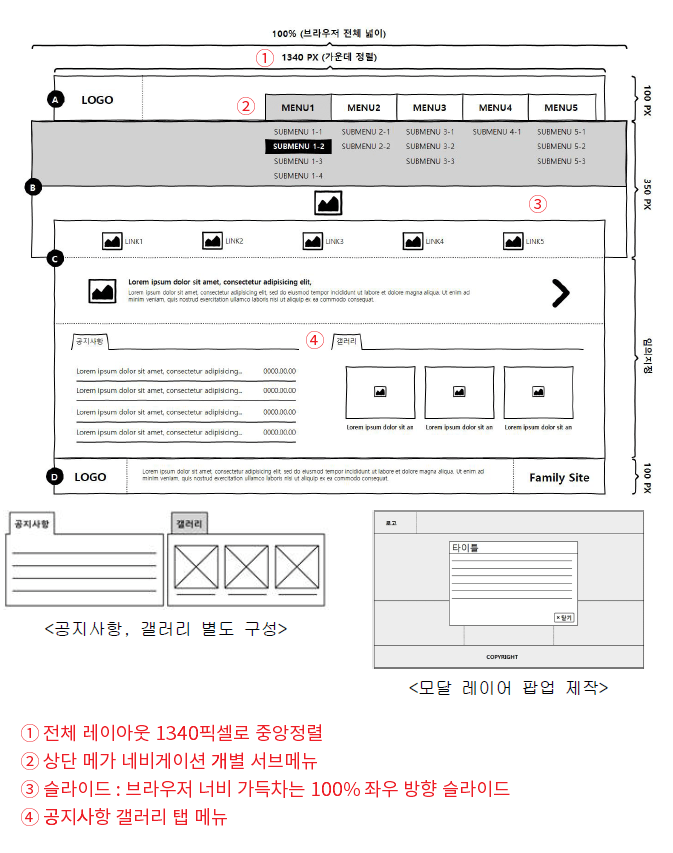
2024年から追加されたFタイプ4種(F1,2,3,4)の制作動画がアップデートされました。Fタイプだからといって新しい制作モジュールがあるわけではありません。ただ、レイアウトがもう1種類追加されたと考えていただければ大丈夫です。追加されたFタイプ4種のせいで、実技試験の準備に大きな負担がかかることはないと思います。
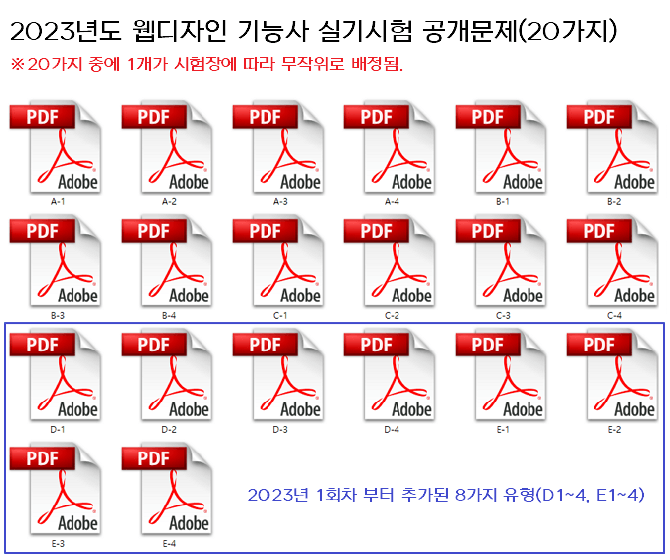
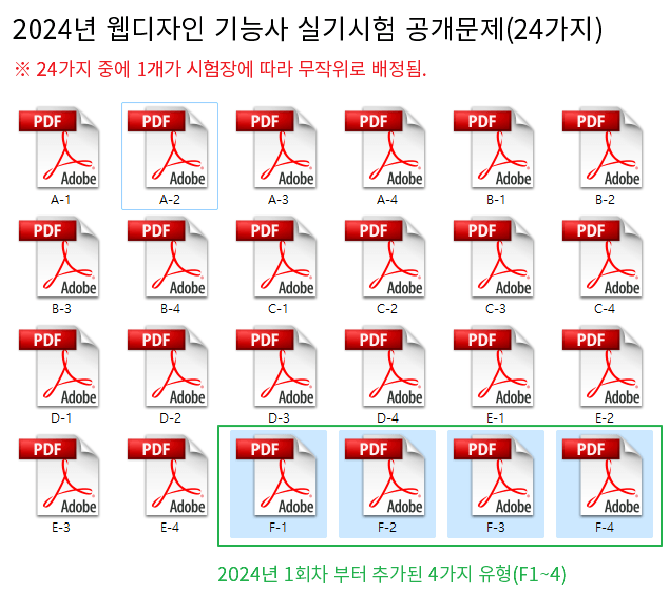
2023年度まではAタイプ、Bタイプ、Cタイプ、Dタイプ、Eタイプがそれぞれ4つずつの計20個でしたが、2024年第1回試験からFタイプ4つが追加されました。そのため、計24個のタイプを勉強する必要があります。
主催側で2023年度に試験の難易度を大幅に上げましたが、2024年度から試験の難易度をもう少し上げました。
✅ 2024年に追加されたFタイプの授業動画は現在準備中です。
2024年第1回実技試験が2024.03.16〜2024.03.29ですので、Fタイプを除いて現在ある内容を勉強していただければ大丈夫です。A、B、C、D、Eタイプが十分にこなせる状態であれば、Fタイプも全体のレイアウトがわずかに異なるだけで、大きく違う部分はありません。ただ、全体のレイアウト設計において1340ピクセルで中央揃えですが、スライドセクションのみブラウザ100%にしなければならない点が少し難しそうです。
※ Fタイプもスライド方式、タブメニュー、ナビゲーション、モーダルすべてA、B、C、D、Eタイプと同じです。
※ 2026年度 公開問題のPDFファイルは2025年と同じです。(セクション14からPDFをダウンロード)
2026年度ウェブデザイン技能士資格試験情報 : http://www.q-net.or.kr/crf005.do?id=crf00503&jmCd=7798
▼ F1 レイアウトおよびモジュール制作内容
▼ F2 レイアウトおよびモジュール制作内容
▼ F3 レイアウトおよびモジュールの制作内容
▼ F4 レイアウトおよびモジュール制作内容
学習に関する質問ではありませんが、先生の周りにFタイプの試験を受けた方がいらっしゃらないとのことでしたので、
情報が正確ではないということを思い出したので、おせっかいかもしれませんが、他の受験生の方々と
先生のお役に少しでも立てればと思い、試験が終わってすぐに駆けつけて掲示板に書き込んでいます!
今週ずっと不思議とFタイプが気になっていたのですが、今日ちょうど試験に出ることを直感していたみたいです(涙)
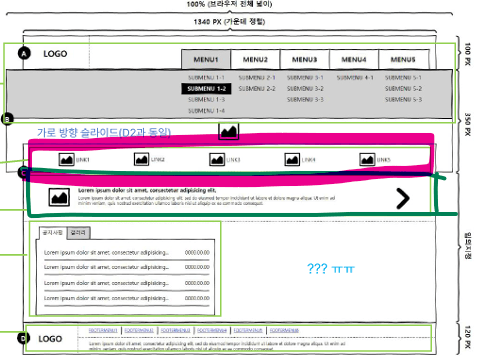
1. 講義通りに
.slide の中に slide-image と slide-banner でまとめて勉強したのですが、
試験問題では、私たちが slide-banner と呼んでいた部分が指示事項では「ショートカット(바로 가기)」となっており、content-inner の中にある shortcut 部分を試験問題では「バナー」と指示していました。単にコードをまとめる名前が違っていただけですが、Fタイプを準備される方々が混乱しないように、コード名を変えて勉強するのはどうかなと思いました!私も途中で「ショートカット」の指示事項を読みながら、いつものように slide-banner と作成していて混乱したので、結局指示事項で要求された名前にコード名も統一させました!
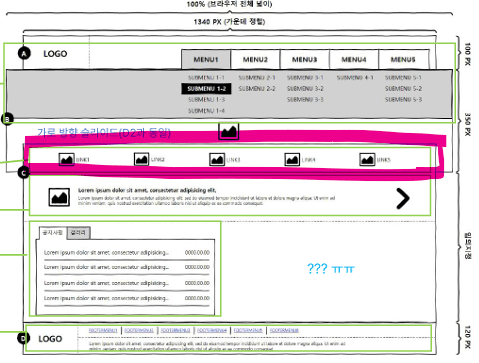
2. ピンク色のボックス部分を塗った箇所についてお伝えしたいことがあるのですが〜
覚えていらっしゃるか分かりませんが…ㅠㅠ
私が24.03.27にFタイプのslide-banner link部分に文字を入力する指示があるのではないかと
質問を投稿したことがあります…!
あいにくㅠㅠ 私の予想通り、試験の指示事項に各アンカーごとにテキストを入れるようにという部分がありました。
提供されたテキストのメモ帳に、挿入すべきテキストが入っていたんですㅠㅠ
そして、合計で入る画像はレイアウトと同じく5枚でした。
ただ、テキストを画像のどこに入れるかという特定の指示はなかったので、
それで私は
spanでテキストを入力して、ギャラリーの画像にspanを入れたのと同じように
display:block処理をして上下に配置し、整列させる方式で作りました。
イラストやフォトショップで画像を作るのではなく、提供された画像を挿入しなければなりませんでした..!
配置してみたところ、スライド画像の上に唐突な写真を貼り付けたようになってしまったので、
私は背景色を指定して透明度を調節し、スライド画像とは別の部分であるアイコンのように見えるように
作成しました。
3. そして、お知らせの部分です!右側に先生が「???ㅠㅠ」と水色で書かれた部分は、本当に空白でした!!ただ、お知らせの部分で「えっ?」と驚いたのは、tab-innerの幅が広くないかもしれないので
お知らせの部分にem / bタグを利用して配置と省略(三点リーダー)を勉強して行ったのですが、
日付の入力がありませんでした!
なので、気楽にアンカーだけ入れてブロック処理し、中央配置にして装飾しました。
私がミスした部分は、フッターメニューにボーダーボトムを入れなかったことと、
メニューのサブ背景のwidthサイズをヘッダーサイズにしてしまったことの2点ですが、(Aタイプのsub-backのように作ってしまいました泣)
他はすべて正常に動作し、自分でも「これくらいできれば十分だ」と思えるくらいしっかり解いてきました!!泣
もしこの2つの問題で落ちてしまったら、ものすごく恥ずかしくて情けないですが…泣泣泣泣
それでも、自分自身で多くの構造を把握して作れるようになったことがとても誇らしいです。
そして、Fタイプはどうしても見たことのないタイプだったからか…
今日私が行った試験会場では12人が受験していましたが、6人が途中で諦めて退出されました。
私はすべての確認を終えて提出するまで2時間20分ほどかかりましたが、
その時間までに私を含めて提出した人は3人で、私が教室を出る時まで3人が残っていました。
4月9日が合格発表日ですが、どうか受かっていますようにㅠㅠ
先生の対面授業ではなくオンライン授業でしたが、本当に多くのことを学びましたㅠㅠ
ありがとうございましたㅠㅠ!
jQuery方式のスライド制作動画がアップデートされました。2023年からDタイプ、Eタイプが追加され、実技試験の難易度が上がったため、スライド制作方式をより簡単かつ便利にする必要があります。そのため、従来のjQuery方式の動画を新しい動画として制作しました。
従来のCSSスライダーで制作すると、多少の減点要素になる可能性があります。CSSスライダーの講義もありますが、jQueryを使用してスライダーを制作することをお勧めします。(実際には2つの方法のうち、やりやすい方で学習して受験しても、合格には全く支障ありません。)
CSSスライドの場合、スライド1、2、3の後に再びスライド1に戻って1、2、3へと進む部分が少し不自然ですが、jQueryスライドはスライド1、2、3の後に再び自然にスライド1、2、3と表示されます。つまり、CSSスライドよりも完璧なスライド制作が可能です。
ジェイクエリのコードを見ると、短くて非常に簡単で理解しやすいと思います。
※ ジェイクエリのコードは6行ですが、実際に動作するコードは3行です。
▼ jQuery方式のスライド制作動画とダウンロードファイルは、以下から確認・ダウンロードいただけます
2023年からウェブデザイン技能士実技試験に新しく追加されたD、Eタイプの制作講義のアップデートが完了しました。追加された映像は約7時間に及ぶ分量です。D、Eタイプは制作の難易度も上がり学習量も増えましたので、早めに準備して学習を進めてください。
2023年に新しく追加されたDタイプとEタイプの制作講義のアップデートが完了しました。DタイプとEタイプの制作講義はセクション09にあります。制作動画内でも説明していますが、必ずA、B、Cタイプをすべて完了してからDタイプとEタイプの制作講義を学習してください。
▼ D1 レイアウトおよびモジュール制作内容
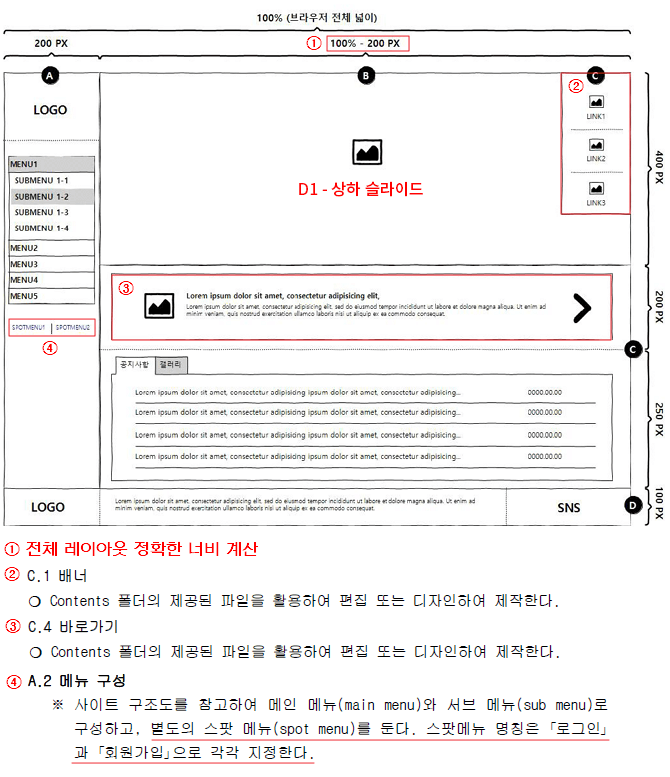
▼ 2023年に新しく追加されたDタイプ(D1)最終版のプレビュー
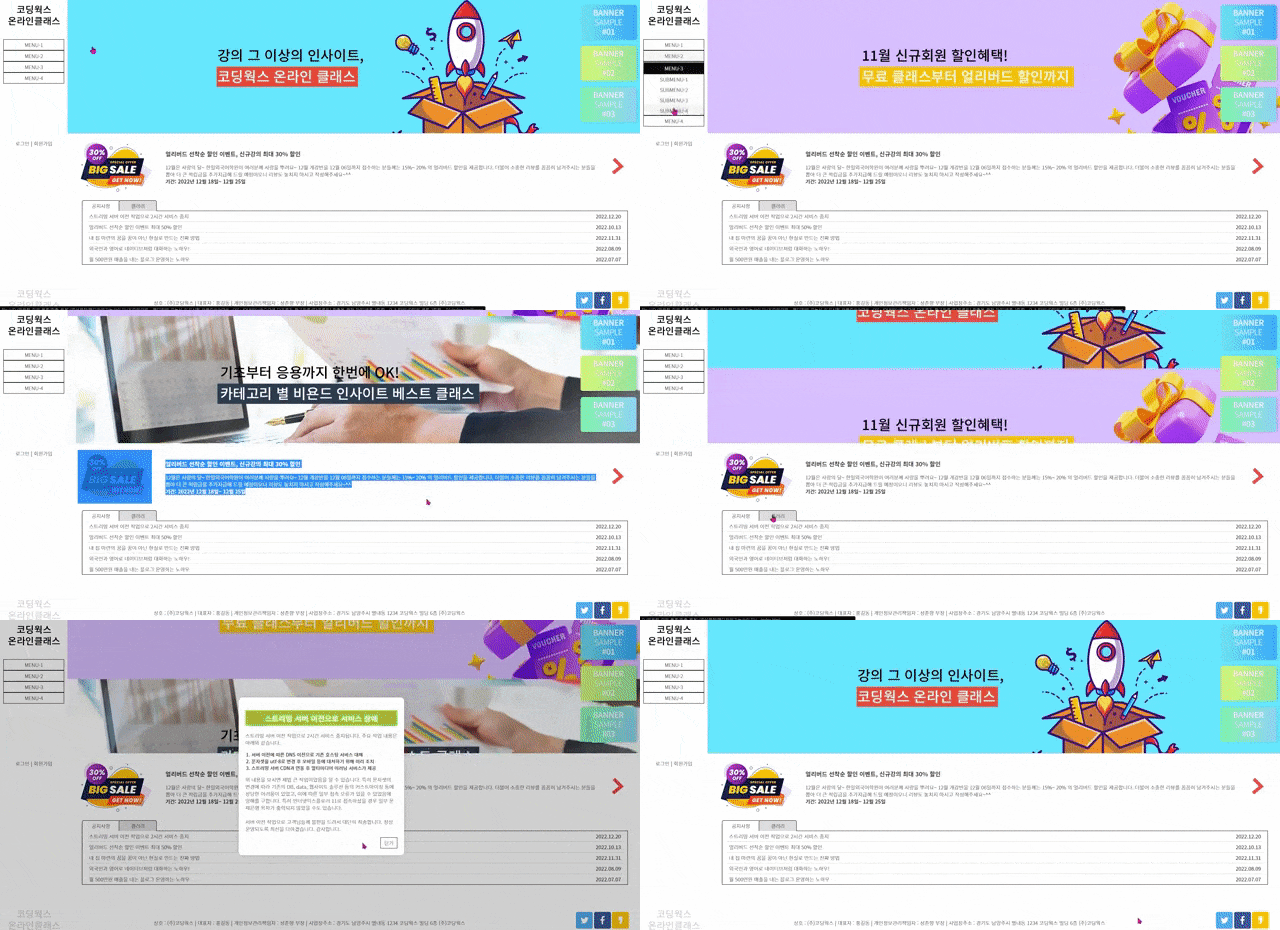
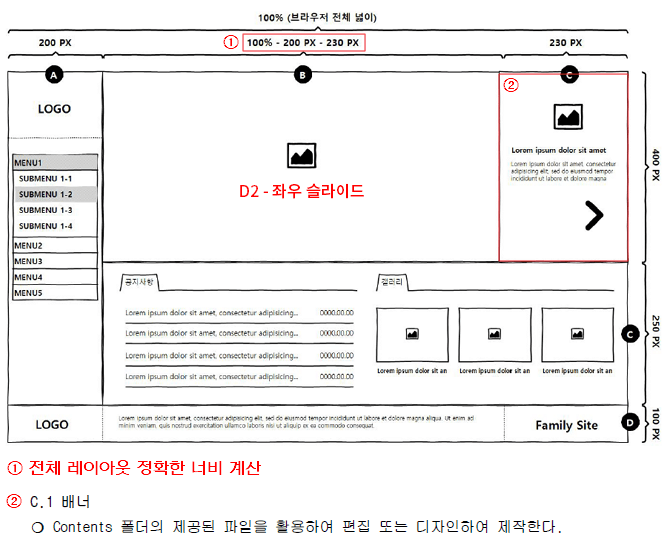
▼ D2 レイアウトおよびモジュールの制作内容
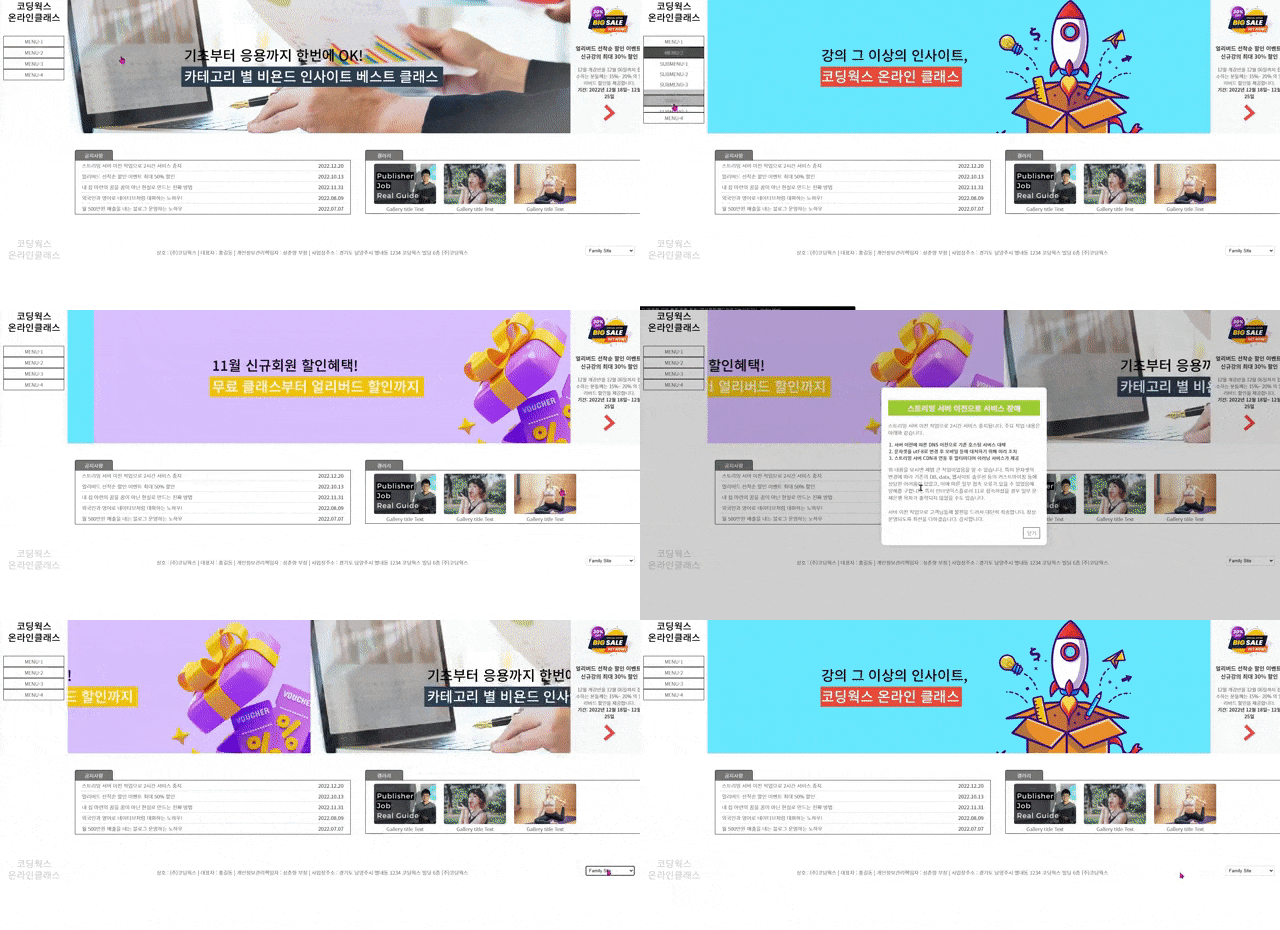
▼ 2023年に新しく追加されたDタイプ(D2)最終版のプレビュー
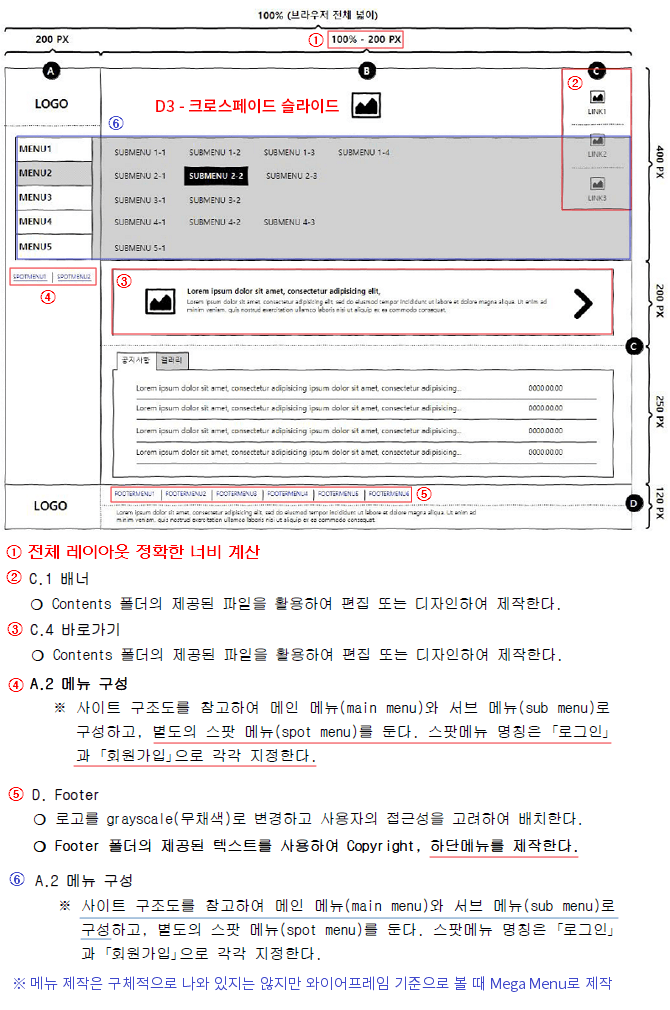
▼ D3 レイアウトおよびモジュール制作内容
▼ 2023年に新しく追加されたDタイプ(D3)最終版プレビュー
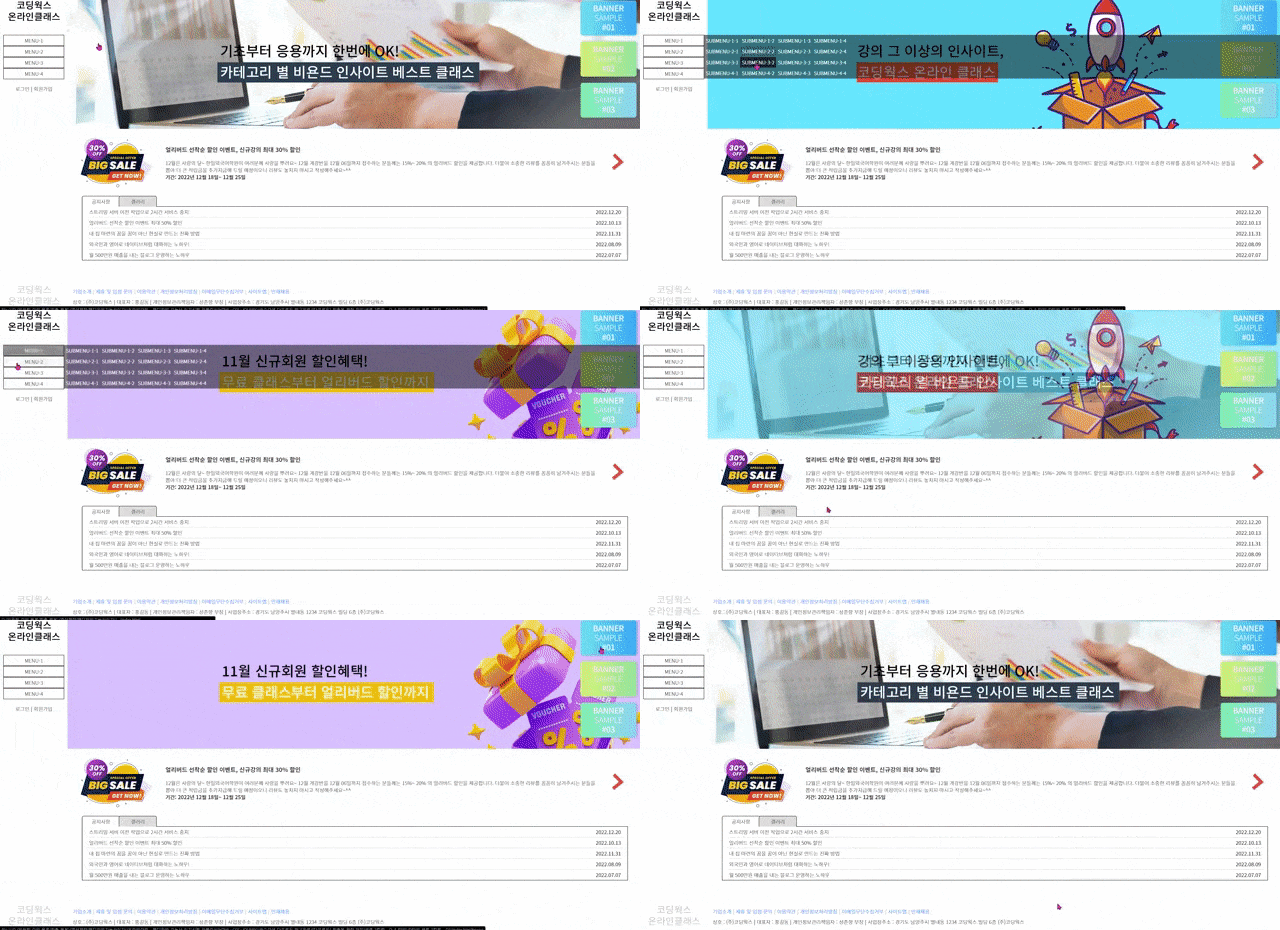
▼ D4 レイアウトおよびモジュール制作内容
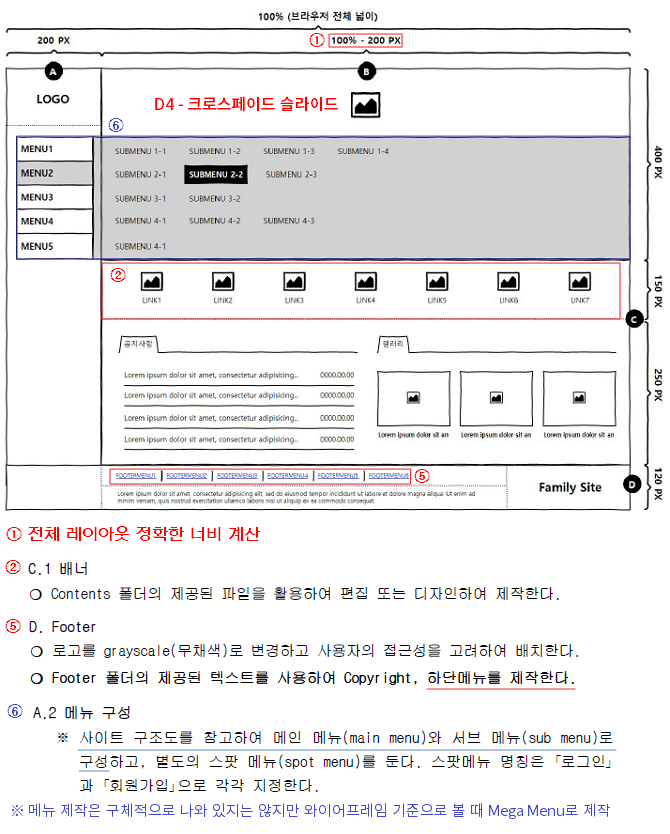
▼ 2023年に新しく追加されたDタイプ(D4)最終版プレビュー
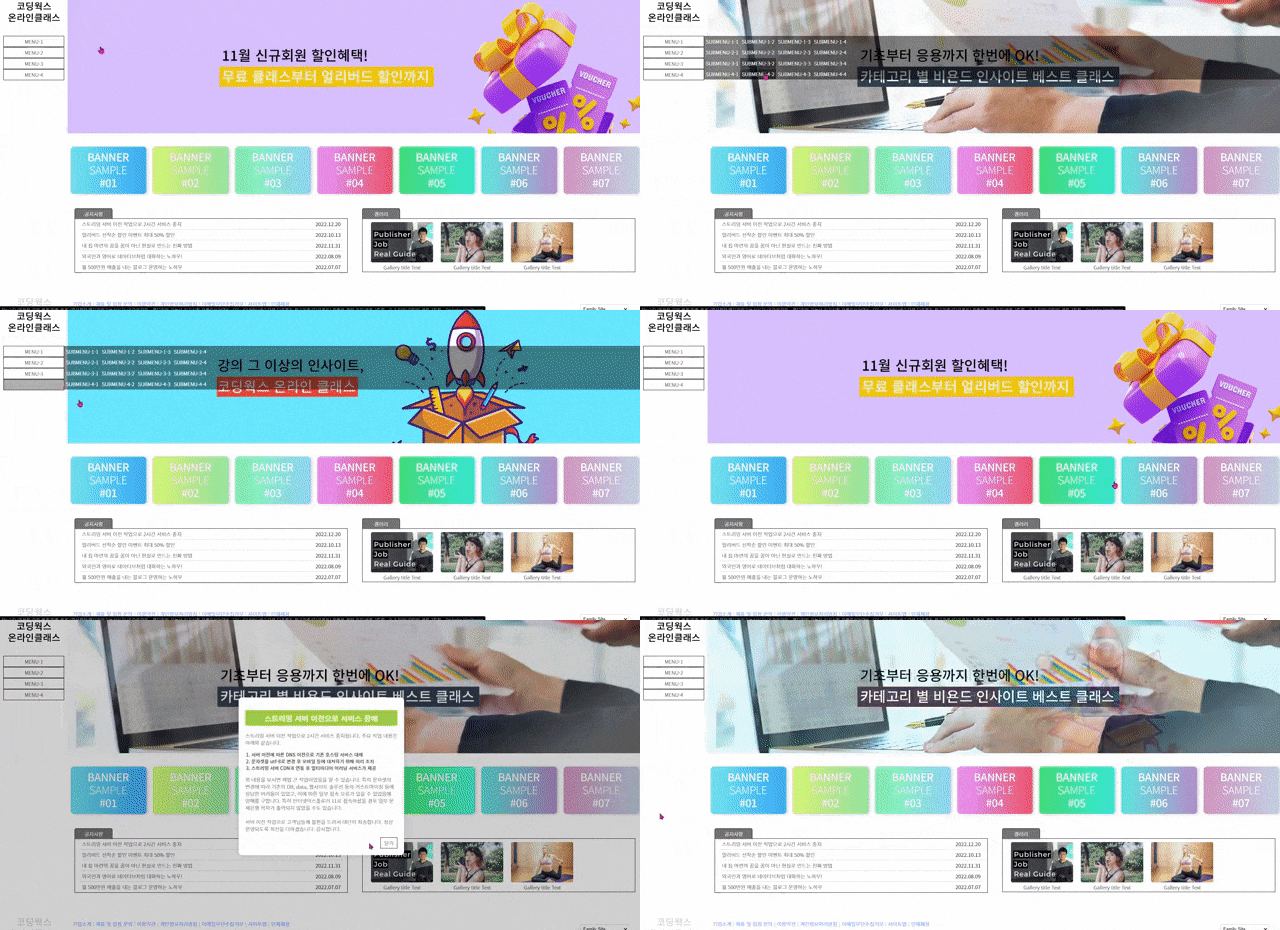
▼ E1 レイアウトおよびモジュール制作内容
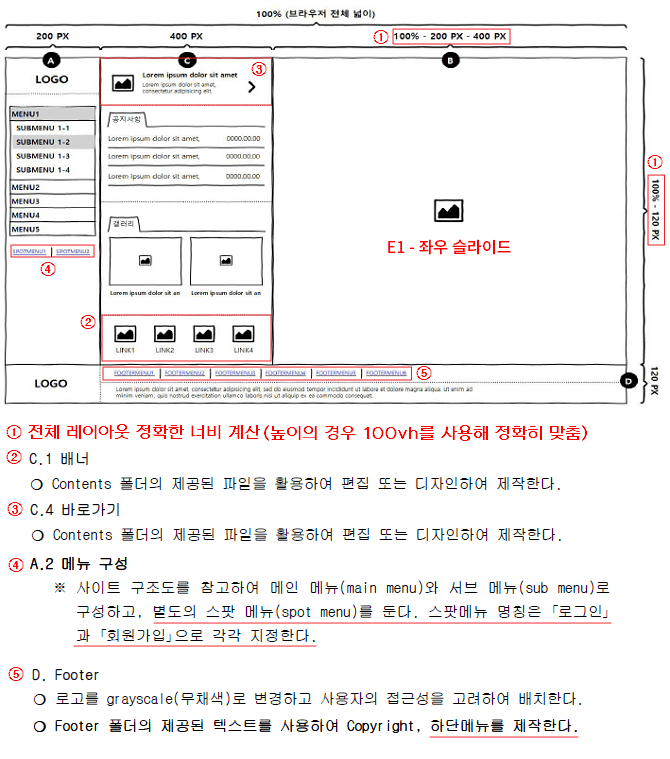
▼ 2023年に新しく追加されたEタイプ(E1)最終版プレビュー

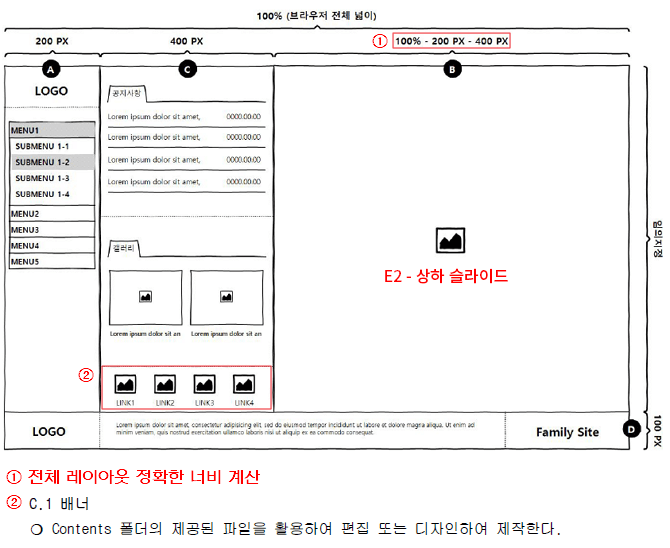
▼ E2 レイアウトおよびモジュール制作内容
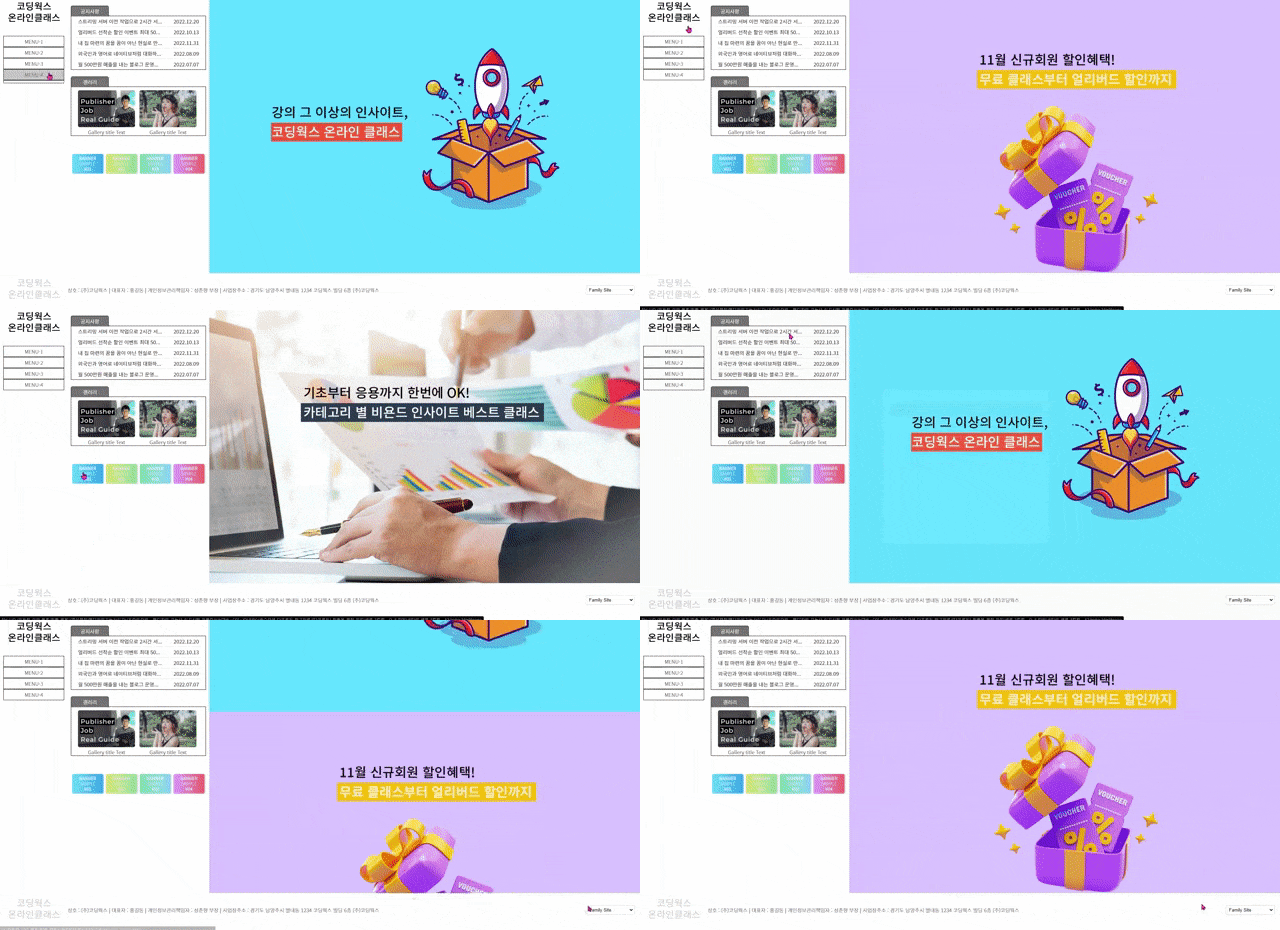
▼ 2023年に新しく追加されたEタイプ(E2)最終版プレビュー
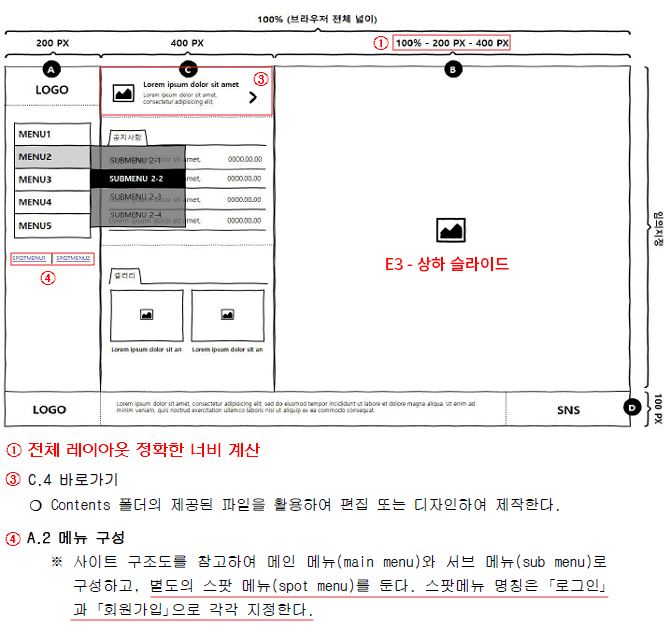
▼ E3 レイアウトおよびモジュールの制作内容
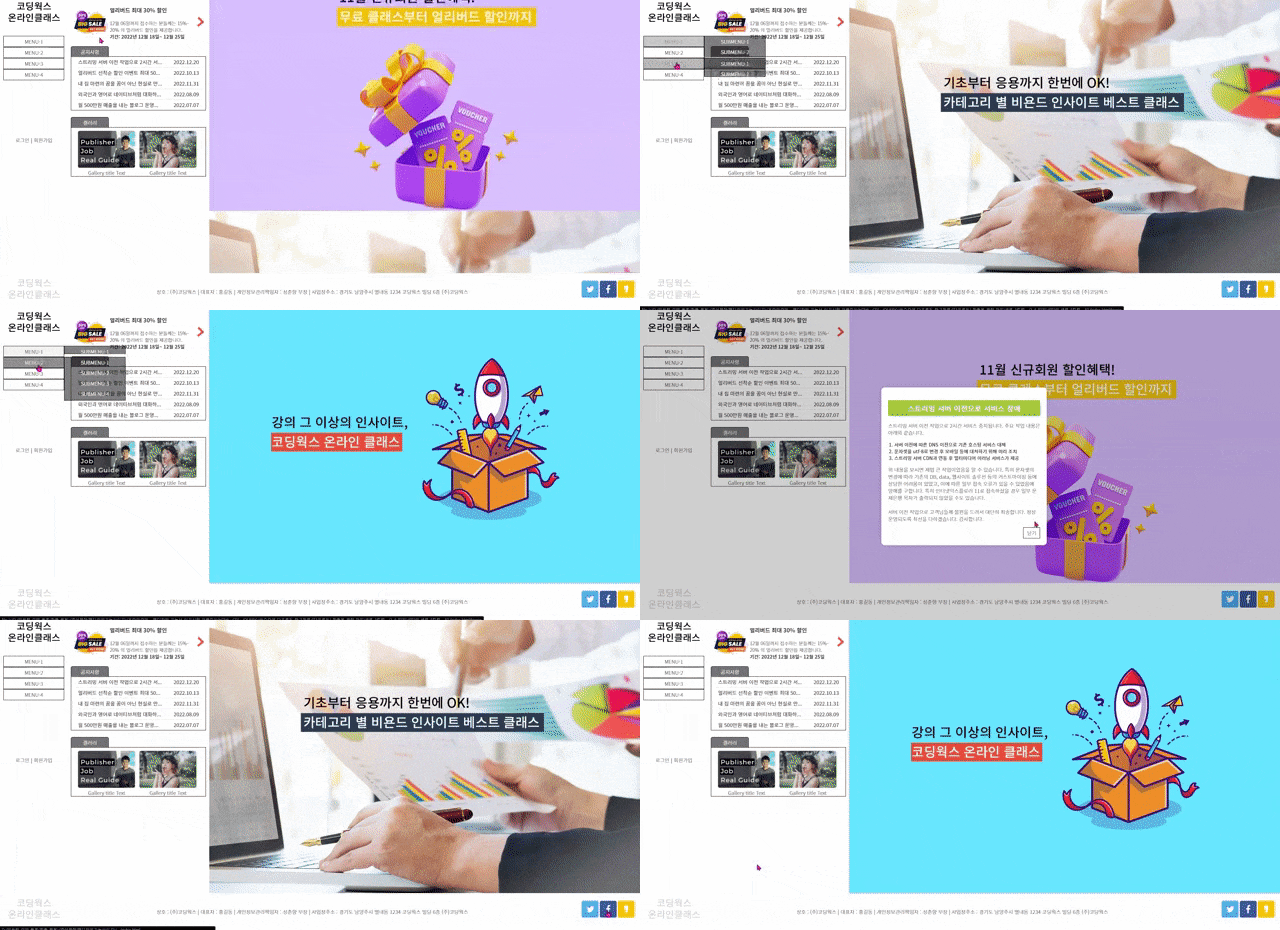
▼ 2023年に新しく追加されたEタイプ(E3)最終版プレビュー
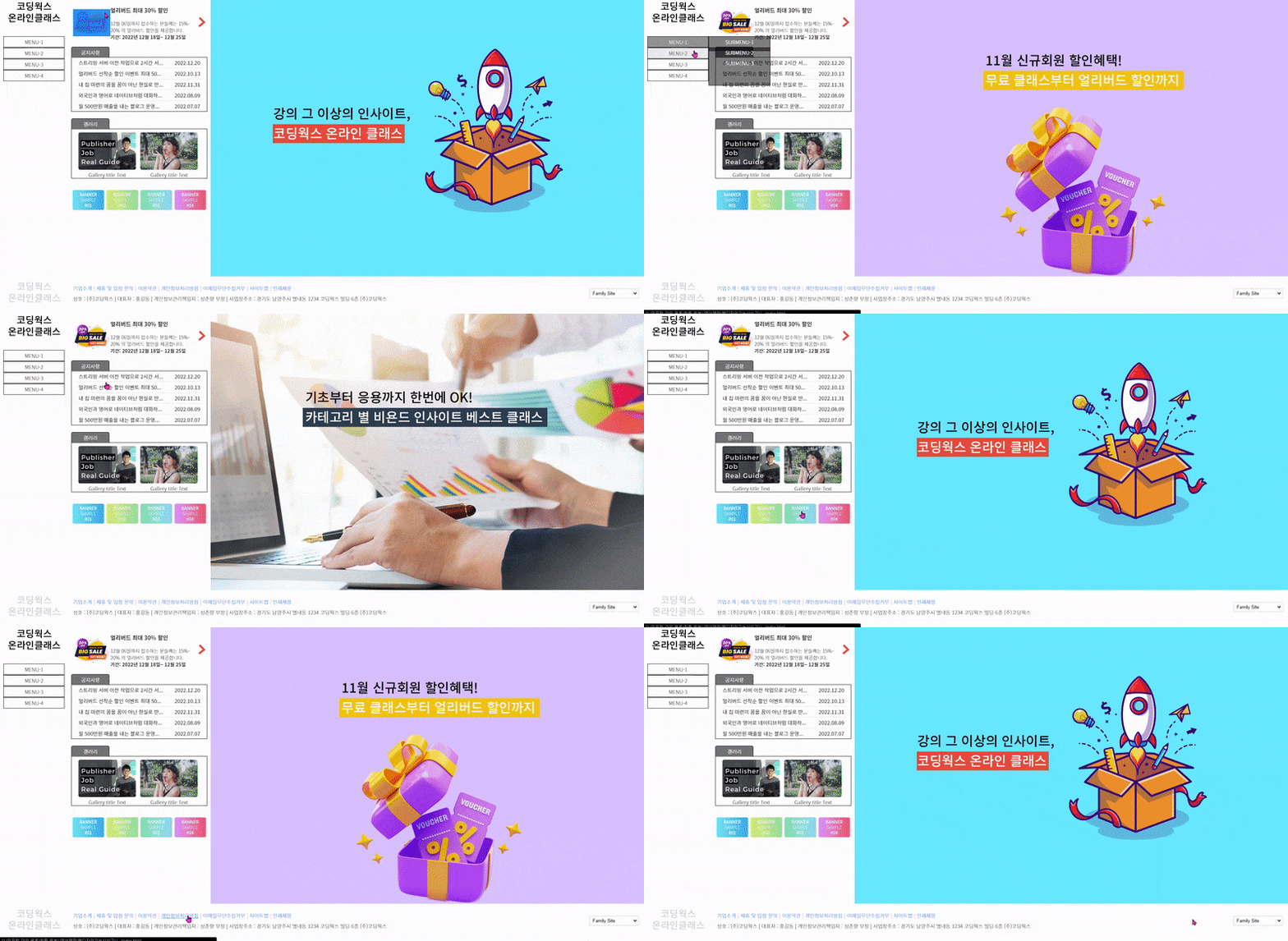
▼ E4 レイアウトおよびモジュールの制作内容
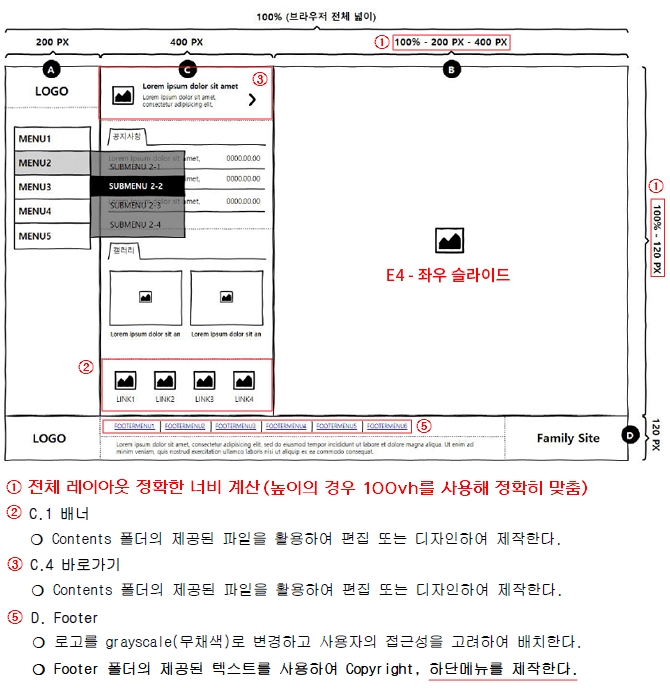
▼ 2023年に新しく追加されたEタイプ(E4)最終版のプレビュー
- ウェブデザイン開発技能士の実技試験は、決して簡単な試験ではありません!!
- ウェブデザイン開発技能士資格の高得点合格!簡単で簡明なコードが保証します。
- ウェブデザイン開発技能士の資格を取得して、ウェブデザイナーとして就職した後の年収もアップさせましょう〜!!
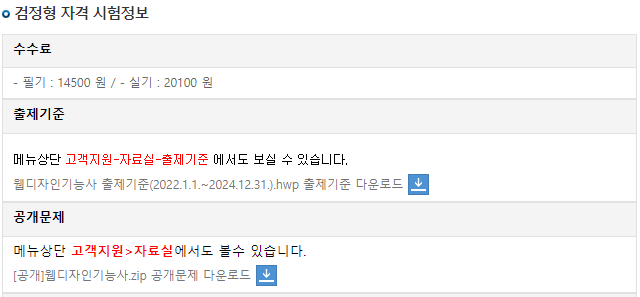
現行のウェブデザイン技能士の出題基準の適用期間は、2025.1.1 ~ 2027.12.31まで有効です。
本講義は、現行の出題基準に完璧に合わせた実技試験講義として制作されました。
2026年度ウェブデザイン技能士資格試験情報: http://www.q-net.or.kr/crf005.do?id=crf00503&jmCd=7798
2021年第3回実技試験から、Visual Studio Code(ビジュアルスタジオコード)テキストエディタのみ使用可能になりました。以前テキストエディタとしてインストールされていたBracketsとDreamweaverは、Q-Net公式サイトの案内によると、2022年からは使用できません。したがって、結論としてはNotepad++またはVisual Studio Codeのいずれか1つを使用して試験準備をすれば大丈夫です。もちろんEditPlusやBracketsを使うことはありませんので、Visual Studio Codeを使用して実技試験の勉強を進めてください。
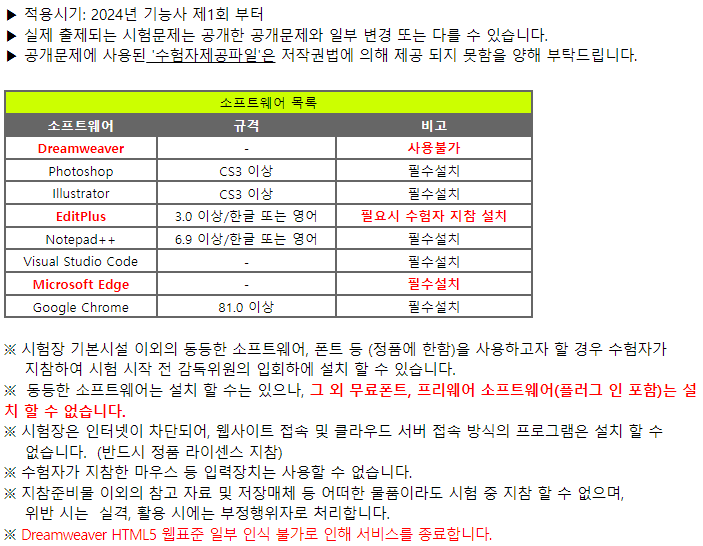
https://www.q-net.or.kr/cst006.do?id=cst00602&gSite=Q&brdId=Q006&code=1204&artlSeq=5199079
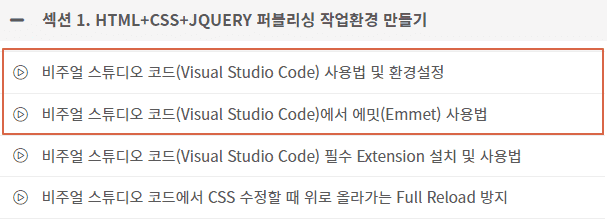
上記の案内にあるように、"プラグイン(別途のアプリケーション、追加機能)はインストールできません。" となっています。これは、Visual Studio Codeのエクステンションがインストールされていないため、Visual Studio Code プログラムの基本機能で実技試験を受けなければならないという意味です。ですので、Visual Studio Codeをインストールした後、別途のエクステンションはインストールせずに学習してください。実技試験会場と同じ環境で試験準備をする必要があります。 下の図にある Visual Studio Codeの4つの講義のうち、赤い枠で囲まれた2つだけを学習してください。 もちろん、実務のための Visual Studio Codeの学習であれば、4つすべて学習する必要があります。
該当講座にあるVisual Studio Codeの使用方法のうち、ウェブデザイン技能士の実技試験のためには、赤いボックスで囲まれた2つの動画のみ学習してください。(実技試験会場には拡張機能(エクステンション)がインストールされていません。)
自動保存は拡張機能ではなくVisual Studio Code自体の機能ですので、自動保存の詳細な方法はCodingWorksのInflearnブログでご確認ください。https://inf.run/RPaoi
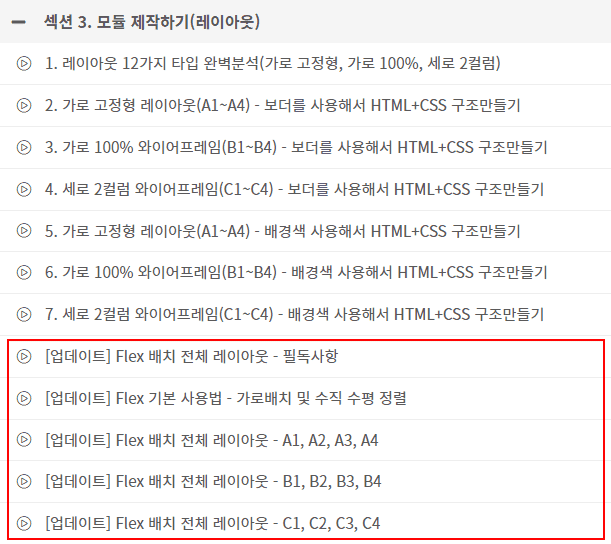
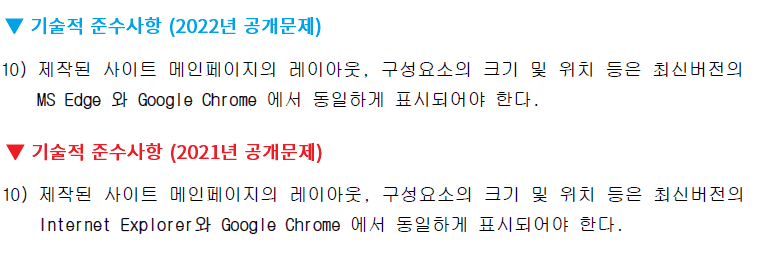
1) 2022年からウェブデザイン技能士実技試験の技術的遵守事項において、EdgeとChromeでクロスブラウジングチェックを行います。以前のIE(Internet Explorer)は公式に除外されました。 👍
2) floatで横並びにする従来の方法を十分に学習した後に、Flex配置を学習してください(Flex配置は必須ではありません)
FloatとPositionの配置を理解していない状態でFlex配置を学習することは控えてください。
3) 使用する場合は、Flex配置は全体のレイアウトにのみ使用することをお勧めします(細かな配置へのFlex使用は控えてください)
選択 1) Flex配置(全体レイアウト) + Float, Position(レイヤーポップアップ、ナビゲーション、お知らせ)
選択 2) Float, Position(全体レイアウト、レイヤーポップアップ、ナビゲーション、お知らせ)
※ フレックス(Flex)による全体のレイアウト制作は、Floatで配置する従来の方法を十分に学習した後、最終版の制作で活用することをお勧めします。


コーディングワークス・パブリッシングのYouTubeチャンネルで、理論の動画講義と並行して学習を進めることをお勧めします。もちろん、すべての理論動画がYouTubeチャンネルにあるわけではありませんが、重要な理論動画はほとんど揃っています。動画の数が多いので、動画を探す際は以下の例のように検索するのが良いでしょう。
コーディングワークス パブリッシング YouTubeチャンネル: https://www.youtube.com/codingworks
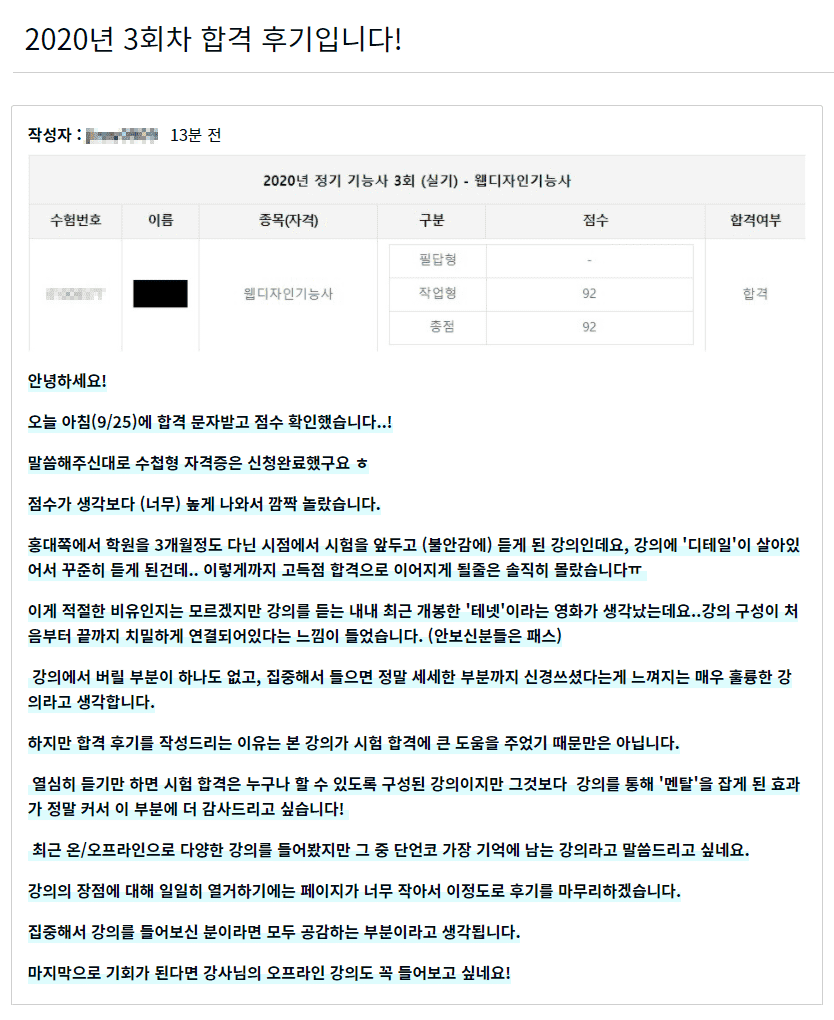
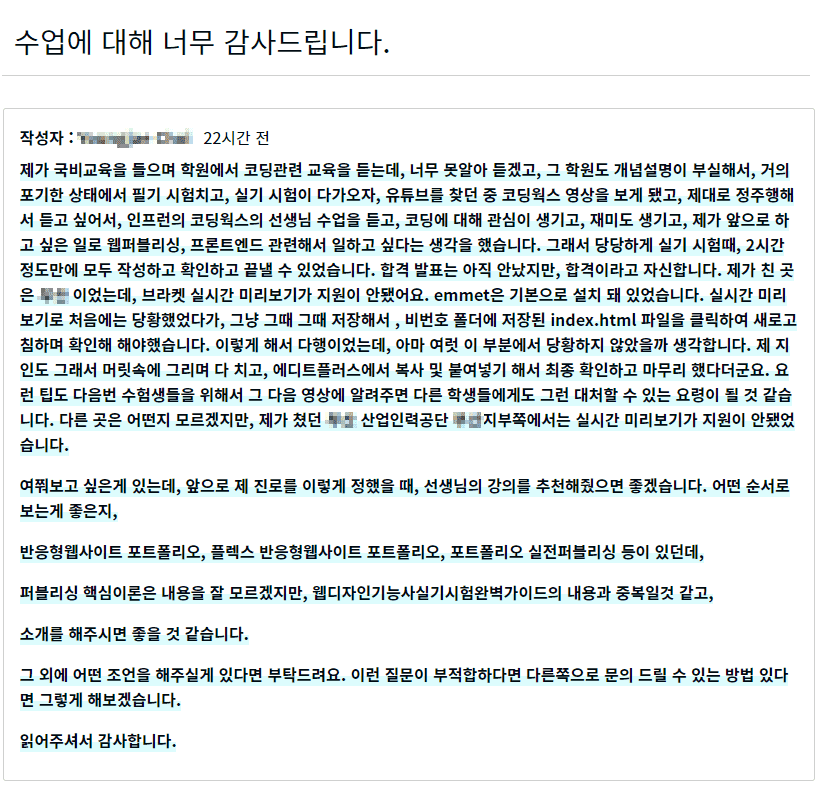
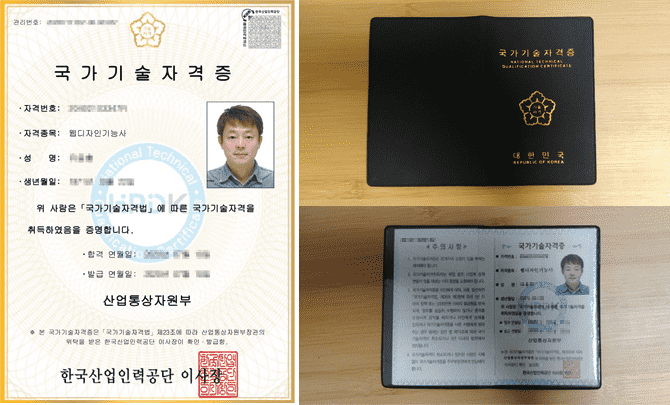
▲ インフランのコーディングワークス・ウェブデザイン技能士実技講座の受講生による合格体験記です。やりがいを感じますね〜^^
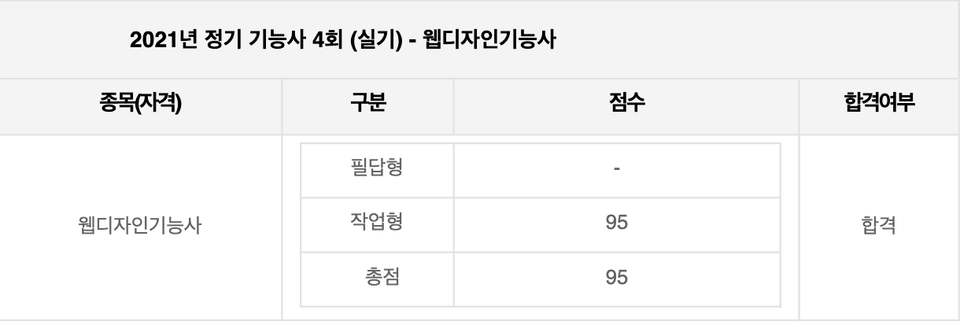
こんにちは!久しぶりに質問の投稿をさせていただきます!結論から申し上げますと、本日89点で合格したとの連絡をいただき、手帳型資格証の申請を終えた状態です :)
実は他の仕事と並行していたため、まともに勉強ができず、急いで1ヶ月間の一夜漬けで挑んだのですが… 現在ウェブデザイン技能士を準備されている方々に、私の方法が少しでも役に立てばと思い、長文を書かせていただきました。
1ヶ月の一夜漬けという言葉に疑問を持たれるかもしれないので先にお伝えしますと、私は映像、広告、デザイン系の専攻で、昨年の夏にウェブデザインをするために勉強して筆記を取得したのですが、実技の準備よりも先に(デザイン系で)就職が決まってしまい、取得が遅くなったケースです ^-^;;
以前に勉強したことがあったので、1ヶ月の一夜漬けが可能でした(泣)
私が勉強した方法についてお話しすると、私は講義を見ながら真似する方法ではなく、
自分が持っている情報で直接作ってみてから、講義を通じて先生がどのように進めるのかを見て学ぶという方式で勉強しました。
具体的な例を挙げると、
タイプAのレイアウトを学んだら、タイプBは自分で作ってみて、ワイヤーフレームの理論を学んだら、その理論だけを頼りにまずは自分で作りました。勉強している最中は時間はかかりますが、覚えるのも早いですし、こうして一度でも自分で作ってみることで、2〜3回目には一人で作れるようになりました。
また、動画の合間に先生がおっしゃっていたように、先生は以前作ったものをコピーして貼り付けていても、私は毎回一つ一つ自分で入力して枠組みを作っていたことも大きかったと思います。
もしかすると当然の勉強方法かもしれませんが、時間はかかりますし、まず自分で作ってみることで最初は上手くいかない部分が出てきます。その時に「なぜだろう?」と考え、先生の講義を聴きながら、なぜダメだったのかを理解するプロセスが、勉強において非常に大きいと感じています。
少しでもお役に立てればと思い、長々と書かせていただきました。ありがとうございます :)
おかげさまで試験を無事に終えることができました!
作成者 : f1rstf1y9 / 2021.12.05 午後 10:28
受講の感想は合格した後に書くことにして、まずはコミュニティに感謝の挨拶を投稿します!
私は実はこの分野の関連専攻の大学生なので、HTML、CSS関連の講義を専攻授業だけで2回は受けました。専攻授業では耳にあまり入ってこない講義内容を、ただ試験のためだけに丸暗記し、試験が終われば忘れてしまうという状態だったので、ウェブデザイン技能士の実技を準備する時も、何をどう準備すべきか分からないほど基礎知識が非常に不足している状態でしたが、コーディングワークスさんの講義を聴いて、ようやくまともな授業を受けられたという気がします。今日の試験は終わりましたが、この講義を通じて学んだ内容は、私の記憶の中に長く残りそうです。
試験の申し込み後、YouTubeの講義で独学をしていましたが、専攻科目の講義を受けていた時のように全く頭に入らず迷っていたところ、この講義を見つけました。無料講義を受けている途中で見つけたので、試験まで残り1ヶ月ほどしかない時点でこの講義にお金を投資するのが正解なのだろうかと悩んだりもしたんです。でも、悩む必要なんてなかったみたいです(笑)
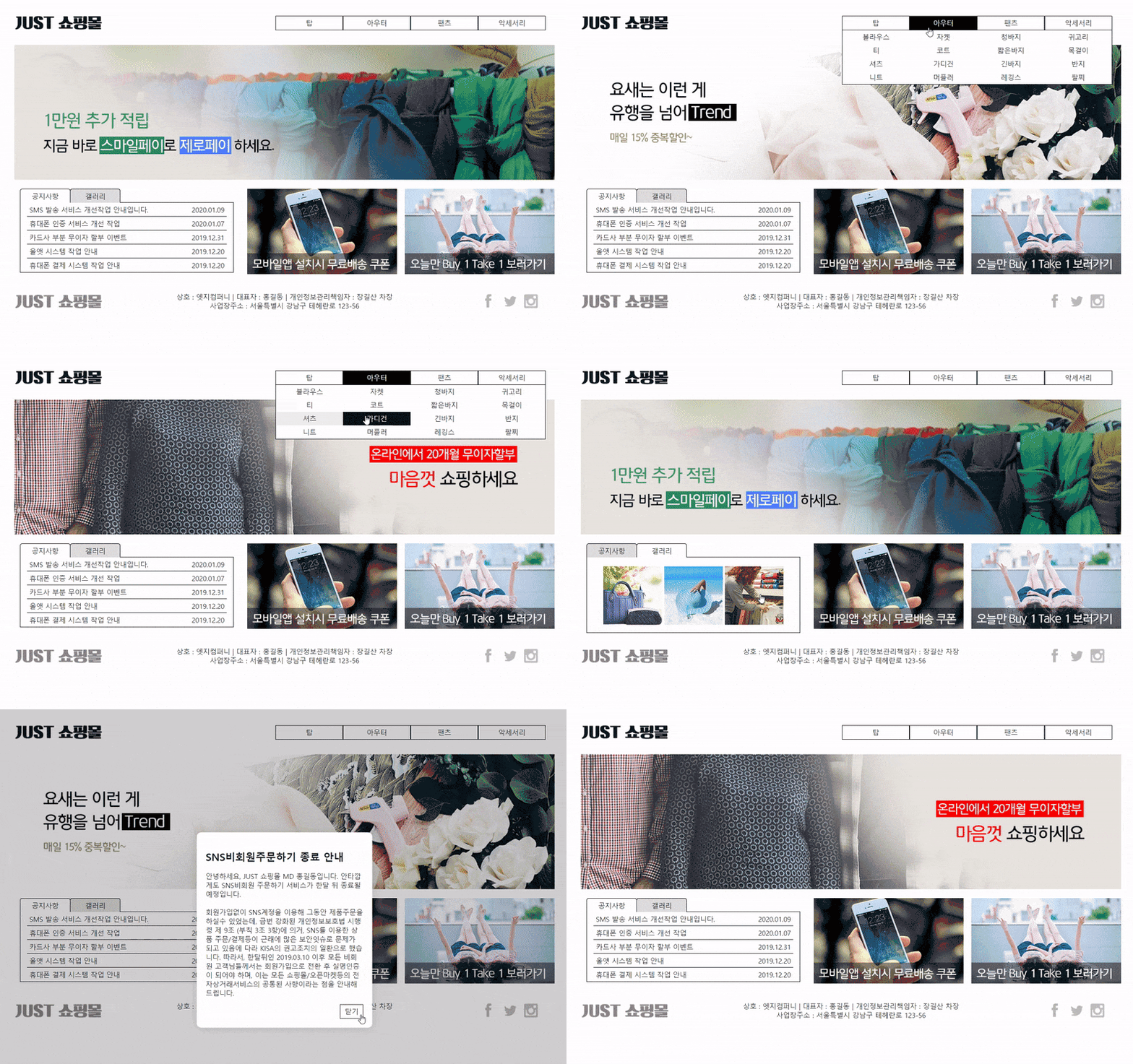
個人的な試験の感想も、もし他の方が見るかもしれないので残しておくと、私は講義を受ける前からVisual Studioを使い慣れていたので、ずっとVisual Studio Codeで勉強し、Brackets関連の講義はパスしていました。試験会場もわざわざVS Codeがある場所を申し込んだんです。ところが、今日試験会場に行ってみたらBracketsしかなくて…。最初は戸惑いましたが、ショートカットキーも講義で習ったそのままでしたし、何より講義内容がBracketsだったので、むしろ慣れたインターフェースで難なく適応でき、無事に試験を受けることができました!試験は「JUSTショッピングモール」が出題され、最終版制作の講義にもあったタイプだったので、ほとんど詰まることなくコードを作成し、何度も見直した後に一番乗りで提出しました!この講義がなかったら、私も何人かの方々のように途中で退出していたかもしれません…。本当にコーディングワークスさんの講義を受けてよかったです(笑)
良い講義をありがとうございました。合格の結果が出たら受講レビューを書きますね :)
------------------------------------------------------------------------------------
合格しました!
計30時間、全112回の講義と18個の核心資料で実技試験合格を自負するカスタマイズ講義
全27回のHTML+CSS+JQUERY核心理論講義
実技試験制作モジュールの完璧分析講義(レイアウト、スライド、ナビゲーション、タブメニュー、レイヤーポップアップ)
ウェブデザイン技能士実技試験合格の最大の難関!スライド制作
コーディングワークスの講義は、jQueryでの制作だけでなく、純粋なCSSでスライドを完璧に実装
学生の好みに合わせて、jQueryスライドまたはCSSスライドの制作方式を選択可能
CSSスライドアニメーション(横スライド、縦スライド、クロスフェードスライド)
jQueryスライド・アニメーション(横スライド、縦スライド、クロスフェードスライド)
すべての制作モジュールが含まれた実技試験最終版3種の制作動画
ウェブデザイン技能士実技試験のための必須のPhotoshop CS6の使い方および画像制作動画
HTML+CSS理論教材だけでなく、すべての制作モジュールと最終版3種類の制作ファイルをダウンロード
コーディングワークスの講義は、合格するかどうかではなく、いかに高得点で合格するかを目指すための本物の講義
実技試験当日の試験会場の雰囲気、手順、コツ、提出方法、資格申請方法など、詳細な動画まで
- ウェブデザイン技能士資格の実技試験合格を目指す方
- ウェブサイトの保守・修正・補完を自ら行いたい方
- ウェブデザインからウェブパブリッシャーへの転職、またはHTML+CSS+JQUERYのパブリッシング能力を強化したい方
- ウェブパブリッシングへの理解を深めたいウェブプランナー
- フロントエンドパブリッシングへの理解を深めたい開発者
- ウェブデザイン技能士実技試験に高得点で合格できます。
- HTML+CSS+JQUERYパブリッシングの実力を体系的に向上させることができます。
- ウェブサイト制作のノウハウを向上させることができます。
- ウェブパブリッシング就職のための個人ポートフォリオサイトを制作することができます。
- 基本的なコンピュータ活用能力とインターネットブラウザの使用能力
- コーディング(Coding)のための基本的な英語タイピング能力
- 2024年の出題基準に最適化された講義内容(12種類のタイプを完璧に分析および適用)
- シンプルで明快なコードが高得点合格と安定した合格を保証
- 実務ですぐに使える実力を養う体系的な講座
- 合計30時間を超える充実した講義内容
- 現場で学生を直接教えている実力派講師による特別な講義
- HTML+CSS+JQUERY理論学習書のPDF教材ファイルを提供
- 実務ウェブパブリッシャー兼、有名学院でオフライン講義を行っている講師
- 質の高い講義のために、直接教えた経験とノウハウが豊富な講師
- 数年間、ウェブデザイン技能士資格の実技試験対策クラスを運営してきた講師として、特別な合格ノウハウを伝授
- ウェブ技能士資格の実技試験を準備する学生のレベルと、何が必要かを熟知している講師
- 入門者や初級者が理解しやすいコードで、現実的かつ効率的な学習方法を提示する講師
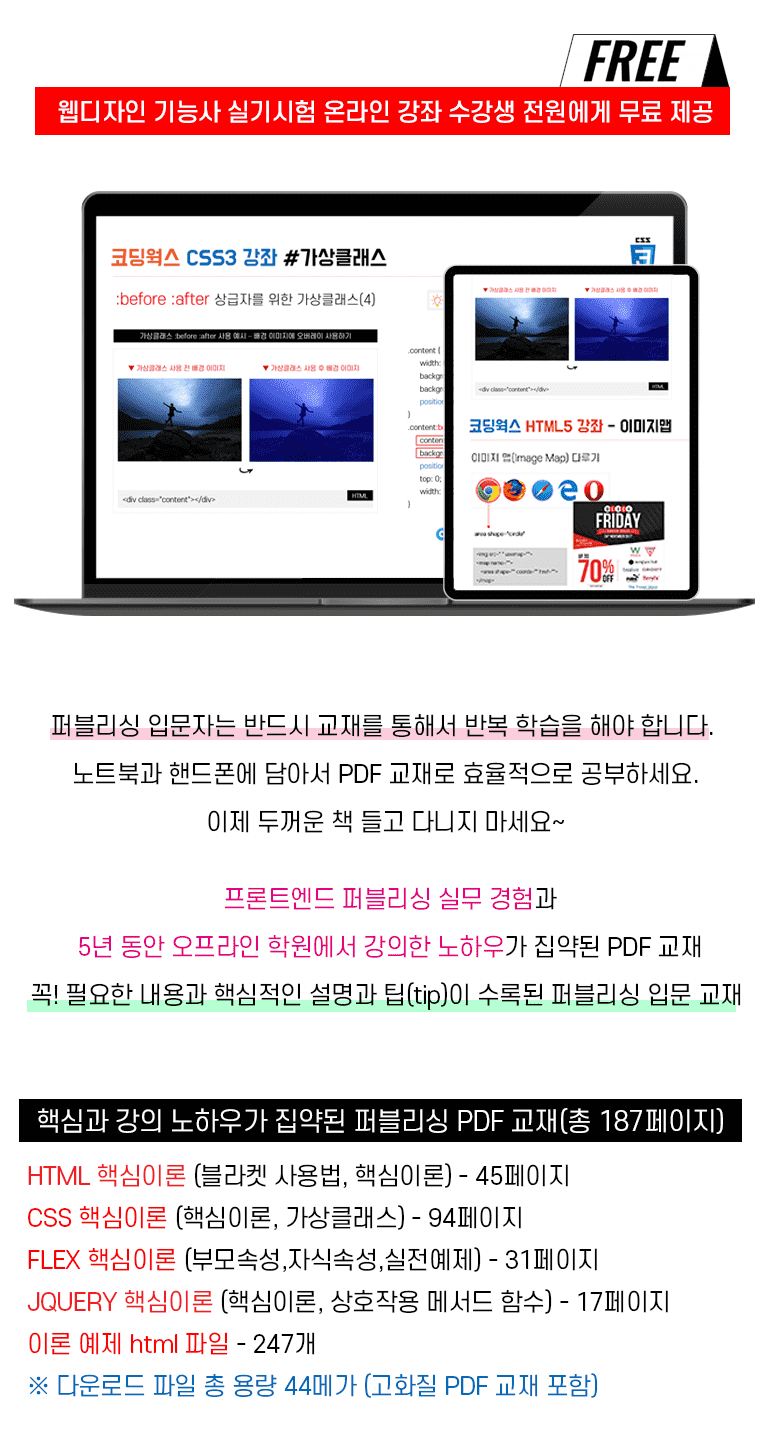

▲ 受講生に無料で提供されるコーディングワークス・パブリッシングPDF教材の詳細を見る
▼ 横スライド
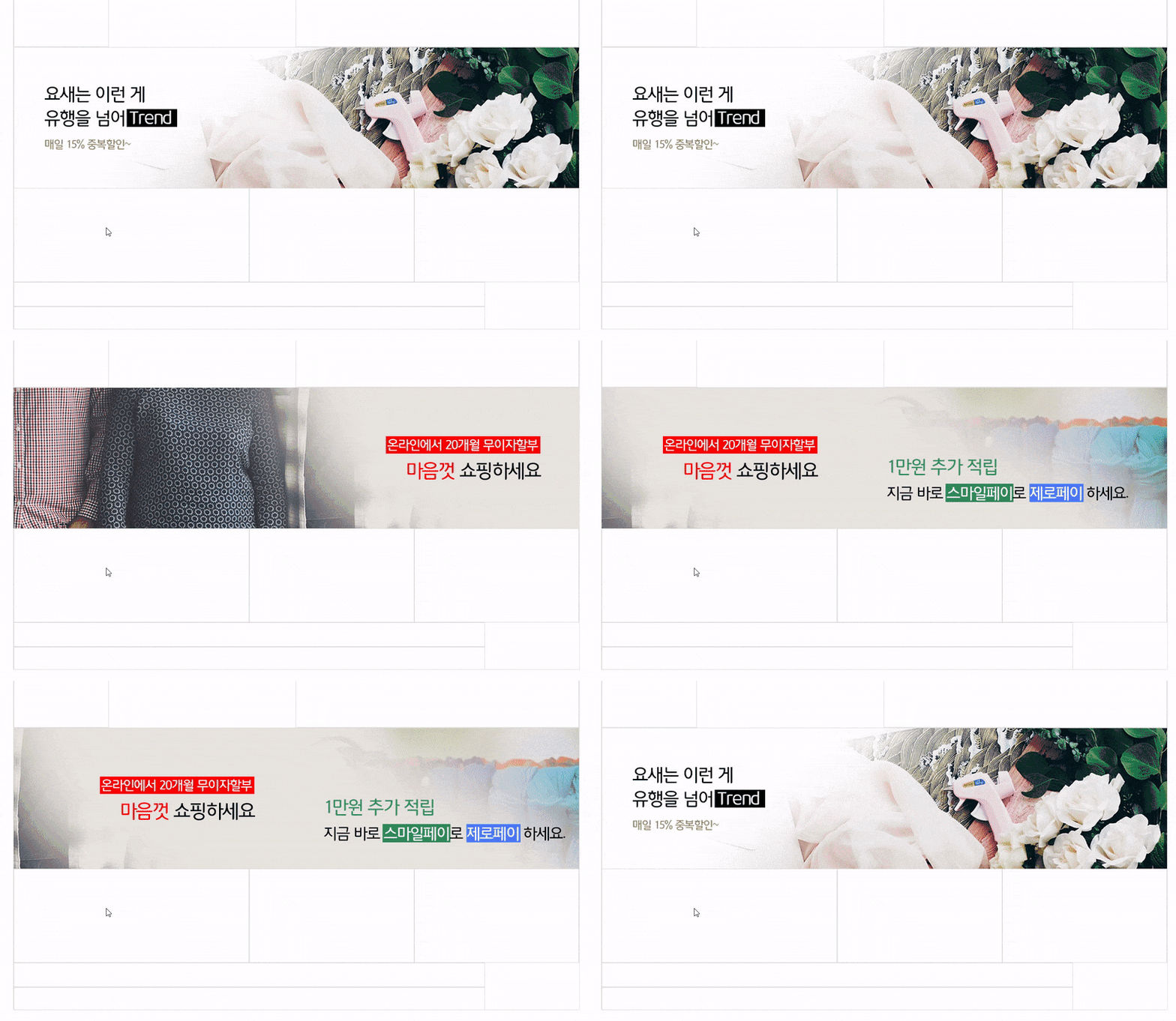
▼ 縦スライド
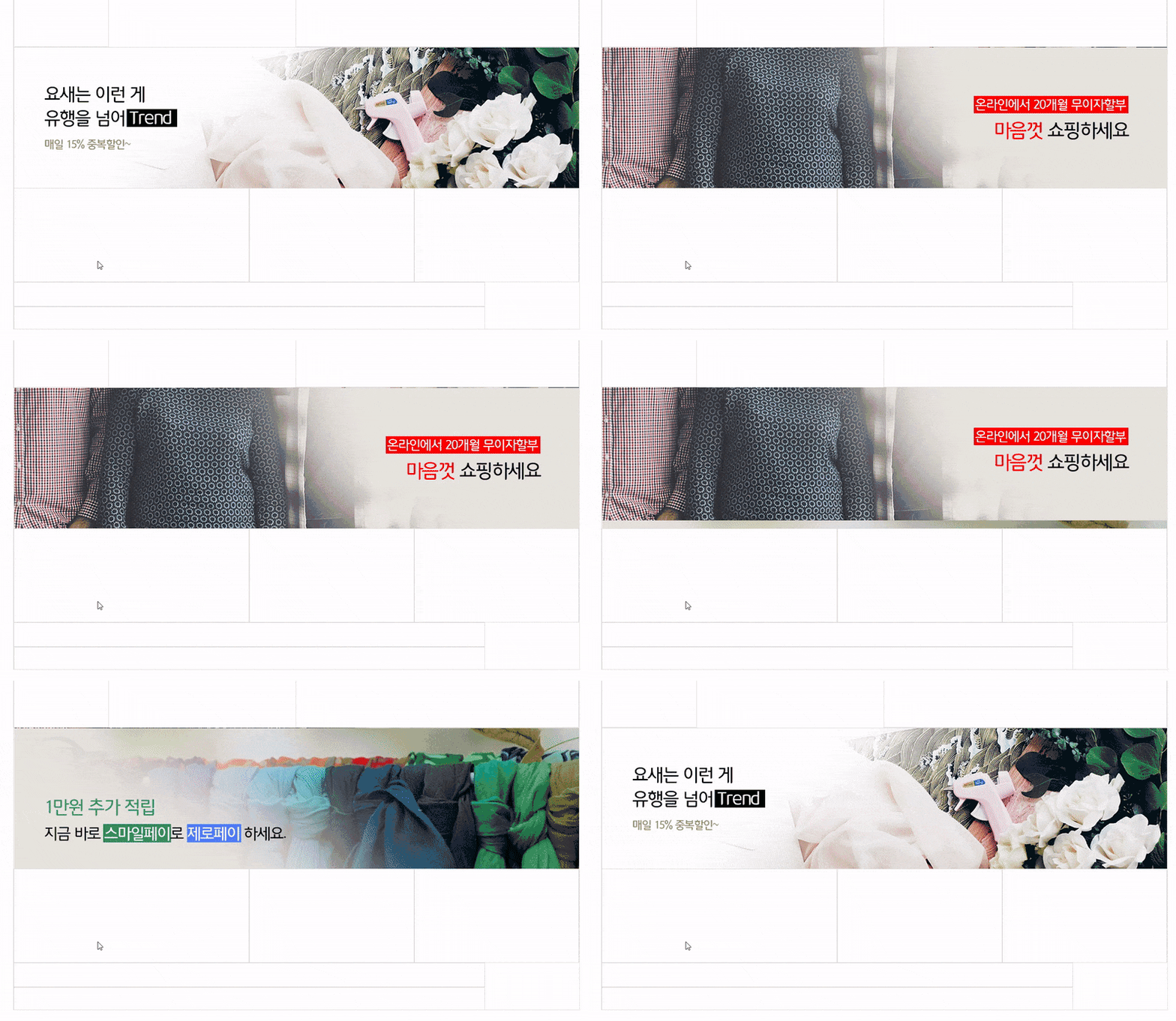
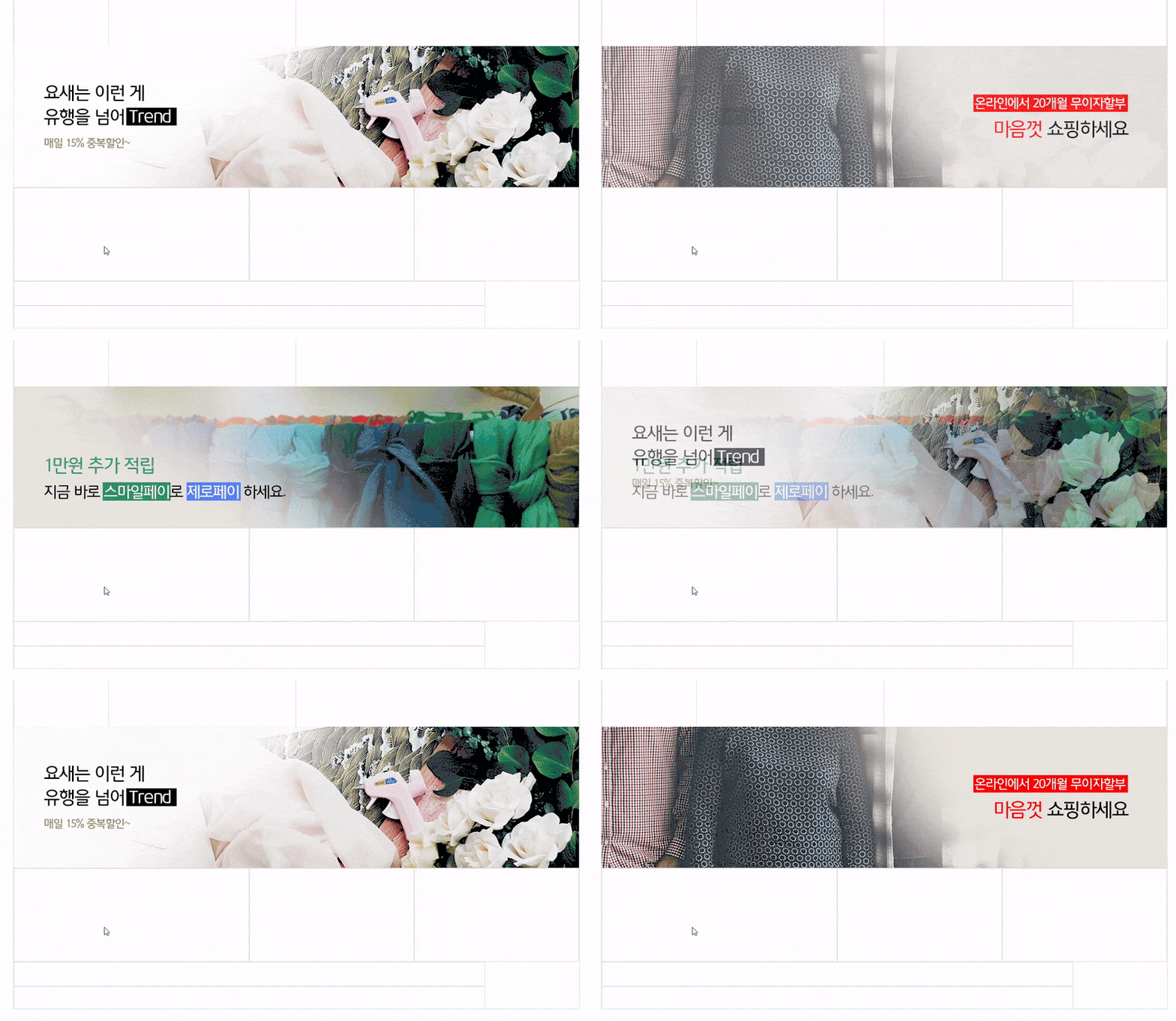
▼ クロスフェードスライド
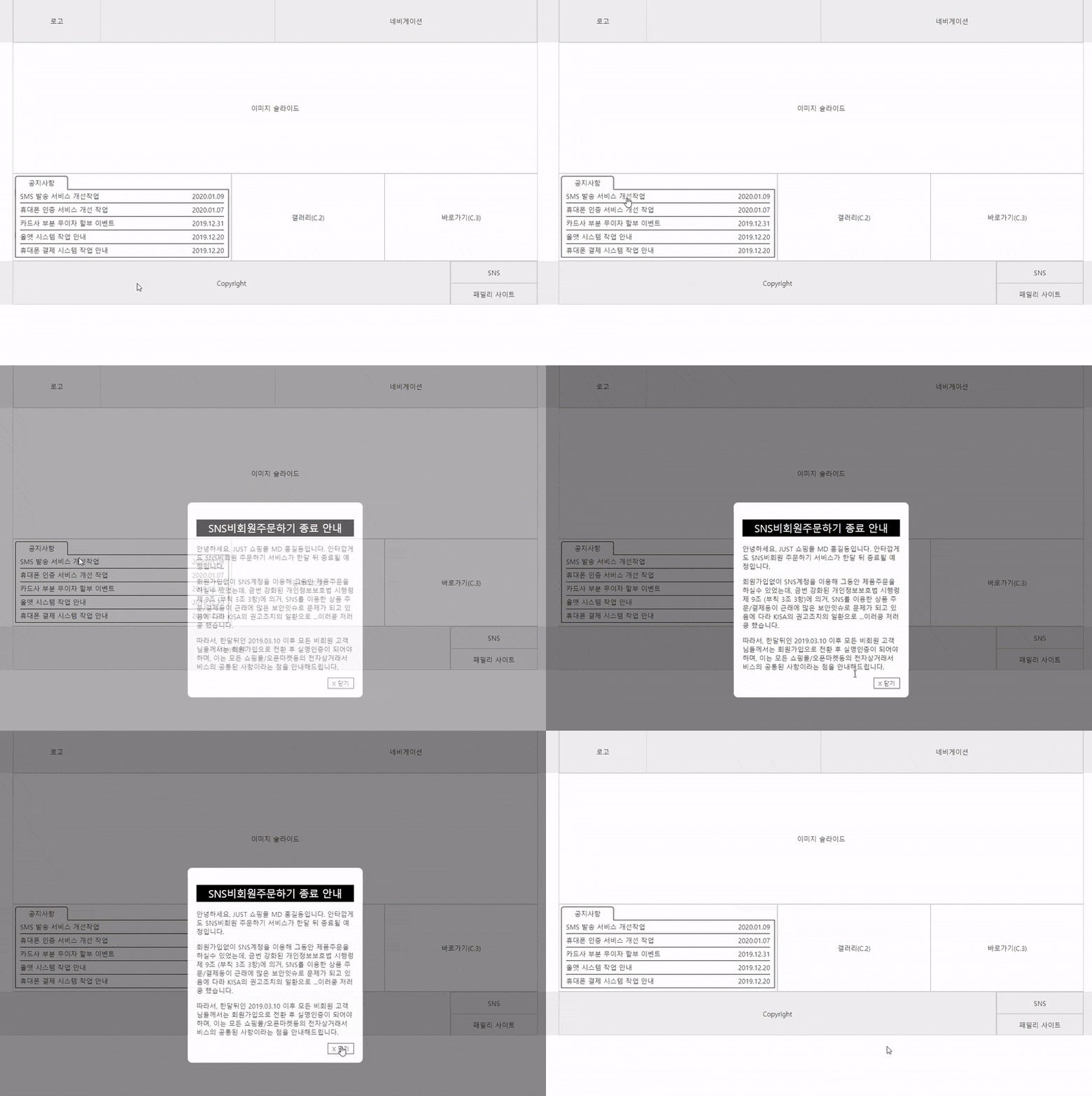
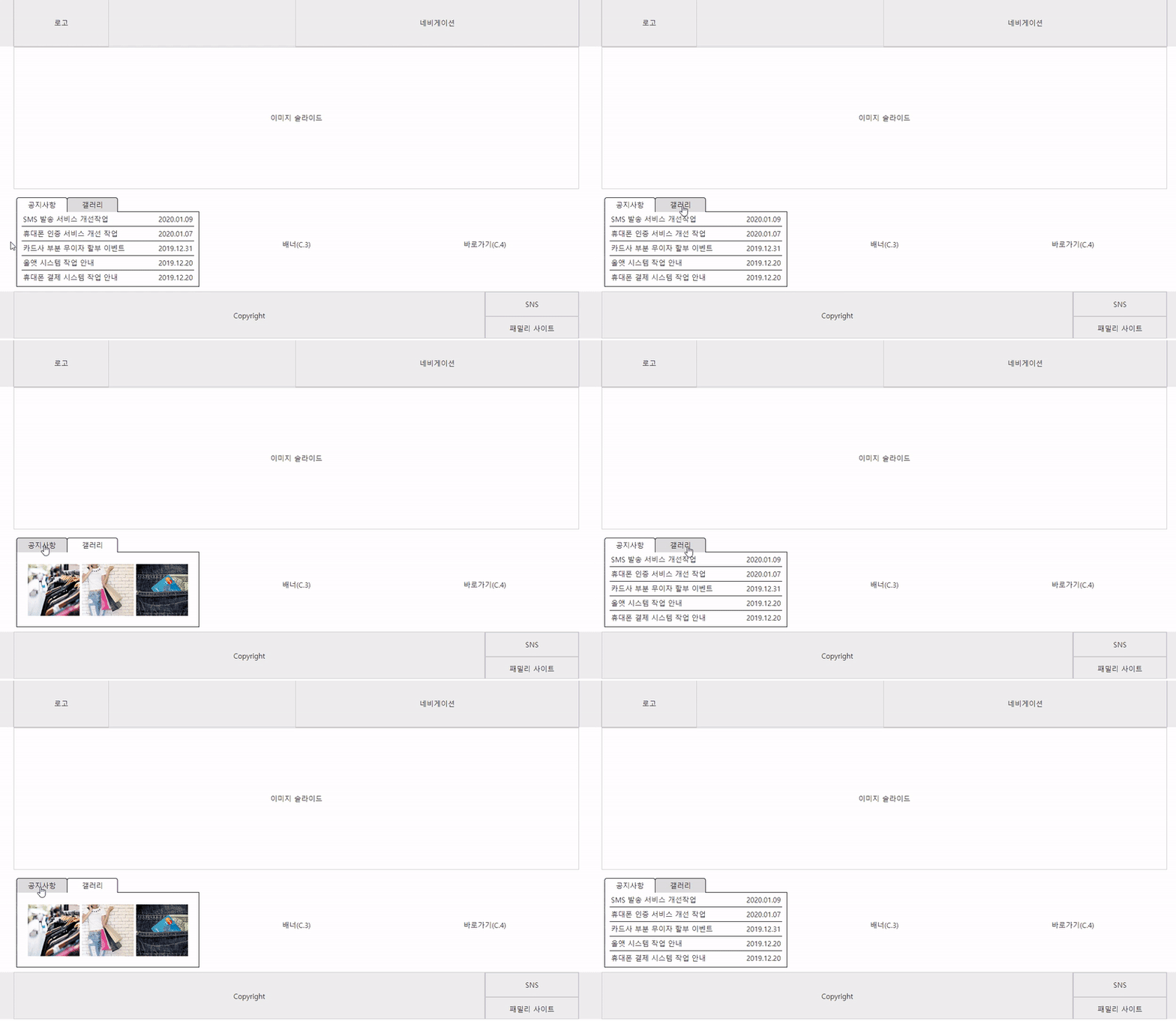
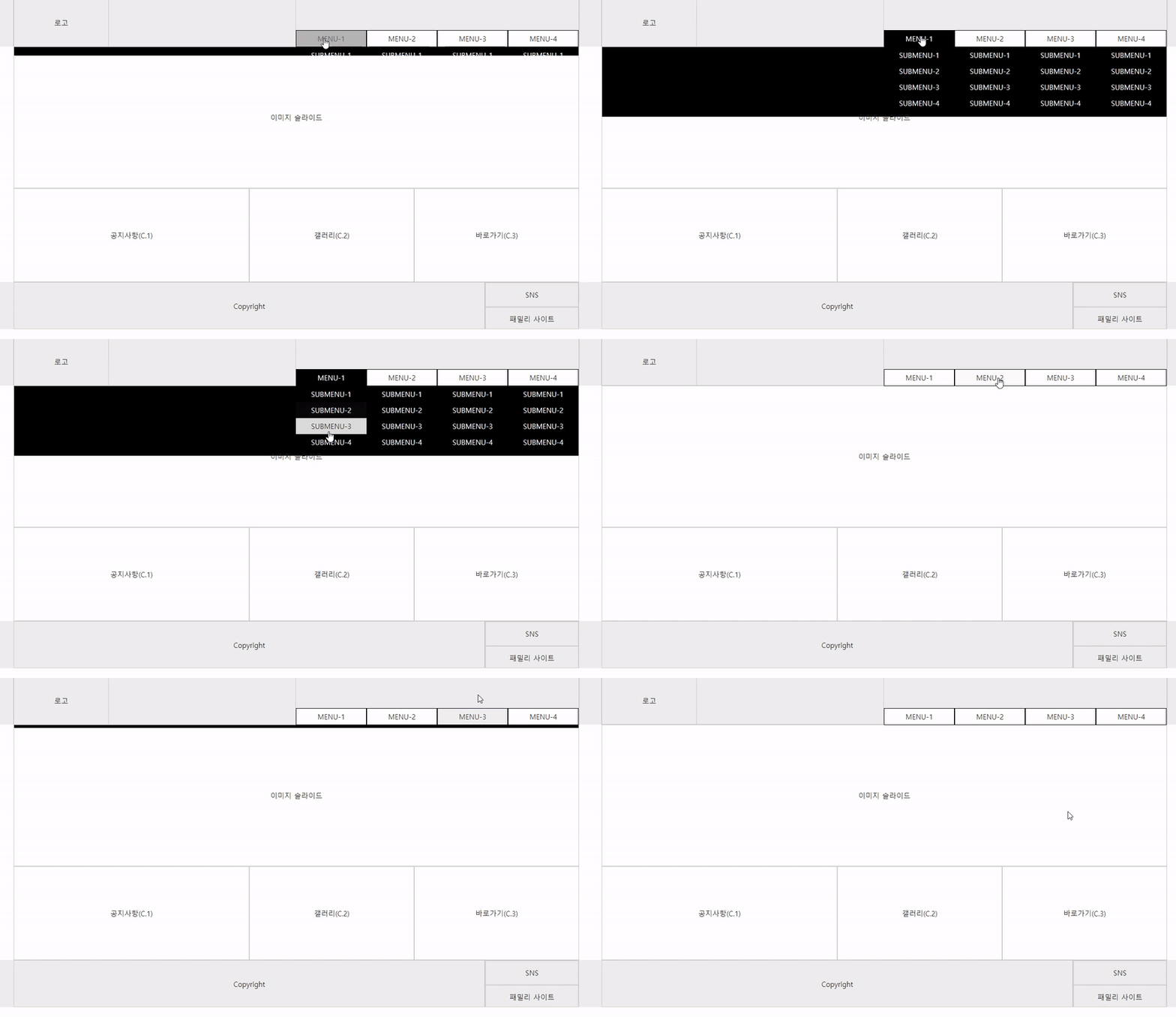
▼ ナビゲーション左側 個別に下に落ちるサブメニュー
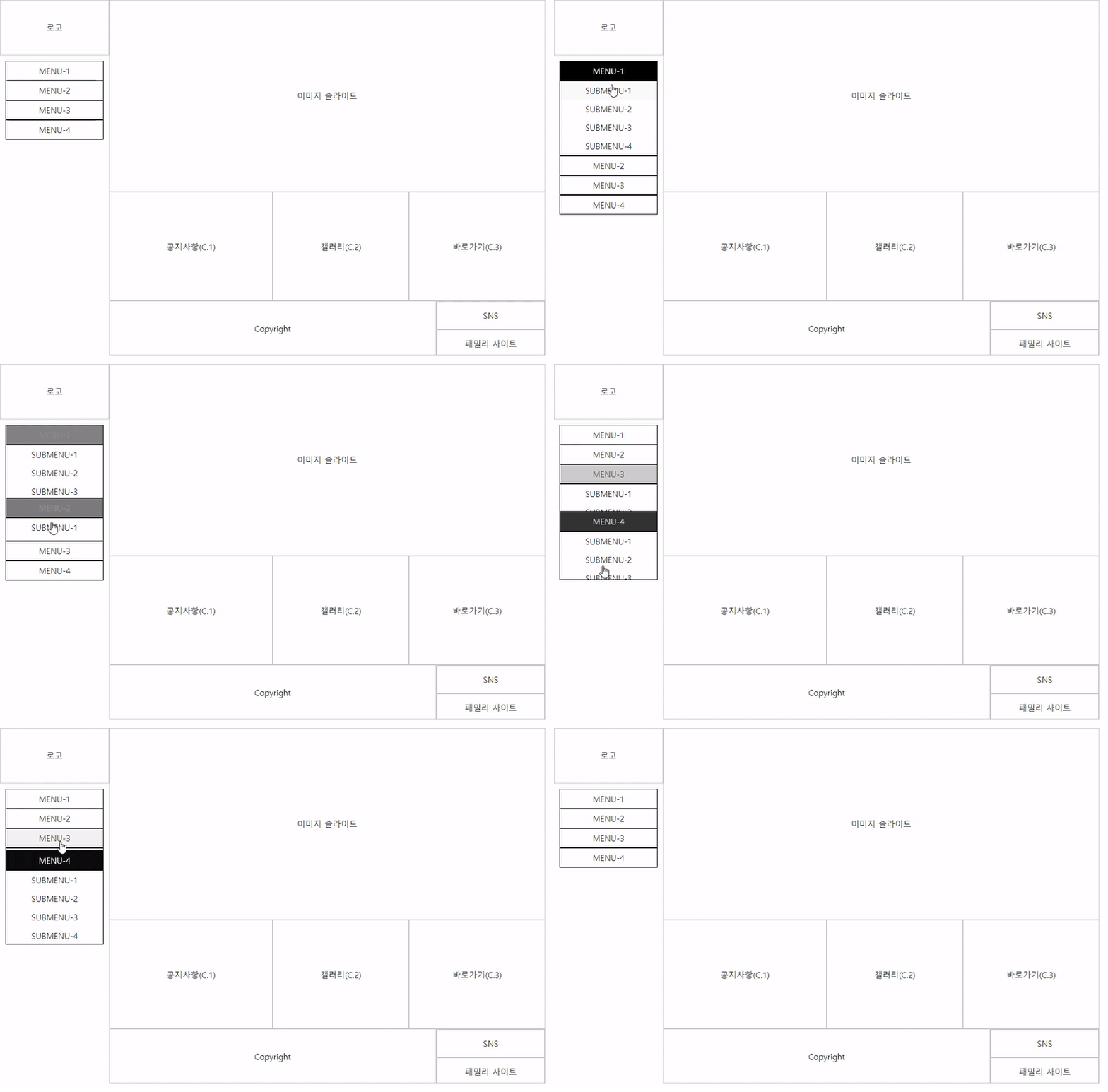
▼ ナビゲーション左側 個別に右へ展開されるサブメニュー
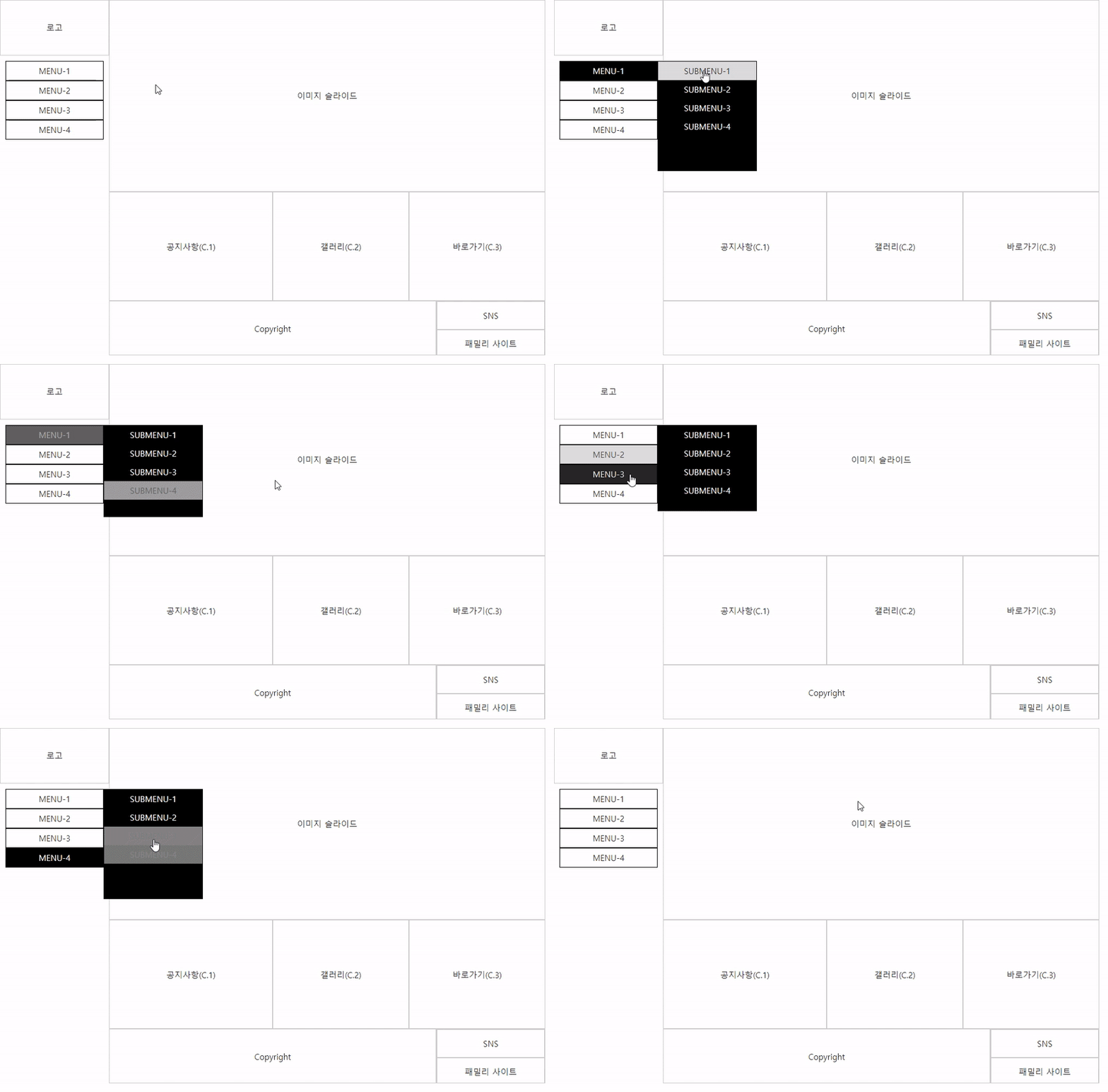
▼ ナビゲーション上部 個別に下に落ちるサブメニュー
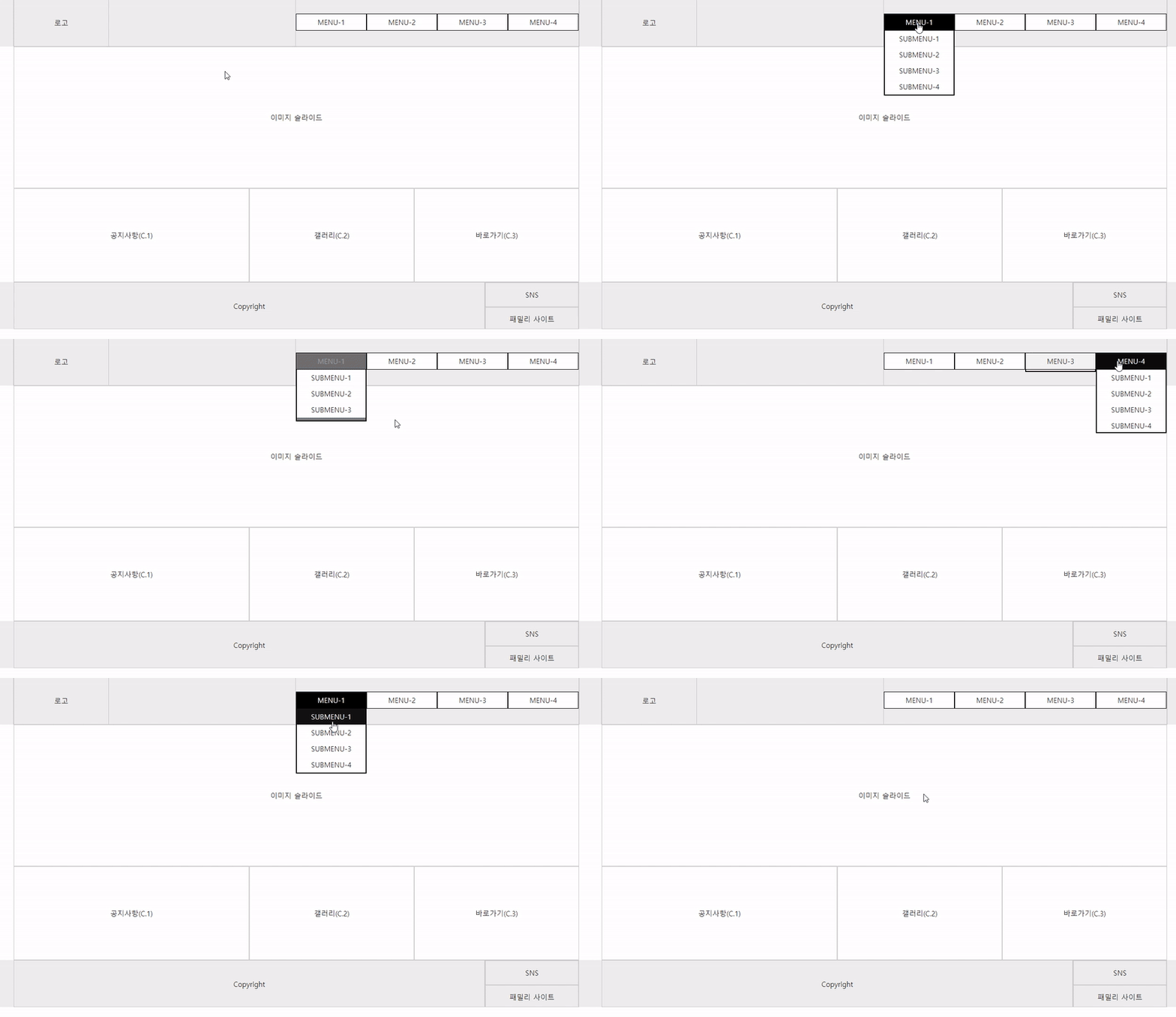
▼ ナビゲーション上部 すべてのサブメニューが下に落ちるメガメニュー
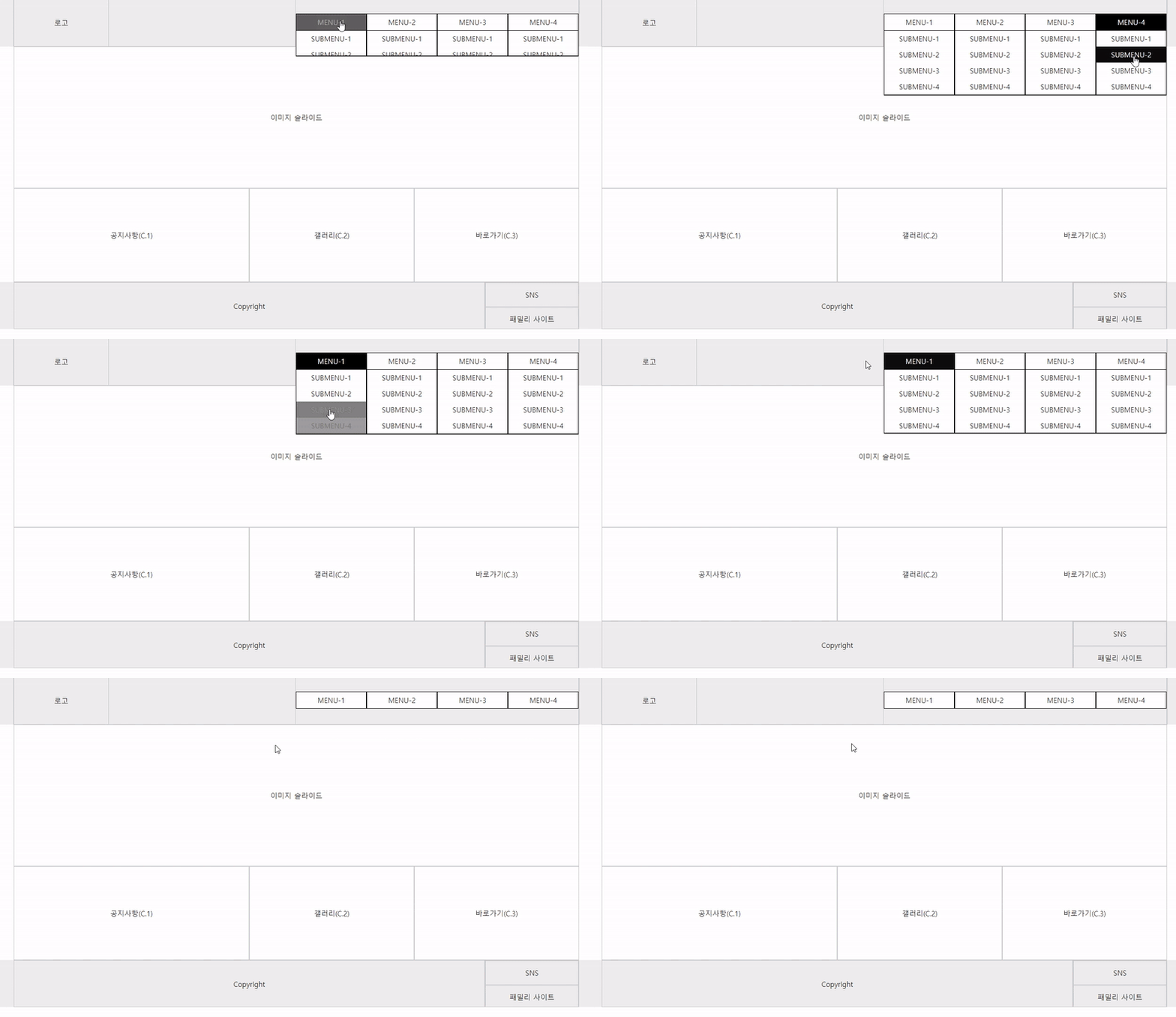
▼ ナビゲーション上部ですべてのサブメニューが背景と一緒に下に落ちるメガメニュー
▼ 横固定型 最終版
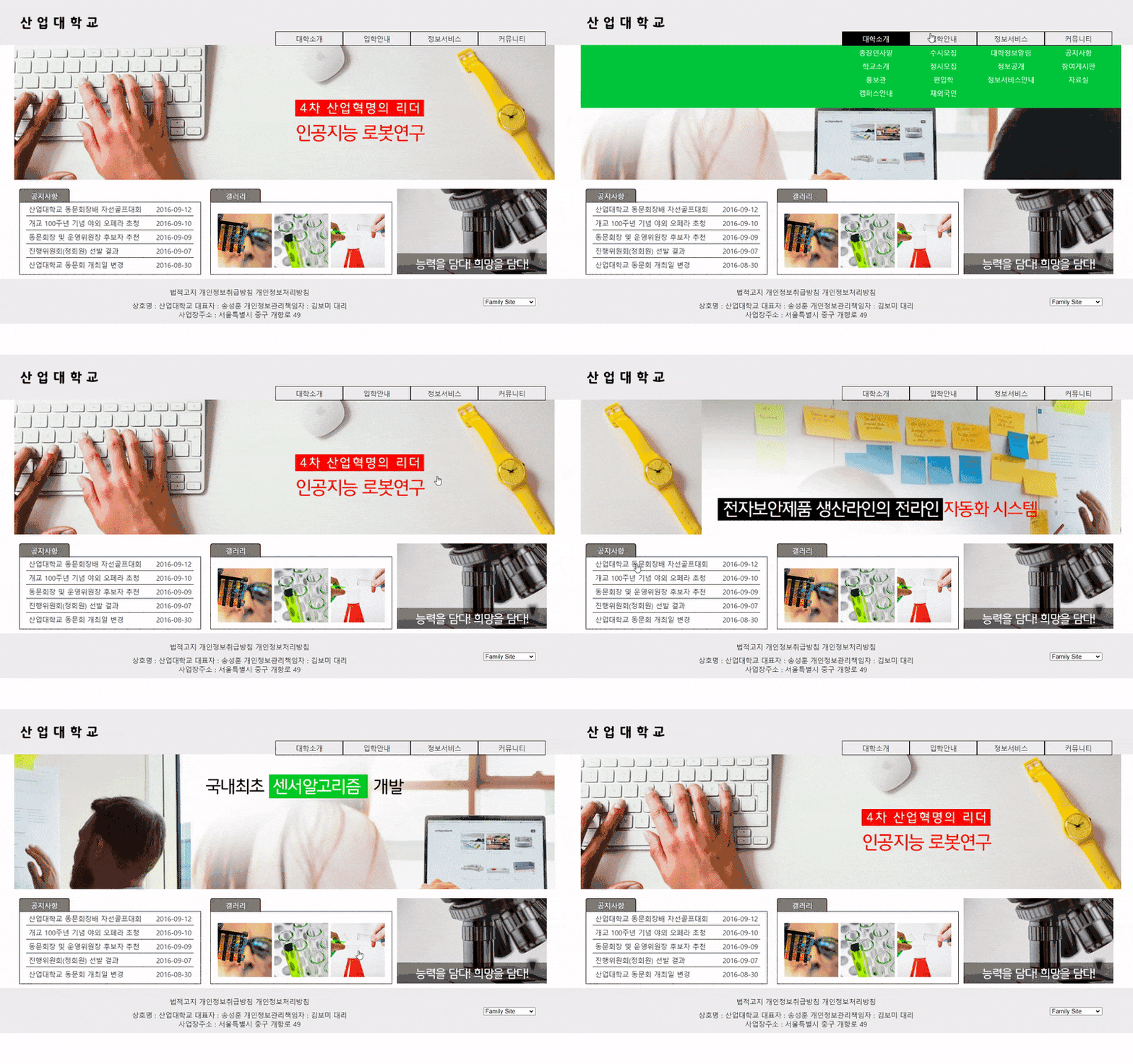
▼ 横100% 最終版
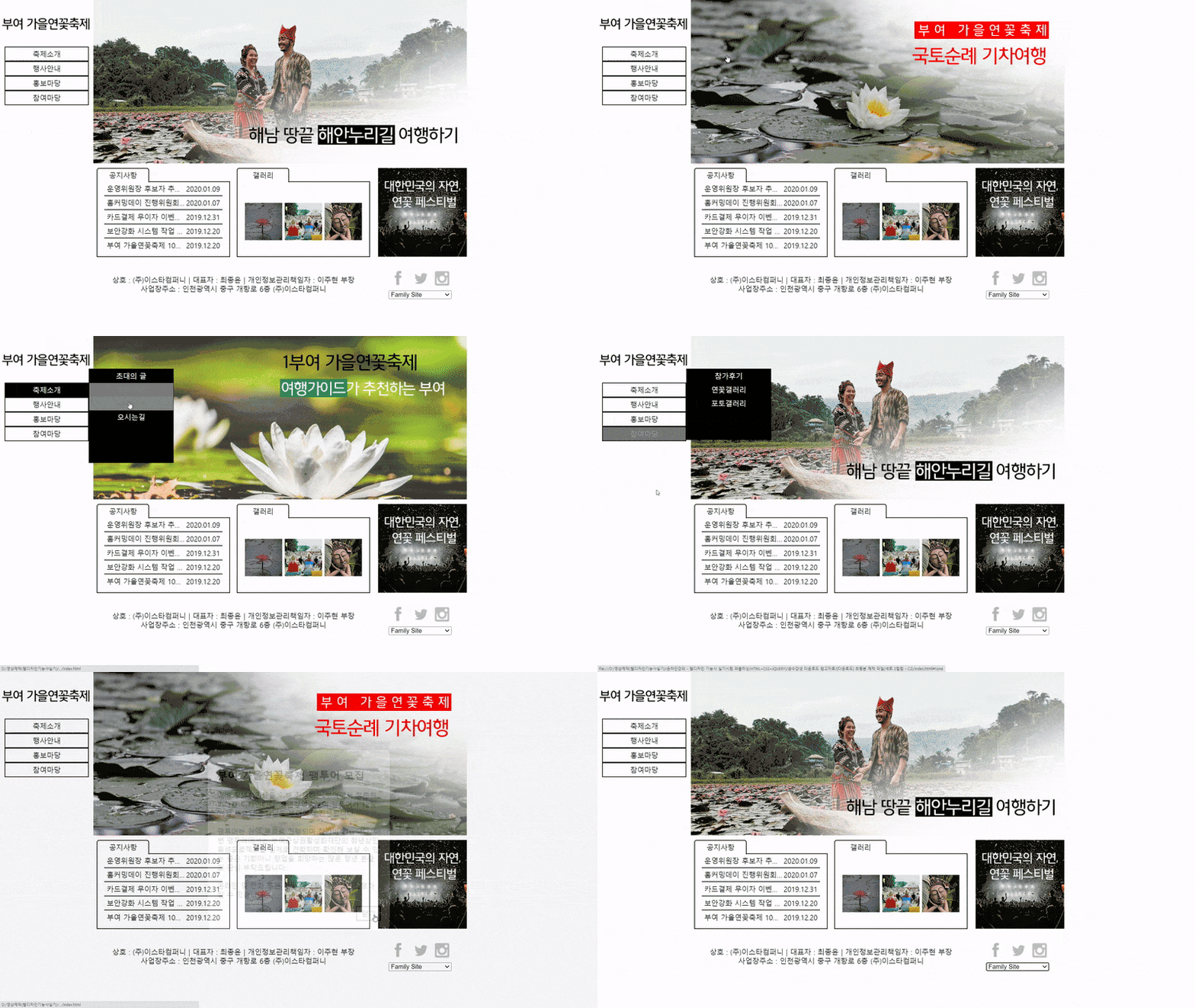
▼ 縦2カラム最終版
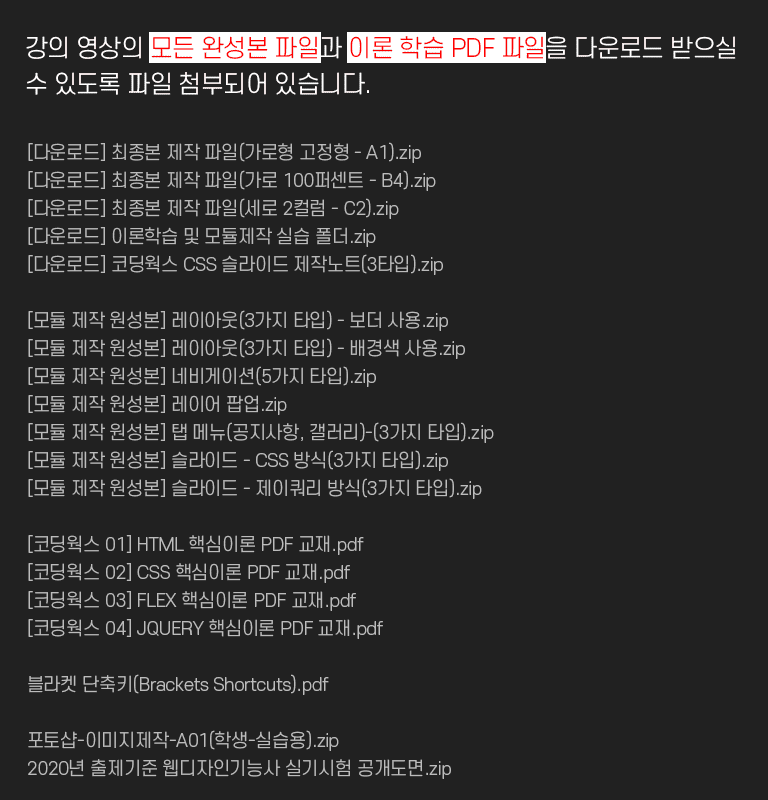
試験会場ではインターネットを使用できません。
そのため、Live Server拡張機能をインストールすることはできません。
Visual Studio Codeでコーディングする場合、保存してからブラウザで更新して確認する必要があります。
試験会場に行かれたら、以下の内容を簡単に設定してから試験に臨んでください。
以下のコーディングワークスのブログ内容を参考にしてください。
[必読] ウェブデザイン技能士実技試験の際のVisual Studio Code設定に関する必読事項https://inf.run/MpGqe
Q. PDF教材で、JQueryパートの内容があまり多くないようですが?
A) jQueryはその特性上、内容が非常に膨大であるため、PDF教材にすべての内容を盛り込むには無理があり、基本的な使い方や必須関数、イベント、メソッドの使い方に関する内容が記載されています。そして、パブリッシング入門者・初心者にとっては、何よりもCSSとFLEXが重要であるため、PDF教材の90%に相当する170ページが割り当てられています。
Q. コーディングワークスのパブリッシング核心理論PDF教材は、市販の教材と何が違うのですか?
A. 今すぐ知らなくてもいい内容や重要度の低い内容は省き、必ず!必要な核心だけを詰め込みました。コーディングワークスの教材は、数年間オフラインの塾で使用された教材をさらに補強して作成したPDF教材です。特に、市販の教材にはないコーディングワークスの講義チップ(Tip)がたくさん盛り込まれています。
Q. ダウンロードコンテンツの容量はどれくらいですか?
A) ダウンロードされるコンテンツの総容量は42MBです。PDF理論教材は見やすいように5つに分けてアップロードされています。個別にダウンロードしてください。また、実習例題ファイルは解凍するとフォルダごとにきれいに整理されています。
Q. 印刷して見る予定ですが、PDF教材は高画質ですか?
A) PDFファイルは300dpiの高画質で制作されているため、印刷しても綺麗なプリントが可能です。
Q. ダウンロードしたコンテンツの使用用途はどうなりますか?
A) ダウンロードされたすべてのコンテンツは、CodingWorksで自社制作したファイルです。CodingWorksのPDF教材は、受講を申し込まれたご本人の個人学習目的以外に、いかなる目的での使用、または他人に配布することは禁じられています。また、PDFファイルのCodingWorksを表示する部分を編集して、講義用資料として使用することもできません。
学習中に気になることがあれば質問してください。質問される際は、うまくいかない内容とコード、そしてブラウザの結果画面のキャプチャをアップロードしていただく必要があります。コードについては、HTML、CSS、JSのコードをコピーしてすべて載せていただければ、正確な回答を差し上げることができます。
ブラウザの結果画面はキャプチャで、コードはコピーして載せていただかないと、正確な回答を差し上げることができません。
面接と就職を勝ち取るパブリッシャー個人ポートフォリオホームページ制作、scss, sass, flex, grid, html, css, html/css, website, ウェブパブリッシャー, パブリッシャー就職, ウェブサイト, コーディング, coding, jquery, javascript, ジェイクエリ, JavaScript, レイアウト, インタラクティブウェブ, interactive web, web design, ウェブデザイン, ポートフォリオ, パブリッシング, レスポンシブウェブ, ウェブデザイン技能士実技試験, bootstrap, ブートストラップ, css frameworks, フレームワーク








![[コードキャンプ]強力なCSS講義サムネイル](https://cdn.inflearn.com/public/courses/329921/cover/325131ea-9c57-427e-98b9-4e207a1dff98/thumbnail-css.png?w=420)