

에러가 생겨서
102
投稿した質問数 23
소스대로 했는데
에러가 생기네요
78, 79 번째줄 text 에서 에러입니다.
에러 메세지는
Running Gradle task 'assembleDebug'...
lib/chat_page.dart:78:63: Error: The getter 'text' isn't defined for the class 'Part'.
 - 'Part' is from 'package:flutter_gemini/src/models/part/part.dart' ('/C:/Users/userpc/AppData/Local/Pub/Cache/hosted/pub.dev/flutter_gemini-3.0.0/lib/src/models/part/part.dart').
Try correcting the name to the name of an existing getter, or defining a getter or field named 'text'.
                    ? HumanMessage(content: chat.parts?.first.text ?? '')
                                                              ^^^^
lib/chat_page.dart:79:60: Error: The getter 'text' isn't defined for the class 'Part'.
 - 'Part' is from 'package:flutter_gemini/src/models/part/part.dart' ('/C:/Users/userpc/AppData/Local/Pub/Cache/hosted/pub.dev/flutter_gemini-3.0.0/lib/src/models/part/part.dart').
Try correcting the name to the name of an existing getter, or defining a getter or field named 'text'.
                    : AIMessage(content: chat.parts?.first.text ?? '');
                                                           ^^^^
Target kernel_snapshot failed: Exception


FAILURE: Build failed with an exception.

* What went wrong:
Execution failed for task ':app:compileFlutterBuildDebug'.
> Process 'command 'C:\flutter\bin\flutter.bat'' finished with non-zero exit value 1

* Try:
> Run with --stacktrace option to get the stack trace.
> Run with --info or --debug option to get more log output.
> Run with --scan to get full insights.

* Get more help at https://help.gradle.org

BUILD FAILED in 4s
Exception: Gradle task assembleDebug failed with exit code 1
혹시
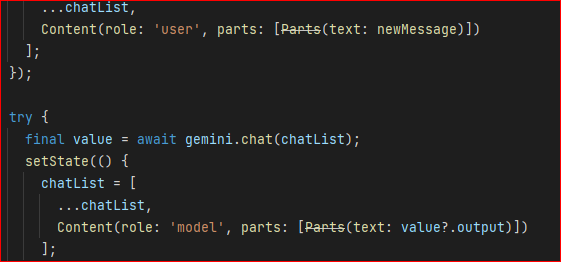
25, 34 번째줄 Parts 에 안쓴다는 줄 쳐졌는데
관계가 있나요
回答 1
0
안녕하세요! 질문으로 올려주셔서 감사합니다.
디버깅을 해보니 flutter_gemini가 버전업이 되면서, 사용법이 바뀌었고, 와중에 freezed를 활용한 타입선언에는 에러가 있네요. 아래와 같이 변경해서 사용해주시면 됩니다.
// setState해서 UI를 변경하는 부분
      setState(() {
        chatList = [
          ...chatList,
          // Content(role: 'model', parts: [Parts(text: value?.output)]) //기존 2.x 버전
          Content(role: 'model', parts: [Part.text(value?.output ?? '')]) // 3.x 버전
        ];
      });
그리고 채팅 내역을 보여주는 부분은 type casting을 해줘야합니다.
itemBuilder: (context, index) {
                final chat = chatList[index];
                Widget messageWidget = chat.role == 'user'
                    ? HumanMessage(content: chat.parts?.first is TextPart ? (chat.parts?.first as TextPart).text : '')
                    : AIMessage(content: chat.parts?.first is TextPart ? (chat.parts?.first as TextPart).text : '');
                return messageWidget;
              },
덕분에 저도 강의자료를 업데이트했는데요, 빠른시일내에 촬영해서 내용을 수정해야 할 것 같습니다
감사합니다!
mcp 관련 질문
0
2
1
영상 최신으로 엡데이트 요청
0
6
1
소스 코드가 회사 보안 프로그램에 막혀서 안 보여요.
0
7
0
claude code 상태표시줄 궁금합니다!
0
9
1
질문 1
1
14
1
10월 15일 삭제예정 강의 문의
0
10
0
vscode에서 클라우드를 사용할 수 없어요
0
10
0
클로드 데스크톱 강의에서 교안찾기
0
11
0
설치의 필요성
0
21
2
실습 자료는 어디에 있나요?
0
17
1
MAGMA와 함께 개인 서비스도 같이 구축할때는 어떻게 세팅하는게 효율적인가요?
0
20
1
hermes dashboard : Failed to restart gateway
0
25
1
getOrCreate / Unique? 멱등 처리 질문
1
32
2
시작하기전에 질문 드립니다.
0
52
2
소리
0
27
1
수강인증 수료배지 링크가 만료되었습니다.
0
34
1
hermes slack 설정 문제?
0
45
1
"폴더를 찾을 수 없습니다." 라는 응답만 계속 나옵니다.
0
41
1
hermes memory setup
0
66
3
강의자료
1
39
2
output style이 안나와요
0
42
2
또다른 오버플로우
0
96
2
오버플로우
0
124
2
실전강의는 무엇인가요?
1
143
1