

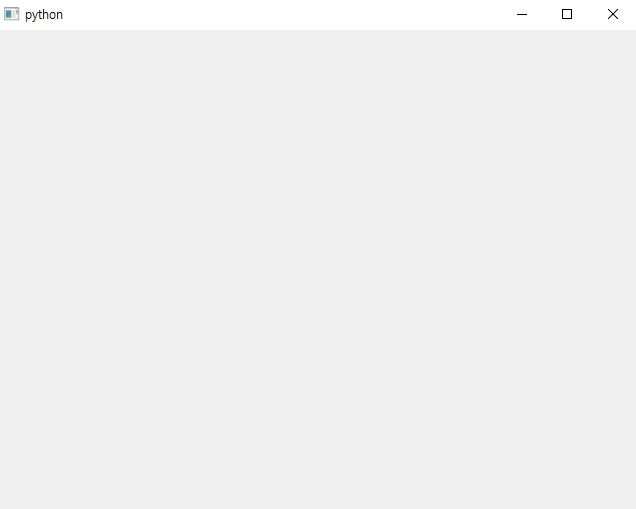
화면은 나오는데 빈 화면이 나옵니다.
강의 설명대로 만들었는데 빈화면만 나오네요. ㅠㅜ
윈도우 10, VisualStudio Code 입니다.
뭐가 문제일까요?
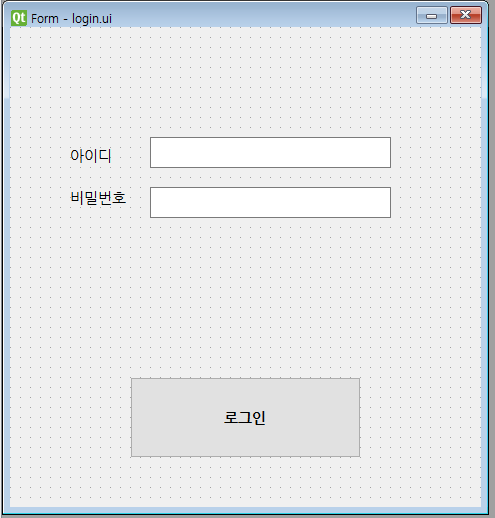
~ 디자인 한 화면 ~
~ 실행 화면 ~
[ login_ui.py ]
# -*- coding: utf-8 -*-

################################################################################
## Form generated from reading UI file 'login.ui'
##
## Created by: Qt User Interface Compiler version 6.7.2
##
## WARNING! All changes made in this file will be lost when recompiling UI file!
################################################################################

from PySide6.QtCore import (QCoreApplication, QDate, QDateTime, QLocale,
    QMetaObject, QObject, QPoint, QRect,
    QSize, QTime, QUrl, Qt)
from PySide6.QtGui import (QBrush, QColor, QConicalGradient, QCursor,
    QFont, QFontDatabase, QGradient, QIcon,
    QImage, QKeySequence, QLinearGradient, QPainter,
    QPalette, QPixmap, QRadialGradient, QTransform)
from PySide6.QtWidgets import (QApplication, QLabel, QLineEdit, QPushButton,
    QSizePolicy, QWidget)

class Ui_Form(object):
    def setupUi(self, Form):
        if not Form.objectName():
            Form.setObjectName(u"Form")
        Form.resize(471, 480)
        font = QFont()
        font.setFamilies([u"\ub098\ub214\uace0\ub515"])
        font.setPointSize(11)
        Form.setFont(font)
        self.pushButton = QPushButton(Form)
        self.pushButton.setObjectName(u"pushButton")
        self.pushButton.setGeometry(QRect(120, 350, 231, 81))
        font1 = QFont()
        font1.setFamilies([u"\ub098\ub214\uace0\ub515"])
        font1.setPointSize(11)
        font1.setBold(True)
        self.pushButton.setFont(font1)
        self.label = QLabel(Form)
        self.label.setObjectName(u"label")
        self.label.setGeometry(QRect(60, 120, 61, 16))
        self.label_2 = QLabel(Form)
        self.label_2.setObjectName(u"label_2")
        self.label_2.setGeometry(QRect(60, 160, 71, 21))
        self.lineEdit = QLineEdit(Form)
        self.lineEdit.setObjectName(u"lineEdit")
        self.lineEdit.setGeometry(QRect(140, 110, 241, 31))
        self.lineEdit_2 = QLineEdit(Form)
        self.lineEdit_2.setObjectName(u"lineEdit_2")
        self.lineEdit_2.setGeometry(QRect(140, 160, 241, 31))

        self.retranslateUi(Form)

        QMetaObject.connectSlotsByName(Form)
    # setupUi

    def retranslateUi(self, Form):
        Form.setWindowTitle(QCoreApplication.translate("Form", u"Form", None))
        self.pushButton.setText(QCoreApplication.translate("Form", u"\ub85c\uadf8\uc778", None))
        self.label.setText(QCoreApplication.translate("Form", u"\uc544\uc774\ub514", None))
        self.label_2.setText(QCoreApplication.translate("Form", u"\ube44\ubc00\ubc88\ud638", None))
    # retranslateUi
[ login.ui ]
<?xml version="1.0" encoding="UTF-8"?>
<ui version="4.0">
 <class>Form</class>
 <widget class="QWidget" name="Form">
  <property name="geometry">
   <rect>
    <x>0</x>
    <y>0</y>
    <width>471</width>
    <height>480</height>
   </rect>
  </property>
  <property name="font">
   <font>
    <family>나눔고딕</family>
    <pointsize>11</pointsize>
   </font>
  </property>
  <property name="windowTitle">
   <string>Form</string>
  </property>
  <widget class="QPushButton" name="pushButton">
   <property name="geometry">
    <rect>
     <x>120</x>
     <y>350</y>
     <width>231</width>
     <height>81</height>
    </rect>
   </property>
   <property name="font">
    <font>
     <family>나눔고딕</family>
     <pointsize>11</pointsize>
     <weight>75</weight>
     <bold>true</bold>
    </font>
   </property>
   <property name="text">
    <string>로그인</string>
   </property>
  </widget>
  <widget class="QLabel" name="label">
   <property name="geometry">
    <rect>
     <x>60</x>
     <y>120</y>
     <width>61</width>
     <height>16</height>
    </rect>
   </property>
   <property name="text">
    <string>아이디</string>
   </property>
  </widget>
  <widget class="QLabel" name="label_2">
   <property name="geometry">
    <rect>
     <x>60</x>
     <y>160</y>
     <width>71</width>
     <height>21</height>
    </rect>
   </property>
   <property name="text">
    <string>비밀번호</string>
   </property>
  </widget>
  <widget class="QLineEdit" name="lineEdit">
   <property name="geometry">
    <rect>
     <x>140</x>
     <y>110</y>
     <width>241</width>
     <height>31</height>
    </rect>
   </property>
  </widget>
  <widget class="QLineEdit" name="lineEdit_2">
   <property name="geometry">
    <rect>
     <x>140</x>
     <y>160</y>
     <width>241</width>
     <height>31</height>
    </rect>
   </property>
  </widget>
 </widget>
 <resources/>
 <connections/>
</ui>
[ 실행 파이썬 코드 ]
import sys
from PySide6.QtWidgets import QApplication, QWidget
from login_ui import Ui_Form

class MainWindow(QWidget, Ui_Form):
    def __inint__(self):
        super().__init__()
        self.setupUi(self)

app = QApplication()

window = MainWindow()
window.show()

sys.exit(app.exec())回答 3
0
안녕하세요, 인프런 AI 인턴입니다.
초보개발자님의 코드를 살펴볼 때, 실행 파이썬 코드에 오타가 있는 것 같습니다. __inint__ 메소드가 아니라 __init__ 메소드를 정의해야 합니다. 올바르게 초기화 메소드를 정의하지 않으면, setupUi 메소드가 호출되지 않아 GUI 요소들이 화면에 나타나지 않게 됩니다.
수정된 코드는 다음과 같습니다.
import sys
from PySide6.QtWidgets import QApplication, QWidget
from login_ui import Ui_Form

class MainWindow(QWidget, Ui_Form):
    def __init__(self):  # 오타가 수정된 부분
        super().__init__()
        self.setupUi(self)

app = QApplication(sys.argv)  # QApplication 인스턴스 생성 시 sys.argv 추가

window = MainWindow()
window.show()

sys.exit(app.exec())
QApplication 인스턴스를 생성할 때 sys.argv를 전달하는 것이 일반적인 관례입니다. 이 수정을 통해 프로그램이 올바르게 실행되어 빈 화면 대신 기대하신 GUI가 나타날 것입니다.
네이버 로그인 자동화 pyperclip 사용시에도 자동로그인방지가 발생합니다.
0
121
3
파이썬크롤링수업중 예제사이트 연결이 안됩니다.
0
80
3
셀레니움 환경설정 오류
0
150
2
네이버 로그인 관련
0
501
2
안녕하세요 셀레니움에 대해서 질문
0
128
1
크롤링 연습사이트 문의
0
145
2
선택자 질문
0
107
2
'특정 요소가 나타날 때까지 스크롤' 부분 에러
0
108
2
자동 로그인 질문
0
127
2
44강 제목, 링크
0
132
1
원하는 값이 없을 때
0
124
2
크롤링한 링크가 엑셀로 들어가면 작동이 안되요
0
303
2
셀레니움 PDF자료는 받을 수 있나요
0
132
2
글목록 추출하기
0
127
2
메일 자동화 로그인 중복방지문자해결 오류 및 명시적 대기 질문
0
121
2
강의 노트가 어디에 있는건가요?
0
101
2
강의 커리큘럼 질문
0
126
1
조건문 else 사용하지 않는 이유
0
108
2
셀레니움으로 접근할 수 없는 경우
0
130
2
웹페이지 변경
0
101
2
자바스크립트로 태그 선택 시 질문입니다.
1
87
2
수료증은 어떻게 받나요?
0
153
2
class명을 활용하여 선택자를 만들지 않는 경우..?
0
85
2
드라이버가 안 열려요
0
114
2