The Complete Guide to Creating a Publisher's Personal Portfolio Website (PDF)
To get a job, you need to go on interviews frequently. To secure those interviews, having a high-quality personal publisher portfolio website is essential. This is a premium guide (PDF) for creating a personal portfolio website, meticulously crafted by Coding Works.
The content in this guide cannot be found through simple Google searches. It is a one-of-a-kind guide (PDF) for building a publisher job-search portfolio, containing detailed methods developed by Coding Works through years of experience teaching publishing theory, practical skills, and portfolio creation to over 300 students to help them get hired quickly by their desired companies.
It helped me a lot with my final project. Thank you so much.
5.0
이유정
100% enrolled
It was a helpful class because I was able to establish a rough outline for my portfolio, which I had no idea what direction to take! I hope I can successfully get a job with this portfolio..!
What you will gain after the course
Things to consider & precautions before creating a personal portfolio website
Personal Portfolio Website Section Composition / Folder Structure / Absolute vs. Relative Paths
Layout and Content Structure by Section for a Personal Portfolio Website
Roadmap for Creating a Personal Portfolio Website Publishing Project
Practical Publishing by Section (iframe, Font Icons, Layout, Detailed CSS)
Web Hosting for Your Personal Portfolio Website
Essential Theory and Know-how for Responsive Web Development
Detailed Guide on Writing Functional Specifications + HTML Wireframes
Essential Theory and Know-how for Mobile Web Publishing Production
The Complete Guide to Creating a Publisher's Personal Portfolio Website (PDF) and Practical Examples
Discover know-how you won't find anywhere else through Coding Works' e-book lectures 📔
The content structure and UI/UX design of a personal portfolio website must be created from the perspective of the hiring manager, not the applicant.
Hello. This is Coding Works.
Website publishing is a difficult task. Among such tasks, I believe creating a personal portfolio homepage is the most challenging. For example, if you are building a shopping mall site, there are general templates to follow, and there is an abundance of reference websites. Therefore, even an inexperienced publisher candidate can easily get ideas and design the UI/UX, and the results are usually quite good. However, there are no set rules for a personal portfolio homepage. Furthermore, there are almost no reference websites to look at. As a result, people don't know what to start, where to start, or how to start. On top of that, the criteria for what makes a well-made personal portfolio homepage are ambiguous. That is why I think it is so difficult to create.
The government-funded publishing course lasts about five months. Typically, the first two weeks are spent learning graphic tools, while the remaining four and a half months are dedicated to learning publishing and creating a portfolio. While it may vary by instructor, this is generally the case. In my experience, the most difficult period to teach during those four and a half months—requiring the most talking and preparation—is the final three weeks of the course. At Coding Works, we start building personal portfolio websites three weeks before the course ends and ensure they are completed by graduation. This allows us to maintain a tight schedule so that students can go on interviews and get hired quickly without any so-called "gaps."
As mentioned above, creating a personal portfolio website without a fixed format is extremely difficult to teach. Since each individual has different tastes and skill levels, an instructor cannot simply pick one or two styles and tell everyone to follow them. It is challenging because the instructor must guide students to understand the basic framework and purpose of a personal portfolio website while letting them build it themselves. Of course, it is not an easy production process for the students either. However, because they create it with continuous assistance from an experienced mentor for three weeks, most of them produce high-quality results.
From the perspective of those preparing for a publisher job through self-study, or those who completed a government-funded publishing course but failed to create a personal portfolio website during that period, there is no choice but to build a personal portfolio website alone. This is an incredibly difficult task. It is challenging even when receiving continuous help from an experienced person for three weeks. However, building this alone without any guidance is truly arduous. Of course, I don't mean that the act of building it is difficult. I mean it is difficult to create a personal portfolio website that looks good to anyone. That is why Coding Works has included everything from the 3-week personal portfolio website production class, conducted during the government-funded publishing course, into this PDF textbook.
Anyone with a certain level of publishing skills can create a personal portfolio website. However, most people feel very proud of results that have lost their sense of purpose. Yet, they don't receive calls for interviews. Even if they do get an interview, they cannot take the lead in terms of working conditions or salary. A well-made personal portfolio website is not just for the purpose of getting a job; it becomes the most important specification for a publisher applicant to stand tall in interviews and work under good conditions.
I believe that the newly created <Complete Guide to Creating a Personal Portfolio Website PDF Textbook> will provide as much know-how and tips as the final three weeks of a government-funded publishing course. In particular, the content was structured with a focus on the objective that it must be created from the perspective of the hiring manager who selects candidates. I trust that through the <Complete Guide to Creating a Personal Portfolio Website PDF Textbook>, publisher applicants will be able to create a truly impressive personal portfolio website on their own.
🌿🌿🌿
Lecture Topic 📖
The goal of this course is, in a single sentence, 'to get a job as a publisher quickly.' To get hired, you need to have interviews frequently. To have frequent interviews, you must have a decent publisher personal portfolio website. This is a guide textbook (PDF) for creating a decent personal portfolio website.
Background of Course Planning ⚡
Among CodingWorks' courses, there is a video lecture titled <Creating a 'Publisher Personal Portfolio Homepage' that Leads to Interviews and Employment>. This course was created a year and a half ago. I put a lot of effort into preparing and launching this video course so that students could create a decent personal portfolio website for quick employment as a publisher. However, there were many more things I wanted to teach... for example, I felt a lot of regret that I should have covered topics like creating functional specifications + HTML wireframe structures, and mobile web production in more detail. Due to the nature of video recording, CodingWorks also wanted to supplement the parts that were produced in a bit of a rush. Furthermore, I wanted to share more know-how and tips along with actual examples of personal portfolio websites from CodingWorks students accumulated over the past year and a half.
Course Features ✨
<The Complete Guide to Creating a Publisher's Personal Portfolio Website (PDF)> textbook content is not something you can find by searching on Google. Coding Works has spent years teaching publishing theory, practice, and personal portfolio website creation to over 300 students in the field, and created this to help students get hired at their desired companies quickly. To help students turn the vague task of creating a personal portfolio website into a concrete, high-quality result, I provide detailed examples and explanations for even the smallest details throughout the production period to ensure students understand the vast amount of course content quickly.
That is why this is a one-of-a-kind Publisher Job Search Personal Portfolio Website Creation Guide (PDF) that contains detailed methods for building a personal portfolio website.
The Perfect Guide to Creating a Publisher's Personal Portfolio Website (PDF)'s Differentiating Features
Understand the concepts and production sequence of creating a personal portfolio website
Understand the section structure of a personal portfolio website
Understanding essential folder structures in practice / Concepts of absolute vs. relative paths
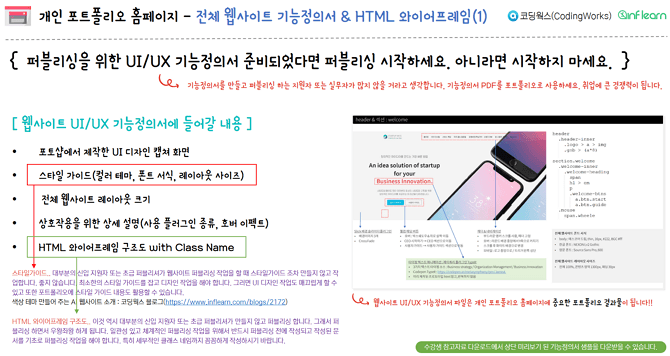
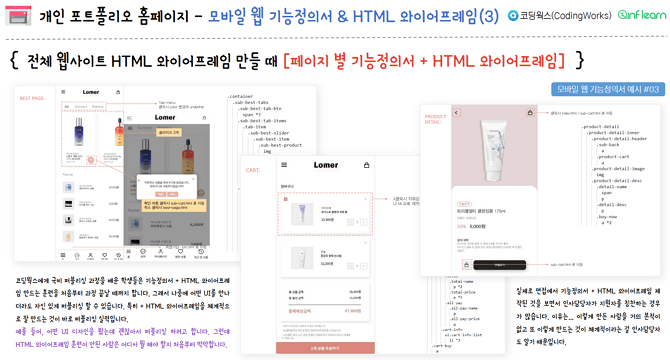
Detailed methods for writing functional specifications and HTML wireframes for systematic publishing
Essential theories and know-how for creating responsive websites
CodingWorks' recommended guide on UI/UX prototype website creation that anyone can start.
Understanding practical publishing by section (iframe, font icons, layout, detailed CSS)
Understanding the final step: Web hosting your personal portfolio website
Essential theory and know-how for mobile web publishing production
Changes in students after taking the course 📜
After taking this course, students will be able to do much more on their own to create a high-quality personal portfolio website for publisher employment. As their capabilities increase, they will be able to produce a personal portfolio website that appeals to hiring managers, leading to more frequent interviews and faster employment. Of course, this does not apply to everyone. However, I believe it is fully achievable if the student follows the guidelines of this PDF lecture well and puts in their own effort.
Learning Content 📚
It took nearly two months to plan and complete this PDF lecture. I had just finished a five-month government-funded publishing course a month ago; I began planning the PDF lecture one month before the course ended and started creating the PDF material immediately after the course was over. The reason I decided to write the book right away was that I believed writing while the memories were still fresh would allow me to deliver the content to students more vividly and thoroughly.
It is a pity that I cannot show you a preview video due to the nature of this course being a PDF textbook.Therefore, I have no choice but to show parts of the PDF textbook through screenshots, but what Coding Works can guarantee is that through the <Perfect Guide to Creating a Publisher's Personal Portfolio Homepage (PDF)> course, you will be able to create a personal portfolio homepage that can satisfy hiring managers.
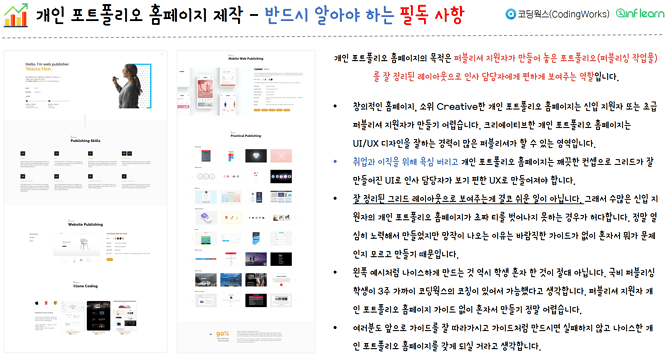
▼ Section 1. Things to Note & Precautions Before Creating a Personal Portfolio Website
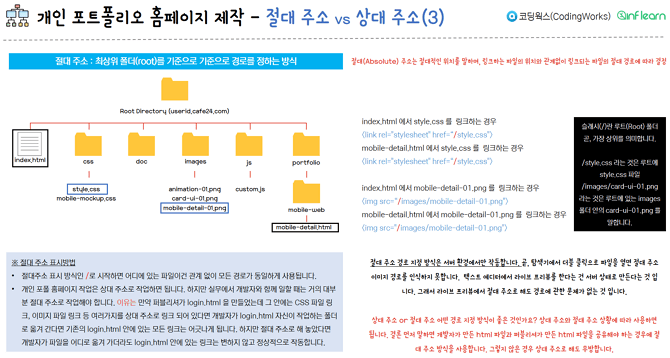
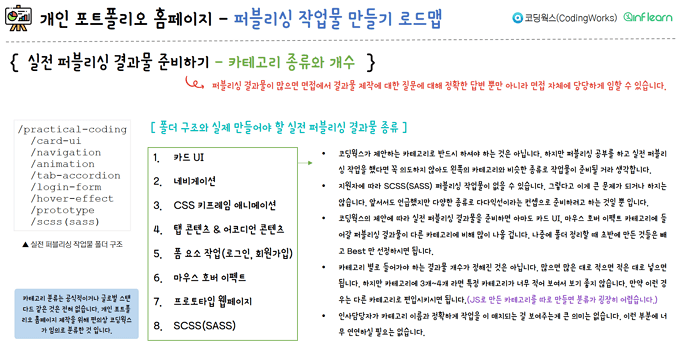
▼ Section 2. Personal Portfolio Website Section Composition/Folder Structure/Absolute Address vs. Relative Address
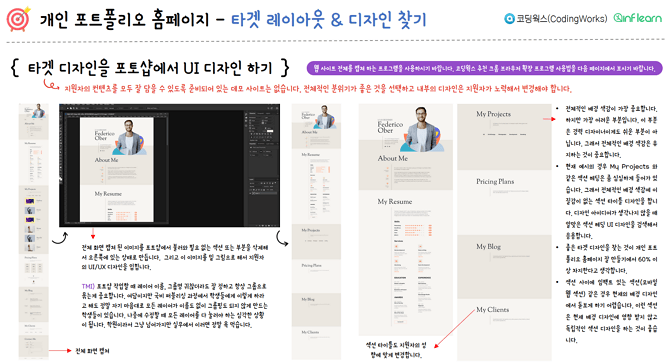
▼ Section 3. Layout and Content Composition for Each Section of the Personal Portfolio Homepage
▼ Section 4. Creating a Responsive Web / Functional Specifications / HTML Wireframe
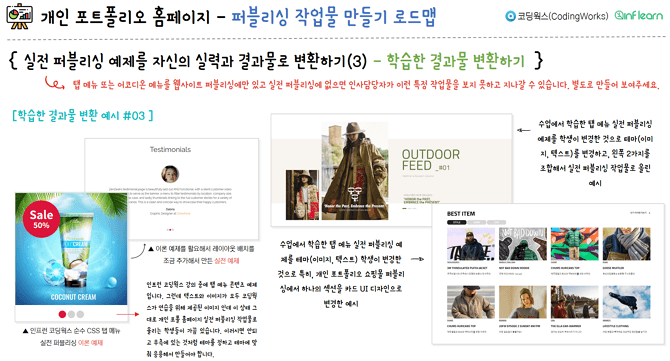
▼ Section 5. Roadmap for Creating Personal Portfolio Website Publishing Works
▼ Section 7. Practical Publishing by Section (iframe, Font Icons, Layout, Detailed CSS)
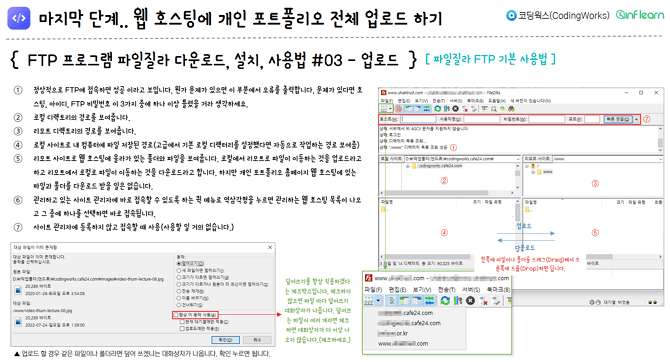
▼ Section 8. Web Hosting Your Personal Portfolio Homepage
Frequently Asked Questions Q&A 💬
For questions other than the expected Q&A questions below, please post them on the community question board for this course, and Coding Works will do our best to answer them.
Q. Is prior knowledge or preparation required?
This is not suitable for those who are just starting to learn for publisher employment. This course is appropriate for students who have completed a certain level of publishing theory and are at the stage of feeling the need to prepare a personal portfolio website for employment. Of course, even those who have just started will eventually need to create a decent personal portfolio website to get a job as a publisher. In the [Roadmap for Creating Publishing Works for Personal Portfolio Website] section of this PDF, there are detailed explanations on how to prepare and create a publishing portfolio. If you look at it in advance, you will have a clear direction on how to prepare your publishing outcomes alongside your future studies.
Q. Who needs this book?
I believe this course is most essential for those who need to create a high-quality personal portfolio website as a new publisher applicant, or for web and graphic designers who need a professional personal portfolio website to transition into a publishing career. In particular, it is for those who are preparing for employment as a publisher through self-study, or those who have completed a government-funded publishing course but graduated without being able to create a decent personal portfolio website for employment.
Q. What is the number of pages and the content?
The total document consists of 221 pages, and all content was 100% produced in-house by Coding Works. None of the material was scraped or processed from existing internet resources. Every coding screen, every single character, and every screenshot was purely created using Coding Works' own original sources. In particular, it is composed of content that detailedly analyzes successful individual portfolio website cases from recent students of Coding Works' government-funded publishing courses and presents specific directions. Furthermore, all completed practice files explained in the PDF textbook can be downloaded from the student download section.
I am confident that this is not common content that anyone can find on the internet, but rather valuable material that faithfully contains CodingWorks' years of know-how.
Q. What is the core content that sets this apart?
Most of the content is differentiated, but in particular, it provides detailed explanations on creating functional specifications and HTML wireframe structures, which are essential for improving publishing skills and creating a high-quality personal portfolio website for publisher employment. Additionally, during the practical section creation where every section is built, core code reviews for HTML+CSS+JS code are provided. Completed versions of the practical section projects are also available for download in the student download section.
This PDF textbook contains a vast amount of information that I share with students during the three-week government-funded publishing course while they build their personal portfolio websites, including web terminology, production know-how, practical production tips, file management, folder management, and thumbnail image creation.
Q. Are there any updates after downloading?
Due to the nature of e-books, frequent updates are rare. However, if there is information that is essential to know as a publisher's job search guide, the PDF file will be revised and uploaded, and students will be notified immediately via the "What's New" section.
Q. How is this different from the video lecture <Creating a 'Publisher Personal Portfolio Website' that Attracts Interviews and Employment> among CodingWorks courses?
The overall purpose and content of the lectures are similar. Both lectures share the same goal of helping students quickly secure publisher positions under favorable conditions by creating a high-quality personal portfolio website. While both are courses created with Coding Works' utmost sincerity, the differences are as follows.
Video lectures have the advantage of being intuitive to understand and allowing students to naturally complete a project while following along. However, they have limitations in building the inner strength required for students to think and solve problems on their own to creatively build their own personal portfolio websites.
On the other hand, the PDF course was written calmly by Coding Works, incorporating detailed references, know-how, and tips that couldn't be fully captured in the video lectures. For example, while it was difficult to explain the functional specification + HTML wireframe structure production methods, essential theories and know-how for responsive web production, and essential theories and know-how for mobile web publishing in detail through video, the PDF course explains these parts thoroughly over several pages. In particular, while the video lectures were produced a year and a half ago, the current PDF course 100% reflects the latest updates, including real-life cases and explanations from students taught by Coding Works.
Q. Which one should I take, the video lecture or the PDF lecture?
I believe students should choose between the video lectures and the PDF lectures based on their personal learning preferences. In the case of video lectures, practical publishing elements such as Full Screen Modal, Slick Slider, UIkit usage, and CSS Mobile Mockup are covered in detail through video demonstrations and explanations. On the other hand, the PDF lectures differ in that they provide explanations through written material rather than through video and audio.
If you need video lectures on how to use Full Screen Modal, Slick Slider, UIkit, or how to create a CSS Mobile Mockup, you can supplement your learning with the video lecture <Creating a 'Publisher Personal Portfolio Homepage' that Leads to Interviews and Employment>.
Q. There is a PDF material provided to students in the video lecture; is it different from that one?
The PDF provided in the video lecture was created 1 year and 6 months ago and consists of 104 pages in total. The overall content in the video lecture PDF is similar. However, since it is a reference material for the video lecture, the page-by-page explanations are not as detailed as the <Complete Guide to Creating a Publisher's Personal Portfolio Homepage (PDF)>. The <Complete Guide to Creating a Publisher's Personal Portfolio Homepage (PDF)> consists of a total of 221 pages, including all the content from the video lecture PDF but with more detailed explanations. In particular, it has been significantly updated with new content tailored to trends from the last 1 year and 6 months, as well as many more actual student works.
About the Instructor ✒️
The Perfect Guide to Creating a Publisher's Personal Portfolio Homepage (PDF) course was created by Coding Works, who has taught publishing theory, application, and personal portfolio homepage creation to over 300 government-funded publishing course students to date. In particular, they are an instructor who has specialized in publishing lectures for many years, providing a perfect A-to-Z guide for all preparation processes for publisher employment so that most students can find jobs immediately after completing the course. Additionally, while conducting publishing-related lectures on Inflearn, they have received evaluations from Inflearn students stating that the courses have been very helpful.
❤ Publisher job offer news from a CodingWorks student
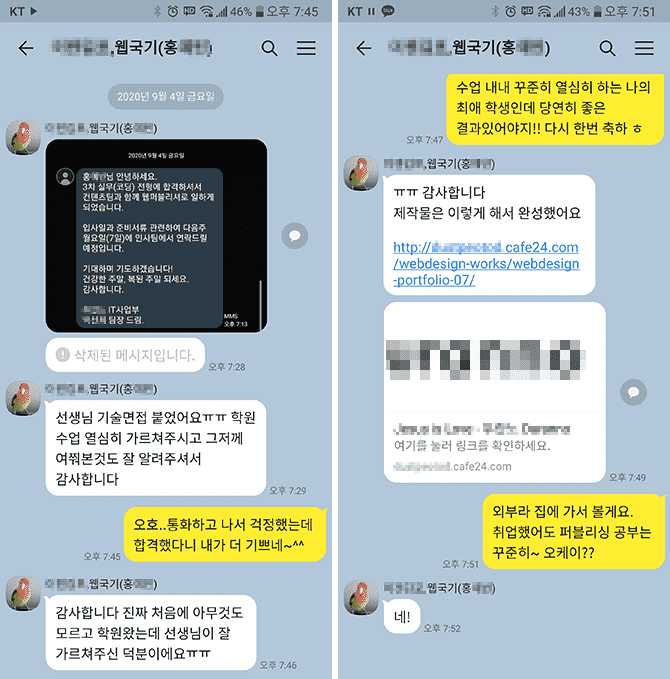
▲ This is a student who studied publishing with me for about four and a half months through a government-funded program, and I just received a KakaoTalk message saying they got a job.
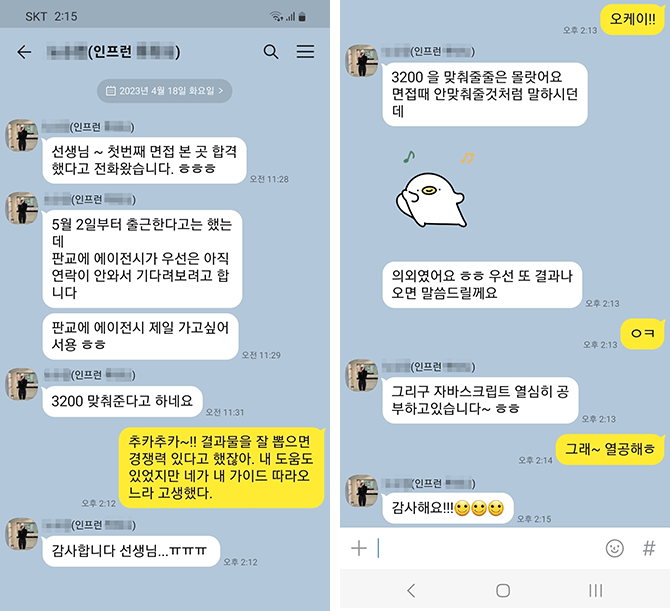
▲ I received a KakaoTalk message from a student in the CodingWorks offline personal portfolio production class regarding their interview and employment results. (2023.4.24)
❤ Email sent by a Coding Works student after getting a job as a publisher
Hello, teacher :)
Hello teacher, I am Kim O-jung, a student who took your Inflearn lectures. I am the student who sent an email this past summer to get advice regarding my personal portfolio. Do you happen to remember me? haha
The reason I'm writing is to share the news that I successfully landed a job as a publisher with the portfolio I received your advice on!
And even!! The company contacted me first after seeing the portfolio I uploaded to Saramin, and I passed after a Zoom interview! The company matched my desired salary, and I joined a company where I can focus solely on publisher duties without having to do design or development work.
It was a company looking for an experienced publisher, but they contacted me even though I'm a newcomer. When I asked why they reached out to me, they said they had looked at many other portfolios, but the "Functional Specification" in mine caught their eye.
I believe this is all thanks to your lectures. If I hadn't taken your course, mine would have just been an ordinary portfolio, but I was able to successfully get a job thanks to the great tips you shared!
Although I have never met you in person, I relied on and trusted your lectures so much while working on my portfolio, and I put in my absolute best!
I feel that my skills improved significantly during the three months I spent creating my portfolio while following your lectures, more so than the skills I built up over a long period of time taking classes at an academy.
I wanted it desperately, and by trusting and following what you told me, I achieved a truly great result.
Thank you so much!
Please stay safe from COVID-19 and I hope to see you again in another great lecture :)
Hello teacher~ I'm OOO, a student on Inflearn~ I found your email address by looking at your replies to other students.. haha
I just wanted to reach out and say thank you haha
I've been struggling for about two weeks while applying for jobs after taking your courses... I finally passed an interview at one company and am set to start working.. Thank you so much..ㅠㅠ
To be honest, I was very worried because I am 32 years old. I sent out many resumes, but I wasn't getting many calls... However, the hiring manager at this company told me that they personally don't like candidates from private academies. haha The company I decided to join is small, but they have developers and web designers. Their system involves training for 3 months before putting you into practical work. The commute is a bit long and the salary is low... but I plan to learn diligently and work on raising my salary~ haha
Thank you so much for everything. You were so helpful with your answers to my questions, and it's amazing that I actually got a job after taking these online classes...
I will continue to study and improve my skills by taking your classes in the future. Fighting!
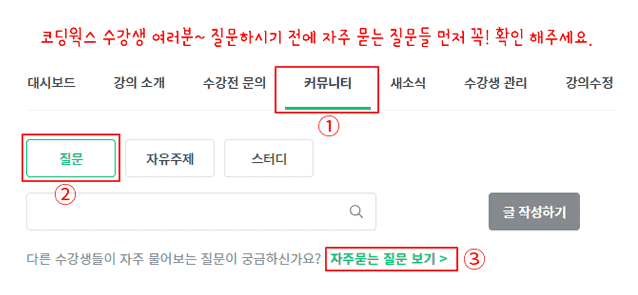
🙋🏻♂️ Please be sure to read this before asking a question~!!
If you have any questions while learning, please feel free to ask. When asking a question, you must provide a description of the issue, the code, and a screenshot of the browser result. For the code, you need to upload all HTML, CSS, and JS code to receive an accurate answer.
If you only describe the problem in text without providing the code in your question, it is difficult to give an accurate answer unless it is something very simple. In that case, I have no choice but to reply with "Please upload your HTML, CSS, JS code and browser screenshots," which ultimately makes getting a solution more cumbersome and time-consuming.
▲ Please check the Frequently Asked Questions in the community for this lecture first~
⚡ For effective learning, please be sure to refer to Coding Works Publishing YouTube.
Please follow the theoretical video lectures on the CodingWorks Publishing YouTube channel in parallel. Of course, not all theoretical videos are on the YouTube channel, but almost all important ones are. Since there are many videos, it is recommended to search for them as shown in the example below to find what you need.
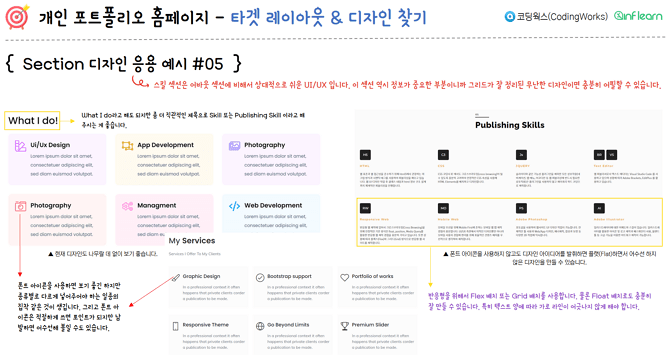
These are the sections that are most difficult for entry-level applicants to design.
Section Design Application Examples (01~05)
Examples of completed section UI publishing ideal for containing content (01~03)
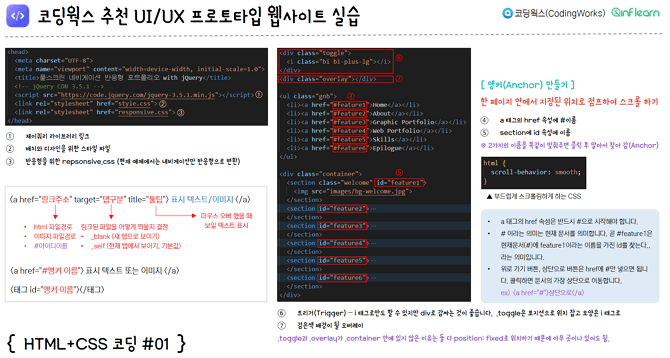
CodingWorks Recommended UI/UX Prototype Website Practice
Section 7. Practical Publishing by Section (iframe, Font Icons, Layout, Detailed CSS)
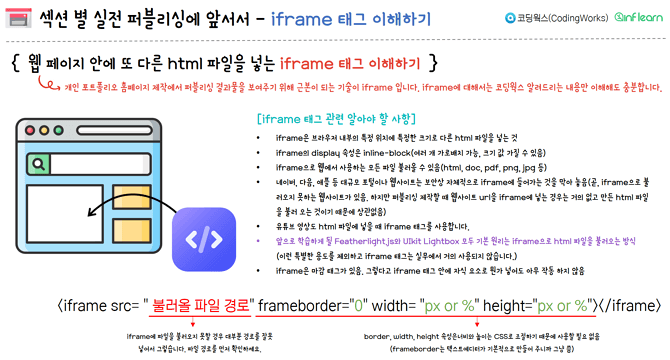
Understanding the iframe tag
Using Font Icons
All the CDNs in the world
Tips for Font Formatting
Things you should never do on your personal portfolio website
Reducing image file size
Complete list of royalty-free download sites
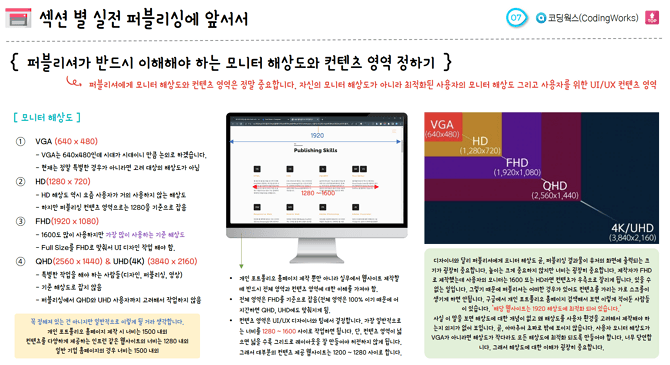
Monitor resolutions that publishers must understand
Dual Monitor work environment to increase productivity by 200%
Practical Publishing by Section - Full Screen Modal
Displaying content by section - UIkit Lightbox
Displaying content by section - UIkit Slider
Displaying content by section - Showing results with a full-screen modal
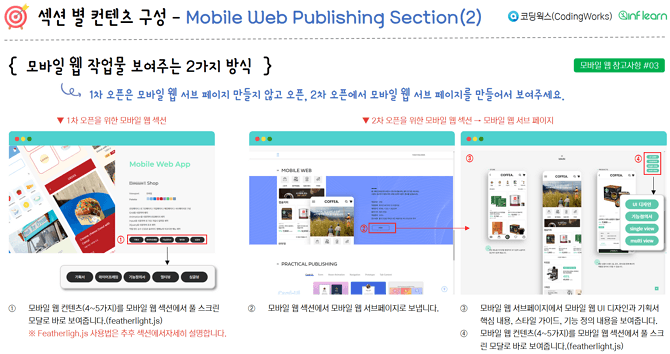
Displaying content by section - Creating mobile web publishing projects
Displaying content by section - Creating thumbnails for practical publishing results
Practical Publishing by Section - Practice Method
Practical Publishing by Section - Practicing the Clone Coding Section
Practical Publishing by Section - Practice Mobile Web Publishing Section
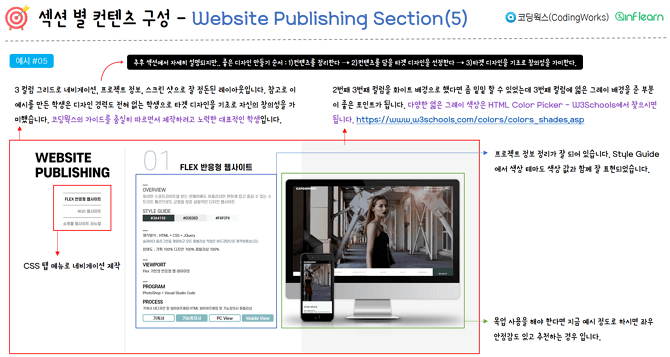
Practical Publishing by Section - Practicing the Website Publishing Section
Practical Publishing by Section - Practice the Practical Publishing Section
Intermediate-Advanced Level Practice - Using jQuery load method, callback functions, and checking navigation
Changing header design after scrolling using jQuery & JavaScript
Section 8. Web Hosting Your Personal Portfolio Homepage
Applying for Cafe24 web hosting and obtaining a personal website domain
How to download, install, and use the FTP program FileZilla
Log in to Cafe24 and go to 'My Service Management'
Checking FTP password and resetting (formatting) personal hosting content
[Student Download] Completed versions and reference materials to help with PDF learning
[Functional Specification PDF] HTML Wireframe + Functional Specification
[Functional Specification PDF] HTML Wireframe Only
[Recommended Template PDF] Publisher Job Skills
Example of overall folder structure (userid.cafe24.com)
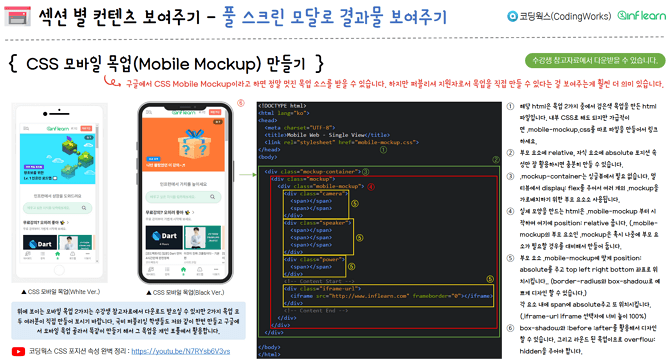
[Completed File] 2 types of mobile mockups (iPhone, Galaxy)
[Completed File] Completed Section UI Publishing for Effective Content Display
[Practice File Final Version] CodingWorks Recommended UI UX Prototype Website
[Practice File Final Version] Practical Publishing by Section (Font Formatting)
[Practice File Completed Version] Mobile Web Wireframe UI Design Transition (transition)
[Practice File Completed Version] Mobile Web Section (Load Method, Navigation Check)
[Practice File Completed Version] Changing header design after scrolling using jQuery & JavaScript
[Section Practice File Final Version] Practical Publishing by Section 01 (Clone Coding Section)
[Section Practice File Completed Version] Practical Publishing by Section 02 (Mobile Web Section)
[Section Practice File Final Version] Practical Publishing by Section 03 (Website Publishing Section)
[Section Practice File Completed Version] Practical Publishing by Section 04 (Practical Publishing Section)
✒About the Instructor
[HTML+CSS+JS Practical Portfolio (Season 3)] course creator Coding Works has taught publishing theory, application, and personal portfolio website creation to over 300 government-funded publishing course students to date. In particular, the instructor has specialized in publishing lectures for several years, providing a perfect A-to-Z guide for all preparation processes for employment as a publisher, so that most students can find jobs immediately after completing the course. Additionally, while conducting publishing-related lectures on Inflearn, the instructor has received evaluations that the courses have been very helpful to Inflearn students as well.
Recommended for these people
Who is this course right for?
Those who need to create a personal portfolio website for employment as a publisher
Those who need to prepare publishing work for employment as a publisher
Need to know before starting?
HTML+CSS+JS fundamentals and practical application skills
■ [Current] Government-funded Publishing & Frontend Instructor ■ [Current] Freelance Frontend Publisher ■ [Current] Operator of HTML+CSS+JQUERY Publishing YouTube Channel 'Coding Works' ■ Green Computer Academy Web Publishing Instructor ■ The Joeun Computer Academy Web Publishing Instructor ■ Ezen Computer Academy Web Publishing Instructor ■ Frontend Publisher, Professional Frontend Publishing Instructor ■ UI/UX Web Design Portfolio Lectures ■ Web Design Technician Practical Certification Class Lectures ■ Easy & Edu Frontend UI/UX Design and Publishing
It was a helpful class because I was able to establish a rough outline for my portfolio, which I had no idea what direction to take! I hope I can successfully get a job with this portfolio..!













![Web Design Development Technician [2025] Complete Practical Course (KakaoTalk Q&A Available)Course Thumbnail](https://cdn.inflearn.com/public/courses/332868/cover/3a2245ca-bb9f-414a-ba67-403cfcb2b7c9/332868.jpg?w=420)
![[2026 Examination Standards] Perfect Guide for the Web Design & Development Technician Practical ExamCourse Thumbnail](https://cdn.inflearn.com/public/courses/324878/course_cover/12211037-e74b-46b3-8942-46d465b81bba/webdesign-cover-02.png?w=420)
![[Backend/Exception Handling Scenario/Aggregation Optimization] Backend Portfolio and Practical Experience Enhancement Strategy. All-in-One PART1Course Thumbnail](https://cdn.inflearn.com/public/courses/335091/cover/1a19a4de-ec2e-4e26-a84e-28691e777020/335091.jpg?w=420)




![How to Create a Data Analysis Portfolio That Stands Out to Interviewers [Datarian Seminar Replay | May 2026]Course Thumbnail](https://cdn.inflearn.com/public/files/courses/342570/cover/01kttv90pd2czjrsqfgx59egvv?w=420)
