Korea's No. 1 PPT/ video /ZOOM utilization expert instructor .
Representative lecturer at the Korea Council for University Education's Higher Education Training Institute .
I am giving lectures at over 500 places including Seoul National University and the National Civil Service Human Resources Development Institute on PPT lecture material production techniques , non-face-to-face online lecture techniques using ZOOM/MEET/TEAMS/Webex , and video lecture production techniques for online classes. there is .
👩🏫 Main Lecture Areas
[ Video /ZOOM/MEET/TEAMS/Webex Courses ]
- Video lecture material production process ( Target : professors , instructors )
- Video lecture content production process for online classes ( Target : professors , instructors )
- Non-face-to-face online real-time lecture techniques using ZOOM/MEET/TEAMS/Webex ( Target : professors , instructors )
- Video production techniques using Premiere Pro , DaVinci Resolve , and KineMaster ( Target : All )
[ PowerPoint / Infographic / Hanshow / MS Word Course ]
- From PowerPoint Basics to Practice ( Target : Office Workers , Students )
- Course on creating premium lecture materials using PowerPoint ( Target : professors , instructors )
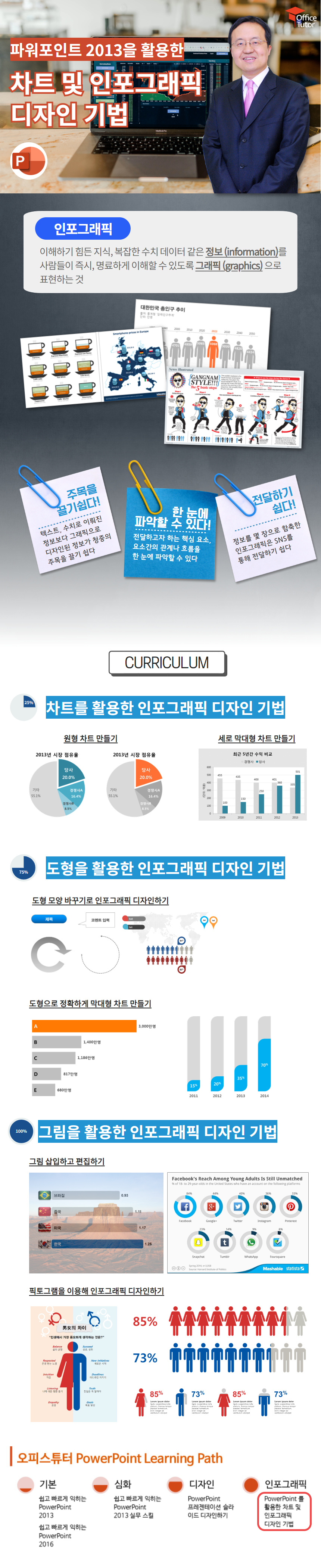
- Infographic design techniques using PowerPoint ( Target : All )
- Presentation production techniques using Hanshow / Document production techniques using MS Word ( Target : All )
🏛 Education and major career experience
- March 2004~Present: CEO of Cool Design (Job: Presentation design/video production consulting)
- September 2000~February 2004: Freelance (Job: Presentation/document design and consulting)
- 1992.04~2000.08: Editor-in-Chief of Monthly CADCAM (Duties: Monthly magazine production/presentation design)
- August 2014: Graduated from Hongik University's Graduate School of Advertising and Public Relations, Department of New Media Contents
- 1991.02: Graduated from Chung-Ang University's College of Business Administration, Department of International Trade (Bachelor of Business Administration)
✨ Special Notes
- 2005.04: Korea's first ' Microsoft® PowerPoint MVP ' award ( 9th worldwide )
- March 2007: Ministry of Public Administration and Security's cyber course ' Briefing Skills Improvement and Presentation '
- March 2008: Cyber course lecture on ' Visualization of Courtroom Evidence for Jury Trials ' at the Prosecutors' Office
- 2009.01: Elected as a member of Passamo ( MS Certified PowerPoint User Group , 70,000 members )
- 2010.09~2015.12: Lectured on ' Speech and Employment Presentation ' at Sungshin Women's University
※ 2006.09~ Present : Lecture on ' Visualization of Legal Evidence Using PowerPoint ' at the Prosecutors' Office / Judicial Research and Training Institute
※ 2008.11~ Present : Lecture on 'PPT/ Infographic / Video Production and ZOOM Utilization ' at the Korean Council for University Education's Higher Education Training Institute
※ 2012.02~ Present : Selected as a ' Korea Corporate Education Master Lecturer ' by Talent Management (7 consecutive years )
※ 2015.07~ Present : Lecture on 'PPT/ Video /ZOOM Utilization Lecture Techniques ' at Seoul National University's Teaching and Learning Development Center
※ 2017.01~ Present : National Civil Service Human Resources Development Institute ' PowerPoint Production Techniques Course Using Multimedia Sources ' lecture
📚 Books
- June 2020: Online Classes and Lectures A2Z ( Hak-i-si-seup )
- June 2016: PowerPoint 2016 Guide ( Information Culture Publishing )
- March 2016: PowerPoint Bible ( Seongandang )
July 2012: Plan Like Jobs and Complete with Keynote ! ( Mentor )
- September 2011: Prezi Basics + Practical Utilization Techniques ( Seongandang )
- May 2011: PowerPoint 2010, available directly at work ( Hanbit Media )
- 2007.01: PowerPoint Know-How 129 Chinese Language Production Company (中國靑年出版社)
- October 2006: The Very Simple Principles of Engaging Presentations ( Gilbut )
- September 2006: PowerPoint design created with Photoshop ( Seongandang )
- November 2005: PowerPoint Know-How 129 ( Seongandang )
















![[Office 365] Setting up and understanding Admin CenterCourse Thumbnail](https://cdn.inflearn.com/public/courses/324935/course_cover/6580912e-13aa-4939-92d0-c3b6fded1a43/omas-admincenter.png?w=420)

![[Work Automation Using Free MS RPA] Power Automate Desktop - Excel AutomationCourse Thumbnail](https://cdn.inflearn.com/public/courses/330201/cover/8adc841c-39de-4770-98d3-2439ed8881a3/330201-eng.png?w=420)





![[For Beginners] Data Visualization with Power BICourse Thumbnail](https://cdn.inflearn.com/public/courses/327055/cover/455b54c1-3e63-439b-9b60-5d12e12bc303/PowerBI-001 (1).png?w=420)
![[Pass ITQ PowerPoint A in One Go] in just 2 daysCourse Thumbnail](https://cdn.inflearn.com/public/courses/330108/cover/a0a7ac8c-cbd6-4acf-9cad-494ee28e1faf/파워포인트 썸네일(인프런).jpg?w=420)
![[Pass ITQ Excel A in One Go] in 3 daysCourse Thumbnail](https://cdn.inflearn.com/public/courses/329652/cover/b44e11b6-a47e-4993-86ea-a85da9836bb5/329652-eng.png?w=420)
