강의

멘토링

커뮤니티

Programming

/

Devops & Infra

A compact and easy-to-understand and implement Kubernetes ELK log monitoring system

In addition to acquiring basic knowledge about the ELK stack and various Kubernetes resources, you can also gain practical experience using Kubernetes by building a log monitoring system.

(5.0) 7 reviews

79 learners

Level Basic

Course period Unlimited

  • Aiden Kim
Kubernetes
Kubernetes
elk
elk
monitoring
monitoring
minikube
minikube
infrastructure
infrastructure
Kubernetes
Kubernetes
elk
elk
monitoring
monitoring
minikube
minikube
infrastructure
infrastructure

Reviews from Early Learners

Reviews from Early Learners

5.0

5.0

sskim1

100% enrolled

It was great that you started with a simple basic explanation of Kubernetes, which helped me refresh my understanding of the concepts. It was a good lecture for grasping the basic concepts of the overall ELK Stack. Additionally, it would be great to have content on expanding the ELK Stack to secure availability, or collecting logs from actual application web servers and WAS logs, rather than just a demo app with simple logs! I enjoyed the lecture. Thank you!

5.0

김정현

100% enrolled

It was a lecture where I could quickly understand the stack by creating a cluster locally through Minikube and setting up ELK myself. Great 😊😊

5.0

최유진

83% enrolled

Thank you for the great lecture. I'm really enjoying it. Will the manifest files for Section 5 be uploaded to the repository separately?

What you will gain after the course

  • Understanding each resource in Kubernetes

  • Understanding the ELK Stack

  • Experience deploying ELK stack on Kubernetes

  • Experience using basic ELK stack tools

What is the ELK stack?

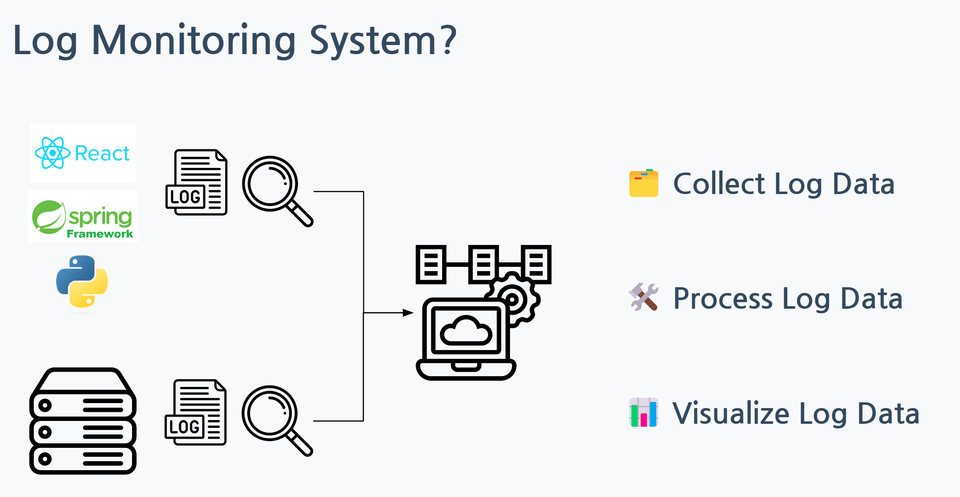
This refers to a stack comprised of log monitoring tools like Elasticsearch, Logstash, and Kibana . Each tool in this stack performs data processing, storage, analysis, and visualization, so they're often used together when building a log monitoring system. ( Filebeat , a data collection tool, is also often used in conjunction with this stack.)

I prepared this lecture with the thought that deploying these ELK stack tools as each resource on a Kubernetes cluster , confirming that they are organically connected to each other , and using them directly would be a good hands-on experience for those who are just learning Kubernetes .


Want to gain practical Kubernetes experience?

Have you heard of the ELK stack, but are curious about how to deploy and use it?

If so, you've come to the right place. This course will give you hands-on experience building and using a log monitoring system using the ELK (with Filebeat) stack in a local Kubernetes environment.


After taking this course...

  • You will gain practical experience using Kubernetes by deploying the ELK stack yourself and building a Log Monitoring system .

  • You can gain a deeper understanding of Kubernetes by taking a basic theory class on Kubernetes infrastructure and deploying each component of the ELK stack using only Kubernetes basic resources .

  • You will gain fundamental knowledge of each component of the ELK stack .

Learning Content

This course is divided into a theory part and a practical part.

A theory class that is easy to understand through pictures

The theory behind Kubernetes and ELK stack tools is explained in a compact and easy-to-understand manner with illustrations.

Create a Kubernetes resource definition file and deploy immediately.

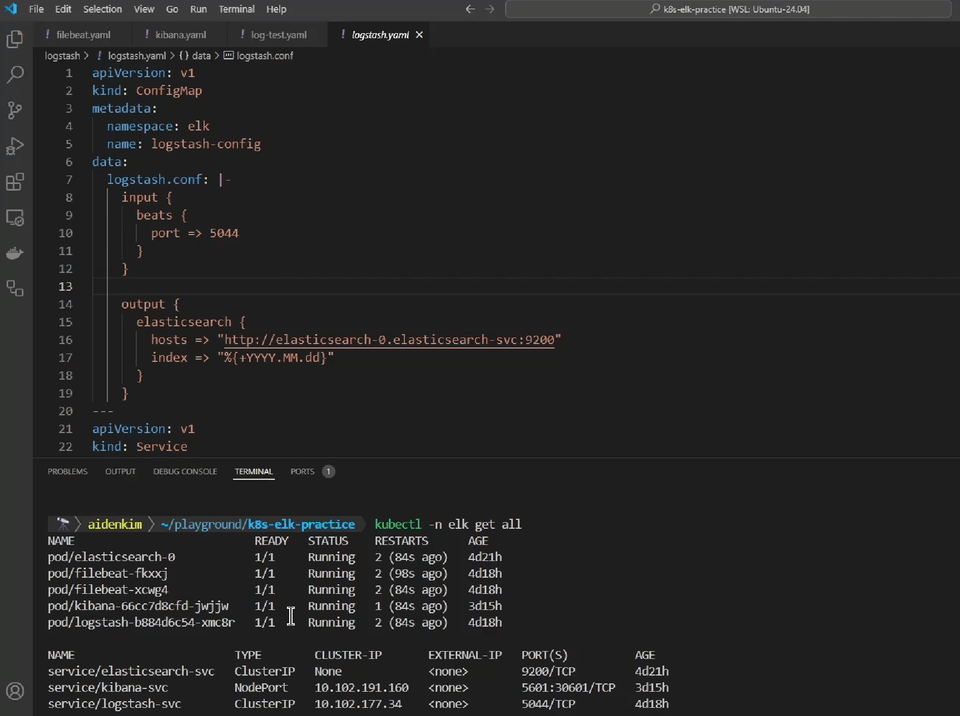
After creating a resource definition file to deploy ELK tools on Kubernetes, deploy it directly in the terminal and check the results.

We will proceed with practical training by reviewing the official documentation for Kubernetes and ELK.

Since you will be reviewing the official documentation for each Kubernetes and ELK tool during your practice, you will be able to reduce any awkwardness with the official documentation.

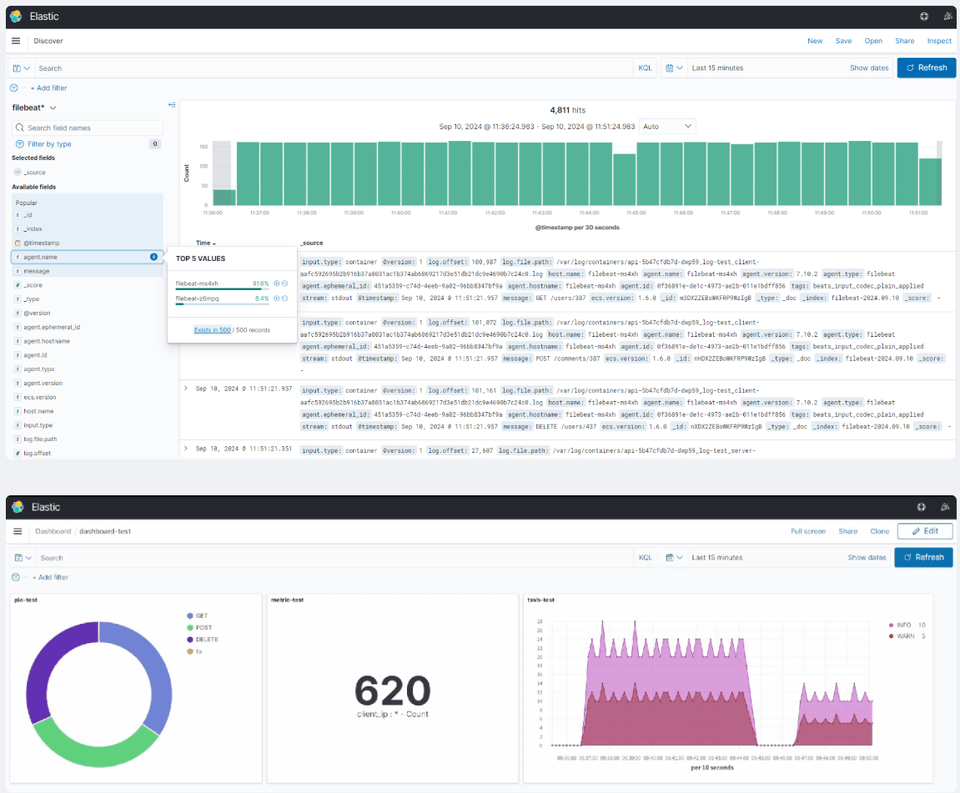
Kibana Data Visualization Practice

Learn the basics of using Kibana's Discover feature, which allows you to explore log data, and the Dashboard feature, which visualizes data, through hands-on practice.

Things to note before taking the course

  • This course will be conducted on a local Kubernetes cluster built using a tool called minikube .

    • In this lecture, we will show you how to install and use minikube, but to proceed with the hands-on lab, you must have a virtualization tool like Docker and kubectl , a Kubernetes cluster management tool, installed in advance on your lab PC.

  • The version of the ELK stack tools used in this lecture is 7.10.2, the latest open source distribution.


    • Since we will cover the basics of a monitoring system using the open source version of the ELK tool, the X-Pack features developed by Elastic will not be covered in this lecture.

Practice environment

Learning Materials

  • The example resource definition files required for this lecture's practical exercises are provided through the Github repository link in the lecture notes for the relevant lecture.

  • We will also share the Docker image links and settings for each tool required for other practical training through the lecture notes .

Player Knowledge and Precautions

  • Here are some things you should know before taking this course:

    • Why Use Kubernetes?


    • Basic knowledge of kubectl


    • Basic knowledge of container technologies such as Docker

Recommended for
these people

Who is this course right for?

  • Anyone who is learning about Kubernetes and wants to gain hands-on experience

  • Anyone who wants to build an ELK log monitoring system on Kubernetes

Need to know before starting?

  • Why use Kubernetes?

  • Basic knowledge of kubectl

  • Basic knowledge of container technologies such as Docker

Hello
This is

79

Learners

7

Reviews

5

Answers

5.0

Rating

1

Course

💻I am a DevOps engineer who constantly thinks about building better systems and processes.

️I am highly interested in sharing knowledge about DevOps and the cloud.

Currently working as a DevOps engineer at a foreign IT company. A CNCF Kubestronaut member who loves Cloud Native technology. Tech Blog: https://guide-to-devops.github.io/ News

  • Currently working as a DevOps Engineer at a global IT company

  • CNCF Kubestronaut member who loves cloud-native technologies

Tech Blog: https://guide-to-devops.github.io/

Newsletter: https://aidenslab-newsletter.beehiiv.com/

Curriculum

All

18 lectures ∙ (4hr 14min)

Published: 
Last updated: 

Reviews

All

7 reviews

5.0

7 reviews

  • chmh33709718님의 프로필 이미지
    chmh33709718

    Reviews 1

    Average Rating 5.0

    5

    83% enrolled

    Thank you for the great lecture. I'm really enjoying it. Will the manifest files for Section 5 be uploaded to the repository separately?

    • aidenkim
      Instructor

      Hello Yujin Choi! I'm glad to hear that you are enjoying the lectures! 😊 Regarding the manifest files for each component of the ELK system you mentioned, I'm afraid I do not provide them separately. I designed the course this way because I wanted students to naturally understand each configuration by starting with examples from the official Kubernetes documentation and manually filling in the necessary fields and values for deploying each ELK stack component. I believe that the experience of creating manifest files yourself will be helpful when you need to create or analyze resource manifest files on your own in the future. I have included parts that are difficult to type manually, such as container image paths, in the lecture notes for each session, so I hope this reduces any inconvenience even just a little. If you have any suggestions or feedback on how the course could be improved, please feel free to let me know at any time! Thank you once again for taking the course.

  • jeonlyung님의 프로필 이미지
    jeonlyung

    Reviews 3

    Average Rating 5.0

    5

    33% enrolled

    • aidenkim
      Instructor

      Hello sangjae! Thank you for leaving a course review🙂 If you have any questions beyond what was covered in the course or any feedback related to the course, please feel free to let me know anytime! I will continue to work hard on creating better courses and sharing knowledge :)

  • hs19167612님의 프로필 이미지
    hs19167612

    Reviews 10

    Average Rating 5.0

    5

    100% enrolled

    • aidenkim
      Instructor

      Hello Shin Hee-chan! Thank you for leaving a course review🙂 If you have any questions about the topics covered in the lecture or any feedback related to the course, please feel free to let me know anytime! I will continue to work hard to provide better lectures and share knowledge :)

  • kimpro2님의 프로필 이미지
    kimpro2

    Reviews 3

    Average Rating 5.0

    5

    33% enrolled

    • aidenkim
      Instructor

      Hello Kim Pro! Thank you for leaving a course review 🙂 If you have any further questions or feedback about the lecture content, please feel free to let me know anytime! I will strive to provide better lectures and share knowledge in the future :)

  • sskim13792님의 프로필 이미지
    sskim13792

    Reviews 2

    Average Rating 5.0

    5

    100% enrolled

    It was great that you started with a simple basic explanation of Kubernetes, which helped me refresh my understanding of the concepts. It was a good lecture for grasping the basic concepts of the overall ELK Stack. Additionally, it would be great to have content on expanding the ELK Stack to secure availability, or collecting logs from actual application web servers and WAS logs, rather than just a demo app with simple logs! I enjoyed the lecture. Thank you!

    • aidenkim
      Instructor

      Hello sskim1! Thank you for leaving such a wonderful review! In this lecture, I tried to convey the basic concepts of Kubernetes and ELK more efficiently. I'm glad you were able to grasp the basic concepts of each technology. 🙂 And thank you so much for suggesting additional topics you'd like to see covered! Ensuring the availability of the ELK stack and collecting logs from a live server are great topics to cover. I'll add these topics to my To-Do List and start planning. If I update the lecture with related content in the future, I'll be sure to let sskim1 know. Thank you again!

$23.10

Similar courses

Explore other courses in the same field!