[Office worker's honey tip] Infographic pattern that revives dead documents
CPR to save your dying document, infographics!
Bring life to your document with infographics that extract, structure, and visualize the core of your thoughts and information.
The instructor is amazing. The explanations and prepared examples are amazing.
The lecture speed is also refreshing. It's been a long time since I've had this much fun taking an online class.
I want to listen to all of this instructor's other lectures! ><
5.0
이지호
100% enrolled
I like that the lectures only explain the key points so they don't drag on. And I liked the part where pictures were used.
5.0
원영하
100% enrolled
I learned well
What you will gain after the course
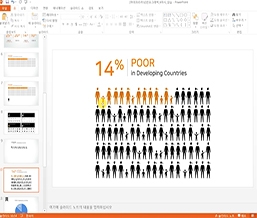
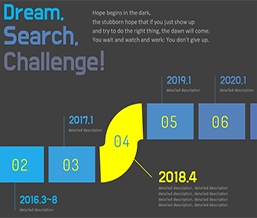
How to Create and Use 14 Infographic Patterns
Must-Know Tips When Creating Infographics
Living business skills for office workers, the secret to office worker success!
Lecture Introduction 📖
※ Please note that this course does not provide [Questions/Answers] from the instructor. For inquiries: 1544-9001 (Weekdays 8:00-20:00, Holidays 9:00-18:00 *Lunchtime 12:00-13:00)
“Your document is dead again” ⌨️
What's the survival rate of your writing? Are your valuable content fading away, perhaps because it's not getting noticed or lacking communication?
Infographics: CPR to revive your dying documents! Bring your documents to life with infographics that extract, structure, and visualize the core ideas and information.
Learning Objectives
Understand these five essential tips for creating infographics and apply them to your own creations.
You can create 14 infographic patterns using PowerPoint.
You can select an infographic pattern that fits your document and design, create, and apply it to suit your purpose.
Recommended points! 💯
Point 1
200% Utilization: A Collection of the Most Frequently Used Patterns by Office Workers We'll show you five essential tips for creating infographics, along with how to create and utilize the 14 most useful infographic patterns for reports, proposals, and plans. • Data visualization infographics that highlight key points (6 patterns) • Infographics showing the information structure at a glance (4 patterns) • Infographics that make your message stand out (4 patterns)
Point 2
See it, use it! An infographic creation tutorial that applies it directly to your documents. We'll show you everything from infographic design to creating infographics in PowerPoint, with a "tutorial" concept of creating one pattern per class, so you can follow along right away at work.
Point 3
10 minutes is all it takes! Microlearning whenever you need it, without the hassle. • Learn briefly and concisely when needed during work with a 10-minute video that extracts only the essentials and contains no unnecessary details.
Recommended for these people
Who is this course right for?
Anyone who wants to create a document that gets noticed
For those who want to improve the conveyability of their documents
The instructor is amazing. The explanations and prepared examples are amazing.
The lecture speed is also refreshing. It's been a long time since I've had this much fun taking an online class.
I want to listen to all of this instructor's other lectures! ><



.jpg?w=960)