
inflearn logo
inflearn logo

Vibe Coding for Immediate Use – $0 Operating Cost

This is a DevOps course based on practical experience in Silicon Valley. It goes beyond theory to cover content that can be applied immediately in the field. You will learn how to develop using Generative AI (Vibe Coding), set up CI/CD tools in a Kubernetes environment, and implement strategies to keep operating costs at $0. We will cover configuring a production environment without additional costs by running DB, Redis, S3, and batch jobs inside Kubernetes, and you will master building automated pipelines using GitHub Webhooks and Jenkins through hands-on projects.

(5.0) 3 reviews

22 learners

Level Basic

Course period Unlimited

Kubernetes
Kubernetes
CI/CD
CI/CD
cursor
cursor
AI
AI
Kubernetes
Kubernetes
CI/CD
CI/CD
cursor
cursor
AI
AI

Reviews from Early Learners

Reviews from Early Learners

5.0

5.0

네모필라

100% enrolled

I can run a production server at home. I'll try installing and testing more open-source projects on k8s easily!

5.0

x3u

78% enrolled

I liked that you explained a structure where I don't have to worry about costs every time I add a service. It was very realistic content from the perspective of someone doing a personal project.

5.0

LucyBae

100% enrolled

I'm also running a personal project on AWS, and keeping the cost at $0 is really not easy. I could totally relate to this lecture since it covers such practical strategies 👍

What you will gain after the course

  • Development and operational deployment with Vibe Coding

  • Building an infrastructure with zero operating costs

  • Infrastructure configuration automation with Vagrant / Kubespray

Configure a Kubernetes Cluster on an old PC and build a CI / CD environment

Configure and operate infrastructure based on Vibe Coding!

The era of knowing everything before using it is over. Adapt by first experiencing a system where AI writes the code and operating costs are zero dollars!

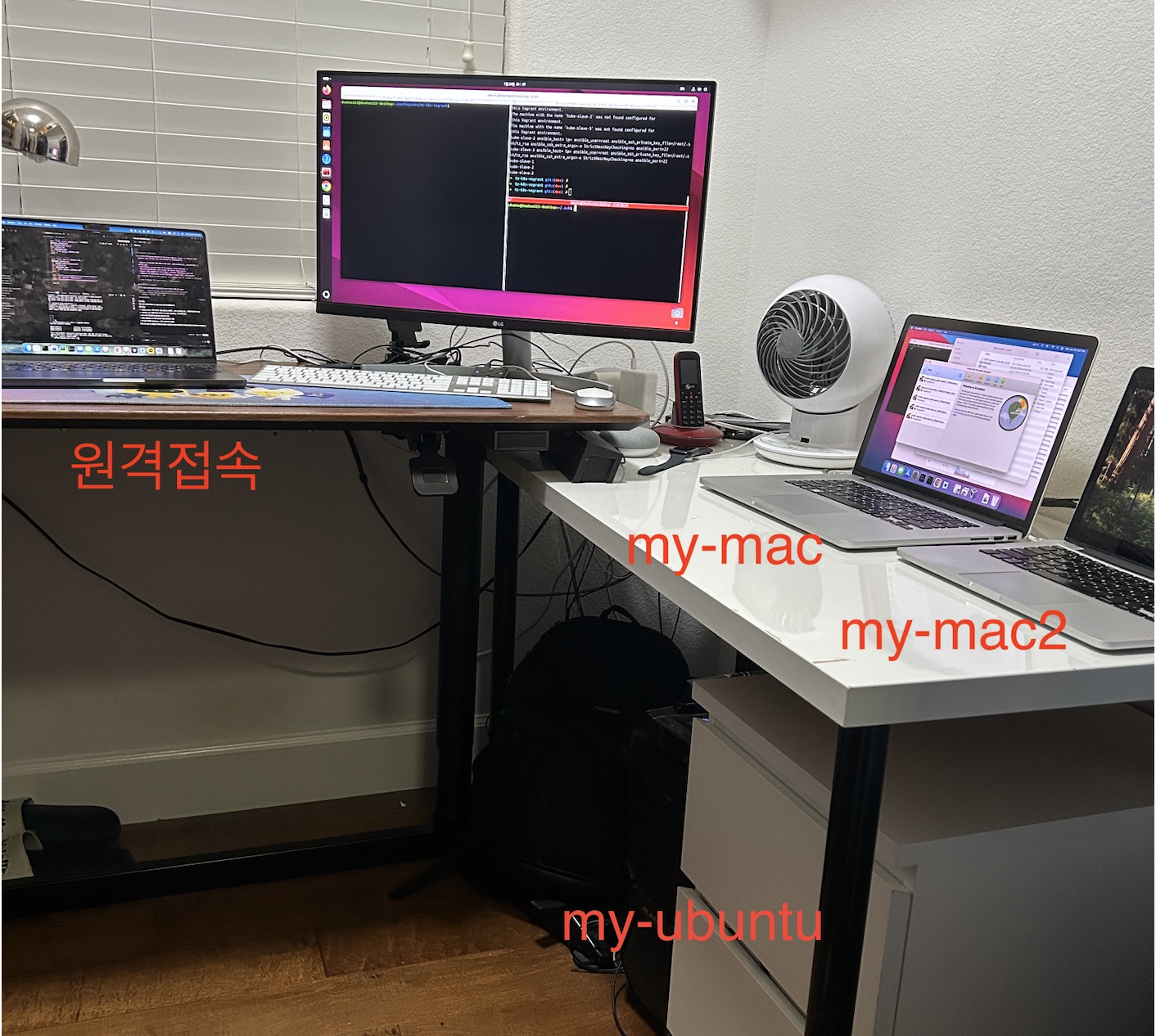
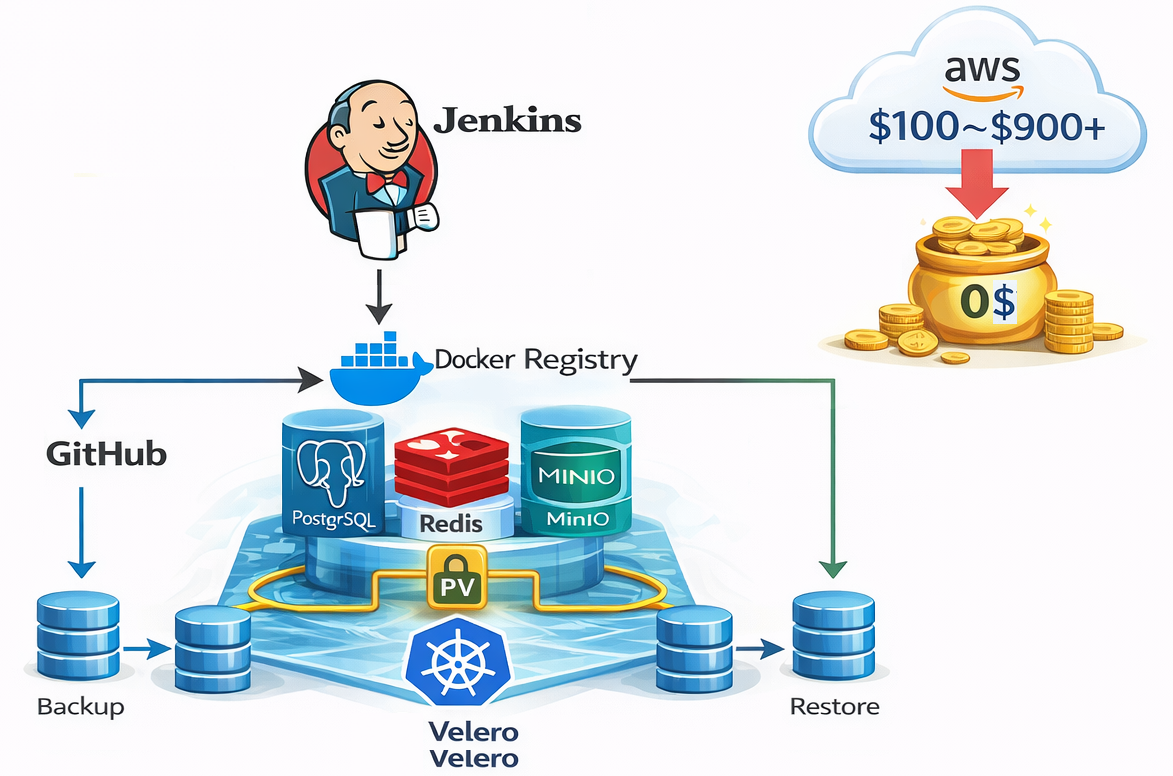
After releasing the "CI/CD on K8S for Immediate Use" course, I received many inquiries regarding cloud infrastructure operating costs from developers who built apps using Vibe Coding (AI coding). They thought, "Since AI writes the code, the costs will be minimal," but in reality, using external cloud services for servers, databases, caches, storage, load balancers, and monitoring results in costs of $100–$900+ per month (over 3 to 4 million KRW per year). To solve this cost burden, I began considering ways to operate all services within a Kubernetes cluster. In fact, once Kubernetes is configured, there isn't a significant difference between using Kubernetes in the cloud versus using it in a local environment. Therefore, for development environments or small-scale projects, you can consider configuring and using Kubernetes on your own servers. Personally, I had been hoarding old PCs instead of throwing them away. So, in this course, I share how to utilize these devices to build a cluster capable of running all the services featured in the lectures using just one or a few PCs. We cover strategies to bring additional costs down to $0 by running everything—including PostgreSQL, Redis, MinIO (S3 compatible), and batch jobs—inside Kubernetes.

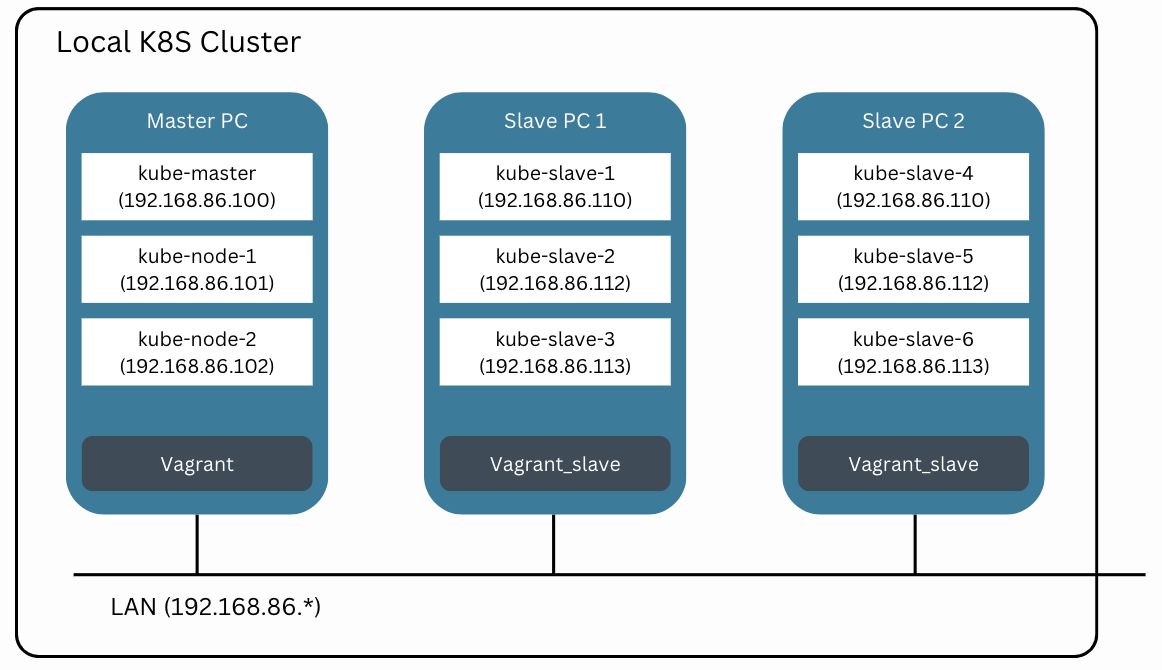
Work Environment - VMs

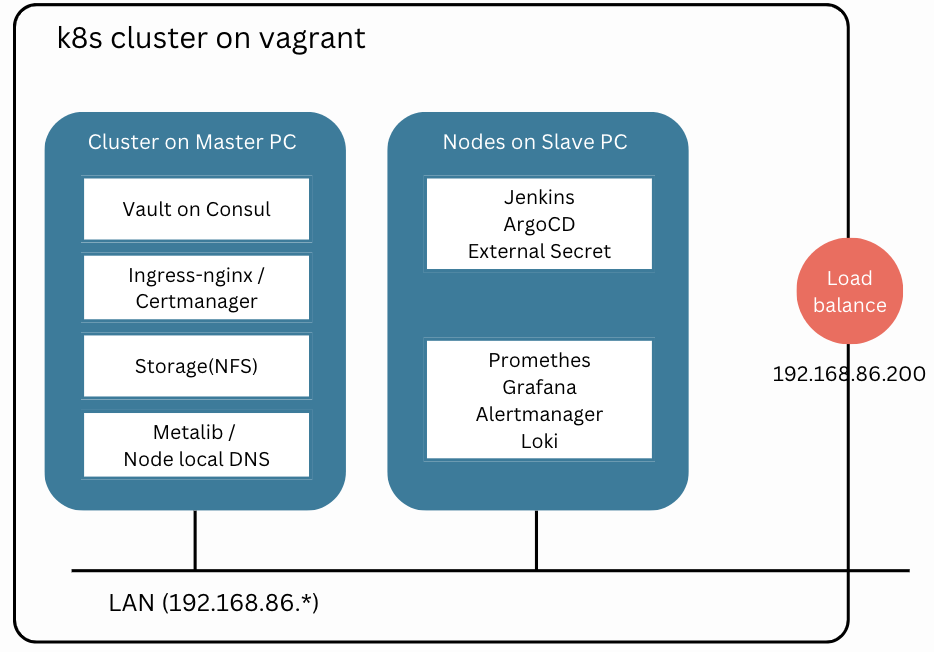
Work Environment - Services

This course is not a typical theoretical lecture or a simple step-by-step configuration guide. Vibe Coding and operational infrastructure cover a vast scope, and studying everything would take a significant amount of time. The approach of studying a thick book from start to finish requires a long time before you actually encounter a real system, making it difficult to grasp the big picture.

Therefore, in this lecture, you will first experience the entire workflow of developing with Vibe Coding and deploying with zero operating costs through an actual live project (DrillQuiz). By experiencing the target system first, we explain what requirements to provide to the AI, how to verify the code generated by the AI, and how to operate it in a Kubernetes environment.

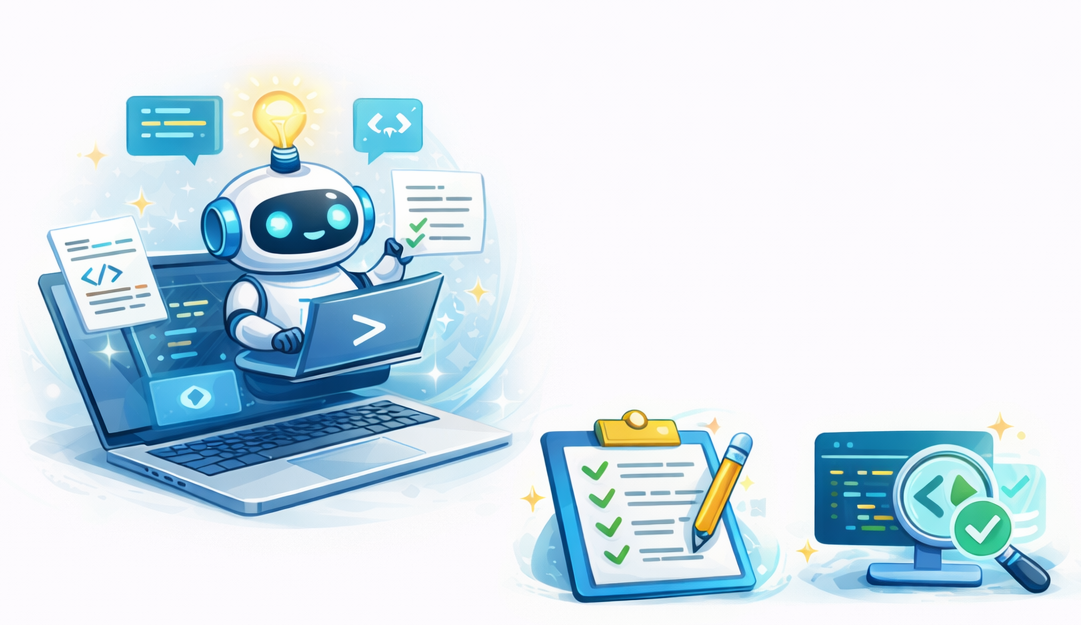
In particular, this course is not about "how to write code." It focuses on what requirements to provide when using AI coding tools (such as Cursor) and how to inspect the code generated by AI. Rather than simply asking to "make a Django API," you will learn how to present structured requirements. We provide requirement templates and inspection checklists that can be used immediately in practice.

This is a practice-oriented course for developers who want to develop using Vibe Coding and deploy services with zero operating costs. Utilizing the Kubernetes environment built in the "Immediately Applicable CI/CD on K8S" lecture, you will learn the entire process through a real-world project—from running all services like PostgreSQL, Redis, and MinIO within the cluster, to setting up CI/CD via GitHub Webhooks and Jenkins, configuring domains and Ingress, and establishing logging and monitoring systems. This course helps you develop Vibe Coding requirement design skills that can be applied immediately in the field and the ability to build an infrastructure with zero operating costs.

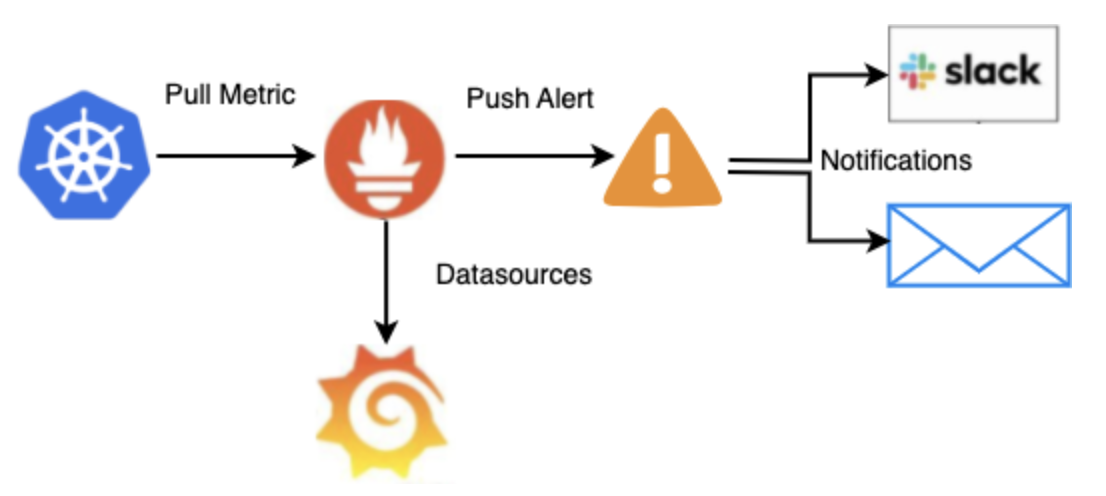
Monitoring / Alertmanager on K8S

You will build a practical vibe-coding development environment and a zero-cost operation system.

Requirement Design and Code Verification Using Cursor AI

You will learn how to effectively present requirements to AI coding tools (Cursor) and systematically verify the code generated by AI. We provide structured methods for presenting requirements—moving beyond simple prompts like "Make a Django API"—along with practical requirement templates and inspection checklists. You will develop the ability to build full-stack applications solely by providing requirements to the AI, without writing code yourself.

Achieving zero operating costs by configuring internal K8S services

Configure an environment to run PostgreSQL, Redis, and MinIO (S3-compatible) inside a Kubernetes cluster to operate with zero additional costs. Practice strategies to reduce monthly expenses of $100–$900+ incurred when using external cloud services (RDS, ElastiCache, S3, etc.) to $0. Build a complete production environment, including data persistence via PV (Persistent Volume) and backup/recovery using Velero.

GitHub Webhook and CI/CD Pipeline

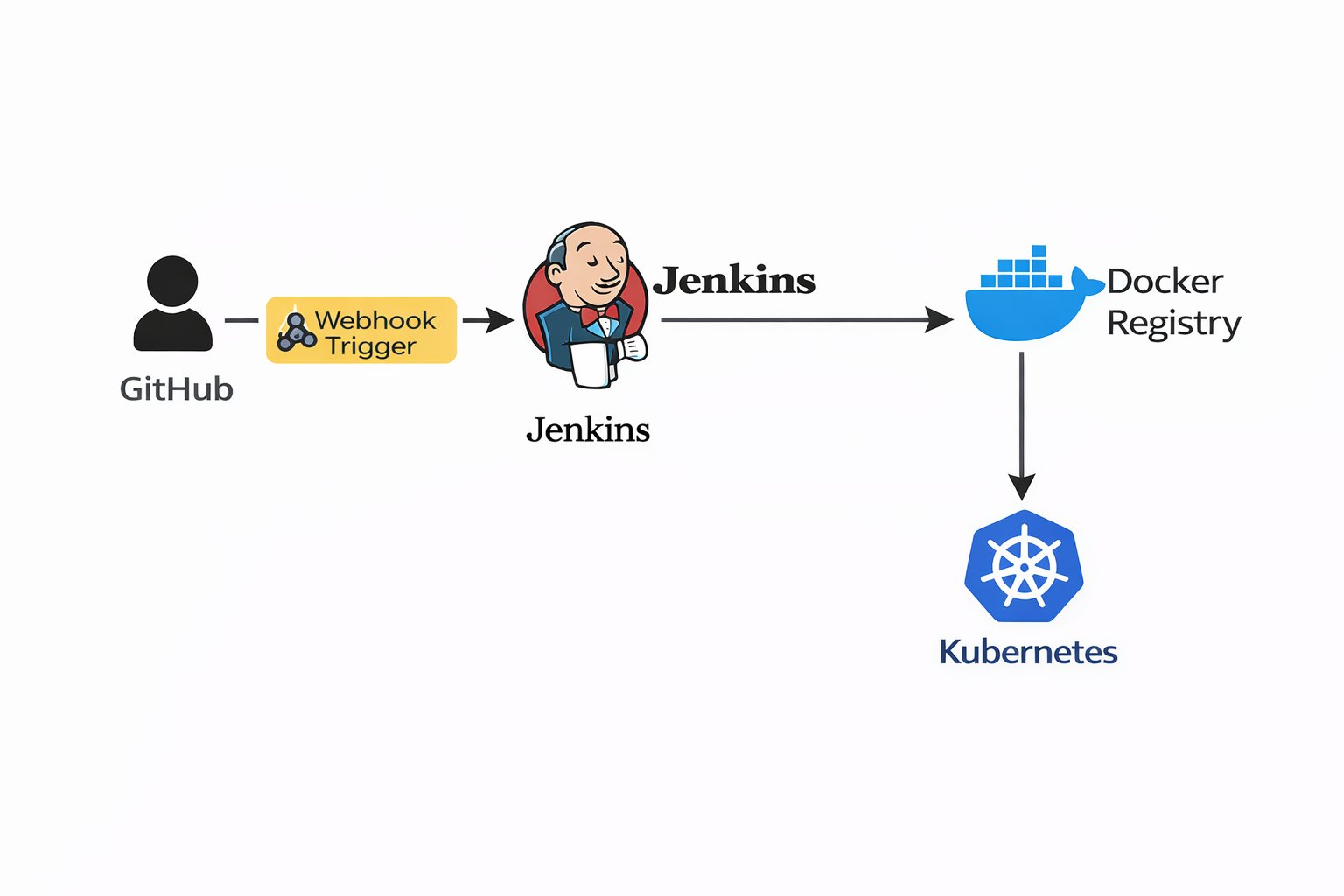
Configure a CI/CD pipeline where pushing code to GitHub automatically triggers a Jenkins build and deploys to Kubernetes. Establish an environment where the main branch is automatically deployed to the production environment and the dev branch to the development environment using a Multibranch Pipeline. Complete a practical CI/CD system that automates the entire process from Docker image building to Kubernetes deployment.

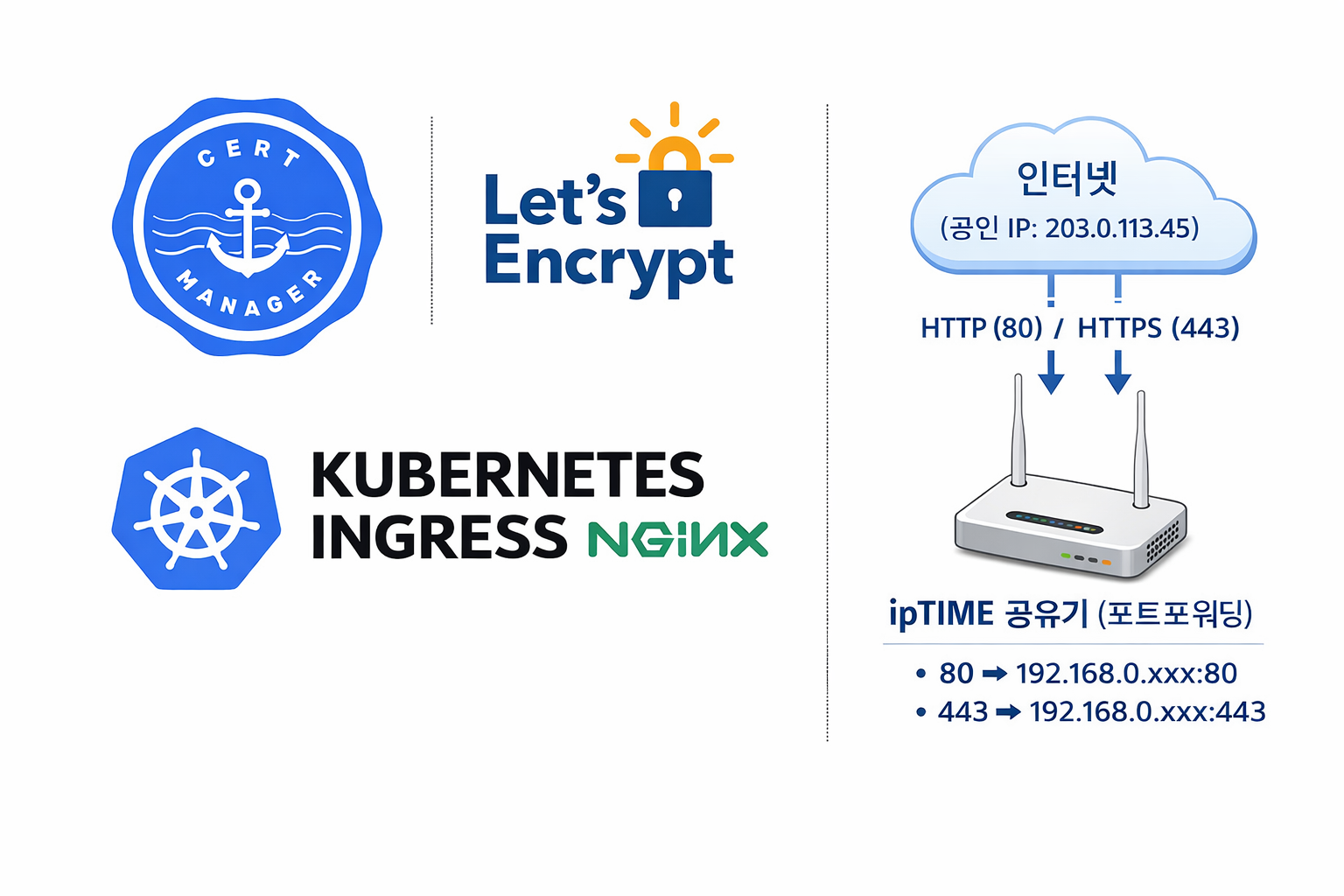
SSL Certificate Automation via Ingress-NGINX and cert-manager, and Router Integration Configuration

Manage application traffic with Ingress-NGINX and automatically issue and renew SSL certificates using cert-manager and Let’s Encrypt. External traffic is routed to the cluster via port forwarding (80/443) on an ipTIME router, establishing a secure, HTTPS-based production environment at no additional cost.

  • Through this course, students will develop development skills using Vibe Coding (Generative AI) and the ability to build infrastructure with zero operating costs. You will cultivate practical skills in effectively presenting requirements to AI coding tools (such as Cursor) and systematically verifying AI-generated code. Furthermore, you will acquire the ability to configure a production environment without additional costs by operating services within a Kubernetes cluster.

  • Create VMs, perform provisioning, build Docker images with Jenkins, and execute CD.


Notes before taking the course

  • You can build a Kubernetes-based CI/CD environment that can be applied to full-scale operations.

  • Build first, analyze/apply later

Practice Environment

  • Operating System and Version: macOS, Linux, Windows

  • Tools Used: Cursor IO, Jenkins, GitHub, K8S, Helm, PostgreSQL, Redis, MinIO, etc.

  • PC Specifications: At least 16GB RAM, 8-core CPU or higher (Recommended: 32GB RAM, 12-core CPU or higher)

  • Learning Materials: PPT, source code, and practice examples provided

Learning Materials

  • Learning material formats provided (PPT, cloud links, text, source code, assets, programs)


Support for DevOps interview practice!

Introducing DrillQuiz, an online learning platform that maximizes the repetitive learning effect.

https://devops.drillquiz.com

  1. Drain Feature: Reinforces long-term memory by re-exposing problems you once knew after a certain period of time.

  2. Interview Mode: Supports conducting mock interviews using the questions.

  3. Incorrect Answer Email Subscription: Receive only the questions you frequently get wrong via email every day for efficient and consistent learning.

Prerequisite Knowledge and Important Notes

  • Knowledge of DevOps, cloud environments, and Kubernetes usage is required.

  • The copyright of the lecture and learning materials belongs to the instructor.

  • Information regarding Q&A and future updates

  • Windows users: You can proceed the same way as Mac/Linux by using Git Bash or MSYS2. After installing VirtualBox, Vagrant, and Git for Windows, run bash bootstrap.sh. For detailed setup instructions, please refer to docs/windows-setup.md.

Recommended for
these people

Who is this course right for?

  • People who want to configure CI/CD in K8S

  • Developers burdened by cloud infrastructure costs

  • Developers who are unable to properly utilize AI coding tools

Need to know before starting?

  • Completion of the "CI/CD on K8S for Immediate Use" course or equivalent experience in building Kubernetes environments.

  • Basic CI/CD Concepts (Understanding Build and Deployment Pipelines)

Hello
This is Dewey Hong

973

Learners

82

Reviews

6

Answers

4.7

Rating

6

Courses

I am a Senior DevOps Software Engineer with over 10 years of experience in Silicon Valley.

I have extensive project experience in various areas, including cloud management, automation, security, and networking.

https://doohee323.github.io/

More

Curriculum

All

101 lectures ∙ (6hr 51min)

Course Materials:

Lecture resources
Published: 
Last updated: 

Reviews

All

3 reviews

5.0

3 reviews

  • cointutorofficia8436님의 프로필 이미지
    cointutorofficia8436

    Reviews 1

    Average Rating 5.0

    5

    100% enrolled

    I can run a production server at home. I'll try installing and testing more open-source projects on k8s easily!

    • doogee3237133님의 프로필 이미지
      doogee3237133

      Reviews 1

      Average Rating 5.0

      5

      78% enrolled

      I liked that you explained a structure where I don't have to worry about costs every time I add a service. It was very realistic content from the perspective of someone doing a personal project.

      • lucybae님의 프로필 이미지
        lucybae

        Reviews 3

        Average Rating 5.0

        5

        100% enrolled

        I'm also running a personal project on AWS, and keeping the cost at $0 is really not easy. I could totally relate to this lecture since it covers such practical strategies 👍

        Dewey Hong's other courses

        Check out other courses by the instructor!

        Similar courses

        Explore other courses in the same field!

        $102.30