inflearn logo

Unreal Engine for UI Designers - Intermediate

Want to implement UI effects exactly the way you want, but tired of enduring the engine developer's 'annoyed' look? Does your company also expect you to handle UI effects? Now, it's time to build it yourself! By taking this course, you'll be able to understand and apply other effect creation methods that once seemed too difficult!

14 learners are taking this course

Level Intermediate

Course period Unlimited

Unreal Engine
Unreal Engine
UE Blueprint
UE Blueprint
unreal-engine5
unreal-engine5
unreal-umg
unreal-umg
Niagara
Niagara
Unreal Engine
Unreal Engine
UE Blueprint
UE Blueprint
unreal-engine5
unreal-engine5
unreal-umg
unreal-umg
Niagara
Niagara

What you will gain after the course

  • A Comprehensive Understanding of Unreal Engine 5

  • In-Depth Understanding and Hands-On Practice with Widget BP Nodes

  • In-Depth Theory and Hands-On Practice for Materials

  • Applying Particle UI using the Niagara Particle Plugin

  • Visual Presentation and Implementation Using Materials and Blueprint Nodes

Engine Course for UI Designers (Intermediate)

Welcome to the Intermediate Unreal Engine UMG: UI Nodes, Materials & Presentation course.

Take a moment to look over what this course has in store for you! Using the ingredients we covered in the introductory course, this time we'll be casting some spectacular spells! How about picturing the wonderful magic we'll conjure using the incantations of BP nodes, materials, and particles?

🪄Before we begin...

Just as you start feeling fairly comfortable with the basics of UMG as a UI designer, another formidable wall appears before us. "How do I create a circular cooldown?", "How do I attach sparkles to the end of the gauge and make them spin?"

Even when you watch various tutorials to implement the flashy effects described in the design document, you often find yourself completely lost, unable to make sense of what's being said, and your mind just goes blank. Unreal Engine's material system is incredibly powerful, but that also means the learning curve to master it is quite steep.

This intermediate course is designed for UI designers who may be feeling overwhelmed and looking to level up their skills. Join Instructor Lucy, who started out as a UI designer before transitioning into programming, and have fun breaking down seemingly complex formulas alongside cute illustrations (yes, again!). And as a bonus, don't miss out on all sorts of tips for Unreal Engine 5!

From Absolute Value and Fractional (Frac) to Pythagoras (VectorLength) and Arctangent! You'll soon realize that these nodes, which practically reek of math, are actually magic incantations for creating stunning visual effects.

Upon completing this course, you will be able to create just about any material and take it a step further with the skills to apply them in creative ways. Furthermore, you will be able to craft complete visual sequences from start to finish by incorporating various arrays and timers into your projects.

I wish all of you students taking the leap to the next level great progress and the very best of luck!

✨What will you learn in the intermediate course?

Section 1. Let's take a comprehensive look at Unreal Engine 5 UMG.

This course will be taught using Unreal Engine 5! Therefore, we'll review the topics covered in the previous introductory course and get prepared by exploring the newly added features unique to Unreal Engine 5.

Finally, Unreal Engine 5!

Section 2. About BP Nodes

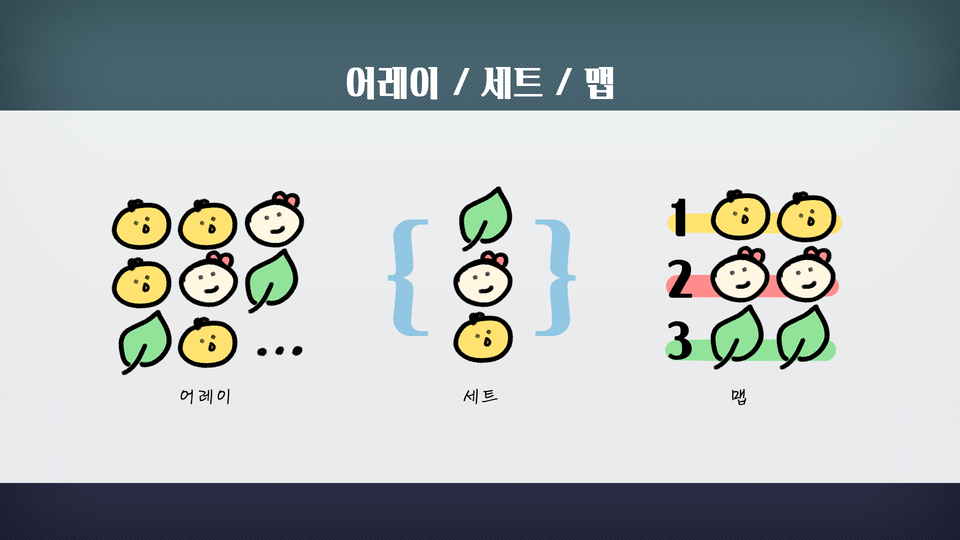
In the beginner section, we only briefly skimmed over BP node setup, but now you'll dive into it in much greater detail! You'll learn all about variables, various events, functions, macros, and more, and we'll also have some hands-on practice to put everything into action.

Even the intermediate level has illustrations!

Section 3. About UI Materials

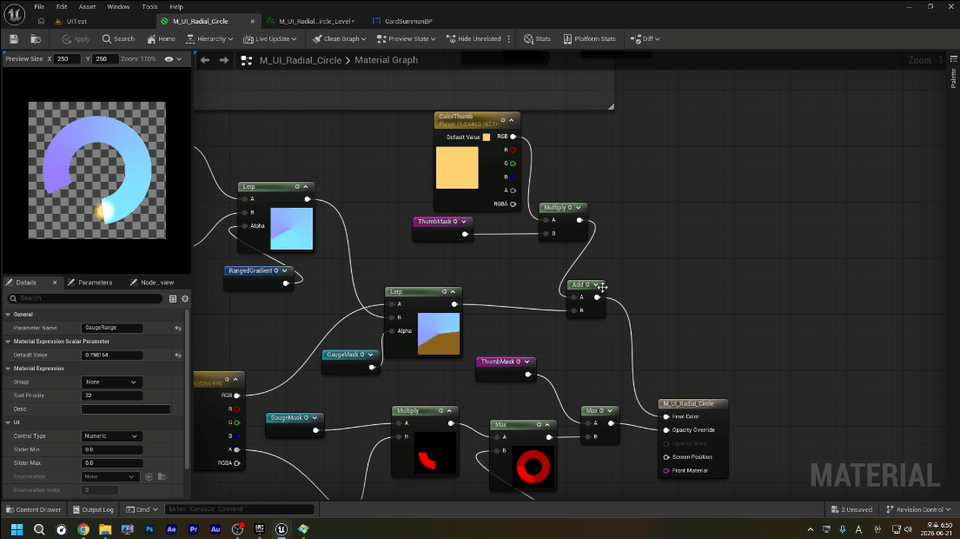
This is the Materials class, which is no exaggeration to call the highlight of this course. You'll build a solid foundation in material theory, covering material parameters, functions, various operations, and UVs, and then use that knowledge to create various UI materials yourself. Let's also create a beautiful radial gauge together using nothing but materials, without even a single texture.

Radial Materials and Sparkles✨

Section 4. Wrapping Up Particles and Widgets!

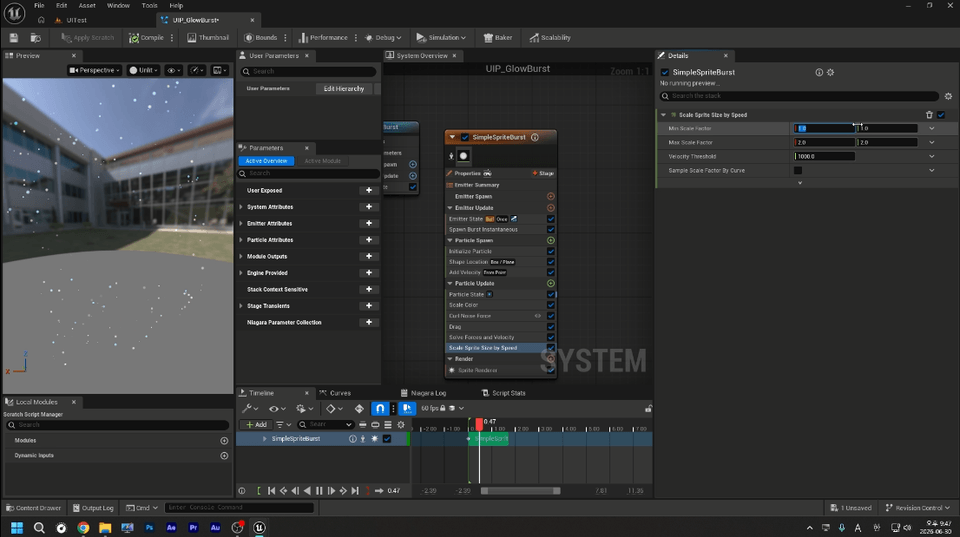
Can you render particles created with the Niagara particle system directly to the UI? Absolutely! In this lesson, you'll learn how to use the Niagara Particle UI Renderer, and as a bonus, get a quick feel for Niagara's workflow while learning how to seamlessly integrate particles into your UI!

A Sneak Peek at Niagara!

🐥Expected Q&A

Q. Wow, an intermediate VFX class~ But why is there more theory than in the beginner class? I was expecting to learn a ton of flashy VFX techniques.

  • Flashy and dazzling effects! Wouldn't that be amazing~ I absolutely love flashy things too, so I totally relate!
    But let me be a little firm here: just copying and connecting flashy nodes made by others without understanding the principle of 'why it moves like this' ultimately turns into 'half-baked learning'. When you have to modify the materials or BP nodes you've created that way, if you don't know the theory, you won't know where or how to fix them, leaving you completely at a loss.
    The reason we cover the theory of materials and BP nodes in more detail in this course than in the beginner course is that they serve as the very foundation for creating truly stunning effects later on. If the beginner course is a thatched cottage, the intermediate course is a tiled house. A tiled house needs a wider and sturdier foundation, right?
    It might seem a bit dry at first, but once you understand these principles, there will come a moment when you suddenly realize, "Ah! If I mix this like this, I can achieve that effect!"

Q. I haven't taken the introductory course, but can I jump straight into the intermediate course?

  • To get straight to the point, yes, absolutely! There's just one small condition, though.
    If you've never opened Unreal Engine even once in your life, or haven't even tried placing text or images on a UMG Canvas Panel... then I'm afraid I strongly recommend taking a beginner's course or a basic tutorial first. Without a grasp of the engine's basic controls or the fundamental concepts of UI widgets, diving into materials and BP nodes can feel like an insurmountable barrier.
    On the other hand, if you can say, "I know how to lay out basic UI widgets in Unreal," or "I've opened a simple Blueprint and hooked up a button click event or two," then feel free to skip the introductory lectures and jump right in!
    This course goes beyond basic controls, focusing on the question, "So how do we render this UI in a more dynamic and efficient way?" In fact, if you've had even a little hands-on experience with the engine, this intermediate course will help tie together all your fragmented knowledge, giving you a perfect grasp of materials and visual direction!

💫Things to Note Before Taking the Course

Practice Environment

  • Operating System: The course was conducted on a PC running Windows 11 (64bit).

  • Tools Used: Unreal Engine 5 (Version: 5.7.4)

  • PC Specifications: Since this course focuses exclusively on UMG, you can take it without any issues even on relatively low-end systems (Intel Core i5 or higher).

Learning Materials

  • The assets required for each lecture and the dummy images needed for hands-on practice are provided in advance.

    After enrolling in the course, you can download the course materials linked in Lecture 1 and proceed with the lessons.

    Therefore, no other image creation programs are required for this course.

Prerequisite Knowledge and Important Notes

  • This course requires prior completion of an introductory Unreal Engine course or equivalent prerequisite knowledge. Therefore, basic topics such as fundamental engine terminology or keyboard shortcuts may not be covered.

  • The use of UI assets provided during the course for any purpose other than course-related learning is strictly prohibited.

🧙Who's teaching us?

Studio Rasa UI Programmer (Current)

NCSoft UX Editor (~2025)

XLGAMES UI Team Lead (~2024)

(List up to three work experiences in chronological order)

Hello, I'm Lucy. With over a decade of experience in UI design and UX editing, I am currently working as a UI programmer. Drawing on my journey from a UI designer to a programmer, I have launched an Unreal Engine course specifically tailored for UI designers. The previous introductory course received more love than I ever expected, and thanks to that overwhelming support, I've put together this intermediate course with a special focus on presentation and direction. I hope you'll show it lots of interest!

Please feel free to post any questions you have on the Q&A board, and I'll do my best to help you out. Even if it's not strictly a technical issue, questions seeking advice are more than welcome.😊

Recommended for
these people

Who is this course right for?

  • For those who have a desired UI presentation in mind but feel overwhelmed and unsure where or how to start.

  • For those tired of constantly having to ask developers to implement UI animations.

  • For those looking to delve deeper into UI implementation nodes and materials.

  • For those who have watched videos on directing workflows or listened to explanations from AI, but are still struggling to understand it.

Need to know before starting?

  • You must have completed an Unreal Engine introductory course or possess equivalent prerequisite knowledge.

  • Ideally, you should have some prior experience working with particles. (We won't be covering the particles themselves in depth.)

Hello
This is lucynim

127

Learners

10

Reviews

6

Answers

4.9

Rating

2

Courses


Eunji Lim (Lucy)
Senior Unreal UX Editor / UI·UX Designer


Hello! I'm Lucy~

It has already been over 10 years since I started working in game UI/UX. During that time, I served as the UI Team Lead for the ArcheAge War team at XLGAMES and worked as a Senior UX Editor at NCSOFT, where I was responsible for interactive UI systems and Unreal-based UX pipelines for large-scale projects.

That’s why I don’t just focus on design; I also have a deep understanding of how UI functions within the engine.
As a result, I’ve always been thinking about ways to help designers and programmers understand each other better.

My class aims for "Unreal Engine that designers can understand."
Instead of just listing difficult functions, it is a class where we solve how to handle the parts that frequently cause bottlenecks in actual professional work together.


I believe that game UI is truly complete only when design sensibility and technology meet.
In my lecture, I will guide you step-by-step through practical, realistic know-how that you can apply immediately in the field, in a comfortable manner.


  • Key Experience

    • 2024–2025 | NCSOFT – Senior Unreal UX Editor

      • I was responsible for building Unreal-based UX systems and streamlining UI pipelines.
        I took on the role of designing UI/UX toolkits and interactive widget structures for large-scale projects, improving collaboration efficiency between designers and programmers.

    • 2017–2024 | XLGAMES – UI Team Lead / Lead Designer

      • I led the UI department to complete a large-scale project prepared over three years and subsequently spearheaded the launch of 'ArcheAge War.'
        I oversaw the establishment of the overall UX visual language, the creation of style guides, and the improvement of the engine pipeline.

    • Previous Experience | Participation in various projects and editor tool development

      • I have extensive experience in practical system design, including developing internal UI editors and establishing prototyping environments.


  • Areas of Expertise
    Unreal Engine UI/UX Design, UMG System, Interactive UI Effects, UI Production and Design



More
Published: 
Last updated: 

Reviews

Not enough reviews.
Please write a valuable review that helps everyone!

Similar courses

Explore other courses in the same field!

Limited time deal

$36.30

29%

$51.70